Know what to reteach and which students need support
GradingPal turns approved assessments into classroom insights: recurring strengths, learning gaps, the students involved, and suggested teaching activities. Spend less time comparing submissions by hand and more time planning the explanation, practice, or individual support your class needs next.
Find the learning gaps behind the class average
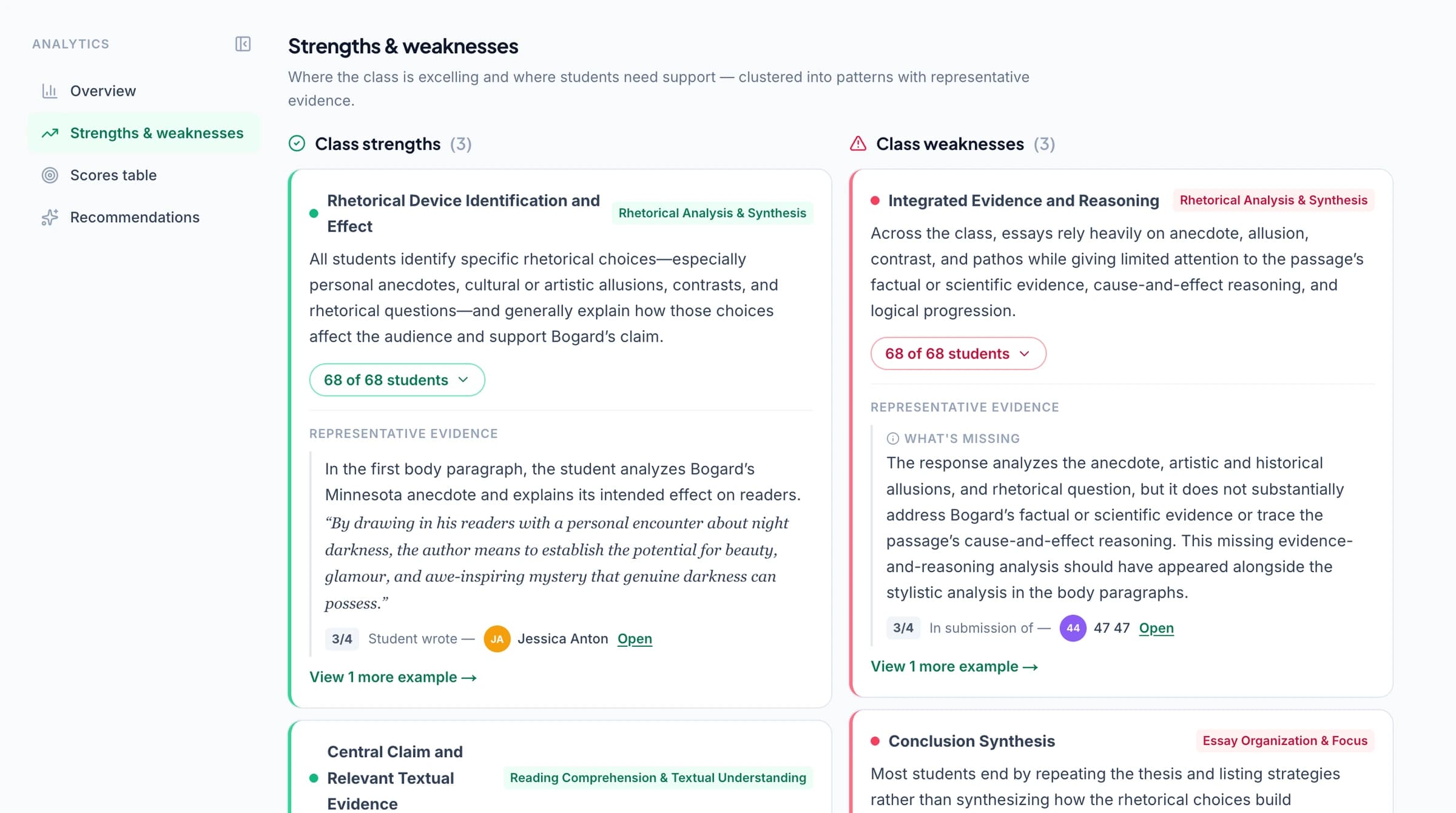
A class average tells you how the assessment went overall. GradingPal's strengths and weaknesses view helps explain the result. See recurring patterns in student work, the students associated with each pattern, and supporting excerpts you can inspect before planning your response.
A group may select relevant evidence but struggle to explain it. Another may understand a method but make errors when applying it. Those students need different follow-up work. GradingPal brings the patterns together so you can distinguish the needs without building a separate spreadsheet of comments.
Open the student responses behind a pattern
Follow a class-level finding back to the work it describes. Review the students, counts, and supporting evidence, then check the original response where you need more context. A useful insight should help you locate the work that supports your decision.
This makes assessment analysis practical during planning: identify an issue, inspect a few relevant responses, and decide what deserves attention. You can also recognize a class strength worth building on instead of planning only around the lowest scores.
Teachers on GradingPal grading and feedback
“GradingPal individualizes feedback specific to each student and gives steps to improve their performance. I also love the ability to change the tone of feedback for different assignment types. The team is incredibly helpful and responsive too.”
 Michelle DouglassGrades 11–12 · Research & Anatomy/Physiology · Central Virginia Governor’s School, Lynchburg VA
“GradingPal helps me optimize my time by streamlining the grading process. What I like most is the feedback students receive — it is specific and it is something they can act on.”
 Adriana Barrios RodriguezCollege · Health Sciences & Teacher Education · Universidad Autónoma de Sinaloa, Mexico
See which questions need another explanation
For question-based assessments, review success rates and recurring wrong answers question by question. GradingPal helps you see whether a difficulty is concentrated in one item or appears across several related questions.
Use that view with worksheets, quizzes and exams, or math problem sets. If students answer a calculation correctly but miss the explanation, the next lesson can focus on reasoning. If a question appears ambiguous, review the wording and assessment before drawing a conclusion about the class.

Choose a teaching response that fits the evidence
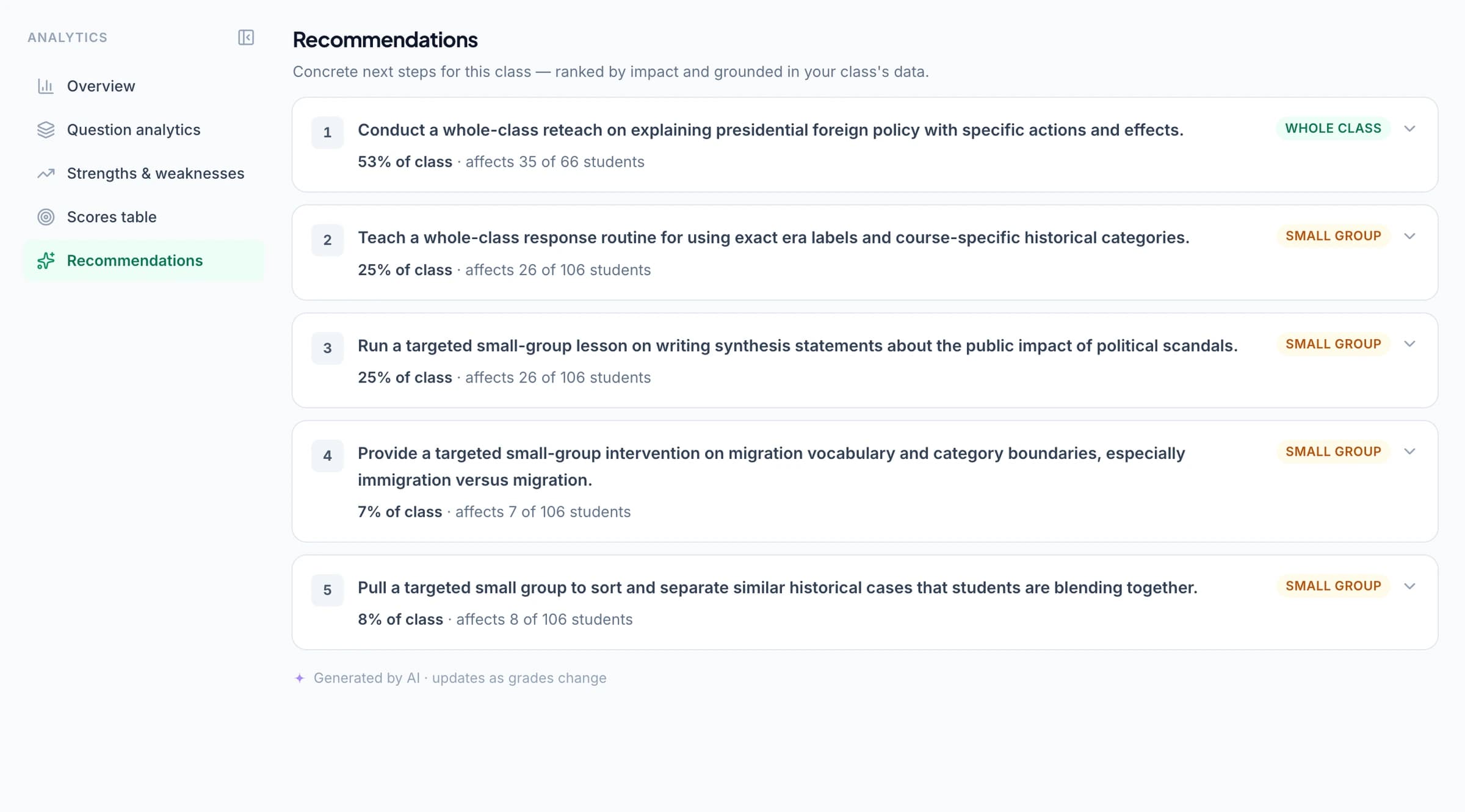
GradingPal suggests follow-up teaching based on the patterns it identifies. Review the recommendation, adapt it to what you have taught, and decide how to use it with the relevant students.
Reteach a shared misconception
When a difficulty appears across the class, use the evidence to choose a focused explanation or worked example. Bring a representative response into the lesson and ask students to examine the step that needs correction.
Plan targeted small-group practice
When a smaller group needs the same support, use the associated student list to plan a short intervention. Set a task that addresses the specific gap while other students work on a suitable next challenge.
Build on what students already do well
Use identified strengths to raise the level of the next task. Students who already select evidence may be ready to compare its quality or explain a counterargument, rather than repeat the same selection exercise.
Turn a recommendation into an activity you can teach
Some recommendations include a prompt you can adapt in an external AI tool to prepare a teaching resource. Keep the learning gap, intended students, and success criteria in view when using that prompt. Review the resulting activity before teaching it.
For example, a writing class may need a short exercise distinguishing evidence from explanation. You could ask students to compare two paragraphs, identify the stronger link between claim and evidence, and revise their own response. This is an illustrative teaching application, not a claim that GradingPal has delivered a lesson or measured its effect.
Use insights across writing, math, and science
GradingPal generates rubric-based scores and individualized feedback across supported assessments, giving the analytics more to work with than an overall mark. The useful pattern depends on what the assignment actually assesses.
In writing, inspect evidence use and explanation. In math, examine answers, methods, and reasoning. In science, look at how students interpret data and support conclusions. Pair the class view with the individual feedback students receive so the lesson and the revision comments address the same learning need.
Track the next demonstration of learning
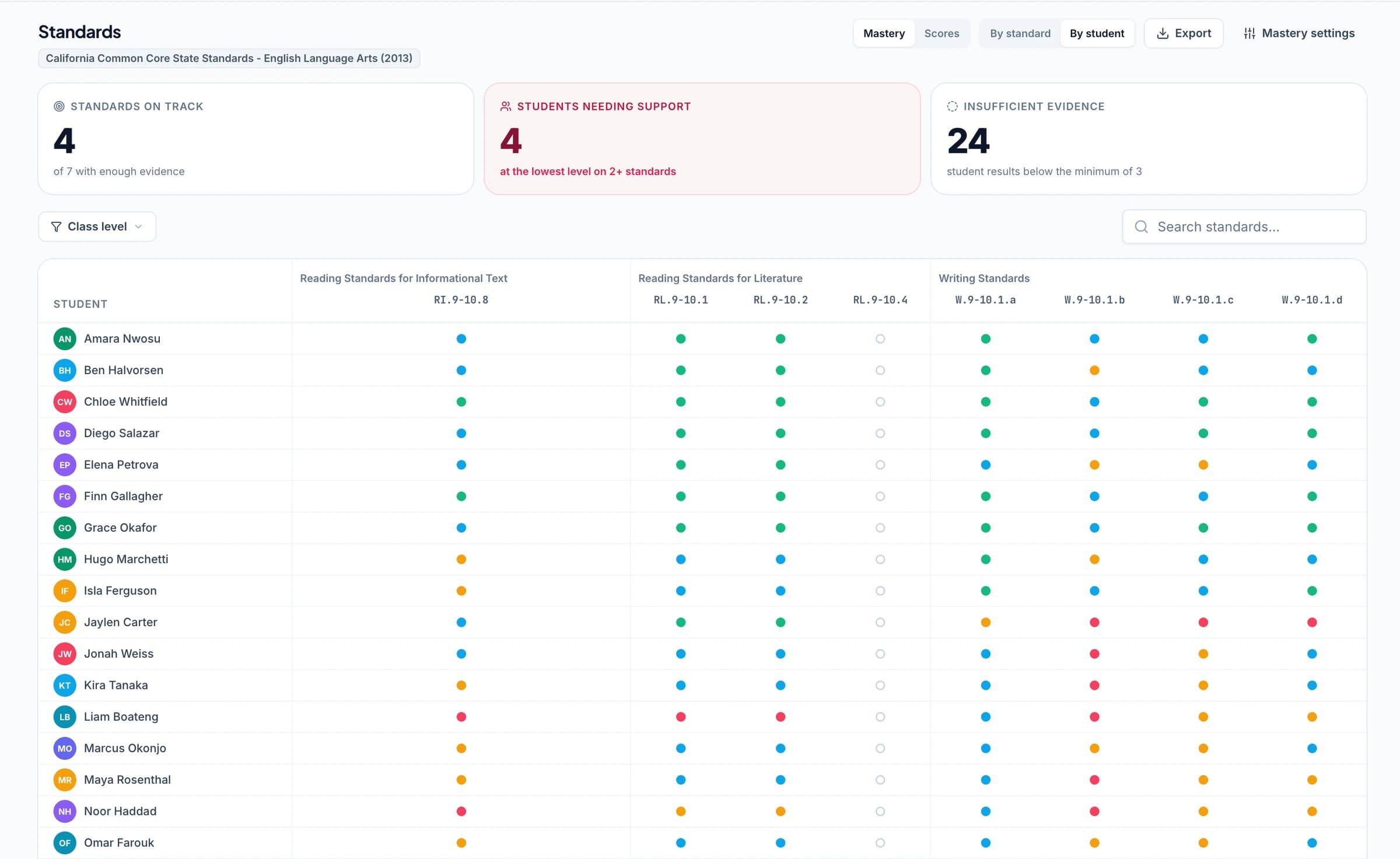
Use a follow-up question or later assignment to see whether students can apply the skill again. With the optional standards mastery gradebook, approved work aligned to Common Core, NGSS, TEKS, or another selected set contributes to a record across assignments.
Analytics helps you plan the immediate response. Standards mastery helps you inspect the evidence over time using your chosen calculation settings. Together, they connect today's grading to the next teaching decision and the student's longer progress record.
Keep useful assessment data ready for team discussions
Inspect points and percentages, and export scores as CSV or Excel when you need to work with them elsewhere. Bring examples of class strengths and difficulties into a department discussion, alongside the criteria and the teaching response you plan.
Performance analytics is available on paid plans or the relevant add-on. Compare access, or discuss your school's requirements for adoption across a team. The classroom views described here do not imply a separate institution-wide reporting dashboard.
Questions about classroom assessment analytics
Which assessments contribute to the analysis?
Use approved assessment results. Review the underlying grading so the patterns reflect assessments you are ready to use for planning. The student responses remain important context when interpreting a finding.
Can I identify the students associated with a learning gap?
Yes. Pattern views include associated students, counts, and supporting evidence. Use those details to decide whether a need calls for whole-class teaching, a smaller group, or an individual conversation.
Does GradingPal teach the follow-up lesson?
GradingPal identifies patterns and suggests teaching responses. You choose, prepare, and deliver the lesson. Where a recommendation includes an activity-generation prompt, you can adapt and use it to prepare a resource.
Is performance analytics included on Free?
Performance analytics is a paid feature. See current plans and add-ons for access. You can evaluate the underlying grading and feedback workflow through the free plan.
How is analytics different from the standards mastery gradebook?
Analytics focuses on assessment patterns, question results, and instructional next steps. The mastery gradebook combines approved aligned evidence over time under your selected method, scale, and weighting.
Can I export assessment scores?
Yes. Export score data as CSV or Excel for your existing analysis and reporting process. Review the data and the intended audience before including it in a shared report.
Can the insights support math and science teaching?
Yes. Use supported math and science assessments with criteria that distinguish the knowledge, working, and explanations you want to assess. Inspect the relevant responses before choosing the next teaching task.
Plan your next lesson with the assessment evidence in view
See how GradingPal connects classroom patterns, student responses, and suggested activities in one assessment workflow.