GradingPal vs CoGrader: one AI grader for math, science, writing, and more
GradingPal brings your grading, student feedback, and learning insights into one complete assessment platform. Automatically grade essays, handwritten math, science, worksheets, exams, presentations, and recordings. Get scores backed by evidence, choose from six feedback styles, and track standards mastery across assignments—with a rubric library your school can build on together.
Published by GradingPal. Official competitor information reviewed on 9 September 2026.
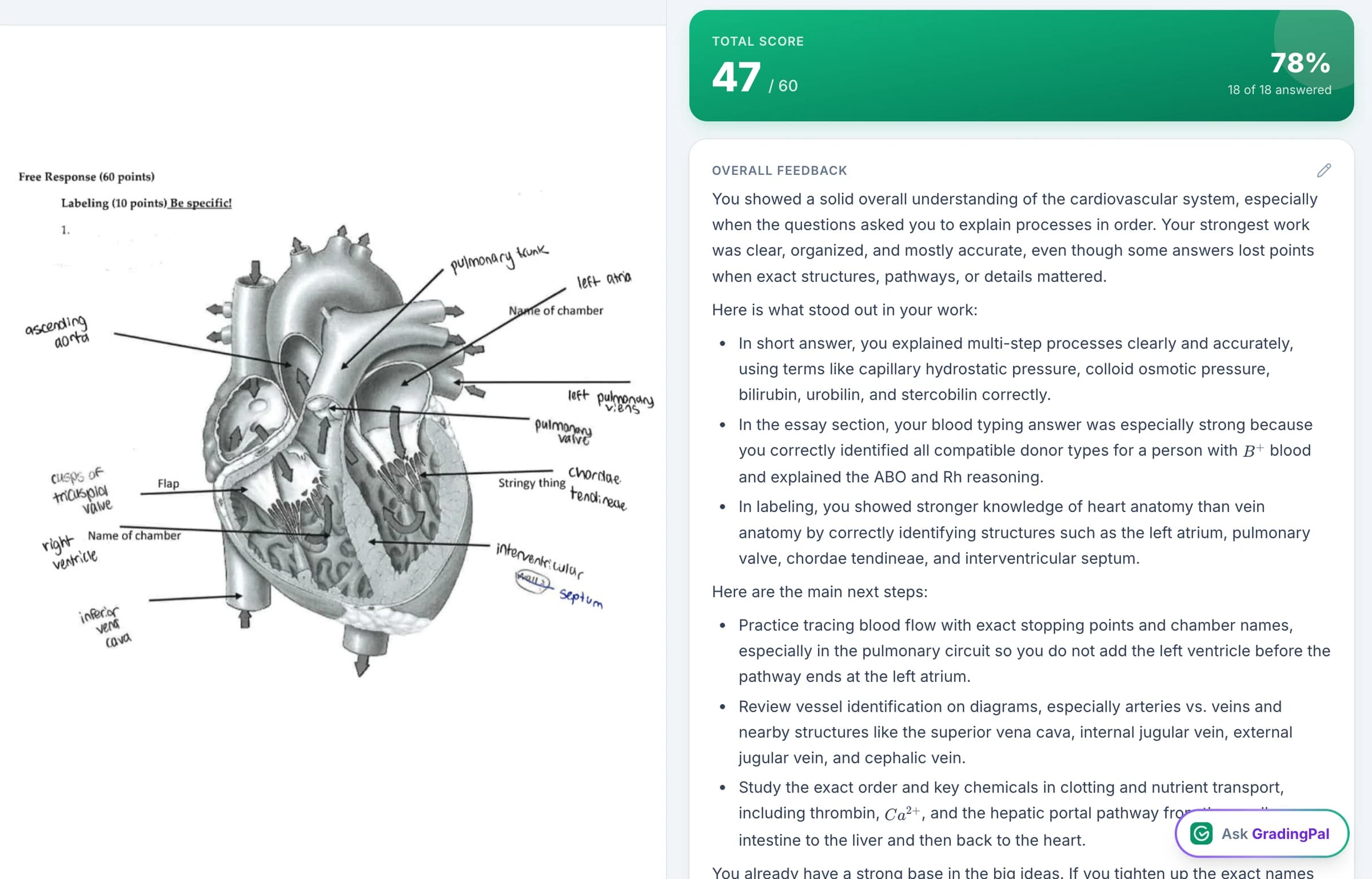
Get rubric scores, individual feedback, and learning insights in one product
GradingPal handles the work before, during, and after marking. Start from a reusable rubric, get each submission scored with individual feedback, refine the assessment in context, and see what the results mean for your next lesson. You spend less time producing scores and comments and more time using the results.
AI grading across subjects and assignment types
Use one system for an essay, a calculation, a lab report, or a recorded explanation.
Rubric scores backed by evidence
See what earned credit and why; check the judgment against the student's actual work.
Six feedback styles and your own instructions
Give a hint, a direct revision step, or a detailed rubric explanation in your teaching voice.
Standards mastery and an evidence-linked gradebook
Follow what students demonstrate across assignments, not just their latest total.
A 500-rubric catalog and shared school libraries
Reuse strong assessment resources and adapt them to your class.
Classroom insights and instructional recommendations
Identify learning gaps and decide what to reteach or whom to support.
Grade the whole teaching workload: paper, digital, short answer, and long answer
GradingPal grades essays, worksheets, quizzes and exams, math problem sets, science labs, slides, art, and spoken-content recordings. Short answers, extended explanations, calculations, and mixed-question assignments all have a place in the same product.
That breadth matters to an elementary teacher covering several subjects, a science teacher assessing both calculations and lab writing, and a school choosing software for multiple departments. The rubric changes with the task; the assessment experience stays familiar.
Read handwritten math and assess the reasoning behind the answer
GradingPal's handwritten grading goes into the work students show on the page. The math grader reads multi-step solutions and scores method, calculation, and final-answer criteria. Set partial-credit rules and required answer forms in your rubric, then see why the response earned its points.
In science, assess a physics calculation, a chemistry explanation, or a biology investigation against the relevant expectations. A student can deserve credit for a sound method even when a later arithmetic step is wrong. Another may calculate correctly but fail to explain the scientific relationship. GradingPal prepares the scores and feedback for those distinctions so you can review them directly.
Get a score you can inspect, with evidence behind the decision
GradingPal explains its assessment against the rubric and connects the judgment to the submitted response. Read the original work, the criterion, and the scoring explanation together. You can see which evidence supports the score and where the response falls short of the next level.
This makes accuracy something you can actively check. You do not have to infer the reasoning from a total or recreate the entire assessment to understand it. When the interpretation needs correcting, edit the score or comment with the work still in view. Evidence-backed scoring makes review more informed; your professional judgment determines the result you return.
What teachers say about GradingPal
“The math capabilities and accuracy have been great. Students can turn in homework digitally but keep hard copies for studying, and the Google Classroom integration is very convenient.”
 Brandon McClurgMathematics · Grapevine Faith Christian School, TX
“GradingPal individualizes feedback specific to each student and gives steps to improve their performance. I also love the ability to change the tone of feedback for different assignment types. The team is incredibly helpful and responsive too.”
 Michelle DouglassGrades 11–12 · Research & Anatomy/Physiology · Central Virginia Governor’s School, Lynchburg VA
Choose from six feedback styles, then make the comments sound like you
High-quality feedback is specific to the student's work, connected to the criteria, and clear about what comes next. GradingPal generates that individual guidance and gives you six ways to present it.
Targeted
Focus attention on the sentence, calculation, or explanation that needs work.
Glow & Grow
Identify a strength to build on and a priority for improvement.
Structured
Explain the assessment through the rubric's criteria.
Sandwich
Place a clear development point between positive observations.
Actionable
Give concrete steps for revision or practice.
Socratic
Ask questions that help the student work through the reasoning.
Choose concise or detailed comments, set the language, and add your own instructions for tone, vocabulary, and priorities. An early draft may need one manageable revision. A completed lab report may need a precise explanation of the missing evidence. GradingPal lets you make that choice without writing every comment yourself. Explore student feedback.
Illustrative feedback: “Your conclusion identifies the trend. Cite two measurements from your results, then explain how they support your claim.” The student gets an action to take, not a generic request to improve.

Automatically build a standards mastery record from approved assessments
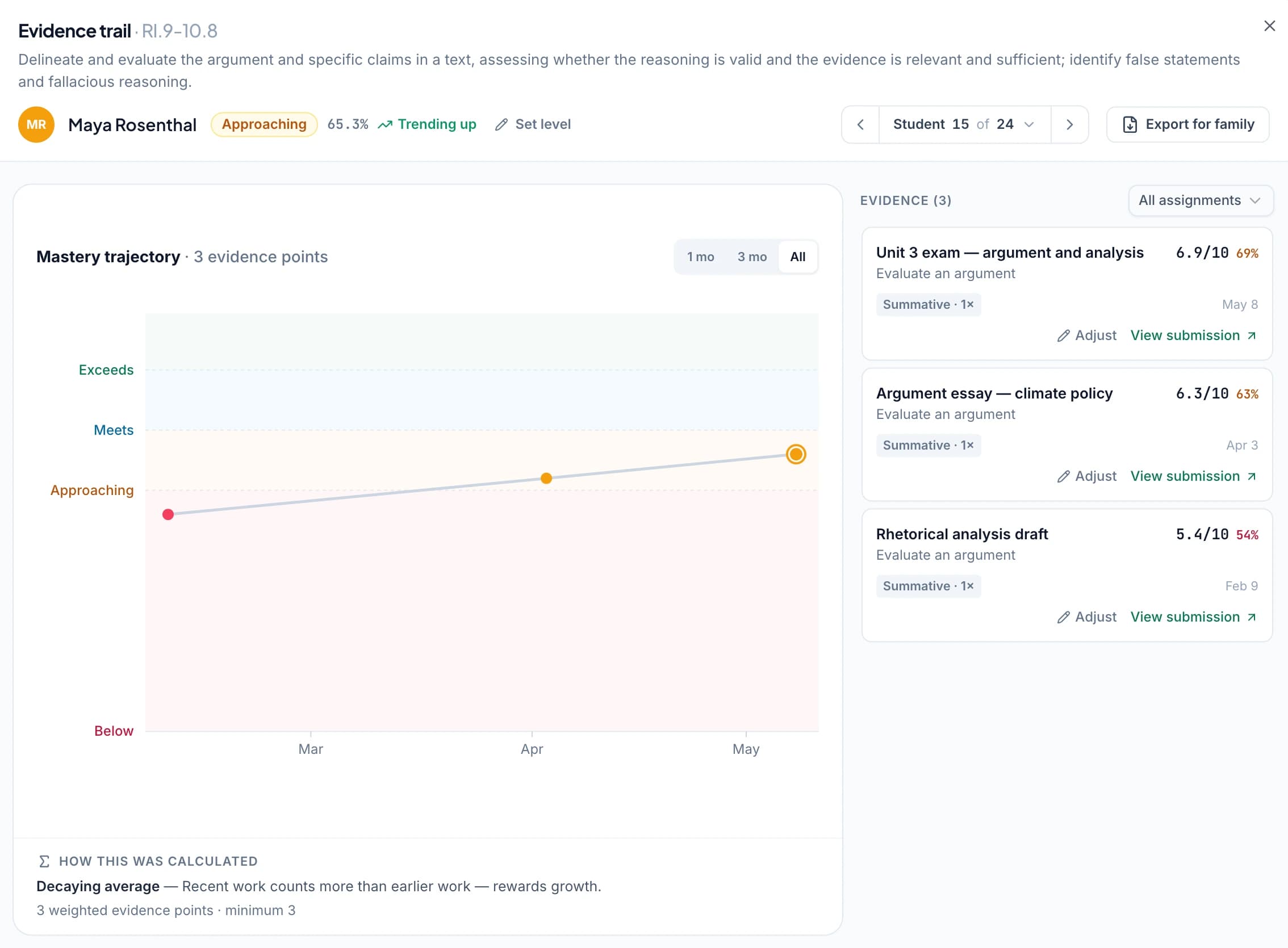
GradingPal turns approved, aligned assessment results into evidence of progress against your selected standards. The standards mastery gradebook shows the class by standard, individual students across standards, and the assessments behind each result. Open a trajectory to see how the evidence develops over time.
You control how mastery is calculated: simple average, decaying average, most recent attempts, most frequent level, or highest level. Set evidence requirements and assessment weights, and make a teacher adjustment when your judgment calls for it. The calculation remains explainable and the underlying work remains available.
This is a learning record you can use in planning, student conversations, and family reports. It goes beyond attaching a standards label to a rubric or displaying one assignment's average. GradingPal's standards directory covers all 50 U.S. states and Washington, D.C., with resources for Common Core, NGSS, Texas TEKS, AP, and IB.
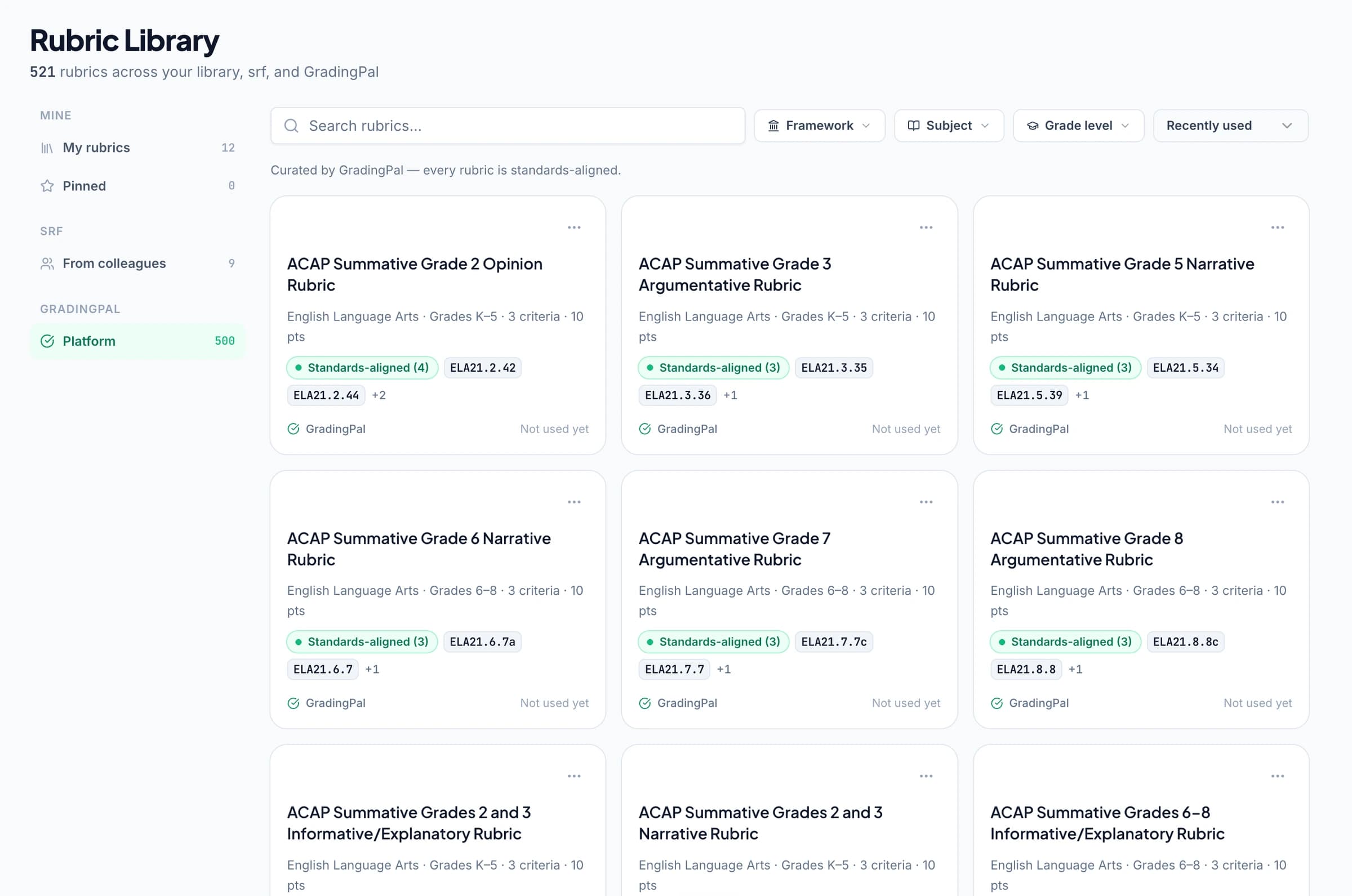
Give your school a rubric library that gets reused
Start with GradingPal's 500-rubric catalog or bring the rubric you already use. Edit a working copy's criteria, levels, and points without changing the original. Then put those expectations to work: GradingPal uses the rubric to generate scores, explanations, and feedback.
On plans with shared libraries, colleagues can reuse assignment and rubric resources across the teaching team. A department can build from agreed criteria while teachers adapt the working copy to their classes. That reduces repeated preparation and gives moderation conversations a common reference. Explore the rubric library and school plans.
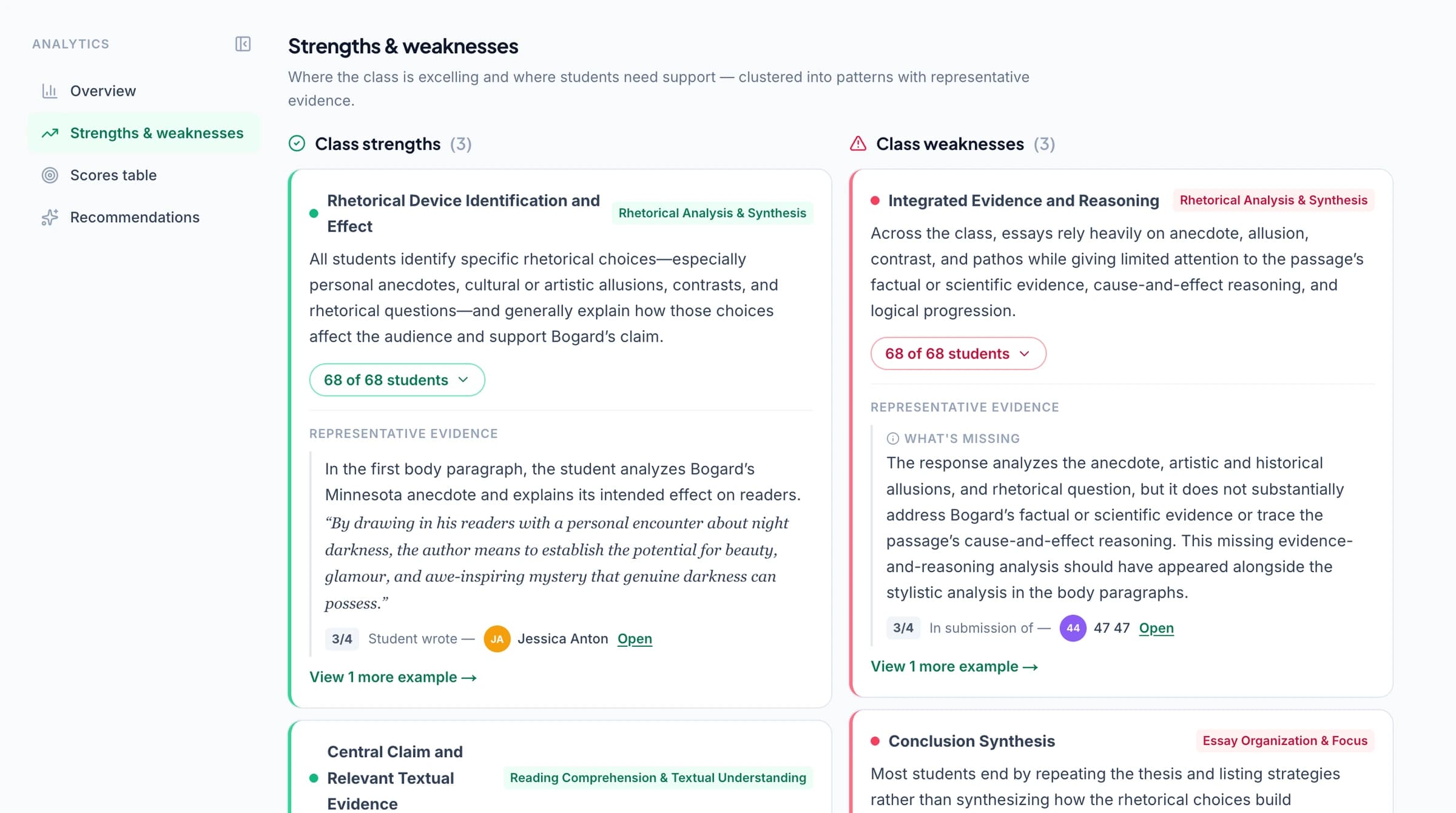
Know what to reteach and who needs support
Classroom analytics surface strengths, weaknesses, and recommended instructional next steps from the work you have assessed. Find the pattern across responses, decide whether it calls for a class explanation or targeted support, and use a later assignment to check the same skill.
The three benefits reinforce each other: grading takes less repetitive work, students receive useful feedback, and the teacher gets information to act on. That is why GradingPal is more than a way to finish comments—it is an assessment system that supports the next lesson.
Ask the assistant to change the rubric, score, or feedback
Ask GradingPal works inside the assessment. Request a new criterion, a review of a score, or a clearer student comment; inspect the proposal and accept the changes you want. The assistant makes detailed control practical while you are looking at the relevant work.
Then print, share, or schedule feedback. Google Classroom is available now, with Canvas and Schoology available on a school plan. Review privacy and security or contact the team about your school's setup.



How CoGrader's published workflow compares
CoGrader describes rubric scores, teacher review, handwritten submissions, written science responses, class analytics, and LMS connections. GradingPal's case is the depth demonstrated above: subject-specific assessment, six feedback styles, configurable mastery records, shared rubric resources, and in-app assessment changes working together. CoGrader grading · CoGrader feedback
For teachers and schools who want that complete assessment environment, GradingPal is a compelling choice. See the features in the actual product and start using the parts that address your workload.
Questions about choosing GradingPal over CoGrader
Why choose GradingPal over CoGrader?
Choose GradingPal for the complete assessment system: grading across subjects and formats, scores backed by evidence, six feedback styles, standards mastery over time, shared school rubrics, and an assistant that helps you refine the assessment. Together, those capabilities reduce repetitive work and make the results more useful to students and teachers.
Do both products support rubrics and teacher review?
Yes. CoGrader documents both. GradingPal makes those foundations part of the wider assessment system described on this page. CoGrader source
What kinds of assignments can GradingPal grade?
Essays, short and long answers, worksheets, quizzes, exams, math problem sets, science labs, handwritten work, presentations, art, and supported audio/video assignments. The subject and format pages explain the evidence each workflow assesses.
Can I customize the student feedback?
Yes. Choose Targeted, Glow & Grow, Structured, Sandwich, Actionable, or Socratic feedback; set detail and language; and add instructions for your teaching voice. You can edit the result or ask the assistant to propose a change.
How can I evaluate GradingPal?
Start free with 50 submissions per month, including the six feedback styles within the allowance. See pricing for advanced feature access, or book a demo of mastery tracking and shared school resources.
Which cost should I compare?
Use GradingPal's current plans to select the grading capacity, assignment types, analytics, library access, and integrations you need. Review CoGrader's current plan information through its product site. Compare the package your teaching actually requires.
Put your grading, feedback, and learning insights in one place
Give GradingPal your next assignment. Get the rubric scores and individual feedback ready for review—and see how much more the assessment can do for your teaching.