AI grading for middle schools. Give every assignment useful feedback.
Grade writing, handwritten math, science, and projects with GradingPal. Teachers get rubric-based scores and specific feedback to review, students get clear actions for revision, and school teams gain assessment evidence they can use to plan support across the work they teach.
50 free submissions per month, shared across assignment types.
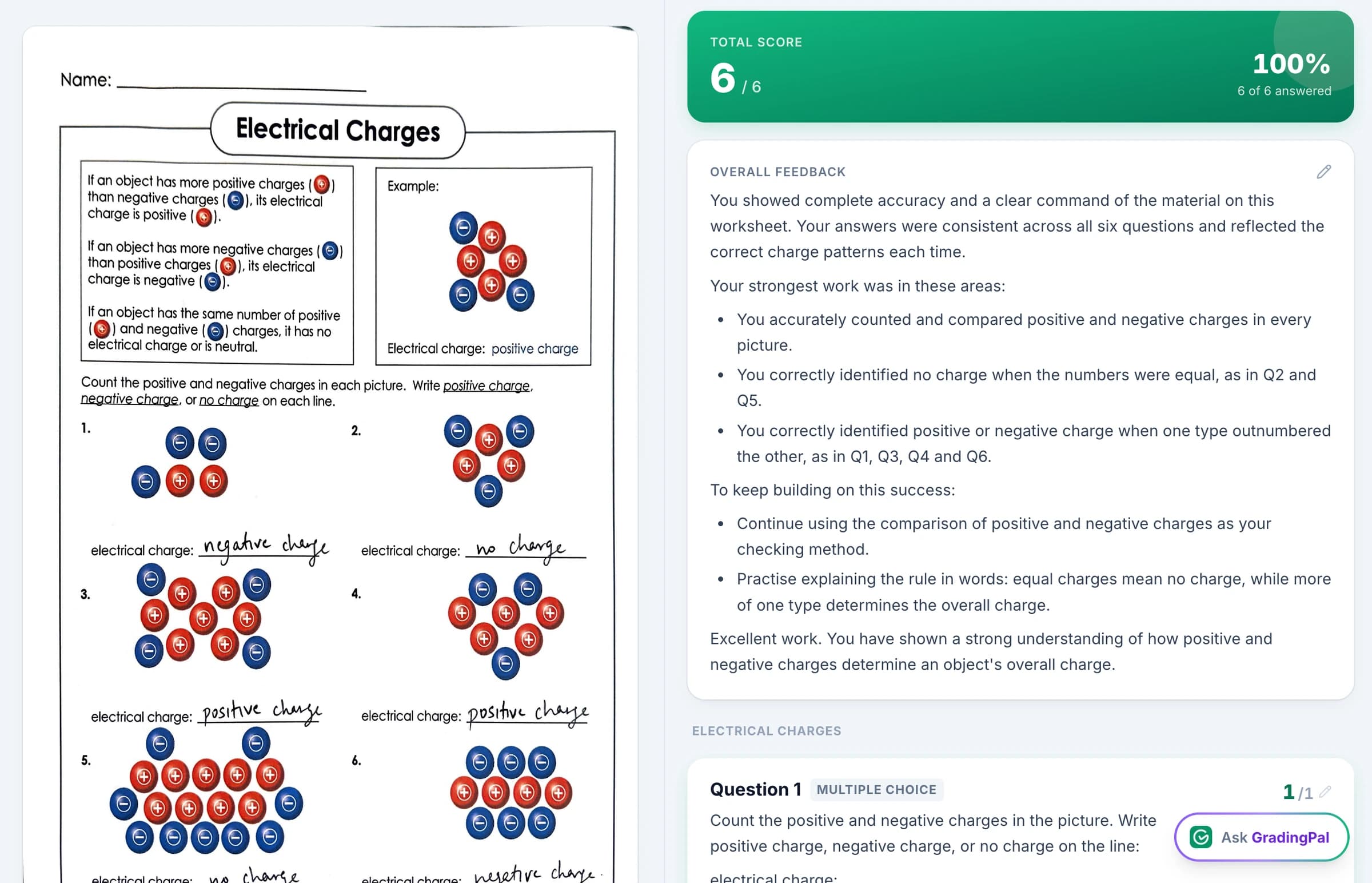
Make detailed feedback practical across a full teaching load
As students take on longer explanations and more demanding subject work, the feedback needs grow too. GradingPal connects the repeated work of grading with the next steps students and teachers can take.
Spend less time scoring each class set
Assess submitted work against your rubric and review the scores with their supporting evidence. GradingPal drafts comments for the individual response, reducing the repeated scoring and writing that accumulate across classes.
Help students turn feedback into revision
Give students guidance tied to a choice in their own work: explain a claim, show a missing calculation step, or connect a conclusion to the data. Teachers decide which action is most useful for the assignment.
Give teaching teams evidence for follow-up
Use classroom patterns and standards progress to identify what needs another explanation. Shared rubric resources help colleagues discuss the expectations and student work behind an assessment, rather than comparing totals alone.
Grade essays, worksheets, calculations, and projects
GradingPal generates scores and feedback across supported assessment types. Set the criteria for each task so a science explanation, math solution, and written argument receive the assessment they require.

Writing and humanities responses
Assess claims, evidence, explanation, organization, and source analysis. Feedback can show where a relevant example needs a stronger explanation and what the student should revise.
Explore essay grading
Math worksheets and problem sets
Read supported handwritten calculations and multi-step working. Score the method and answer according to your rubric, including partial credit where your criteria provide it.
Explore math grading
Science investigations and short answers
Assess scientific ideas, use of data, and written reasoning in submitted investigations and responses. Review the evidence behind a score before approving the feedback.
Explore science grading
Presentations and recorded explanations
Use the appropriate grading workflow for slides, audio, or video submissions. Assess the criteria the task asks students to demonstrate and return specific feedback for the next presentation or response.
Explore supported assignment typesSee the work, the score, and the reason together
GradingPal places the submitted response beside the rubric assessment so teachers can inspect what earned credit and where the explanation is incomplete. Review a familiar assignment in the product demo to see how scoring, feedback, and teacher edits connect.
What teachers say about grading and handwritten work
“GradingPal is helping me a lot! It is cutting down a lot on grading certain assignments, especially map and geography projects. With Middle School students especially, it is very difficult to read their handwriting. GradingPal does it better than I do!”
 Marcus AbernathyHistory Teacher · Lancaster Christian Academy, TN
“The math capabilities and accuracy have been great. Students can turn in homework digitally but keep hard copies for studying, and the Google Classroom integration is very convenient.”
 Brandon McClurgMathematics · Grapevine Faith Christian School, TX
Use the learning platforms your school already knows
Google Classroom is available now, with Canvas and Schoology available on a school plan. Connect the supported assignment workflow or upload work directly, including readable scans of paper submissions. Students can keep the format appropriate to the task. Explore integrations and handwritten grading.



Review student-data protection before introducing a new tool
Student work is not used to train AI models. Teachers review assessments and decide when results are returned. Your school can inspect the published security information and discuss its approval requirements with GradingPal. Read the security overview.

FERPA
Compliant

COPPA
Compliant

GDPR
Compliant
CASA
Tier 2 Verified
Give students one clear revision priority—or detailed criterion feedback
A draft paragraph may need one focused next action. A completed investigation may need fuller feedback on scientific reasoning and evidence. Choose the feedback style, length, language, and instructions that fit the assignment, then review the comments for the class.
An illustrative instruction: “Use the terms claim, evidence, and reasoning. Identify the weakest connection and give one specific action the student can take in revision.” GradingPal uses the response and rubric to make that guidance specific. Explore student feedback.
Teachers can share comments without the displayed grade when they want students to start with revision. Ask students to identify the advice they used and point to the change in their next response. See feedback sharing.

Know what to reteach and which students need practice
Classroom analytics surfaces recurring strengths, weaknesses, and question-level patterns from approved assessments. Open the responses behind a pattern and use the suggested teaching activities to plan a whole-class explanation or smaller-group support.
For example, if several students name the result of an investigation but do not connect it to their conclusion, use that shared difficulty to focus the next lesson. Review that gap, model a worked explanation, and ask students to revise using their own data. Analytics makes the pattern easier to inspect; teachers choose the response. Access requires a plan with performance analytics.

Follow standards progress beyond one assignment
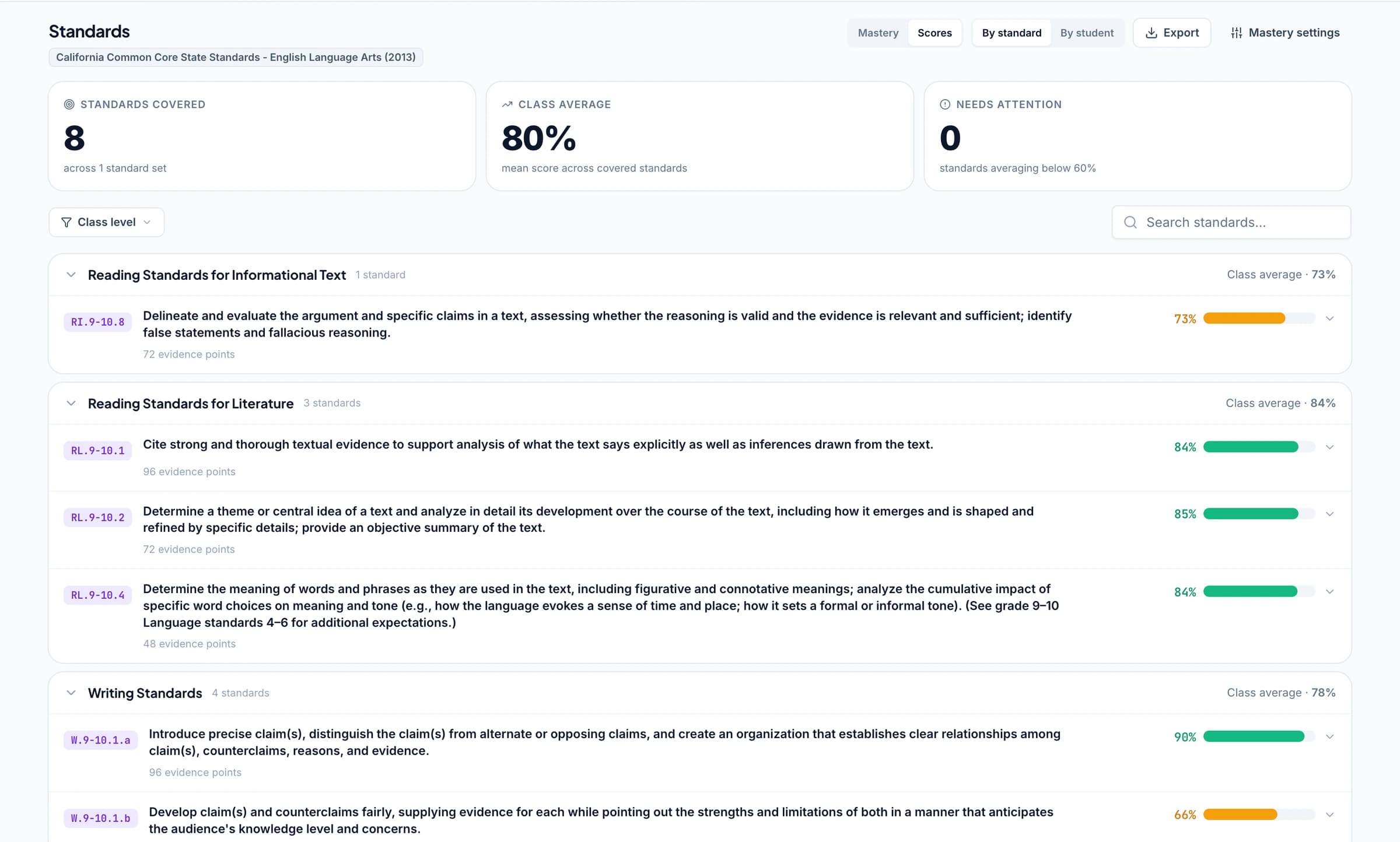
Align relevant questions or rubric criteria to the standards being taught. Approved evidence contributes to the mastery gradebook, where teachers can trace a result back to the work and follow later demonstrations of the skill.
Use Common Core, NGSS, TEKS, and other supported frameworks across all 50 states and Washington, D.C. Choose the right grade and subject rather than treating every assignment as evidence for every standard. For schools using IB MYP resources, select and adapt the relevant IB criteria.
Give your team common rubrics and meaningful scoring discussions
Shared assignment and rubric libraries help teachers build on the same resources. A department can agree expectations for an explanation, review a few responses together, and refine the criteria before broader use. Individual teachers still inspect scoring and respond to class context.
Use the rubric library or bring existing department criteria. Add grading instructions to make the required terminology and task expectations explicit. The value for the school is a reusable assessment approach with evidence teachers can discuss.
Ask the AI assistant to make a specific assessment edit
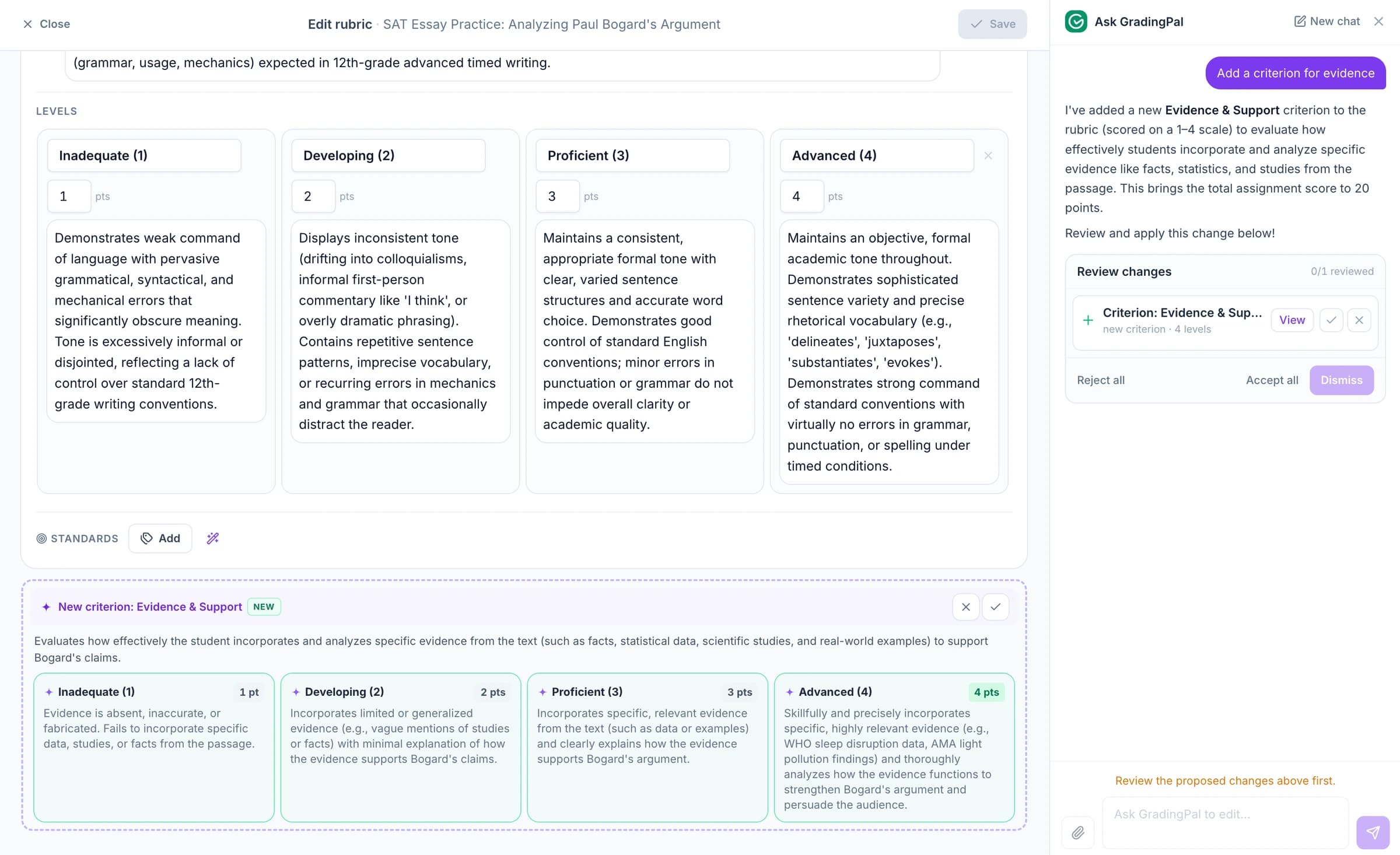
Ask GradingPal to propose a rubric, score, or feedback change while you are working on the assessment. For example: “Shorten this feedback to one revision priority and keep the terms we use in class.” Inspect the proposed edit and accept it when it matches your intention. Explore Ask GradingPal.
Evaluate the workflow with teachers from more than one subject
Choose familiar work from math, science, and writing. Compare the suggested scores with your criteria, inspect the usefulness of feedback, and see whether classroom insights suggest a worthwhile next teaching action. Include the LMS workflow and shared-resource needs in the conversation so the evaluation reflects the school day. Explore GradingPal for schools.
Questions about AI grading for middle schools
Can I use the same tool for essays and worksheets?
Yes. GradingPal supports essays, worksheets, short answers, calculations, and other assessment types through the appropriate workflow. Each assignment uses its own rubric and teacher review, so the criteria fit the work.
Can I adapt the tone for different classes?
Yes. Set feedback preferences and instructions for the class or assignment, then edit individual comments where context matters. Choose the detail students need for a draft, a completed task, or targeted practice.
Can students revise before seeing a number?
Yes. Teachers can share feedback without displaying the grade. You can use those comments in a revision activity and decide when scores should be shared.
Does sharing a rubric make every teacher's judgment identical?
Shared criteria make expectations explicit and give teachers a common basis for discussing work. Teachers still review the suggested assessment, interpret classroom context, and resolve individual scoring decisions.
Can it grade handwritten math and science responses?
Yes. GradingPal reads supported handwritten working and generates scores and feedback against the rubric. Review unclear writing and the reasoning behind partial credit before approving the assessment.
How does GradingPal help with reteaching?
Performance analytics shows recurring strengths and weaknesses, the students involved, and suggested teaching activities from approved work. Open the underlying responses and decide what to reteach or practise. Analytics is a paid feature with access determined by plan.
Does it track Common Core, NGSS, and other standards?
Yes. Align relevant criteria or questions to supported standards and use approved evidence in the mastery gradebook. Coverage includes Common Core, NGSS, TEKS, and other state frameworks; use the grade and subject that match your course.
Can our school use Google Classroom, Canvas, or Schoology?
Google Classroom is available now. Canvas and Schoology are available on a school plan. Contact GradingPal to discuss your school's assignment workflow, integration setup, shared resources, and access needs.
Can teachers try an assignment before involving the whole school?
Yes. Start with the free plan's current monthly submission allowance and a familiar assignment. The Free Plan page explains the allowance; school evaluation can include the additional analytics and team features relevant to adoption.
Give your middle-school team more time to teach from assessment
See how GradingPal grades the work your teachers assign, gives students useful revision guidance, and brings learning needs into view.