AI math grader for handwritten solutions and step-by-step working
GradingPal reads handwritten math, grades multi-step solutions against your rubric, and explains the scores it assigns. Award partial credit, recognize equivalent answers, and give students feedback on calculation and reasoning errors. Spend less time marking and see which math concepts need more teaching.
50 free submissions per month, shared across assignment types.
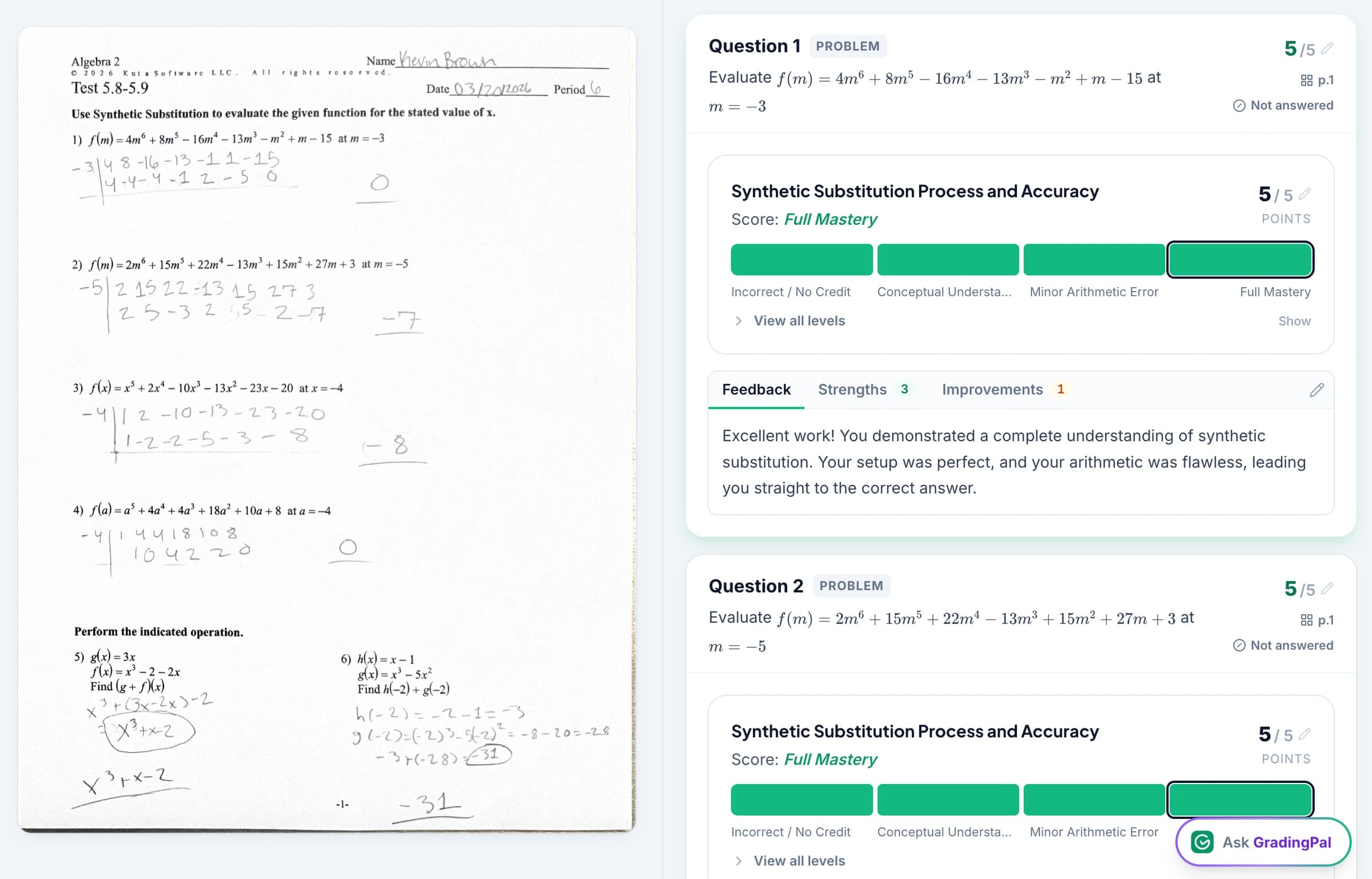
Automatically score handwritten math and explain each grade
GradingPal reads the equations, calculations, and explanations a student submits and automatically scores them against your rubric. It assesses the method and working as well as the final answer, then explains the evidence behind each score.
You can see whether a student chose the right method but made an arithmetic error, or needs help understanding the method itself. Check the original solution beside the score explanation and edit the grade or feedback before sharing.
Award partial credit for correct working
Tell GradingPal how much credit belongs to the method and how much belongs to the final answer. A correct setup, an appropriate transformation, and a correct solution can be separate expectations. The scoring explanation gives you something concrete to inspect when a response is only partly correct.
A useful comment is: “Your equation steps are correct. Check the division in the final line, then substitute your answer into the original equation.” That feedback directs attention to the actual error and leaves the teacher in control of the score.
See GradingPal in action
Watch the GradingPal product demo to see rubric-based grading, feedback controls, classroom insights, and standards mastery.
What teachers say about GradingPal
“The math capabilities and accuracy have been great. Students can turn in homework digitally but keep hard copies for studying, and the Google Classroom integration is very convenient.”
 Brandon McClurgMathematics · Grapevine Faith Christian School, TX
“GradingPal is helping me a lot! It is cutting down a lot on grading certain assignments, especially map and geography projects. With Middle School students especially, it is very difficult to read their handwriting. GradingPal does it better than I do!”
 Marcus AbernathyHistory Teacher · Lancaster Christian Academy, TN
Grade algebra, geometry, statistics, and calculus
Use GradingPal for handwritten or digital math assignments across the topics you teach. Set the criteria for the solution, including required working, reasoning, notation, and answer form.
Algebra and functions
Assess equation solving, substitution, rearrangement, and explanations using the criteria for the task.
Geometry and measurement
Review written reasoning, calculations, and visible diagrams, with requirements for justification and units made explicit.
Statistics and probability
Assess calculations and the student's interpretation of what a result means in context.
Calculus and extended solutions
Apply criteria to the working, notation, and reasoning shown in a multi-step response. Check symbolic details and required conditions carefully during review.
Students can submit handwritten work through scans or photos. Review unclear symbols, cropped steps, or missing pages before approving the result. A small mark can change a mathematical expression, so the original response remains part of the assessment.
Connect GradingPal to Google Classroom, Canvas, and Schoology
Import classes, assignments, rubrics, and student submissions from Google Classroom. Return approved feedback with or without grades. Canvas and Schoology are available on the school plan. You can also upload files directly or import them from Google Drive.



Give students specific feedback on calculation and reasoning errors
GradingPal writes feedback about the submitted solution. Choose the style, length, language, and instructions to control how much guidance students receive, including whether the next step should be a hint or a fuller explanation.
For the 3x + 5 = 20 example, feedback can say: “Your rearrangement is correct. Recheck 15 ÷ 3, then substitute your result into the original equation.” Students have a way to diagnose their error and check their correction, instead of simply copying the right answer.
Review notation in the returned guidance so signs, fractions, and expressions remain clear. Teacher-facing scoring evidence stays available for your review; students receive the comments and scores you choose to share.

Identify math concepts to reteach and students who need support
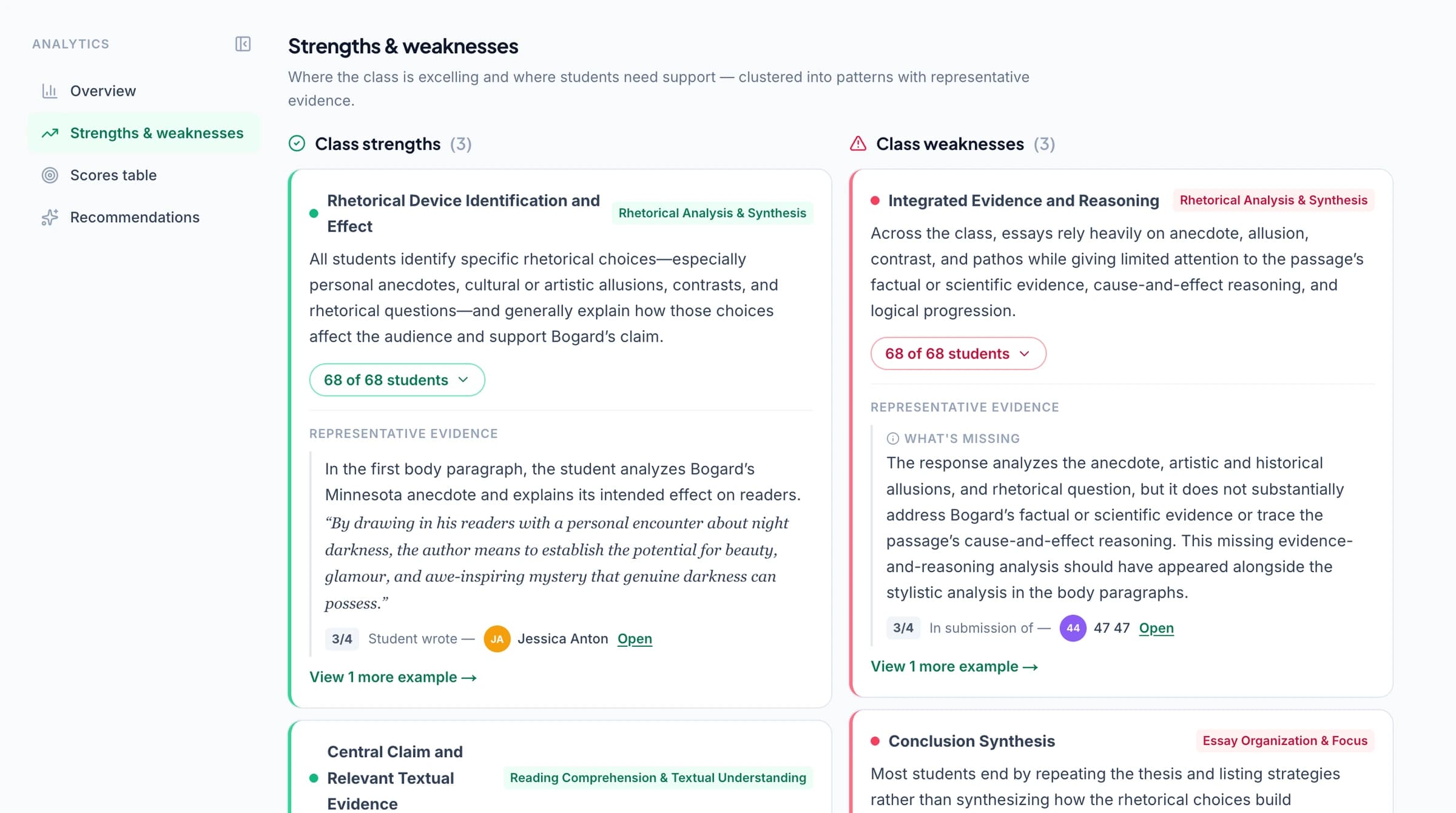
GradingPal's classroom analytics show common difficulties in students' math work and suggest teaching activities. Check the solutions behind the results to decide who needs another explanation of the concept and who needs practice with a calculation or checking step.
Explore classroom analytics. Performance analytics is available on eligible plans; compare plans.
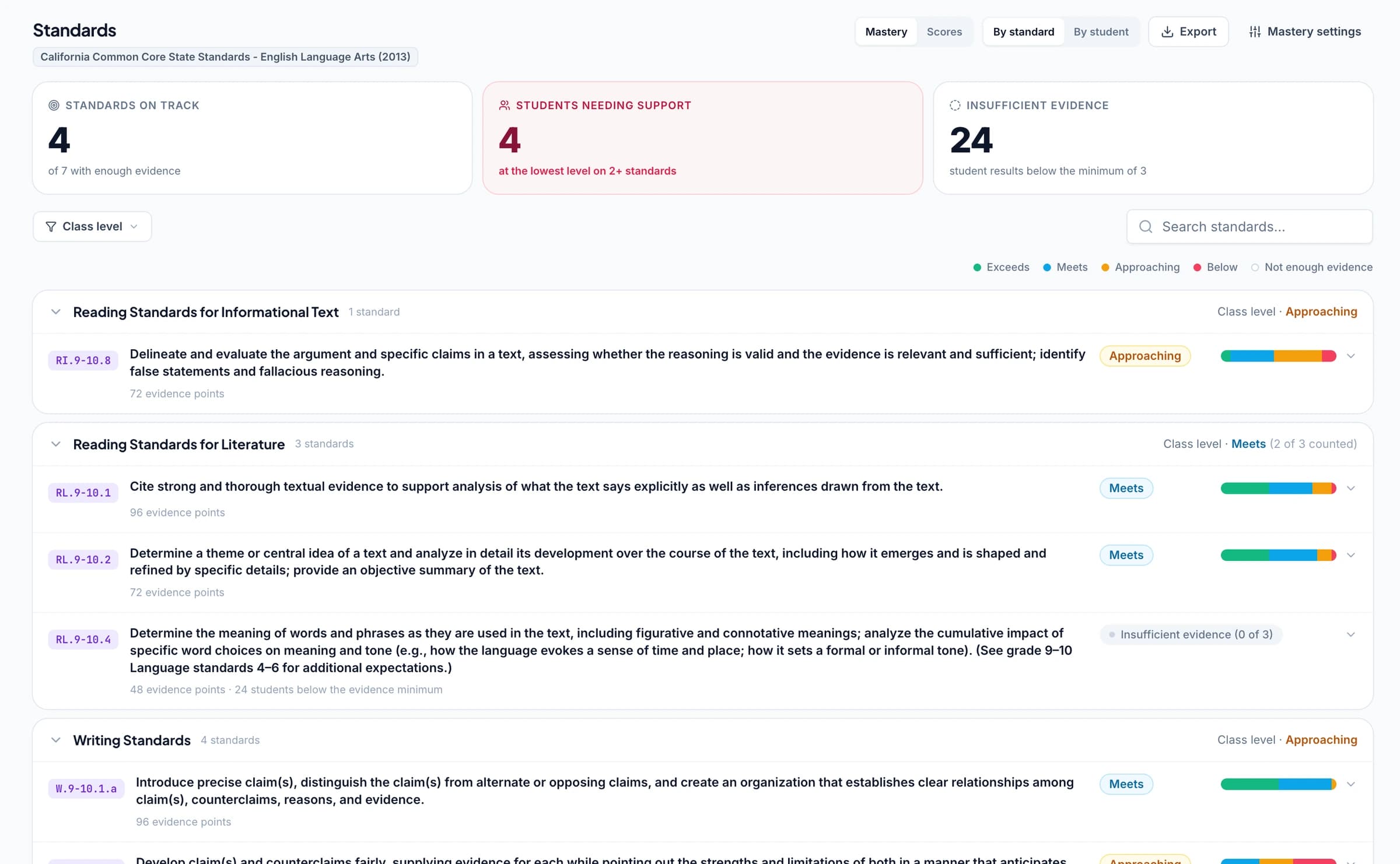
Track mathematics standards mastery across assignments
Connect math questions or rubric criteria to your learning standards. As you approve grading results, GradingPal automatically updates each student's progress in the standards mastery gradebook using your chosen calculation rules. Open the graded solutions behind a result and use later assignments to check whether the student has improved.
Frameworks: Common Core mathematics; Texas TEKS and STAAR practice; California standards and CAASPP practice; Florida B.E.S.T. standards and FAST practice; New York NGLS and Regents practice. GradingPal's standards directory covers all 50 states and Washington, D.C. AP and IB rubric resources also support relevant classroom practice; they are distinct from state standards and official exam scores.
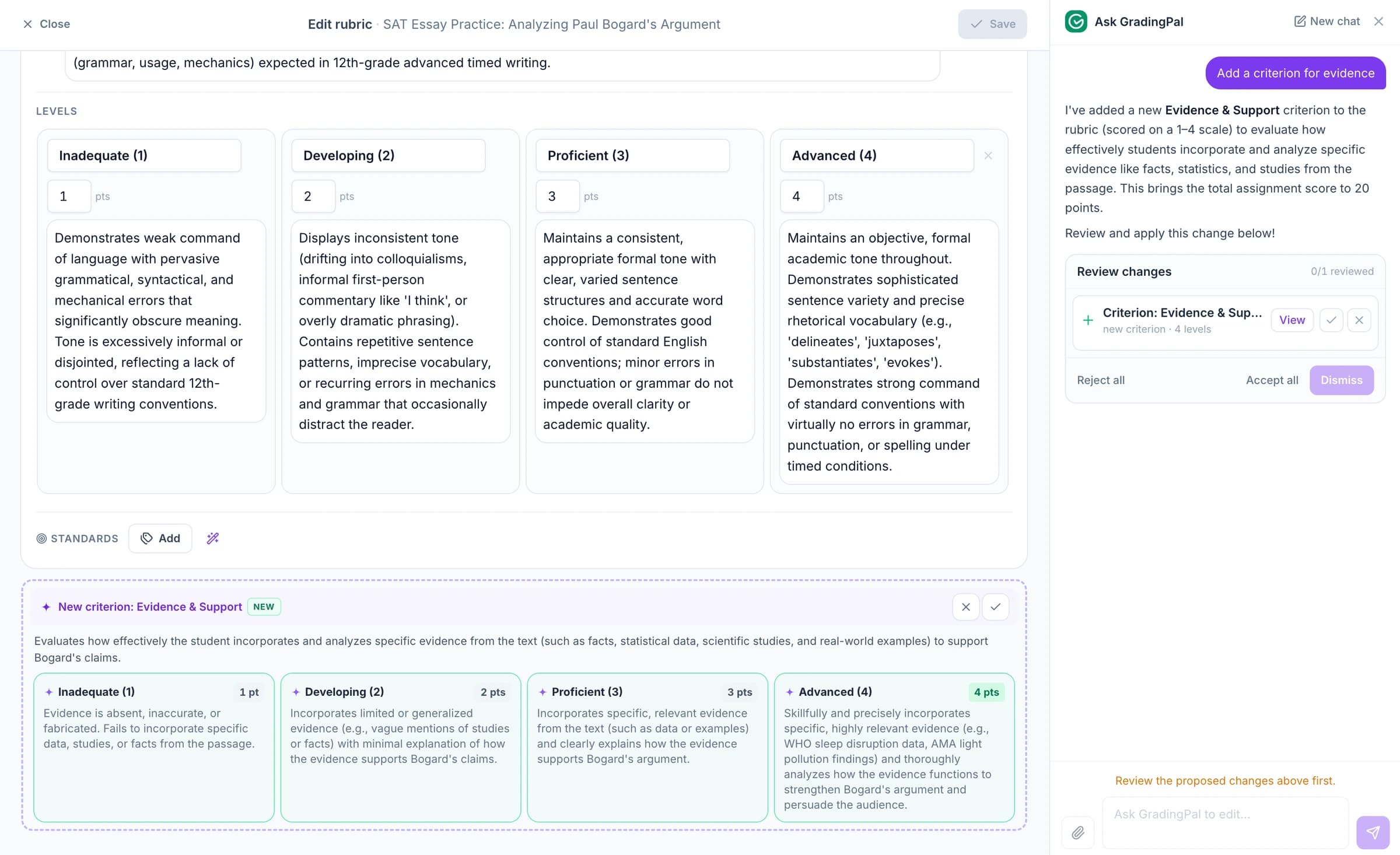
Ask the AI assistant to change math scores, feedback, or rubrics
Ask the in-app AI assistant to change a math score, edit a rubric criterion, or revise student feedback. Check the proposed edit and accept it when it matches your intention.
For example: “Keep the hint, but ask the student to check the answer by substitution.” GradingPal proposes new wording while you continue reviewing the student's solution.
Recognize mathematically equivalent answers
GradingPal supports mathematical equivalence: different numerical or algebraic forms can represent the same answer. That helps teachers assess the mathematics without reducing every question to an exact text match.
For example, 1/2, 0.5, and 50% describe the same value. But a question that specifically asks for a simplified fraction has an additional expectation. Put required forms, exact values, rounding, and units into the rubric or grading instructions, then check the proposed result against the task.
Protect student work and approve grades before sharing
GradingPal is FERPA, COPPA, and GDPR compliant, with CASA Tier 2 verification. Student work is never used to train models. Review scores and student feedback before you choose what to share.

FERPA
Compliant

COPPA
Compliant

GDPR
Compliant
CASA
Tier 2 Verified
Questions about AI math grading
Can it recognize different forms of the same answer?
Yes. Mathematical equivalence is supported. State any required answer form in your rubric or instructions, and review whether the response meets both the mathematical and presentation requirements of the question.
Can a wrong answer still receive method marks?
Yes, when the rubric awards credit for the working shown. Define those allocations and review the proposed partial credit against the student's actual steps before approving it.
Does it work with handwritten equations?
Yes. GradingPal reads handwritten math from scans and photos. Check unclear symbols, indices, fractions, and scan quality, especially where a small mark changes the mathematical meaning.
Can I use my department's marking conventions?
Yes. Bring the rubric and add relevant grading instructions for conventions such as exact answers, rounding, method marks, or a required form. Review the assessment against those expectations.
Does GradingPal automatically grade and score math work?
Yes. It assesses the submitted work against your criteria and generates scores with explanations and feedback. Teachers review and edit the assessment before sharing it.
Can I use it for physics and chemistry calculations too?
Yes. The same rubric-based workflow supports mathematical working in science. Specify the relevant scientific reasoning, relationships, units, and precision. See the AI science grader for that subject-specific workflow.
Can results help me track mathematical learning goals?
When questions or criteria are aligned to the relevant standards, approved work can contribute to mastery tracking over time. Use the evidence alongside classroom analytics and your knowledge of students to plan the next teaching step.
Does every feature on this page come with the free plan?
No. You can try grading within the free submission allowance; performance analytics and other plan-specific features depend on your access. Check pricing for the current options.
Try GradingPal free on a handwritten math assignment
Upload a solution and the criteria you teach. Inspect the method marks, the score explanation, and the feedback for the next attempt. Start with real work from your class so the assessment is easy to judge.
Try math grading free50 free submissions per month. Compare plans and included features.