GradingPal vs MagicSchool: put better assessment at the heart of your school
Less repetitive marking. More useful feedback for each student. A clearer understanding of what to teach next. GradingPal brings those priorities together through AI grading across subjects, evidence-backed rubric scores, six feedback styles, standards mastery tracking, and shared rubric resources for schools.
Give teachers an assessment system that supports the work they already set—and helps them do more with what students submit.
Published by GradingPal. Official competitor information reviewed on 9 September 2026.
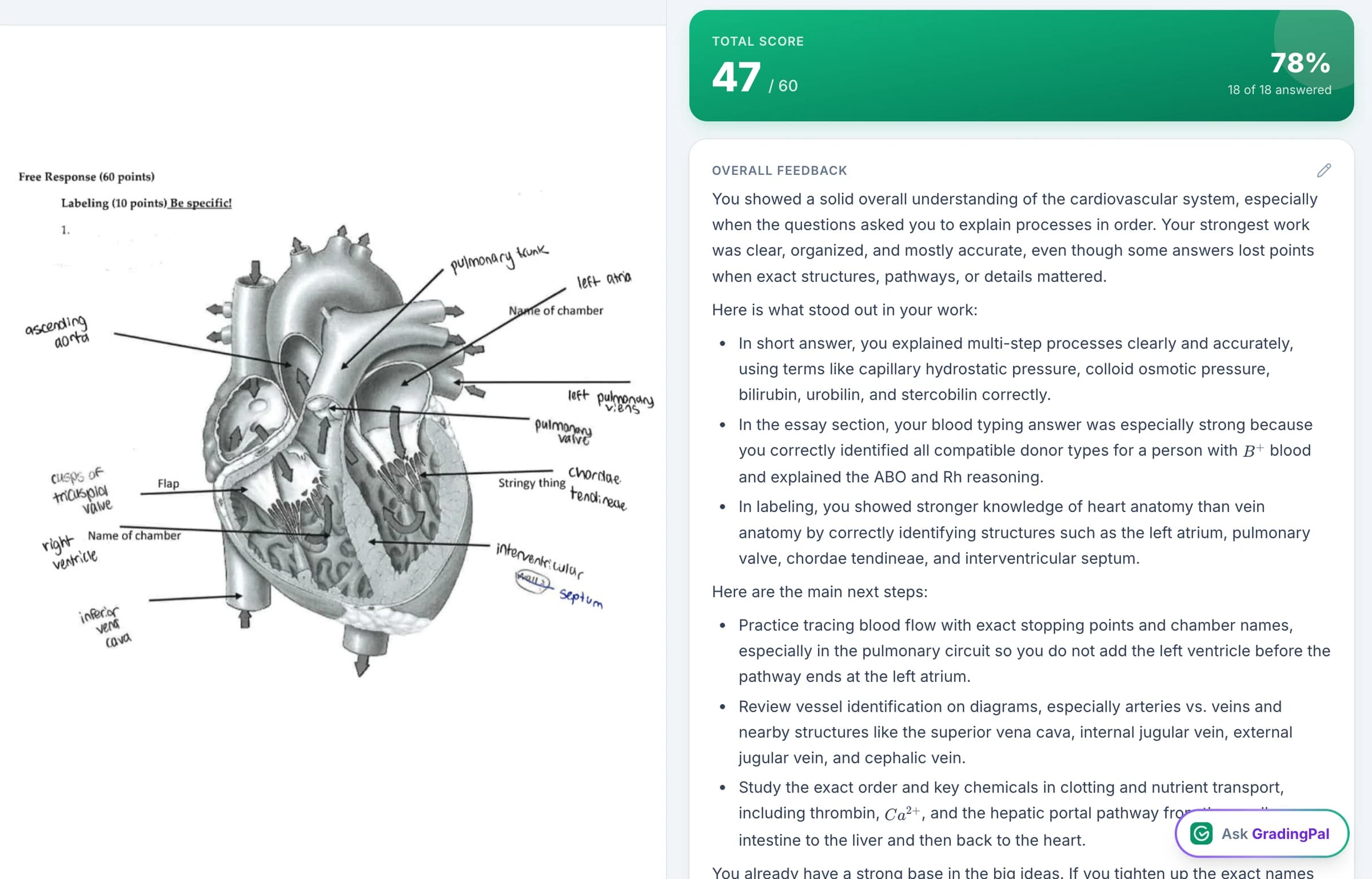
Why choose GradingPal for teaching and assessment?
The value of school AI should be visible in a teacher's day. GradingPal prepares rubric scores and individual feedback for review, helping with repetitive marking. It makes the guidance specific enough for students to act on. It then uses assessment evidence to support mastery tracking and instructional decisions.
Grading across subjects and assessment formats
Teachers can use it for written, handwritten, mathematical, scientific, and recorded work.
Evidence supporting rubric scores
Staff can check how an assessment was reached and apply their judgment.
Six feedback styles and teacher voice controls
Detailed student guidance can fit the task, learner, and classroom.
Standards mastery with configurable evidence rules
Teachers can follow learning across assignments and inspect the work behind the record.
A 500-rubric catalog and shared school libraries
Departments can reuse resources and make common expectations practical.
Class strengths, weaknesses, and recommended next steps
Assessment can inform teaching and targeted support.
This is the case for GradingPal: meaningful help with the marking, the feedback, and the instructional follow-up in one product.
Support the assessments across your departments
Schools teach more than writing, and assessment takes more than one form. GradingPal supports math, science, essays, mixed worksheets, quizzes, exams, and problem sets. It can read handwritten work and assess short answers, long answers, calculations, and explanations against a rubric.
For math, teachers can evaluate methods and partial credit. For physics and chemistry, the rubric can address principles, calculations, reasoning, and units. For biology, it can address scientific understanding and the use of evidence. The assessment follows the expectations of the subject and task.
Presentation slides, oral assessments, and supported video submissions extend that coverage. Teachers can set the kind of work that reveals learning and bring it into GradingPal for scores and individual feedback.
Make every proposed score open to teacher review
GradingPal gives teachers detailed evidence explaining why a rubric score was selected. The score is accompanied by an account of how the student's work meets the criterion, so review has something concrete to examine.
A teacher can check the interpretation, judge the credit, and change the assessment before returning it. In a handwritten science response, for example, a student might state the right conclusion without explaining the evidence. The rubric can distinguish those expectations, and the scoring explanation can show how the response was assessed.
Evidence supports a more informed accuracy check; it is not a promise that AI cannot make mistakes. For schools, this reviewable process matters because the teacher's professional judgment remains part of the assessment.
What teachers say about GradingPal
“GradingPal has been incredible in helping me grade quicker and get better at feedback. The rubric creator creates great feedback without much change by me, and I’m able to get my students’ work back to them faster with actionable feedback.”
 William Pollard9th Grade · Earth & Space Science · NYC Dept. of Education District 15, Brooklyn NY
“GradingPal helps me optimize my time by streamlining the grading process. What I like most is the feedback students receive — it is specific and it is something they can act on.”
 Adriana Barrios RodriguezCollege · Health Sciences & Teacher Education · Universidad Autónoma de Sinaloa, Mexico
Give more students feedback they can act on
Detailed individual feedback is valuable and difficult to produce at classroom scale. GradingPal generates student feedback linked to the submitted work and assessment criteria, so the teacher starts with guidance to review and refine.
Choose from six styles:
Targeted
Address the particular response or issue that needs attention.
Glow & Grow
Recognize an existing strength and identify the next improvement.
Structured
Explain performance through the rubric's criteria.
Sandwich
Put constructive advice between positive observations.
Actionable
Give practical steps the student can carry out.
Socratic
Encourage reasoning with purposeful questions.
Teachers can select the language and detail, add instructions for their own terminology and tone, and edit the result. A school can provide shared criteria while teachers retain their voice in how they explain learning to students.
That distinction matters. Consistent expectations do not require every teacher to write identically, and individualized guidance should be useful to the learner receiving it. Feedback sharing supports printing, sharing, and scheduling the reviewed result.

Build a mastery record from the work students already complete
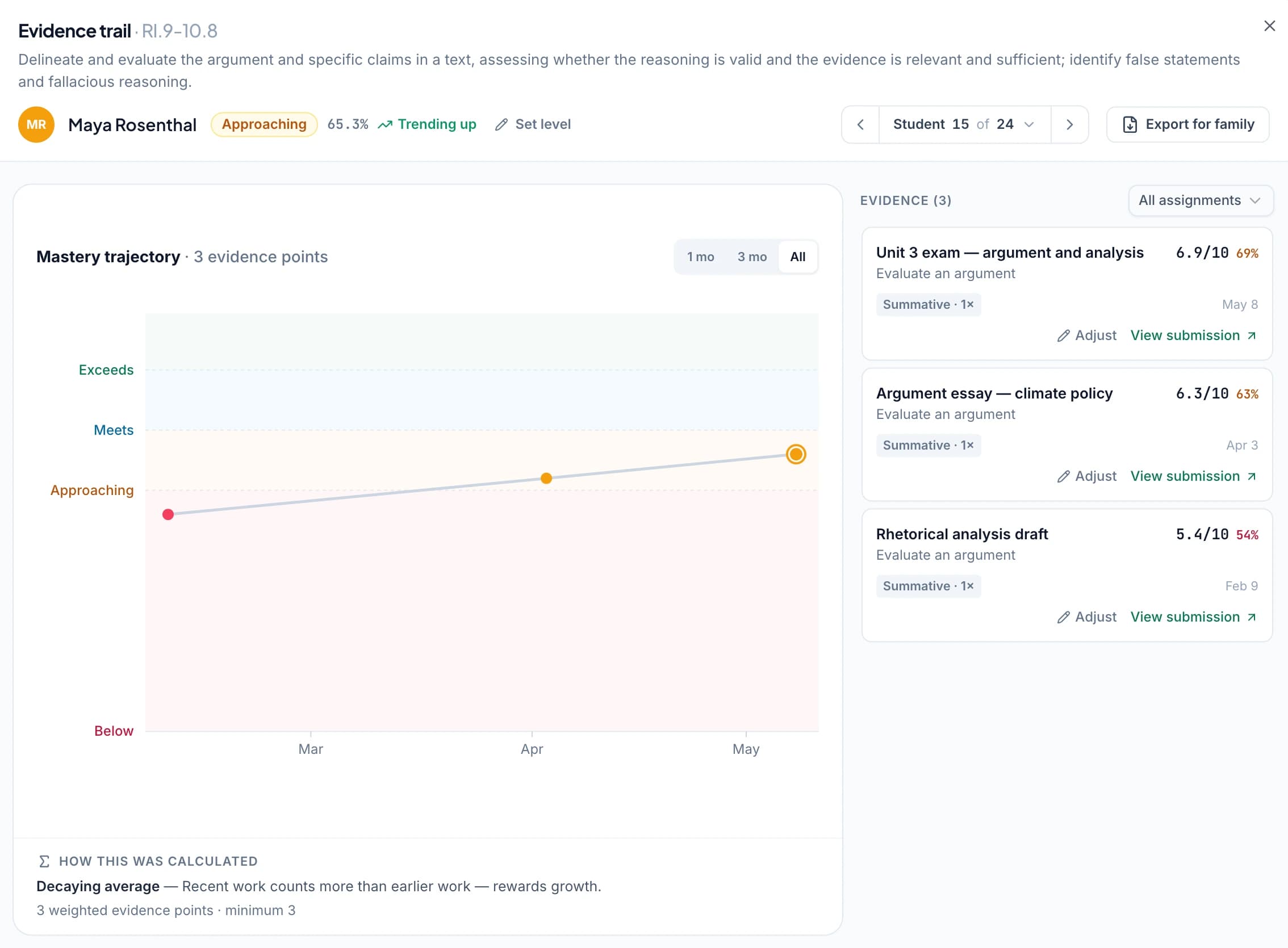
GradingPal's standards mastery gradebook automatically uses approved aligned results to build evidence of progress. Teachers can view the class by standard, an individual across standards, and the trajectory over time, with access to the underlying assessments.
The system offers five calculation methods: simple average, decaying average, most recent attempts, most frequent level, and highest level. Teachers can configure the scale, minimum evidence, and contribution of assessment categories. They can also adjust a standard level with a reason while keeping the calculated result visible.
These settings help a school make its assessment approach explicit. If recent demonstrations of learning should carry more weight, the calculation can reflect that choice. Staff can inspect which evidence contributed instead of relying on an unexplained mastery label.
The standards directory includes resources for all 50 US states and Washington, DC. Explore Common Core, NGSS, Texas TEKS, and AP and IB course and rubric resources. Teachers select the relevant alignment for their assessments; mastery depends on the approved evidence connected to those standards.
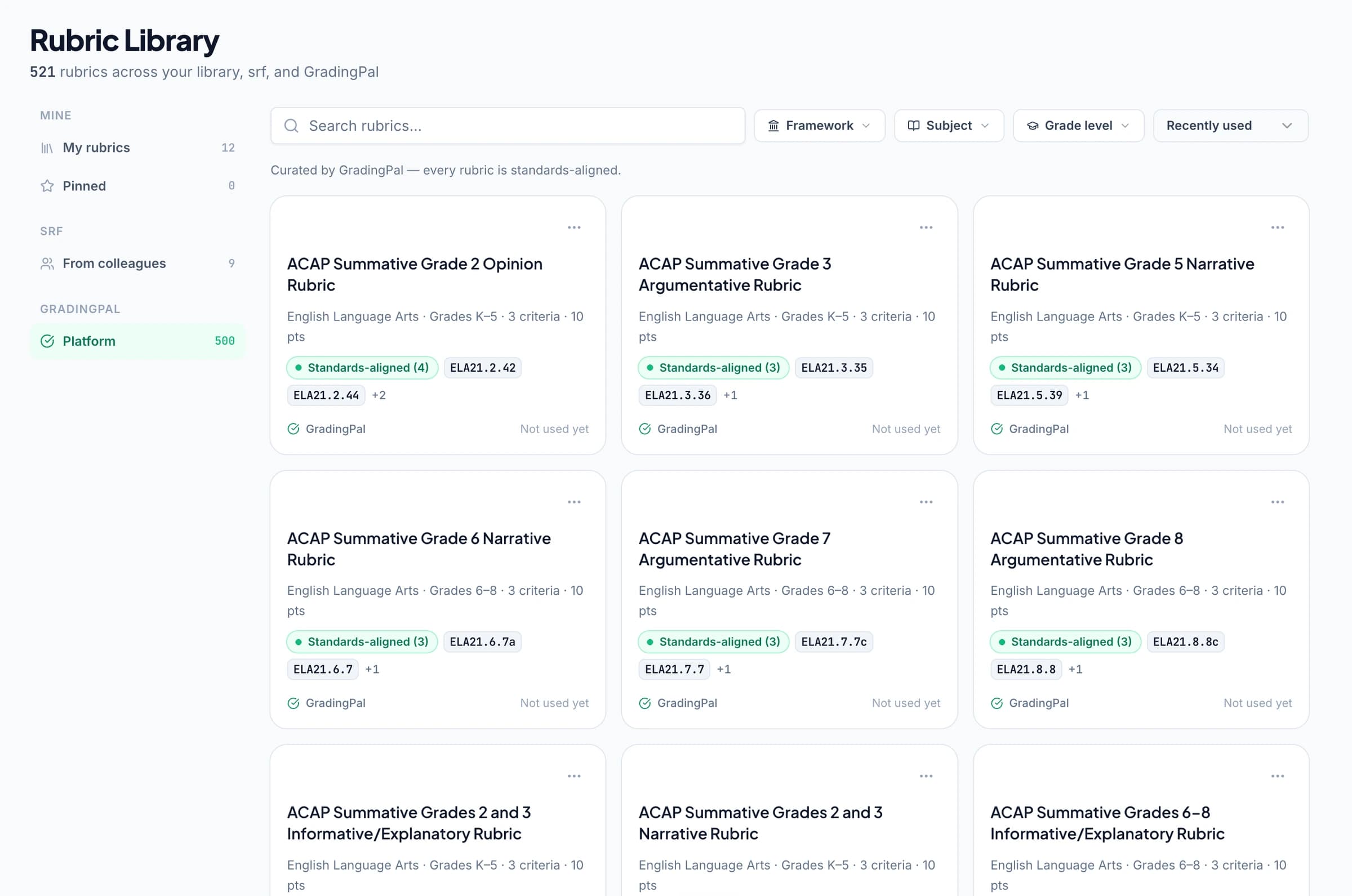
Give teachers a shared rubric library, not another task to repeat
GradingPal's rubric library includes a 500-rubric catalog. Browse, copy, and adapt a rubric's criteria, levels, and points, or use an existing school rubric. Teachers can build on a useful starting point while retaining control of the assessment.
Shared rubric and assignment libraries on eligible plans let departments make agreed resources available to colleagues. Reuse a common rubric for a lab report, a writing task, or a presentation, then adapt a copy where the assignment requires it.
The school benefit is both practical and educational: less duplicated preparation, clearer shared expectations, and assessment resources that can be used again. Explore GradingPal for schools for the broader adoption story.
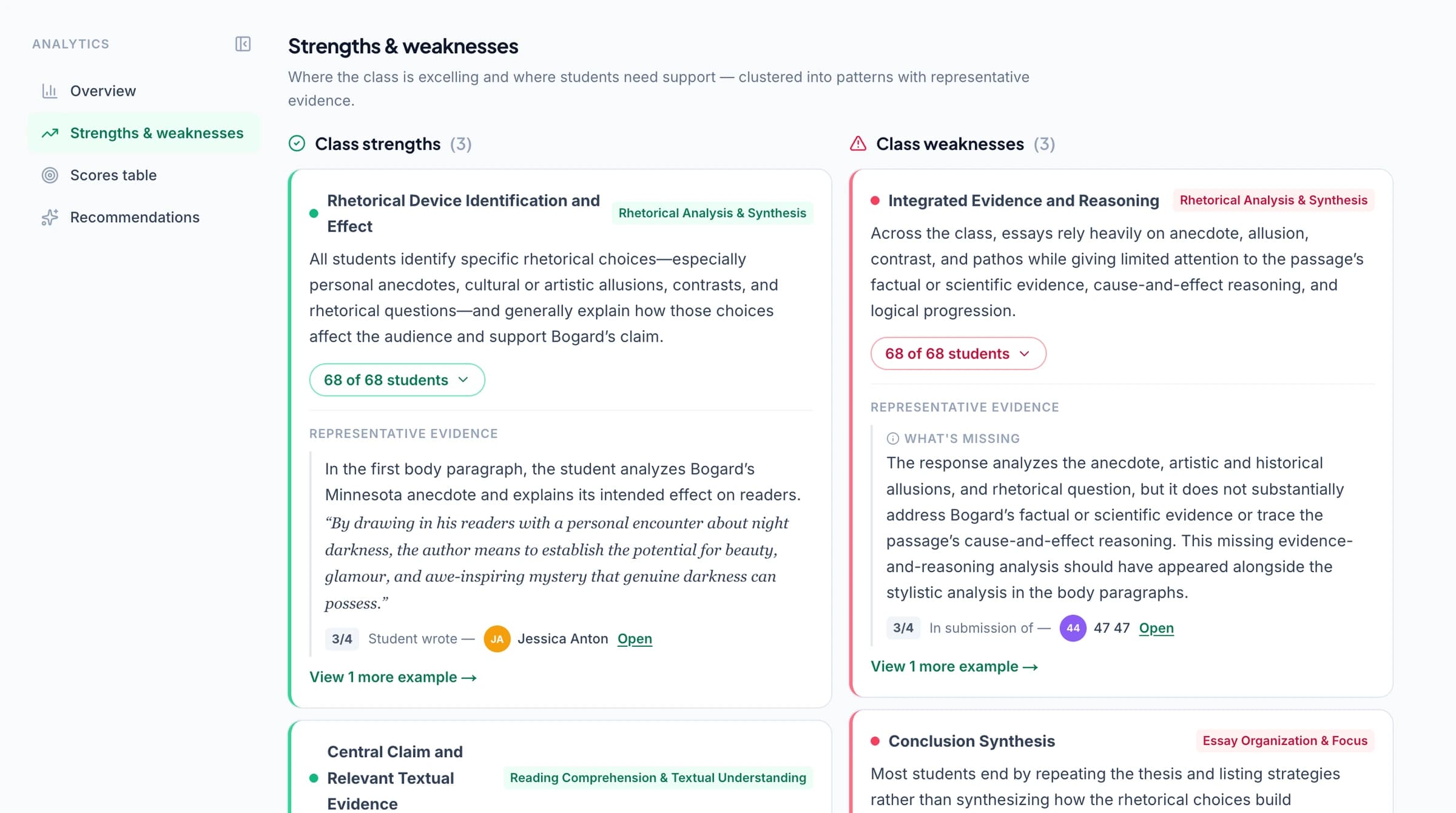
Use classroom evidence to decide what happens next
Classroom analytics surface strengths, weaknesses, and recommended instructional next steps. Teachers can see which concepts or criteria need attention and use that information to plan a lesson or focused student support.
For example, a class may recall the vocabulary in a topic but struggle to apply it in explanations. A teacher can model a stronger explanation, provide guided practice, and check a later aligned task for progress. This illustrative sequence connects the three school priorities: manageable assessment, feedback that helps students improve, and evidence that informs teaching.
Mastery tracking preserves the longer view while classroom insights help with the immediate response. Assessment becomes useful information for the next lesson as well as a record of the last one.
Make review and refinement straightforward for staff
The GradingPal AI assistant works in the assessment context. Teachers can ask it to propose rubric, score, or feedback edits, inspect the changes, and accept or reject them. Undo supports reconsideration.
This makes it easier to put a teacher's decision into the assessment. The interface brings the submitted work, scores, explanations, and feedback together, helping staff work through the review with the relevant information in view. See the product features in a demo with examples from your subjects.
How MagicSchool's published assessment tools compare
MagicSchool offers a broad range of teacher and student AI tools. Its published updates include class writing feedback, quiz insights and instructional next steps, rubric flexibility, and enterprise opt-in Canvas and Schoology imports. Its product materials also describe teacher personalization and rubric-based feedback. Tool directory · June 2026 updates · Assessment and personalization updates
Choose GradingPal when assessment is the job you want to strengthen across the school. Its combination of subject breadth, evidence-backed scoring, six feedback styles, configurable standards mastery, and shared rubric libraries gives teachers support from the submitted work through the next teaching decision.
Bring GradingPal into the systems teachers use
Google Classroom is available now, with Canvas and Schoology available on a school plan. Discuss the integrations, shared resources, and staff support your school needs.
Review security information, explore plans, and contact our team for a school conversation. A demo can follow an actual assessment through scoring, feedback, classroom insights, and standards mastery.



Questions about GradingPal and MagicSchool
Why choose GradingPal instead of MagicSchool for grading?
GradingPal brings broad assignment coverage, scoring evidence, six feedback styles, a configurable mastery gradebook, and school rubric resources into the assessment process. It is a strong choice when your priorities are reducing repetitive marking, giving more individual guidance, and acting on learning evidence.
Does MagicSchool have grading and feedback tools?
Yes. Its published tools and updates include rubric-based writing feedback, class feedback, and quiz insights. This comparison explains the positive reasons to choose GradingPal's assessment offering. MagicSchool tools
Which LMS integrations does GradingPal offer?
Google Classroom is available now. Canvas and Schoology are available on a school plan. Contact the GradingPal team to discuss the setup your school requires.
Can departments share rubrics while teachers keep control?
Yes. Shared libraries on eligible plans let colleagues reuse resources. Teachers can adapt rubric copies, inspect scores and evidence, select feedback styles, and edit the assessment before returning it.
Can teachers try GradingPal first?
The free plan includes 50 submissions per month, including the six feedback styles within that allowance. Check the current plans for feature access. A school demo can show the full range of assessment, mastery, and shared-resource features.
Give your school more from every assessment
Help teachers spend less effort producing scores and comments, give students guidance they can use, and bring learning evidence into the next lesson. That is what GradingPal is built to do.