AI oral and video grader with rubric scores and timestamped feedback
Upload student audio or video and GradingPal automatically grades the spoken content against your rubric. Get scores, explanations, and timestamped feedback without preparing a transcript or writing every comment yourself. Help students find the part to improve and see which ideas your class needs to practice explaining.
50 free submissions per month, shared across assignment types.
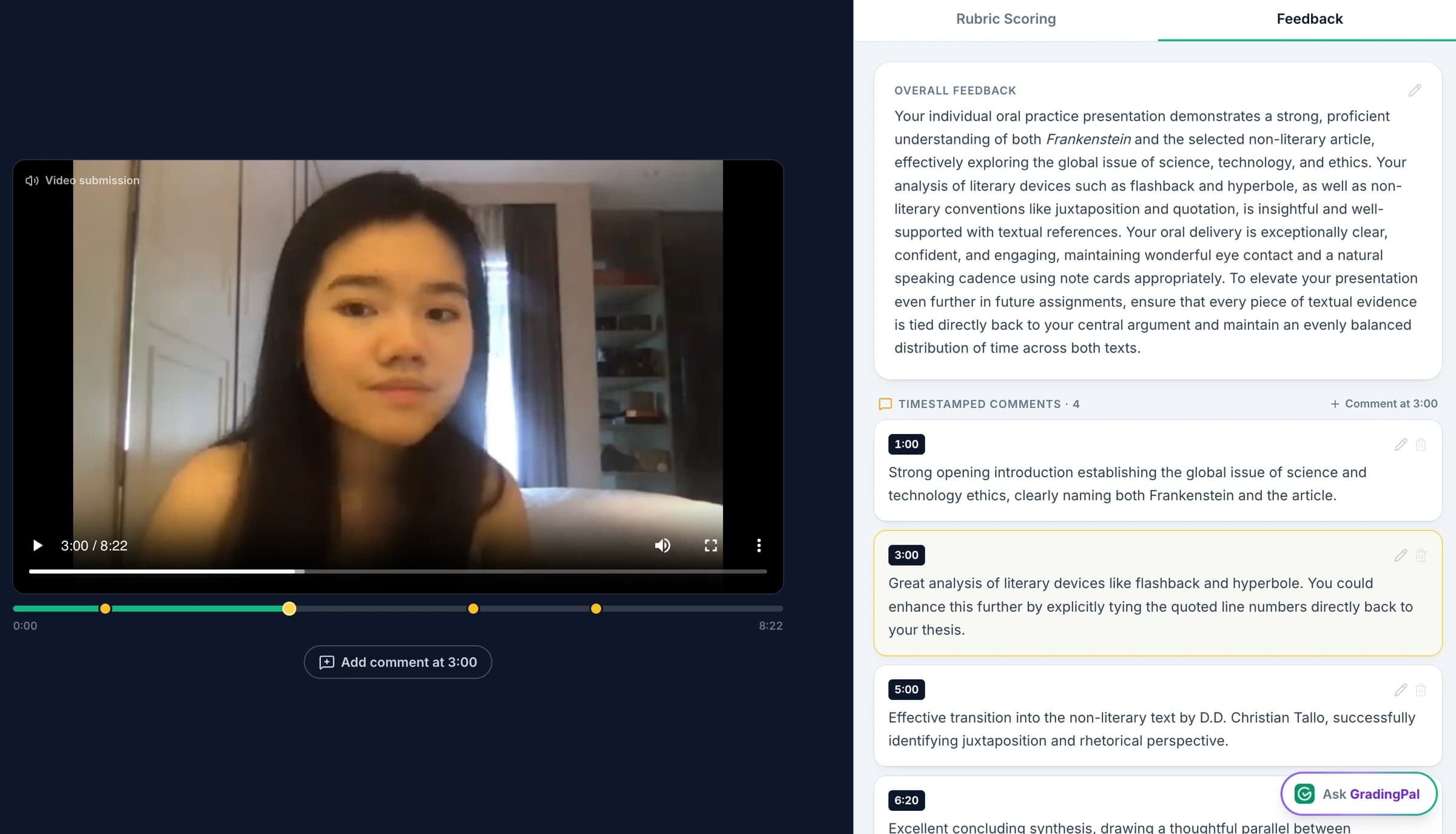
Automatically grade spoken answers from audio or video
GradingPal assesses what the student says, scores it against your rubric, and links feedback to the relevant moments in the recording. You do not need to prepare a transcript or manually write each comment.
Listen to the passage behind a score, check the explanation, and edit the result or feedback before sharing it. Students can replay the part the comment refers to and practice a more complete answer.
Score explanations, arguments, and evidence against your rubric
Set criteria for answering the question, explaining a concept, supporting an argument, or interpreting evidence. GradingPal grades the spoken response against those criteria and explains its scores.
Use it for a student's explanation of a physics calculation, an oral history answer using sources, or a project reflection describing what changed and why. The rubric defines what the answer needs to demonstrate.
This workflow assesses spoken content. Where the task includes delivery, pronunciation, physical technique, or individual group contributions, the teacher uses the additional observation those criteria require.
Link student feedback to specific moments in the recording
GradingPal links feedback to the passage it concerns. Students can return to the relevant part of their response, hear the gap in context, and practice a more complete explanation.
A useful comment at the passage is: “You identify what the source says. Explain how that detail supports your interpretation, then connect it to your conclusion.” The scoring evidence supports the teacher's review; the located comment gives the student an actionable practice task.
See GradingPal in action
Watch the GradingPal product demo to see rubric-based grading, feedback controls, classroom insights, and standards mastery.
What teachers say about GradingPal
“GradingPal individualizes feedback specific to each student and gives steps to improve their performance. I also love the ability to change the tone of feedback for different assignment types. The team is incredibly helpful and responsive too.”
 Michelle DouglassGrades 11–12 · Research & Anatomy/Physiology · Central Virginia Governor’s School, Lynchburg VA
“GradingPal helps me optimize my time by streamlining the grading process. What I like most is the feedback students receive — it is specific and it is something they can act on.”
 Adriana Barrios RodriguezCollege · Health Sciences & Teacher Education · Universidad Autónoma de Sinaloa, Mexico
How to grade an audio or video assignment with GradingPal
1.Add the task and rubric
Define what the spoken response should demonstrate and how the criteria contribute to the score.
2.Upload the recording
Bring in the audio or video response itself. You do not need to prepare a transcript first.
3.Review the assessment
Check proposed scores, explanations, and comments against the relevant moments. Edit the result where it needs a different interpretation or clearer guidance.
4.Share the next steps
Return the reviewed feedback so the student can revisit the recording and prepare another response.
Connect GradingPal to Google Classroom, Canvas, and Schoology
Import classes, assignments, rubrics, and student submissions from Google Classroom. Return approved feedback with or without grades. Canvas and Schoology are available on the school plan. You can also upload files directly or import them from Google Drive.



Give students specific feedback for improving their spoken answers
Choose the feedback style, length, language, and instructions so the guidance fits the learner and the task. GradingPal drafts the comment about the actual response; you decide how directly to explain the gap and what to ask the student to do next.
For the history example, students replay the passage, explain why the source supports the argument, and practice that part again. The recording gives them a concrete reference for improvement, and the drafted feedback makes individualized guidance easier to return across the class.

Identify concepts students need help explaining
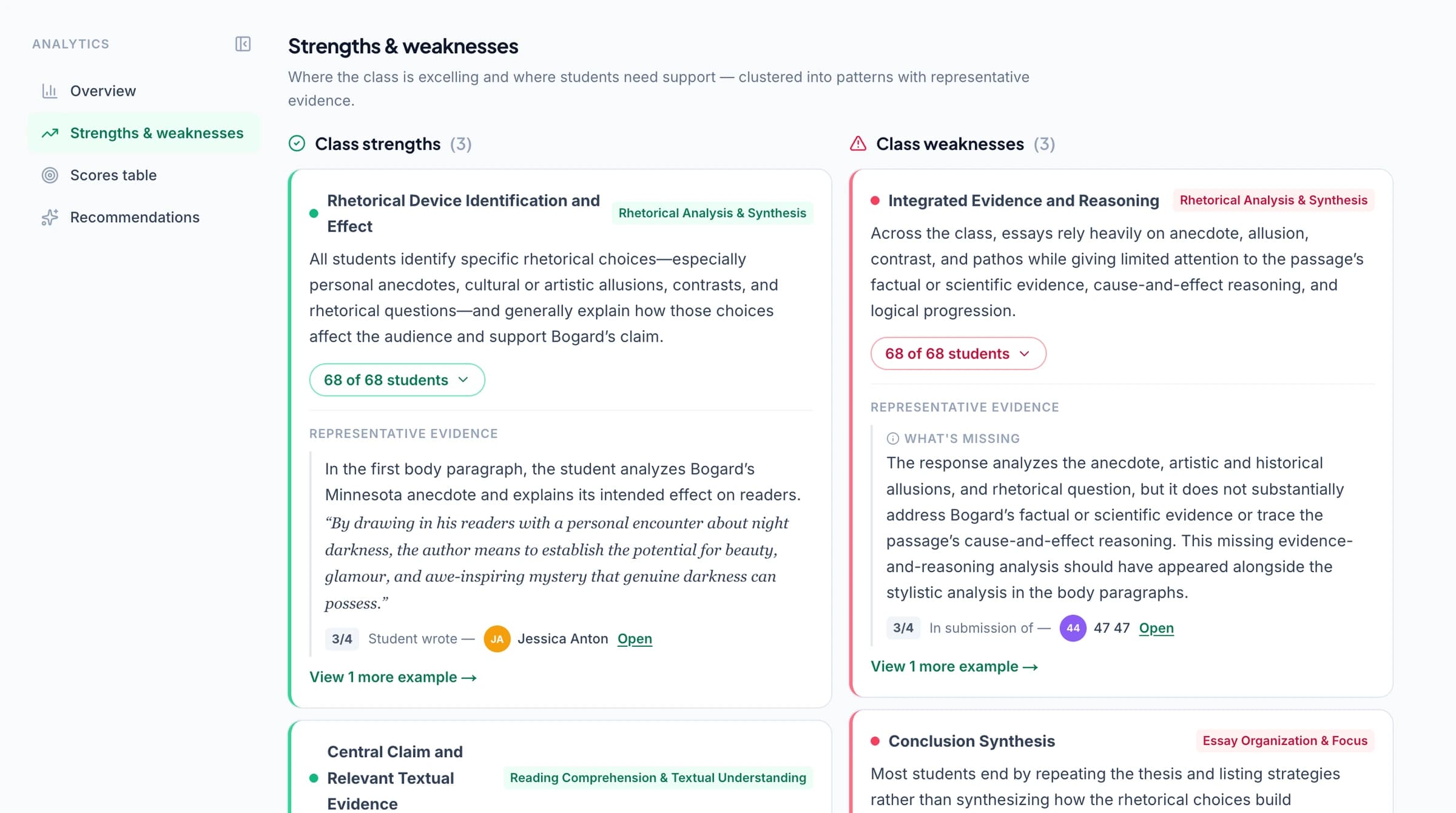
GradingPal's classroom analytics show strengths and weaknesses in students' spoken answers and suggest teaching activities. Listen to the responses behind the results to decide which concepts need another explanation and who needs more practice.
Explore classroom analytics. Performance analytics is available on eligible plans; compare plans.
Track standards mastery from spoken assignments
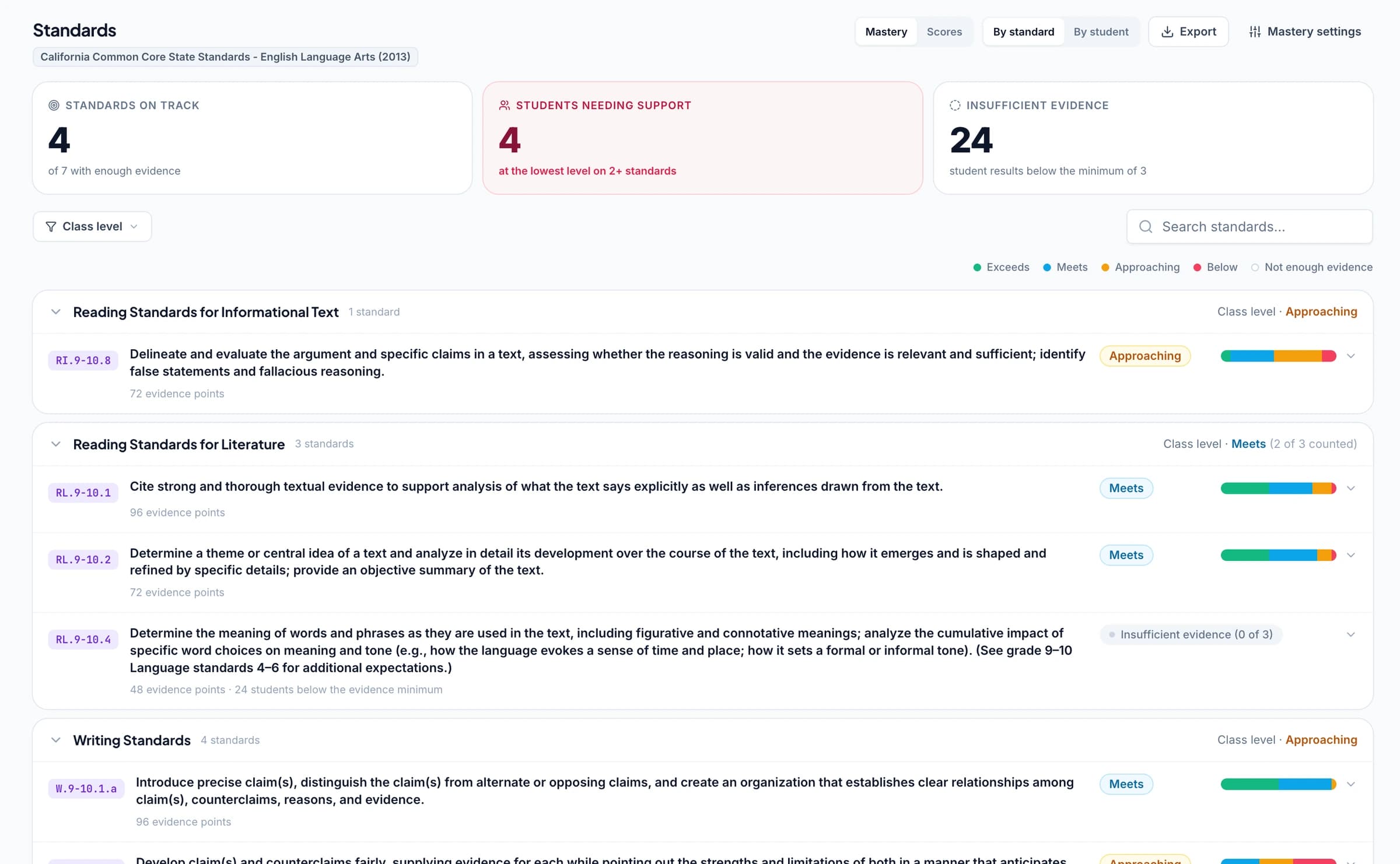
Connect oral-assessment criteria to supported Common Core literacy and speaking/listening goals, NGSS scientific explanation, Texas TEKS, or other relevant learning standards. Approved grades then update each student's progress in the standards mastery gradebook using your chosen calculation rules. Include evidence from spoken answers alongside other assignments when tracking progress.
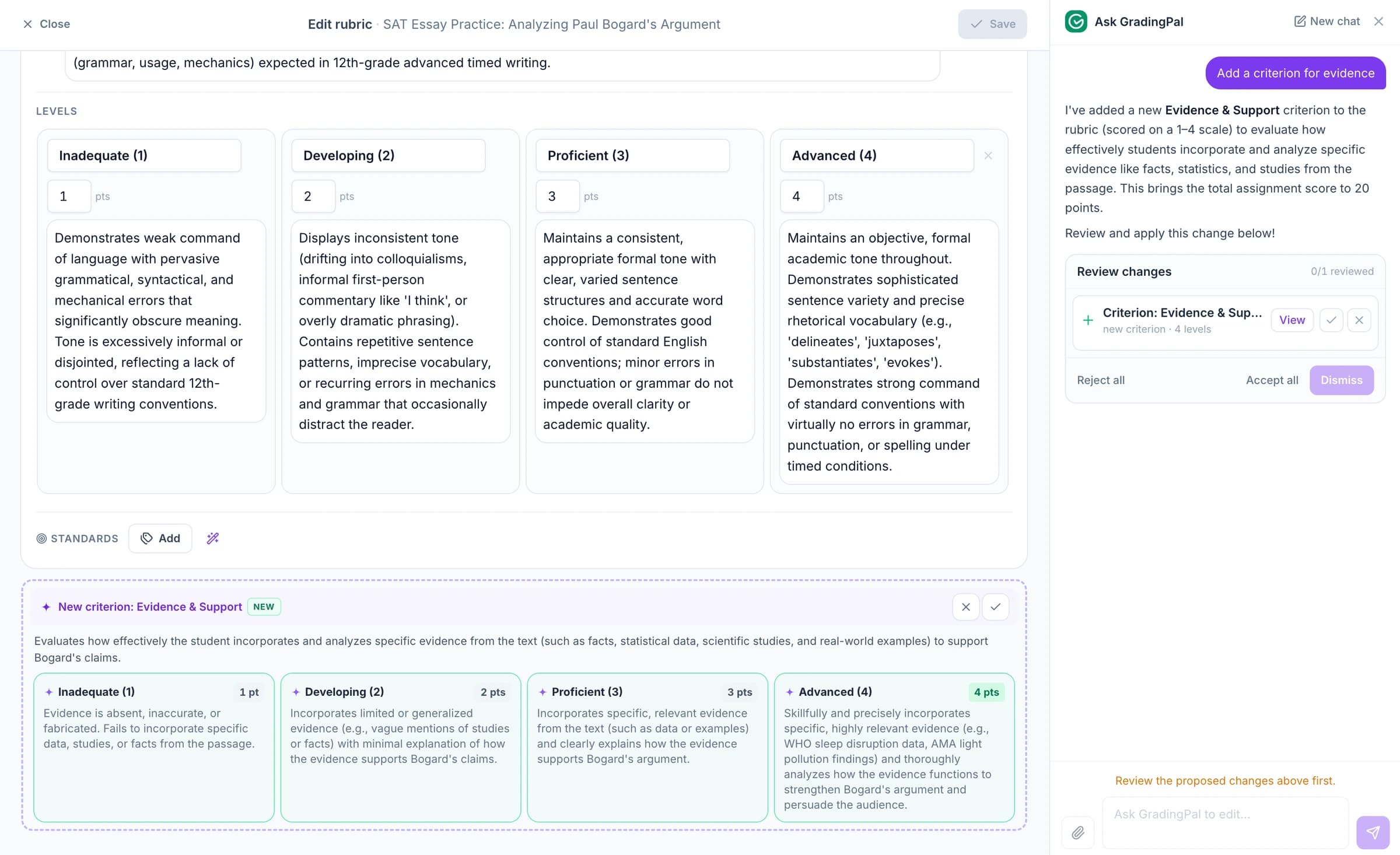
Ask the AI assistant to change scores, feedback, or rubrics
Ask the in-app AI assistant to change a score, edit your oral-assessment rubric, or revise student feedback. It proposes a change for you to check and accept.
For example: “Make this feedback a question about why the source supports the argument.” Review the proposed comment against the student's recorded answer before sharing it.
Grade oral exams, recorded presentations, discussions, and reflections
Oral exams and recorded answers
Assess whether the response addresses the question, explains the relevant ideas, and supports its reasoning.
Research talks and project explanations
Review how the student develops the topic and communicates the evidence expected by the task.
Debates and structured discussions
Assess the spoken content as one submission. If students need individual grades, use your own review and evidence about each contribution.
Audio explanations and reflections
Assess the student's account of what they learned, how they approached the task, and the reasoning required by the rubric.
AI video grading for recorded presentations and narrated demonstrations
GradingPal grades the spoken content in recorded presentations, narrated demonstrations, and project walkthroughs. It generates rubric-based scores and feedback linked to relevant moments in the video. Spend less time assembling comments and give students a clear passage to revisit and an explanation to improve.
Score the student's spoken explanation against your rubric
A narrated science investigation can reveal whether the student connects an observation to a model. A math walkthrough can reveal why they chose a method. A project video can explain how an idea developed. Set the content criteria and GradingPal assesses the spoken response against them, with score explanations for your review.
The teacher separately assesses physical technique or silent actions when the task requires them. The illustration concerns what was explained; it does not establish practical competence from the video.
Give students timestamped feedback they can replay
A timestamped comment makes the revision task easier to locate. Feedback on the reaction explanation might say: “You describe the change in reaction rate. Explain how temperature affects particle energy and how that changes the number of successful collisions.”
Choose the feedback style, length, language, and instructions to match the lesson. Try: “Ask for the link between the observation and the scientific model.” Use the in-app assistant to propose a shorter or more focused version, then inspect and accept the edit.
Students can replay the passage and practice a stronger explanation. The teacher decides whether to ask for another recording, discuss the idea, or use a written response to check understanding.
Identify learning gaps in recorded explanations
GradingPal’s classroom analytics show strengths and weaknesses in students’ recorded explanations and suggest what to teach next. If students describe observations accurately but omit the model behind them, the next lesson can focus on making that connection explicit.
Grade recordings and slide decks separately
Submit a slide deck through presentation grading and the recording through spoken-content grading when a task includes both. Teachers review them separately and apply any final weighting themselves. A group recording is assessed as one submission; use additional evidence for individual contributions.
Grade slide decks and recordings as separate submissions
A presentation often contains two pieces of evidence: the deck and the explanation. Upload the deck for slide grading and the recording for spoken-content grading. GradingPal connects comments to the relevant slide or recording moment in each separate assessment.
Review those results together as part of your teaching process and apply any final weighting yourself. The workflows do not automatically produce one combined score. This lets the teacher choose appropriate criteria for what was shown and what was said.
Grade spoken work in English, Spanish, French, German, and Brazilian Portuguese
GradingPal supports spoken work in English, Spanish, French, German, and Brazilian Portuguese, with regional options for English, Spanish, and French. Choose the assessment language for the assignment and the supported language used for student feedback. The teacher-facing scoring explanation remains in English.
For a language-class response, use the workflow for the supported spoken-content criteria. Pronunciation, accent, and delivery need your own assessment when they form part of the task. Feedback language and the content being assessed are separate choices.
Review flagged unclear audio before approving scores
If GradingPal cannot make out evidence needed for a criterion, it flags that part for review. Listen to the original recording and decide what the response demonstrates before approving the assessment. Background noise, overlapping speech, or an incomplete recording may require closer attention or clearer evidence.
This is part of reviewing the actual student response. Teachers keep responsibility for the score instead of treating an uncertain interpretation as an established answer.
Protect student recordings and control what gets shared
GradingPal is FERPA, COPPA, and GDPR compliant, with CASA Tier 2 verification. Student work is never used to train models. Review scores and student feedback before you choose what to share.

FERPA
Compliant
COPPA
Compliant

GDPR
Compliant
CASA
Tier 2 Verified
Questions about oral, audio, and video grading
Can GradingPal grade an oral exam recording?
Yes. It assesses the spoken content against your rubric and proposes scores and feedback. Review the explanation and relevant moments, adjust the assessment, and decide what to share.
Do I need to transcribe the recording first?
No. Upload the recording itself. GradingPal assesses the spoken content and links feedback to relevant moments so you can review the original audio or video.
Can students return to the moment a comment refers to?
Yes. Timestamped feedback links comments to relevant moments. Students can replay the passage while reviewing the guidance, and teachers can use the same moments to check the assessment.
Can GradingPal assess the slides as well as the recording?
Yes. Upload the deck for presentation grading and the recording for spoken-content grading. They are separate submissions and assessments, with comments attached to slides or moments respectively.
Does it score accent, confidence or delivery style?
No. The current workflow assesses spoken content. Accent, nerves, confidence, and delivery style are not automatically scored; use your own observations if those criteria belong in the assignment.
What happens when part of a recording is hard to hear?
When GradingPal cannot make out evidence required for a criterion, it flags it for review. Listen to the recording and decide how to assess that part, using clearer evidence where needed.
Can it give separate grades to speakers in a group recording?
No. A group recording is assessed as one submission. Use your own review and additional evidence when students need individual contribution grades.
Can GradingPal grade a silent video performance?
The oral workflow assesses spoken content. A narrated demonstration can be assessed for the student's explanation, but silent movement, physical technique, and performance require your own assessment.
How many recordings can I grade free?
The current free plan includes 50 submissions a month, shared across supported assessment types. Check pricing for plan-specific access to performance analytics and other features.
Can GradingPal assess a narrated demonstration?
Yes. It can assess the student's spoken explanation against your rubric and connect feedback to relevant recording moments. Use your own observation for physical technique, silent actions, or practical performance criteria.
Can students use video feedback to prepare a better explanation?
Yes. Timestamped comments help students find the passage to revisit. Teachers can ask them to explain a connection, strengthen evidence, or practice a clearer response, then review the improvement in the next task.
Try GradingPal free on a student recording
Upload a recording and your content rubric. Open the passage behind a comment, inspect the assessment, and review what the student would practice next. No prepared transcript is required.
Try oral grading free50 free submissions per month. Compare plans and included features.