GradingPal vs Brisk Teaching: make assessment one of your strongest teaching tools
Get the marking done, give students feedback they can act on, and see what the results mean for learning. GradingPal combines AI grading across subjects with evidence-backed rubric scores, six feedback styles, a configurable standards mastery gradebook, and shared rubric resources for schools.
It is built for the whole assessment job—from a handwritten answer to the next teaching decision.
Published by GradingPal. Official competitor information reviewed on 9 September 2026.
Why choose GradingPal as your assessment system?
GradingPal gives teachers a place to do the marking and a way to make more use of it afterward. The response, criteria, scoring explanation, and feedback stay together for review. Approved aligned evidence can then contribute to mastery tracking, while classroom analytics help identify the teaching response.
Grading for math, science, writing, and recorded work
Bring different subjects and assignment types into a consistent assessment process.
Scores explained with evidence
Check the interpretation and credit instead of facing an unexplained number.
Six feedback styles plus teacher instructions
Match the guidance to the learner and the purpose of the assignment.
Mastery calculated from assessment evidence
Follow a skill across tasks under rules you choose.
A 500-rubric catalog and shared school libraries
Spend less effort rebuilding criteria and make departmental expectations easier to reuse.
Class insights and recommended instructional next steps
Make a more focused plan for reteaching and student support.
Grade the whole worksheet, including the handwritten working
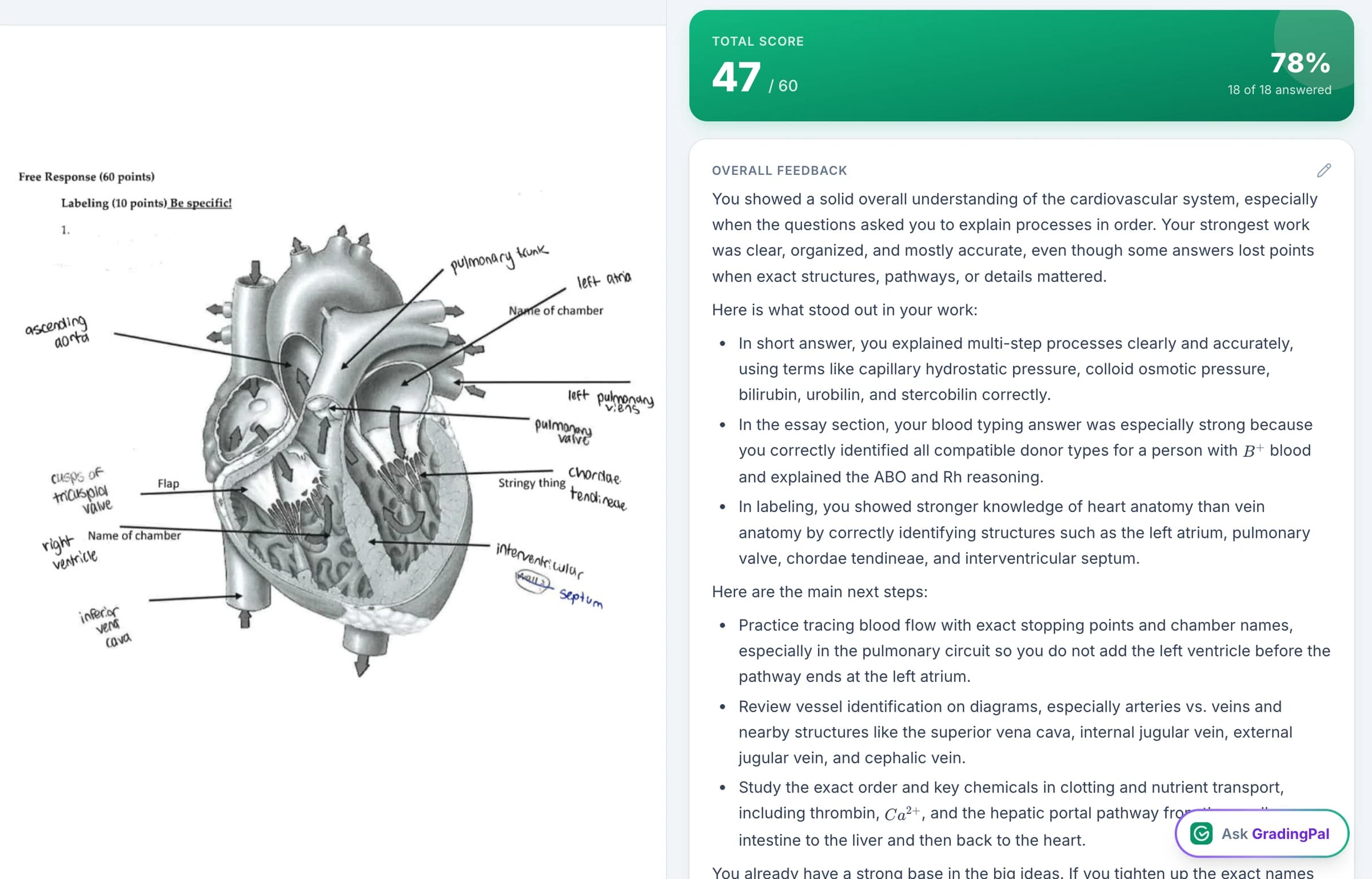
GradingPal supports worksheets with short answers, long answers, calculations, and explanations. Read handwritten submissions, assess math methods, and score science reasoning against your rubric. A digital essay and a photographed response can both receive individual scores and feedback through the assessment system.
This breadth matters when the work of teaching changes from lesson to lesson. A physics problem may need credit for choosing the right principle. A chemistry response may depend on calculation and units. A biology task may require the student to connect an observation to a conclusion. GradingPal uses the criteria you set to assess those expectations.
The range also includes quizzes, exams, problem sets, presentation slides, oral work, and supported video assessments. You can choose tasks for their educational purpose while using GradingPal to help with the resulting marking.
Review why a score was selected
GradingPal's scoring explanations connect the proposed credit to evidence in the work. That gives you a concrete way to inspect accuracy: check whether the response was read correctly, whether the explanation matches the criterion, and whether the credit reflects your expectations.
For example, a student may use the correct mathematical method and make a final arithmetic error. If your rubric distinguishes method from the final answer, GradingPal can propose the corresponding credit and explain it. You review the decision and change it if needed. This is an illustrative use of rubric-based assessment, not a claim that an AI result never needs correction.
The benefit is practical. You begin with a scored assessment and an explanation to inspect, instead of composing every score justification and student comment from a blank page.
What teachers say about GradingPal
“GradingPal individualizes feedback specific to each student and gives steps to improve their performance. I also love the ability to change the tone of feedback for different assignment types. The team is incredibly helpful and responsive too.”
 Michelle DouglassGrades 11–12 · Research & Anatomy/Physiology · Central Virginia Governor’s School, Lynchburg VA
“GradingPal helps me optimize my time by streamlining the grading process. What I like most is the feedback students receive — it is specific and it is something they can act on.”
 Adriana Barrios RodriguezCollege · Health Sciences & Teacher Education · Universidad Autónoma de Sinaloa, Mexico
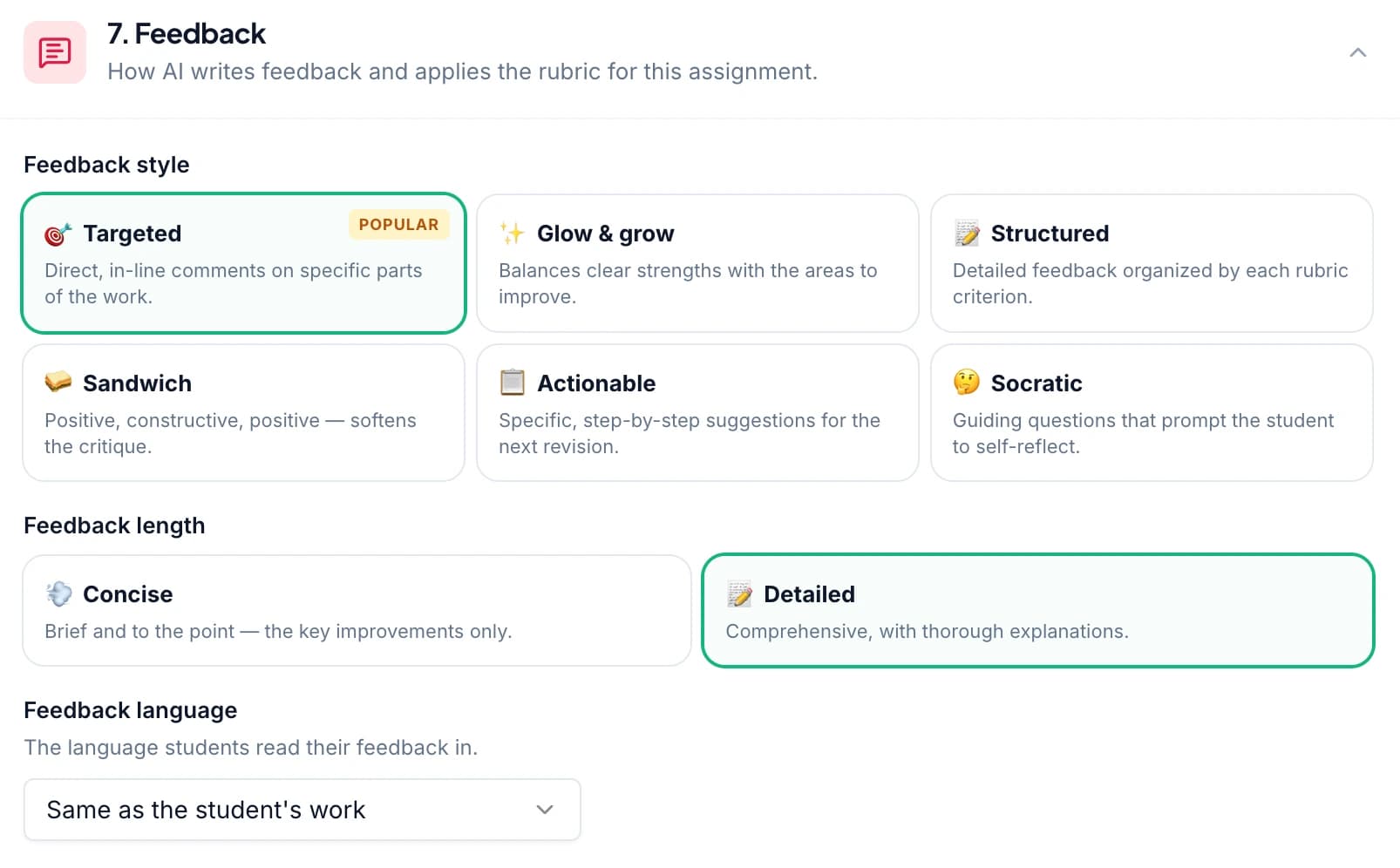
Choose from six ways to give useful feedback
Student feedback should do more than sound encouraging. It should help the learner understand the work and take a useful next step. GradingPal gives you six styles to shape that guidance:
Targeted
Direct attention to a particular response or issue.
Glow & Grow
Show a strength and a clear opportunity to improve.
Structured
Make the explanation easy to follow criterion by criterion.
Sandwich
Frame constructive guidance between positive observations.
Actionable
Give the learner concrete revision or practice steps.
Socratic
Ask questions that encourage the learner to work through the reasoning.
Set the language and level of detail. Add your own instructions for tone, terminology, and priorities. You can ask for concise guidance that matches your classroom vocabulary or more detailed support for an extended task, then edit the result before students receive it.
Print, share, or schedule feedback to fit how your class works. The same rubric expectations can support different ways of explaining improvement.
Make the mastery gradebook reflect how you assess learning
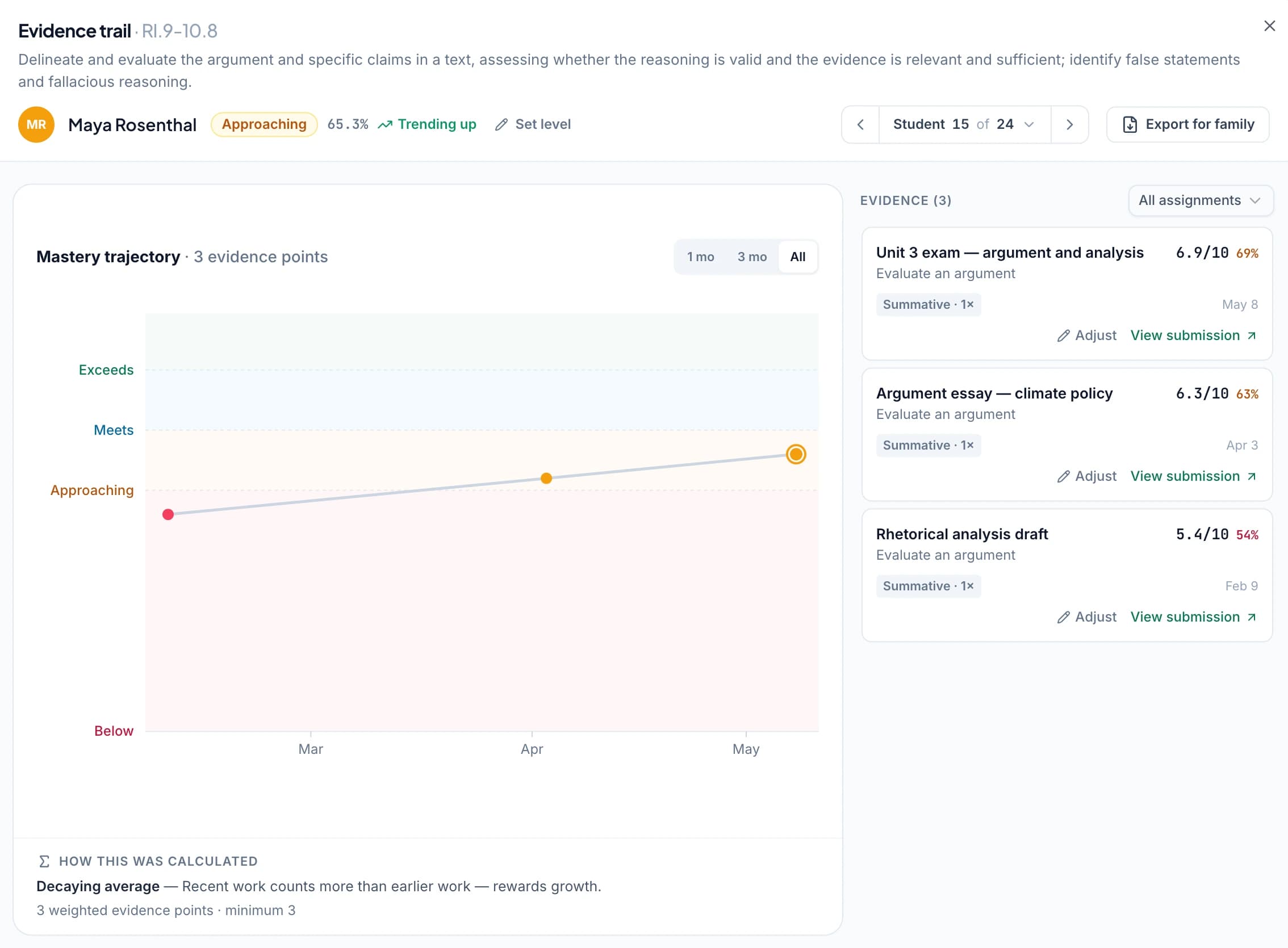
GradingPal's standards mastery gradebook automatically gathers evidence from approved, aligned assessments. It shows class performance by standard, individual understanding across standards, and progress over time. You can open the original work behind a result.
Choose one of five calculation methods: simple average, decaying average, most recent attempts, most frequent level, or highest level. Configure the scale and minimum evidence, and decide how assessment categories contribute. If a standard level needs your judgment, adjust it with a reason; the calculated value remains visible and you can revert the adjustment.
Those controls matter because teachers do not all assess growth the same way. A department emphasizing recent evidence can use a different approach from one averaging the full set of attempts. The rules are explicit, and the evidence remains available to review.
GradingPal's standards resources cover all 50 states and Washington, DC, including Common Core, NGSS, and Texas TEKS. Explore AP and IB resources for the relevant course and rubric expectations.
Give your department rubrics it can actually reuse
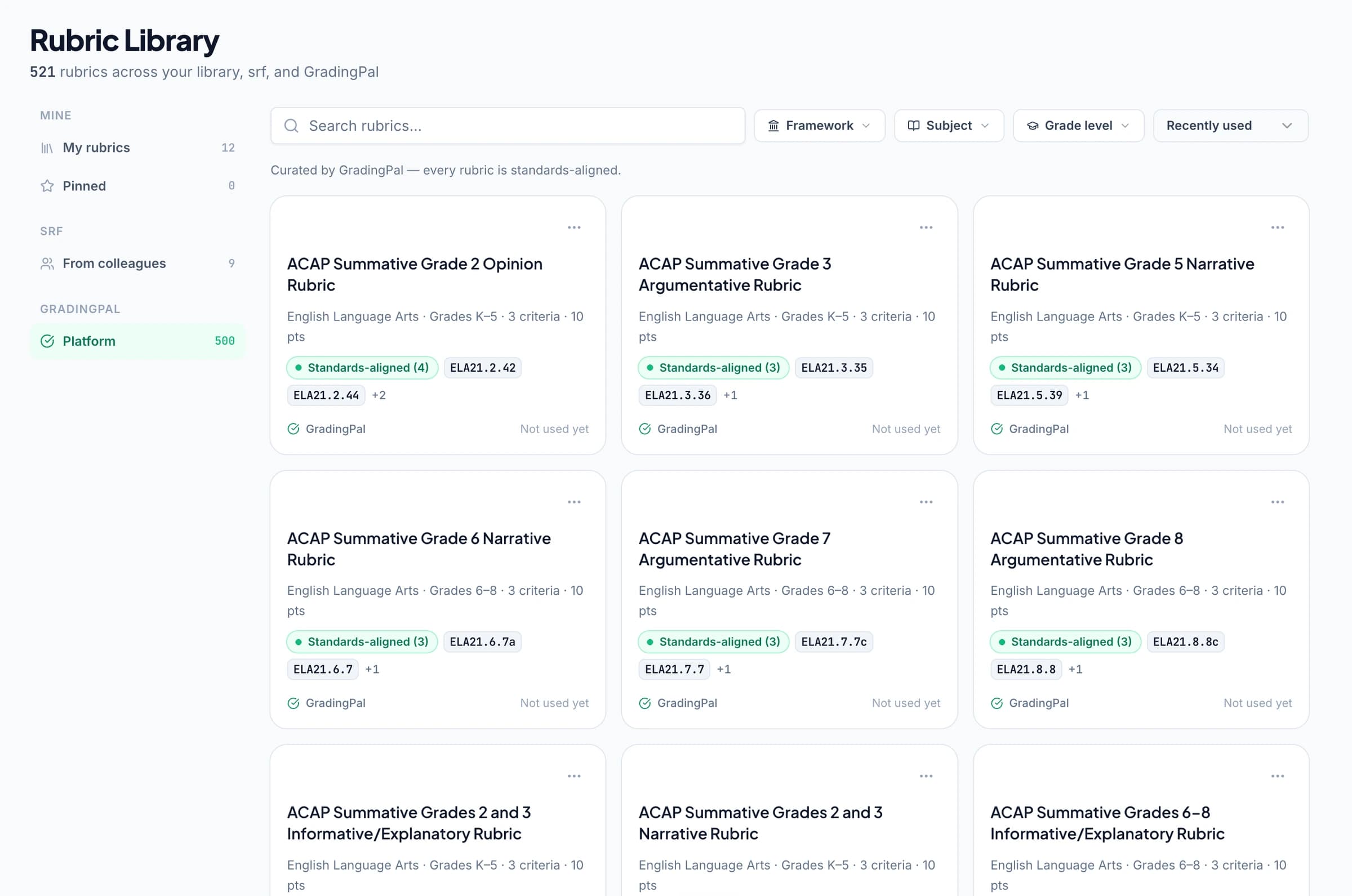
Start from the 500-rubric catalog, copy a relevant rubric, and edit the criteria, levels, and points. Or bring your existing rubric so that your own expectations guide the grading.
Shared assignment and rubric libraries on eligible plans make agreed resources available to colleagues. A department can reuse a common starting point across classes, with teachers adapting their copy to the specific assignment. That is useful infrastructure for consistent expectations and less duplicated preparation.
For schools, the benefit extends beyond one teacher getting a comment written faster. GradingPal supports the resources, assessment decisions, student guidance, and learning evidence that teachers work with throughout the year.
Turn class patterns into the next lesson
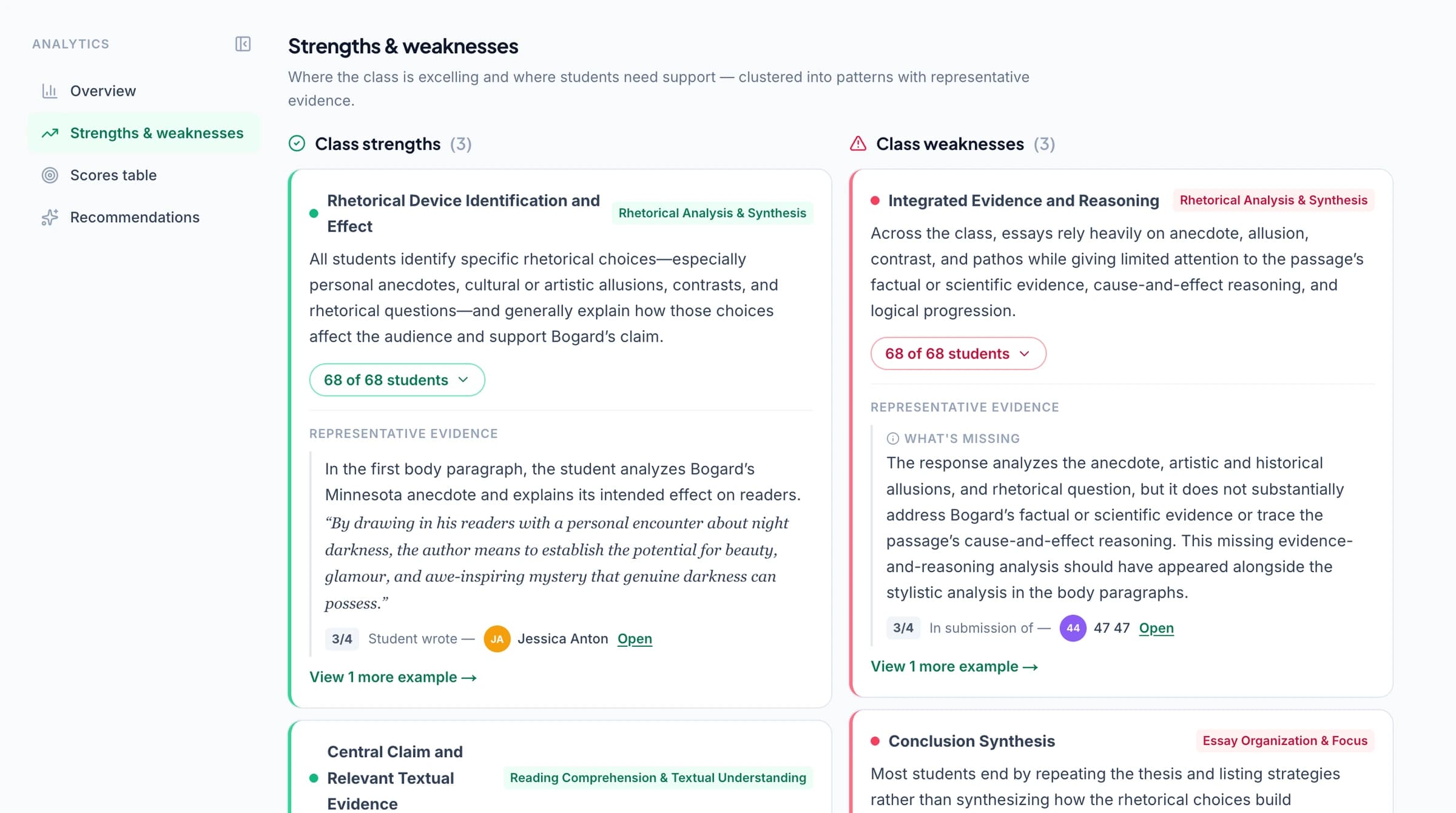
Classroom analytics identify strengths, weaknesses, and recommended instructional next steps. Use the findings alongside mastery evidence to decide who needs support and which skill deserves attention next.
Imagine a class worksheet where most students complete the calculation but struggle to justify their choice of method. A focused worked example and a short follow-up task may be more useful than repeating the whole topic. That illustrative teaching response shows the value of specific assessment information: it helps you use lesson time where it is needed.
Ask the assistant to help with the final refinements
The in-app AI assistant can propose edits to the rubric, scores, or feedback while you are working on the assessment. You inspect the proposed change and decide whether to accept it, with undo available.
An illustrative request might be to shorten feedback and retain one clear next step. The assistant helps carry out the refinement in context, while you retain responsibility for the assessment students receive. Explore AI grading and the full feature set.
How Brisk's published workflow compares
Brisk provides feedback through classroom tools and a web workspace. It documents batch feedback on essays, PDFs, labs, and math work, along with class insights and instructional recommendations. It also supports feedback on uploaded photos and handwritten work. Brisk platform · Feedback · Photo uploads
Brisk also documents opt-in batch rubric scoring for school/district accounts and rubric scoring with score return in Canvas SpeedGrader. Batch scoring release · Canvas integration
The case for GradingPal is the depth of its assessment offering: broad assignment support, reviewable scoring evidence, six feedback styles, a mastery gradebook with five calculation methods, and reusable school rubric resources. Those are substantial reasons to choose a dedicated grading and learning-progress system.
Fit GradingPal into your school's workflow
Google Classroom is available now; Canvas and Schoology are available on a school plan. Review security information and contact the team to discuss shared resources, rollout, and your subject requirements.



Questions about GradingPal and Brisk Teaching
Why choose GradingPal if I already use Brisk?
Choose it for the full assessment offering: rubric scoring with evidence, broad submission support, six feedback styles, configurable standards mastery, and shared school rubrics. Consider the whole process from submitted work to the next teaching decision when deciding what belongs in your classroom.
Do both products let teachers review feedback before it reaches students?
Yes. Brisk describes review before posting. GradingPal lets you inspect the scoring evidence, edit scores and comments, and choose the feedback students receive. Brisk feedback
Can I use handwritten math and science assignments?
Yes. GradingPal can read handwritten responses and assess methods, explanations, and other expectations in your rubric. Review legibility, the interpretation of the work, and the resulting credit before returning the assessment.
What makes the standards gradebook useful?
Approved assessment evidence builds a record across assignments. You can inspect contributing work, choose how mastery is calculated, and apply a documented teacher adjustment when needed. It makes progress review part of the assessment system.
How do I start?
Try an assignment on the free plan and review the scores, evidence, and student feedback. Explore plan access for the formats and features you need. A school demo can show the mastery gradebook and shared rubric library in more depth.
Give your grading a bigger role in learning
GradingPal helps you finish the assessment and put its findings to work. Get evidence-backed scores, feedback in your voice, and a clearer view of what your students need next.
Further Brisk information: official guidance.