AI grading, student feedback, and teaching insights in one place
GradingPal assesses supported work against your rubric, gives students individualized guidance, and turns approved results into classroom insights and standards progress. Explore the tools that reduce grading workload while keeping assessment decisions with teachers.
50 free submissions per month, shared across assignment types.
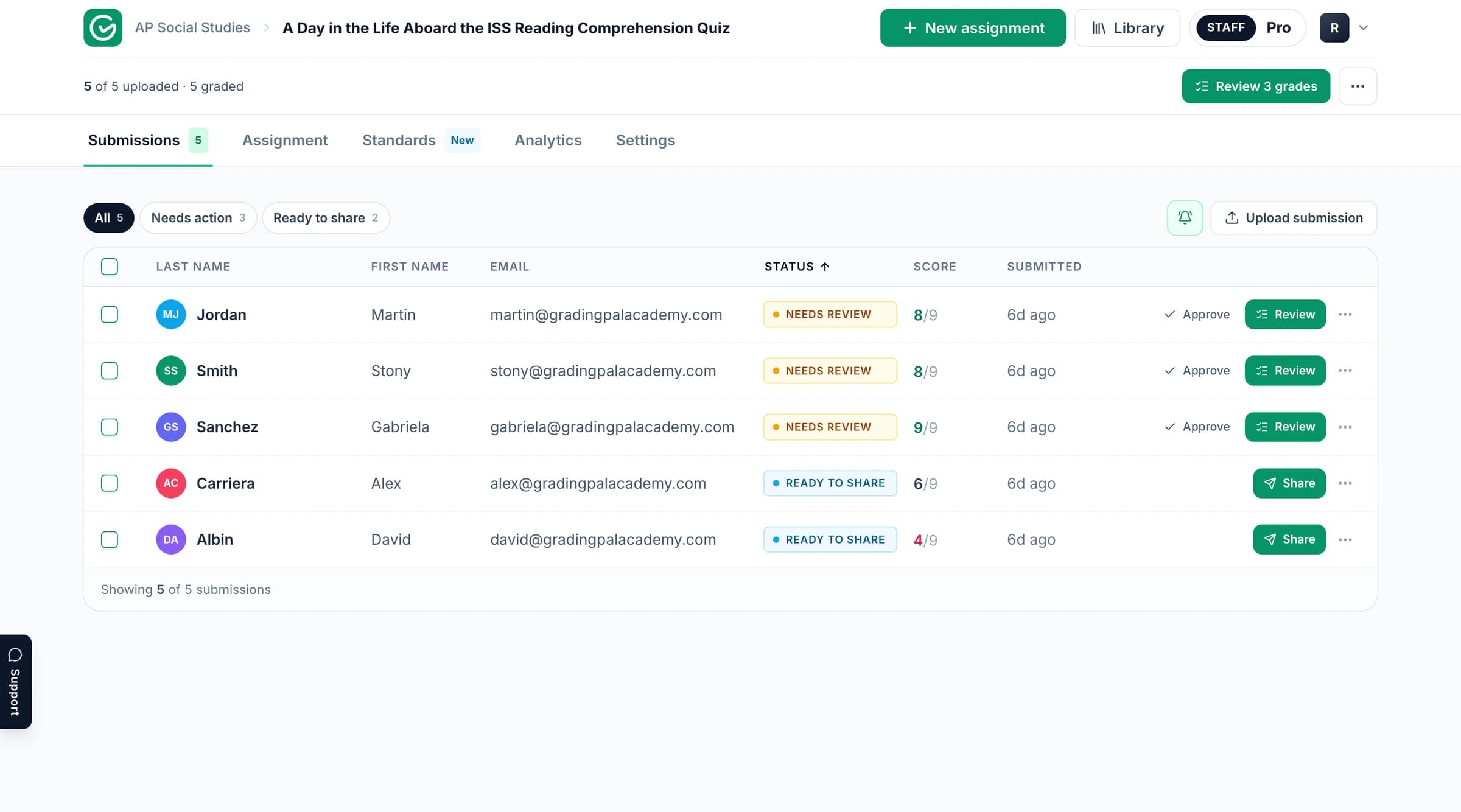
Connect grading to the learning that follows
Use GradingPal to handle the repeated assessment work and make the result useful beyond recording a grade. Three connected capabilities organize the product.
Reduce grading workload
Generate rubric-based scores and comments from supported submissions. Inspect the evidence and spend your review time on the judgments that need attention.
Give each student actionable feedback
Write comments about the student's own response, shaped by your style, language, and instructions. Return guidance that identifies a concrete next step.
Know what to teach next
Inspect classroom strengths and gaps, identify students associated with a pattern, and review suggested teaching activities. Track aligned evidence over time when standards mastery fits your teaching.
Grade across subjects and assessment types
Keep the assignments that reveal learning in your subject. GradingPal supports short and long answers, handwritten calculations, scientific reasoning, essays, slides, recordings, and other work through the relevant graders.

Essays & Writing
Assess claims, evidence, reasoning, and organization against your rubric.
Explore essays & writing
Worksheets
Review mixed short answers, extended responses, and calculations in one assignment.
Explore worksheets
Quizzes & Exams
Generate question-level scores and feedback for supported test responses.
Explore quizzes & exams
Problem Sets
Assess mathematical working and calculations in math, physics, and chemistry, with method credit defined by the rubric.
Explore problem sets
Science Labs
Assess submitted investigations, data analysis, explanations, and conclusions in biology, chemistry, and physics.
Explore science labs
Handwritten Work
Bring readable scans and photos into the assessment workflow with page and student checks.
Explore handwritten work
Presentations & Slides
Review slide content, organization, and visual communication against the criteria.
Explore presentations & slides
Video & Audio
Assess supported recorded explanations and spoken responses with the relevant evidence and review workflow.
Explore video & audioFor supported visual art submissions, see art grading.
Teachers on GradingPal grading and feedback
“GradingPal individualizes feedback specific to each student and gives steps to improve their performance. I also love the ability to change the tone of feedback for different assignment types. The team is incredibly helpful and responsive too.”
 Michelle DouglassGrades 11–12 · Research & Anatomy/Physiology · Central Virginia Governor’s School, Lynchburg VA
“GradingPal helps me optimize my time by streamlining the grading process. What I like most is the feedback students receive — it is specific and it is something they can act on.”
 Adriana Barrios RodriguezCollege · Health Sciences & Teacher Education · Universidad Autónoma de Sinaloa, Mexico
Connect the classroom tools you already use
Google Classroom is available now for the supported class, assignment, rubric, submission, and feedback workflow. Canvas and Schoology are available on the school plan. Use direct uploads or Google Drive for supported files collected elsewhere.
Choose the relevant integration page to understand the workflow and discuss your school's setup. File intake, native LMS connection, and result exports have different roles in moving work through assessment.
Set the rubric and inspect the scoring evidence
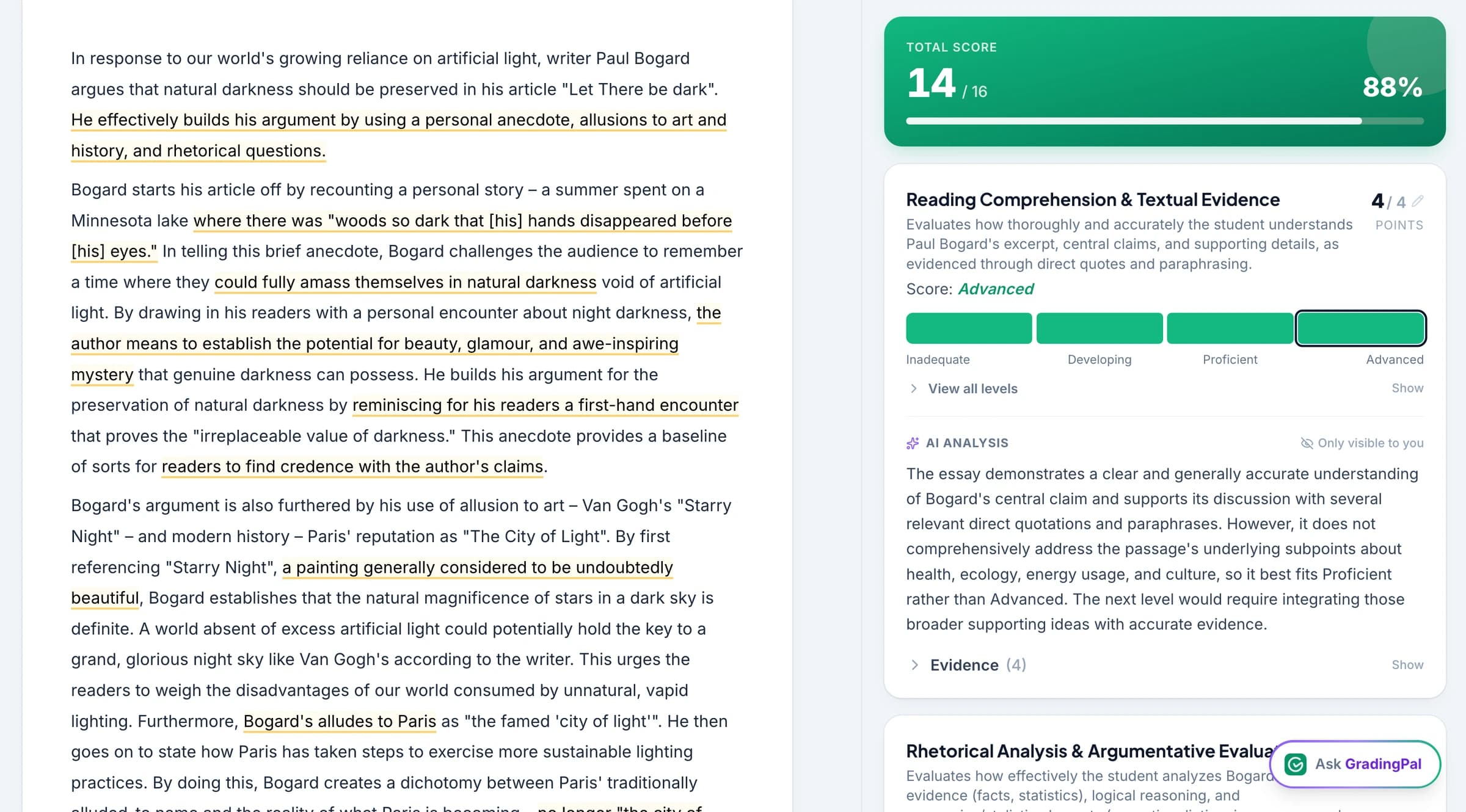
Use your own rubric, review one generated for the task, or adapt a library rubric on an eligible plan. Define criteria, performance levels, and points, then examine how GradingPal applies them to each response.
Grading controls let you add classroom instructions and refine results. The scoring explanation connects the proposed mark to the submitted work, so teacher review has more to inspect than a total alone.
Write feedback in your teaching voice
Choose Targeted, Glow & Grow, Structured, Sandwich, Actionable, or Socratic feedback. Set the length, tone, supported language, and instructions so comments fit the way you teach and the stage of the assignment.
Student feedback explains the styles and individual guidance in detail. Grammar suggestions add specific language corrections, while custom instructions bring in familiar classroom vocabulary.

Identify the next teaching priority
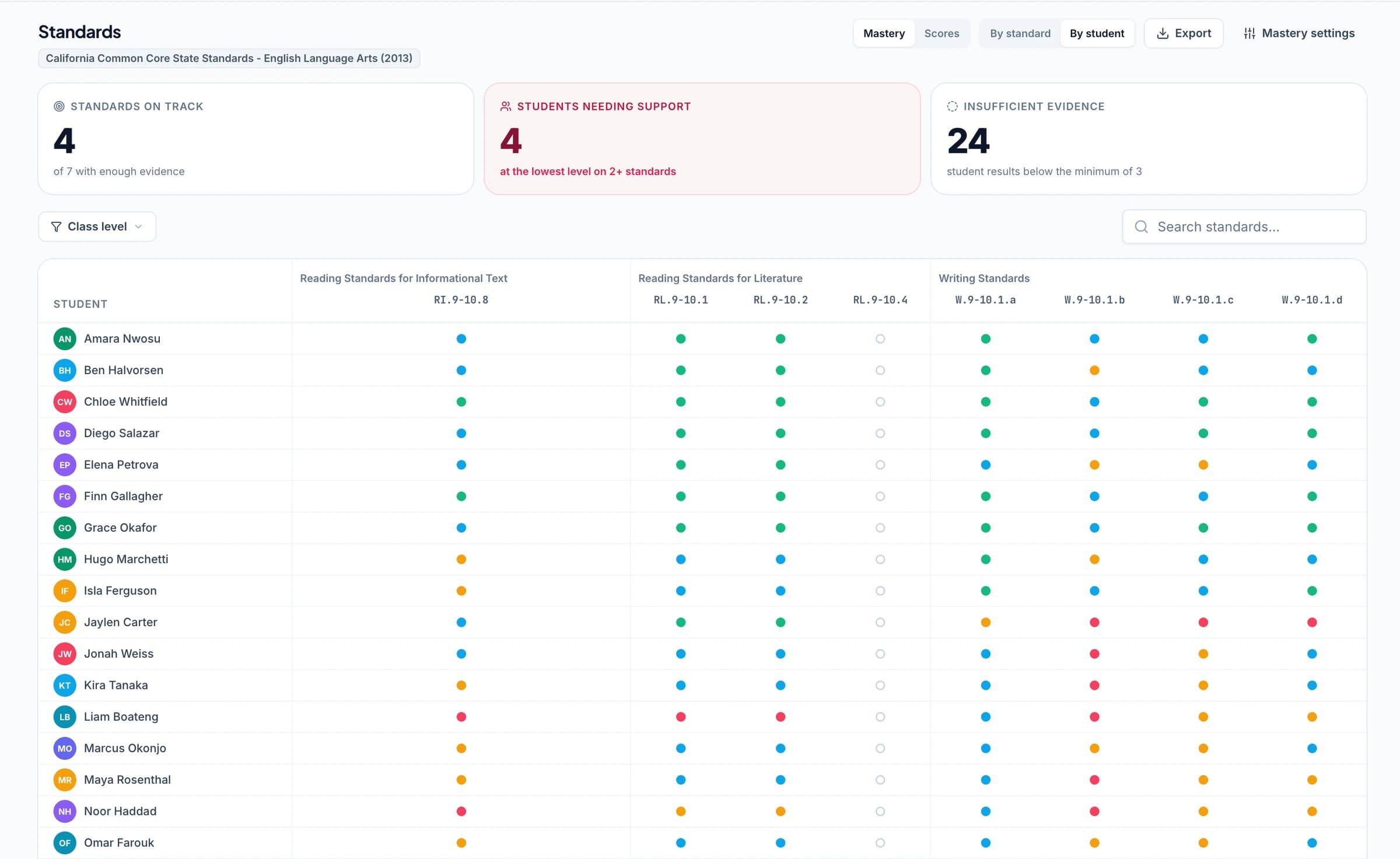
Performance analytics shows question results, recurring strengths and weaknesses, associated students, and suggested follow-up activities from approved work. Inspect the evidence to choose a whole-class explanation, smaller group, or individual task.
Analytics is a paid feature or relevant add-on. It helps organize the information used in a teaching decision; teachers choose and deliver the instructional response.
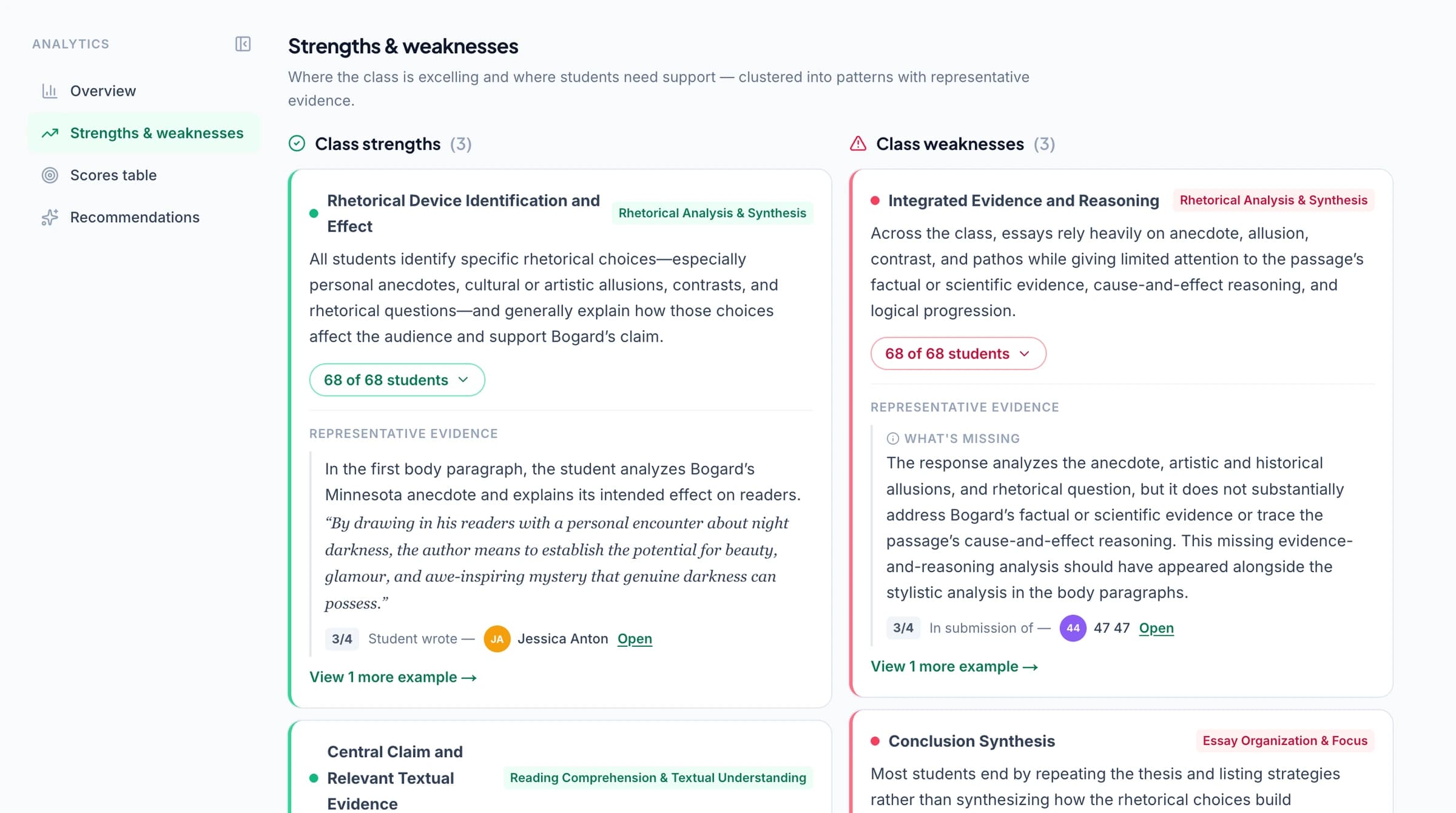
Track standards mastery across assignments
The optional standards mastery gradebook combines approved aligned evidence under your selected calculation method, scale, and weighting. Open the work behind a result and use the reports to explain progress.
Select from supported frameworks and state sets, including Common Core, NGSS, TEKS, and coverage across all 50 US states and Washington, D.C., alongside relevant AP, IB, and exam-board resources. Explore standards. Assignment points and feedback remain available without enabling mastery.
Ask the assistant to make a specific edit
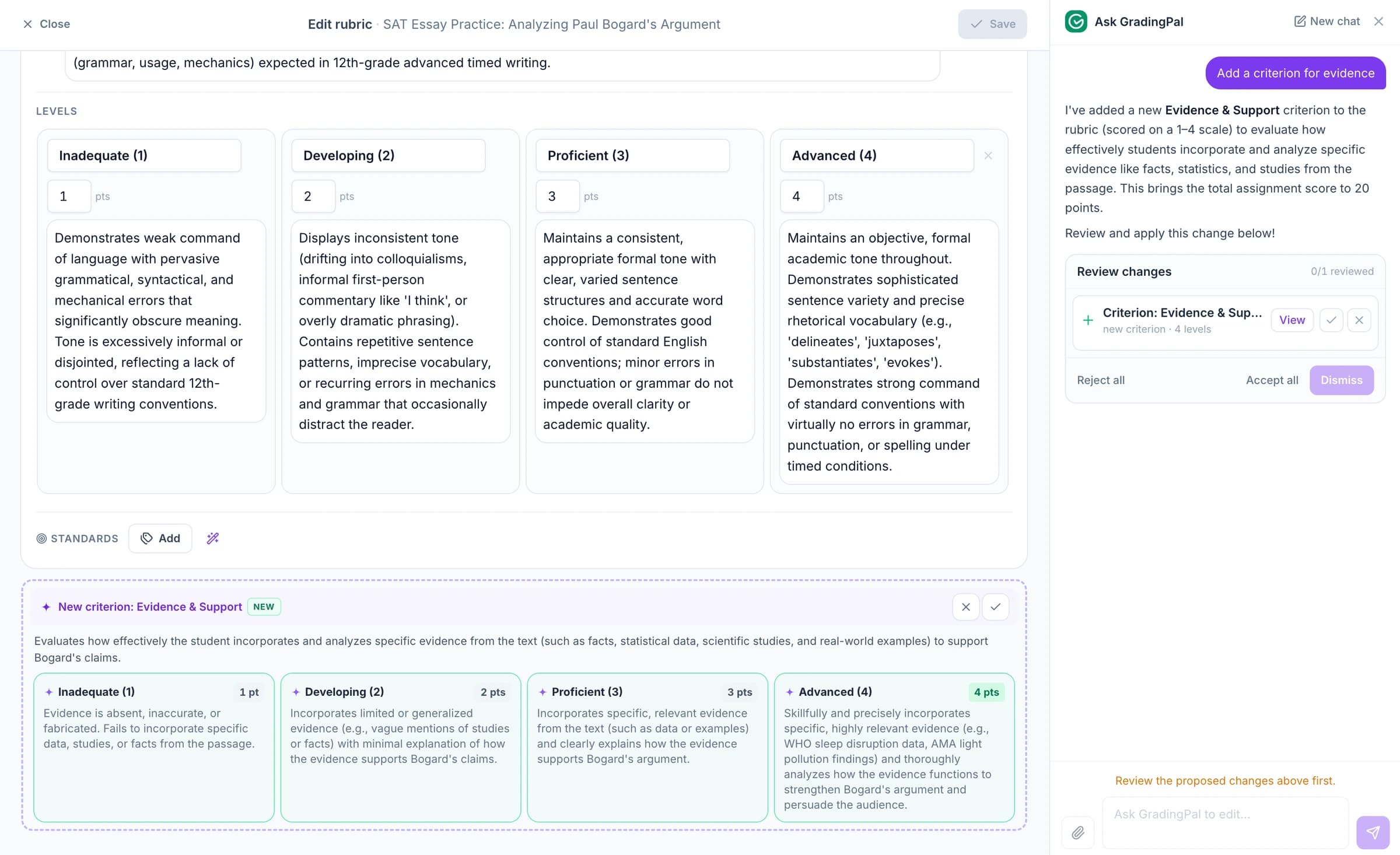
Ask GradingPal proposes rubric, question, answer-key, score, and feedback changes in the current supported context. Describe the change, inspect the proposal, and accept the edits that fit.
Use the assistant to reduce repetitive editing while keeping the criteria and student response in view. Reusable preferences belong in saved settings; a contextual request addresses the item you are working on.
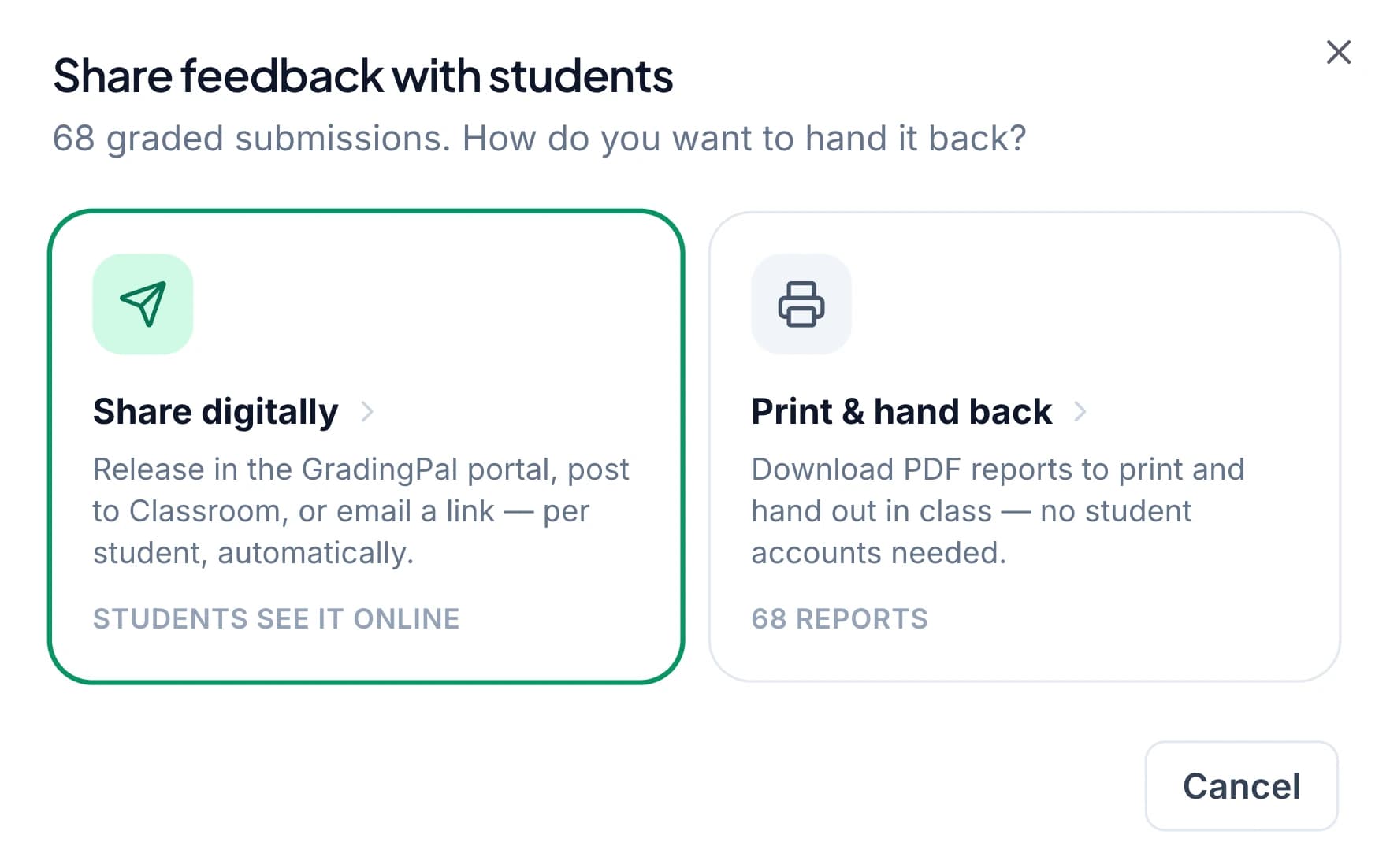
Print, share, and schedule feedback
Return approved results through Google Classroom, email, or printable PDFs. Choose feedback with or without a displayed grade and release it at the time that fits the next lesson.
Sharing feedback covers individual reports, class downloads, recipient checks, and timing. Use the result to give students a clear revision task rather than ending the process at the grade.
Support adoption across a school
Evaluate the classroom benefits alongside shared resources, platform setup, support, and licensing. GradingPal for schools connects reduced marking, individualized feedback, and instructional evidence to a teaching-team evaluation.
Review the shared security information, including FERPA, COPPA, GDPR, and CASA Tier 2 details. Student work is not used to train models. Compare plans for feature access and discuss institution-specific requirements with the team.

FERPA
Compliant

COPPA
Compliant

GDPR
Compliant
CASA
Tier 2 Verified
Questions about GradingPal features
Which feature should I try first?
Start with a familiar assignment. Review the rubric scores and comments, then explore feedback controls or analytics according to the teaching question you want to answer.
Does GradingPal support math and science?
Yes. It generates scores and feedback for supported calculations, handwritten working, scientific explanations, and investigations against your rubric, alongside writing and other assessment types.
Do all features come with the free plan?
No. The free plan includes a monthly grading allowance and core feedback features. Analytics, rubric-library access, shared resources, and school integrations have their own plan arrangements. See the plan comparison.
Can teachers keep control of final scores?
Yes. Teachers inspect the work and evidence, edit results, and decide what to share with students.
Do I have to enable standards mastery?
No. Standards tracking is optional. You can use assignment points, percentages, and student feedback without changing the reporting approach your class uses.
Which LMS platforms are available?
Google Classroom is available now. Canvas and Schoology are available on the school plan. Explore the relevant integration page for the setup conversation.
Where can I see the current product in action?
Use the product walkthrough on the demo page and the real screenshots on each feature page. The what's new page provides the release overview.
Can I use my own rubric?
Yes. Use your own criteria or review a rubric generated from the assignment. Library and shared resources provide additional options on eligible plans.
Are all supported assignment types available to try?
The free plan's monthly submission allowance is shared across supported assignment types. Check the current plan comparison for the allowance and the separate access rules for paid features.
Explore related features
- Ai art grader
- AI essay grader
- AI exam and test grader
- How AI grading works
- AI math grader
- Ai oral grading
- Ai presentation grader
- AI science grader
- AI worksheet grader
- Classroom analytics
- Ask gradingpal
- GradingPal for schools
- Free AI grading
- Get in touch
- Grading controls
- Handwritten grading
- Instant grading
- Integrations
- Google Classroom integration
- Pricing
- Responsible ai
- Rubric library
- Security
- Sharing feedback
- Supported standards and states
- Standards mastery gradebook
- Student feedback
- Whats new
Learn more on the blog
- The Complete Guide to AI Grading for K-12 Teachers: Align with Standards, Deliver Better Feedback, and Boost Student Outcomes in 2026
- The 6 AI-Powered Feedback Styles in GradingPal: Complete 2026 Guide to Effective Student Feedback (Writing & Multi-Media)
- How GradingPal Grades Handwritten Math and Science Worksheets
Start with the assessment your students already completed
See how the scoring, feedback, and teaching tools work together on a task you know.