AI essay grader. Your rubric. Detailed feedback in your teaching voice.
GradingPal automatically scores essays against your rubric and explains each score using evidence from the student's writing. Give every student actionable feedback with the tone, length, language, and instructions you choose. Save time grading and identify the writing skills your class needs to practice.
50 free submissions per month, shared across assignment types.
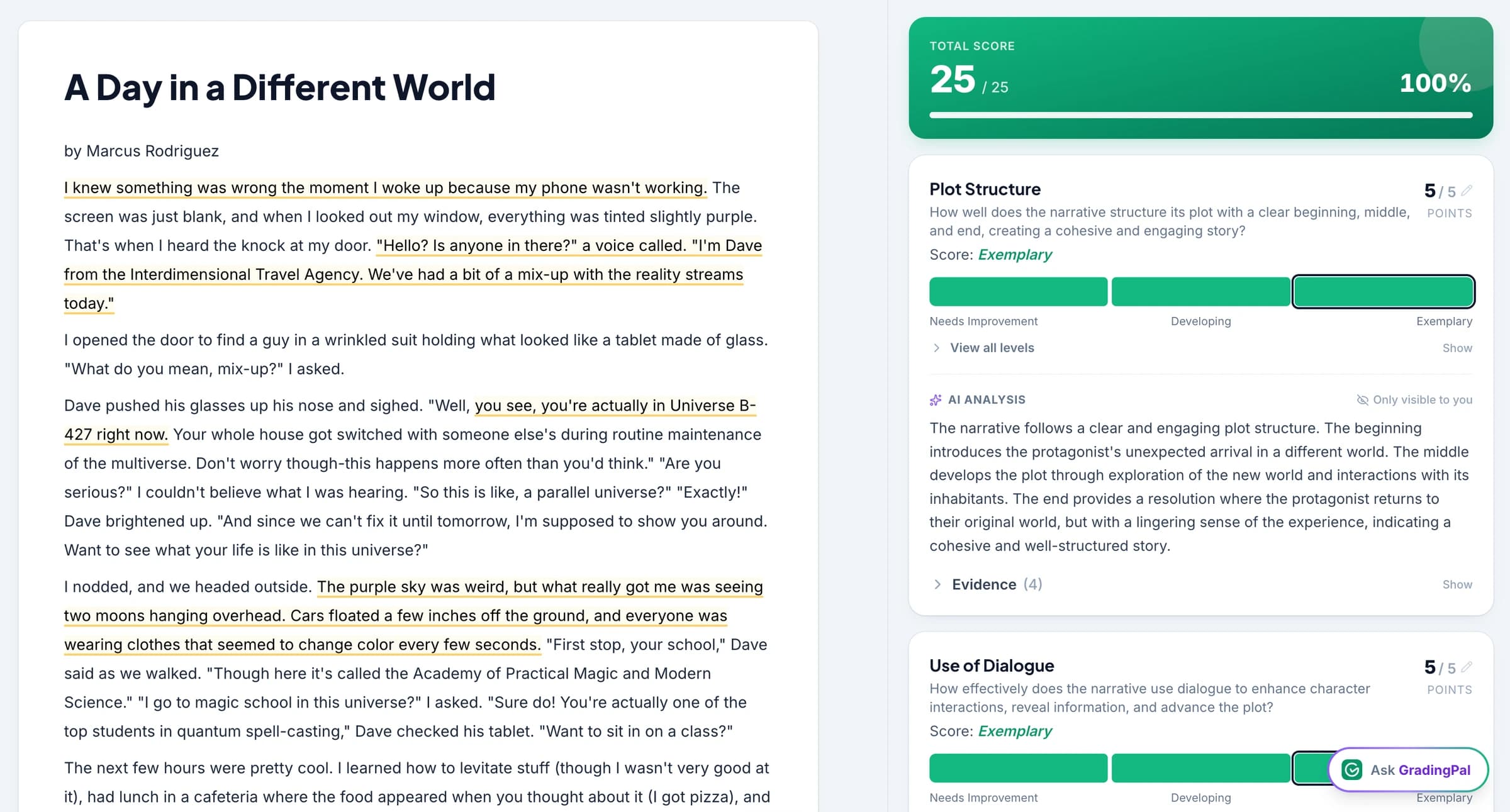
Spend less time grading essays and writing individual comments
GradingPal generates rubric scores, explains them using evidence from the essay, and writes individualized feedback. You review the writing alongside the scores and comments, then edit anything that needs your judgment or a different explanation.
Feedback instructions let you choose how the comments should sound and what they should focus on. Classroom analytics show recurring writing difficulties so the essays also help you plan the next lesson.
Grade argument, evidence, organization, and analysis with your rubric
Use your own essay rubric, your department's criteria, or generate a rubric from the assignment and edit it before grading. GradingPal scores each criterion separately, whether you are assessing argument, evidence, organization, analysis, or writing conventions.
See the writing that supports each rubric score
GradingPal explains criterion-level scores using the submitted writing. You can inspect the evidence behind an assessment of argument, analysis, organization, or another skill, then adjust the result where your judgment differs.
The score explanation identifies both the strength and the gap. That gives the teacher a concrete assessment to check and the student a revision priority more precise than “develop your argument.”
See GradingPal in action
Watch the GradingPal product demo to see rubric-based grading, feedback controls, classroom insights, and standards mastery.
What teachers say about GradingPal
“GradingPal individualizes feedback specific to each student and gives steps to improve their performance. I also love the ability to change the tone of feedback for different assignment types. The team is incredibly helpful and responsive too.”
 Michelle DouglassGrades 11–12 · Research & Anatomy/Physiology · Central Virginia Governor’s School, Lynchburg VA
“GradingPal helps me optimize my time by streamlining the grading process. What I like most is the feedback students receive — it is specific and it is something they can act on.”
 Adriana Barrios RodriguezCollege · Health Sciences & Teacher Education · Universidad Autónoma de Sinaloa, Mexico
Connect GradingPal to Google Classroom, Canvas, and Schoology
Import classes, assignments, rubrics, and student submissions from Google Classroom. Return approved feedback with or without grades. Canvas and Schoology are available on the school plan. You can also upload files directly or import them from Google Drive.



Give every student specific suggestions for improving their essay
Choose the feedback style, length, language, and instructions before sharing. GradingPal uses those settings to shape comments about the individual essay, so your expectations guide both the assessment and how students hear it.
For a different class, you might request a direct instruction and a fuller explanation. The controls make that choice practical across the assignment. Students receive the feedback and scores you choose to return; your scoring evidence remains in the teacher grading view.

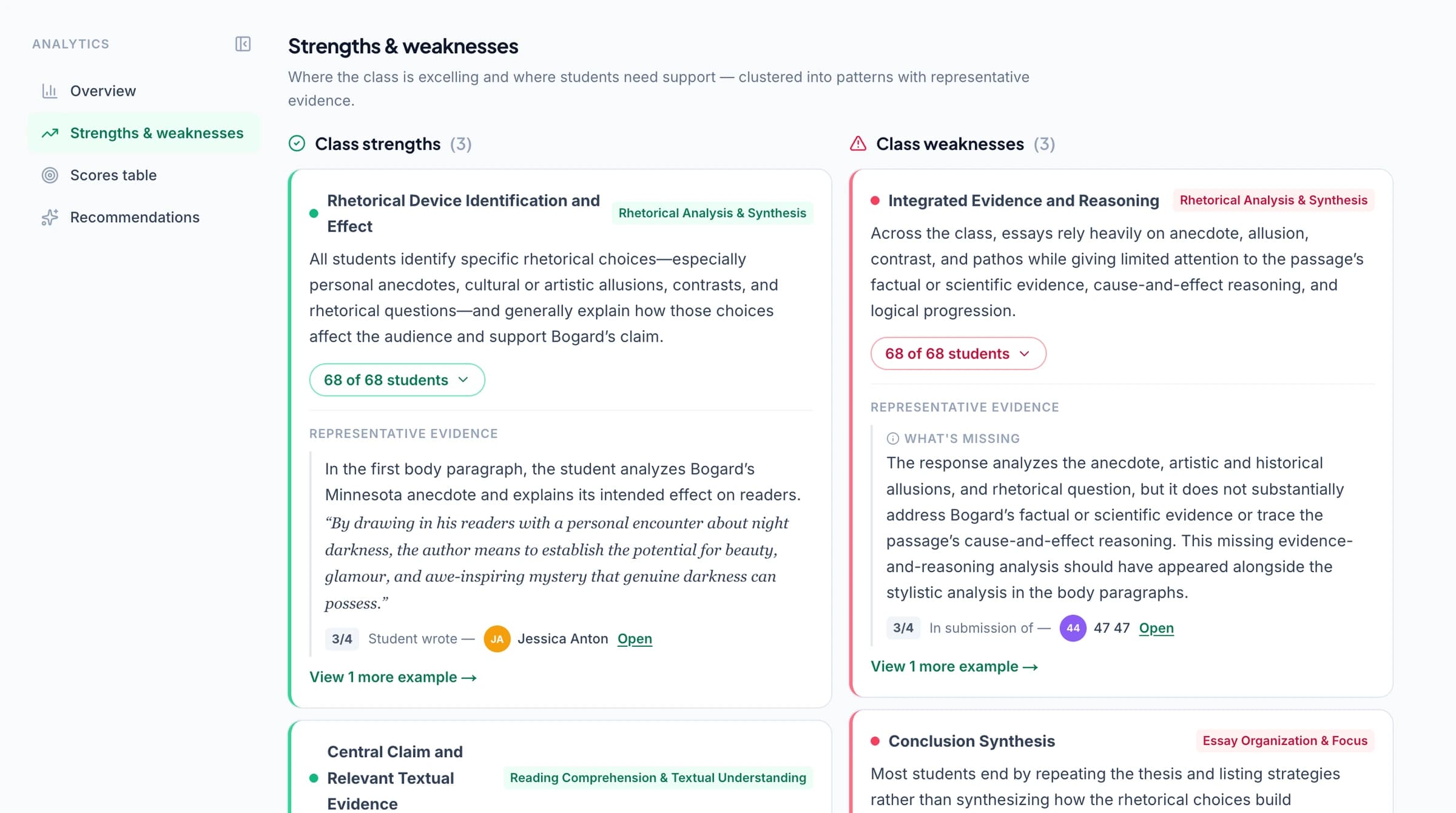
Identify writing skills to reteach and students who need support
GradingPal's classroom analytics show strengths and recurring difficulties across the class's essays and suggest teaching activities. Read the essays behind the results to decide which writing skill to teach next and which students need individual help.
Explore classroom analytics. Performance analytics is available on eligible plans; compare plans.
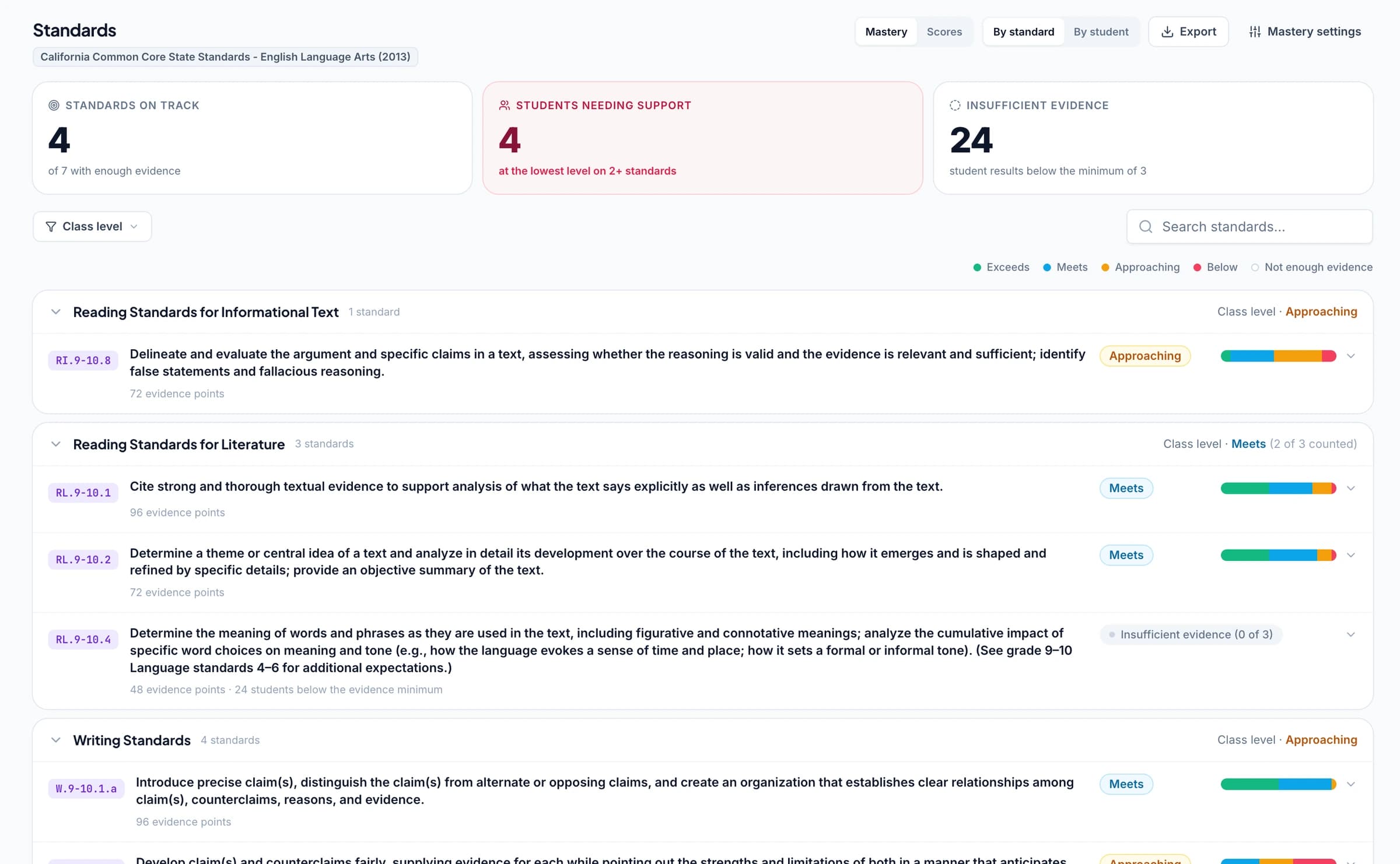
Track writing standards mastery across assignments
Connect essay rubric criteria to Common Core ELA, Texas TEKS, or your state's writing standards. As you approve grading results, GradingPal automatically updates each student's progress in the standards mastery gradebook using your chosen calculation rules. Track writing progress across assignments and open the essays behind a mastery result.
The standards directory includes California, Florida B.E.S.T., New York NGLS, and other frameworks across all 50 states and Washington, D.C. AP and IB rubric resources offer additional starting points for suitable classroom practice. Keep the actual learning goal at the center of the task.
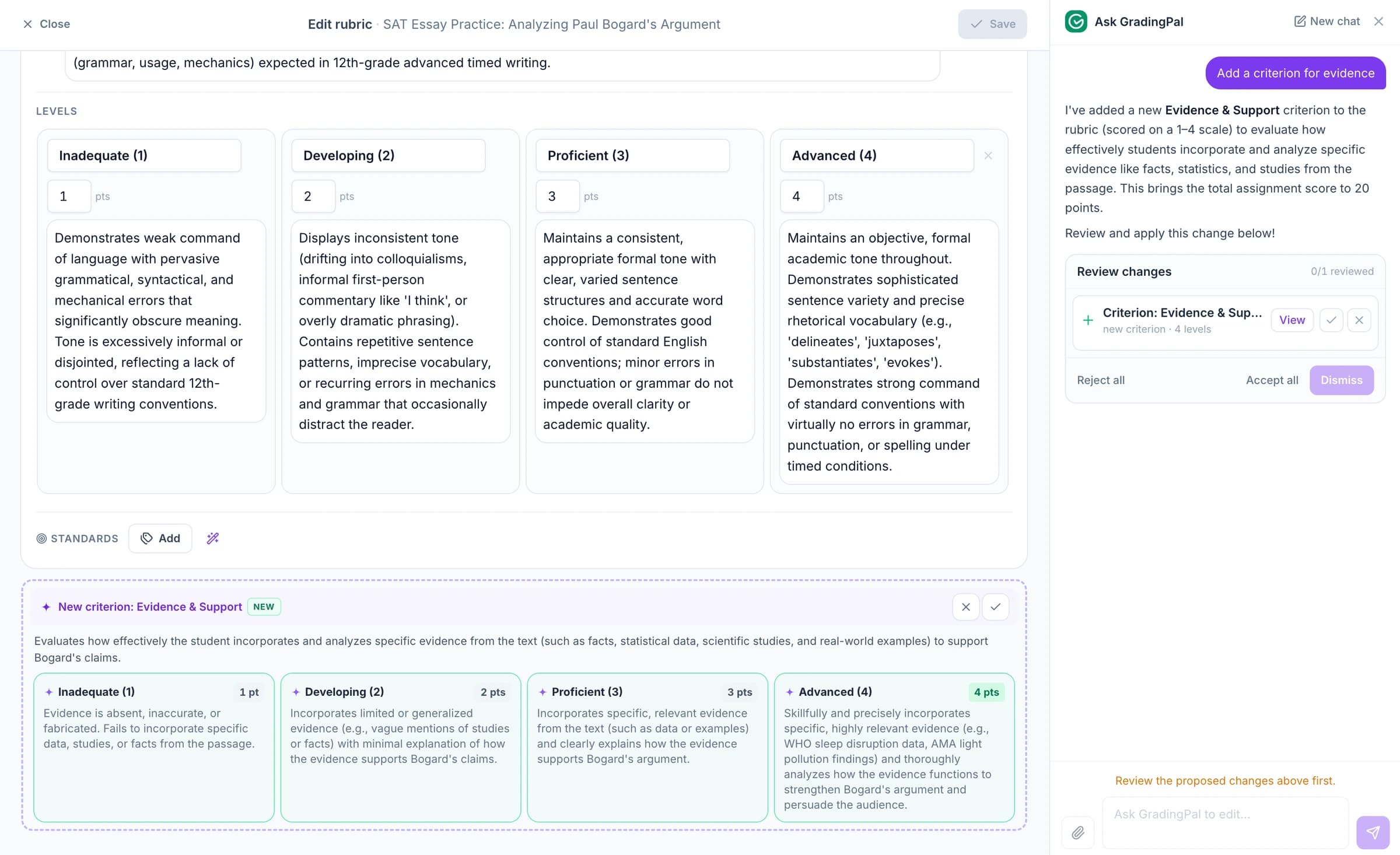
Ask the AI assistant to change essay scores, feedback, or rubrics
Ask the in-app AI assistant to change an essay score, revise a feedback comment, or edit the rubric. Review the proposed change and accept it when it matches your judgment.
For example: “Keep the strength, but make the next step a question about evidence.” GradingPal proposes new wording so you can tailor the comment without writing it again.
Check grammar separately and choose the feedback language
GradingPal's grammar check provides separate spelling and punctuation suggestions. Those suggestions do not automatically reduce an essay score; grammar affects the score when it is part of the rubric. Teachers can therefore give useful language guidance while keeping assessment tied to the assignment's criteria.
Choose the supported language used for student feedback separately from the writing conventions expected in the essay. Review both settings and the comments before sharing, especially when students are writing in an additional language. The goal is understandable guidance that serves the task, with scoring expectations made explicit.
Grade argumentative essays, literary analysis, research writing, and reflections
Argument and persuasive essays
Assess a position, supporting evidence, and the reasoning that connects them.
Literary and source analysis
Review interpretation, use of the text or sources, and how the student develops the analysis.
Research writing and extended responses
Assess organization, explanation, and the evidence expected by your task.
Reflections and shorter written assignments
Set criteria for the learning or reasoning the response should demonstrate rather than applying a full essay rubric automatically.
Upload handwritten essays as clear scans, photos, or a class PDF. Review page groupings, student matches, and unclear writing before approving the results.
Grade math, science, presentations, and recordings too
The same platform also generates rubric-based scores and feedback for handwritten math, science assignments, presentation slides, and recorded explanations. Use the assessment type that fits the evidence your students produce, with the rubric and feedback expectations appropriate to each task.
Print or share feedback after you approve it
Review the writing, make any score or comment changes, and decide what to share. Print feedback or use the supported digital delivery options to make it available for revision.
GradingPal is FERPA, COPPA, and GDPR compliant, with CASA Tier 2 verification. Student work is never used to train models. Review scores and student feedback before you choose what to share.

FERPA
Compliant

COPPA
Compliant

GDPR
Compliant
CASA
Tier 2 Verified
Questions about AI essay grading
How does GradingPal's AI essay grader work?
It assesses the submitted writing against your rubric, proposes criterion scores, explains the assessment with supporting evidence, and drafts feedback. You review and edit the results before deciding what students receive.
Can I grade essays with my own rubric?
Yes. Bring your rubric, use shared department criteria, or import a rubric through the supported Google Classroom workflow. You can also review an AI-generated rubric or adapt a library resource available on your plan.
Can I customize the essay feedback?
Yes. Choose the feedback style, length, and language, add instructions for the task, and edit the comments. The result should reflect your teaching voice and give the student an appropriate next step.
Does grammar automatically lower an essay score?
No. Grammar affects scoring when the rubric includes it. The separate grammar check can suggest corrections while the score remains tied to the assessment criteria.
Can GradingPal assess handwritten essays?
Yes. Upload readable scans or photos, including class PDFs. Check the grouping and student matches, then review the writing and any unclear passages alongside the proposed assessment.
Can I return essay feedback through Google Classroom?
Yes. Bring assignments and submissions into GradingPal and return reviewed feedback through the supported Classroom workflow. Choose whether to include grades when sharing.
What do students see when I share essay feedback?
Students receive the feedback and scores you choose to share. The teacher-facing scoring explanation and quoted evidence remain in your review view. Check and edit the student-facing comments before returning them.
How many essays can I grade on the free plan?
The current free plan includes 50 submissions a month, shared across assessment types. See pricing for the feature access and plan options that fit your workflow.
Does GradingPal check whether an essay was written by AI?
No. GradingPal assesses submitted writing against a rubric and drafts feedback; it does not determine authorship or identify AI-written work. See responsible AI for the assessment scope.
Explore more of GradingPal
- ai grading
- Student feedback controls
- Rubric library
- Handwritten assignment grading
- grading controls · grammar check
- grading controls · feedback languages
- integrations · google classroom
- Classroom analytics
- research
- Responsible AI
- Explore GradingPal features
- Free AI grading
- Compare GradingPal plans
- LMS integrations
- Standards mastery gradebook
- GradingPal for schools
Try GradingPal free on your next essay assignment
Bring the writing and your rubric, then set how you want the feedback to sound. Check the assessment against the essay and preview the guidance the student would receive. Start with an assignment whose learning goals you know well.
Try essay grading free50 free submissions per month. Compare plans and included features.