GradingPal vs EssayGrader: grade the writing, the working, and the reasoning
GradingPal gives teachers and schools a complete AI assessment platform across subjects. Grade essays, handwritten calculations, scientific explanations, worksheets, exams, slides, and recordings. Get rubric scores with supporting evidence, individual feedback in six styles, standards mastery tracking, and reusable school rubrics—all connected to the work students submit.
Published by GradingPal. Official competitor information reviewed on 9 September 2026.
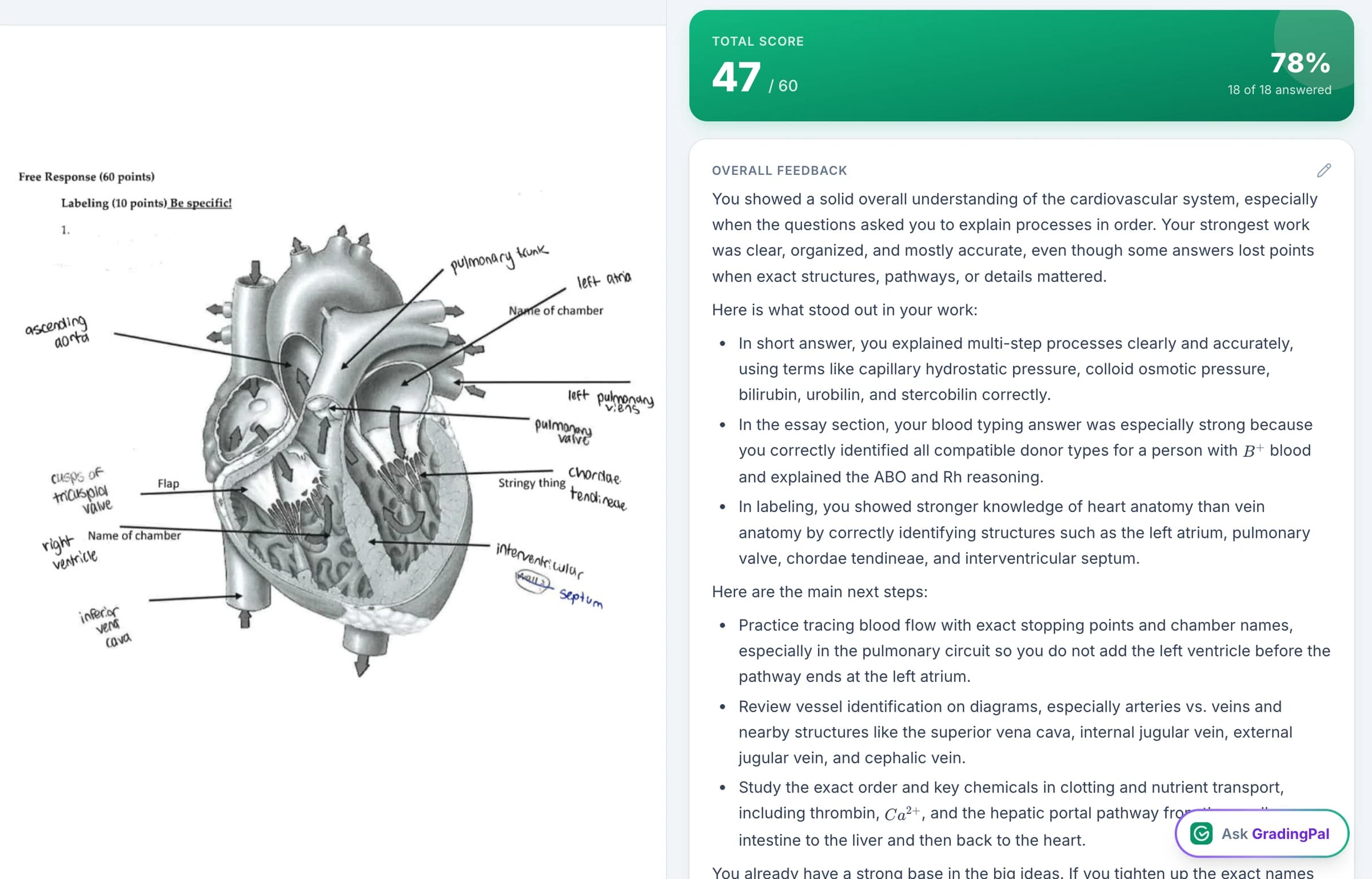
One AI grader for writing, mathematical working, and scientific reasoning
An English teacher needs feedback that improves an argument. A math teacher needs credit assigned to the method. A science teacher needs an explanation assessed for scientific correctness. GradingPal brings those needs into the same product, then makes the results useful for revision, mastery tracking, and the next lesson.
Automatic assessment across subjects
Grade different kinds of understanding with the rubric appropriate to each task.
Handwritten working and partial credit
Recognize the method a student demonstrated, including where an error occurred.
Scoring evidence and explanations
Check whether the awarded credit matches the response and criteria.
Six feedback styles, length, language, and instructions
Shape the guidance for the learner and the learning task.
Standards mastery and classroom recommendations
Follow learning across assignments and plan the response to gaps.
A 500-rubric catalog and shared resources
Give teachers a reusable foundation for high-quality assessment.
Grade math and science with the same depth you expect for writing
GradingPal's math grader reads multi-step solutions, including handwritten working, and generates scores against your rubric. Define the credit for a correct method, a calculation, an equivalent answer, or a required answer form. The proposed assessment explains how the work meets those expectations.
Use the science grader for physics calculations, chemistry problem sets, biology explanations, and lab reports. Score scientific reasoning and the use of evidence as well as the final result. A polished paragraph can contain a flawed inference; a partly correct calculation can show meaningful understanding. Your criteria determine how those differences count.
Bring short answers, long answers, calculations, and explanation questions together in worksheets and exams. GradingPal prepares the question-level assessment and feedback, reducing the repeated work of marking every response and explaining every point.
Keep paper assignments and handwritten work in your classroom
Students can continue showing their work on paper. Bring supported scans and photos into GradingPal, then review the original page beside the assessment. The product reads the response, applies the rubric, and produces scores and comments you can refine.
That matters when handwriting is part of the task: an algebraic method, a labeled science response, or a timed written answer. You can assess the evidence in the format students used rather than requiring them to rewrite everything digitally. See handwritten grading.
Give writing feedback students can actually use
GradingPal's writing feedback addresses the student's argument, evidence, organization, and other criteria in your rubric. It identifies a specific strength or gap and gives the student a next action. You control how that guidance is expressed.
Targeted
Direct a student to a particular passage or response.
Glow & Grow
Pair a demonstrated strength with a development priority.
Structured
Explain performance criterion by criterion.
Sandwich
Frame an improvement with constructive encouragement.
Actionable
Set concrete revision or practice steps.
Socratic
Guide a student through questions about their reasoning.
Choose concise or detailed feedback, set the language, and add instructions about tone, terminology, and priorities. You might ask for one revision priority in an early draft, or a detailed evidence explanation in a final essay. The assessment stays tied to the rubric while the communication fits your teaching. Explore the six feedback styles.
Illustrative feedback: “Your quotation supports the topic, but the paragraph does not explain how it supports your claim. Add that connection after the quotation.” The comment gives the student a precise revision to make.

What teachers say about GradingPal
“GradingPal has been incredible in helping me grade quicker and get better at feedback. The rubric creator creates great feedback without much change by me, and I’m able to get my students’ work back to them faster with actionable feedback.”
 William Pollard9th Grade · Earth & Space Science · NYC Dept. of Education District 15, Brooklyn NY
“GradingPal individualizes feedback specific to each student and gives steps to improve their performance. I also love the ability to change the tone of feedback for different assignment types. The team is incredibly helpful and responsive too.”
 Michelle DouglassGrades 11–12 · Research & Anatomy/Physiology · Central Virginia Governor’s School, Lynchburg VA
See the evidence behind the rubric score
GradingPal makes the basis of its assessment visible. Read the submitted response alongside the rubric level and the explanation of the score. Inspect the relevant evidence, check what earned credit, and identify what is missing.
That is essential to a dependable review process. You can check the proposed judgment against the student's work and correct a misinterpretation with the source still in view. The explanation supports scrutiny of the score; it does not ask you to trust an unexplained number.
For schools, this also gives assessment conversations more substance. Teachers can discuss the evidence and the criterion when reviewing a result, rather than comparing only totals.
Track standards mastery across writing, math, and science assessment
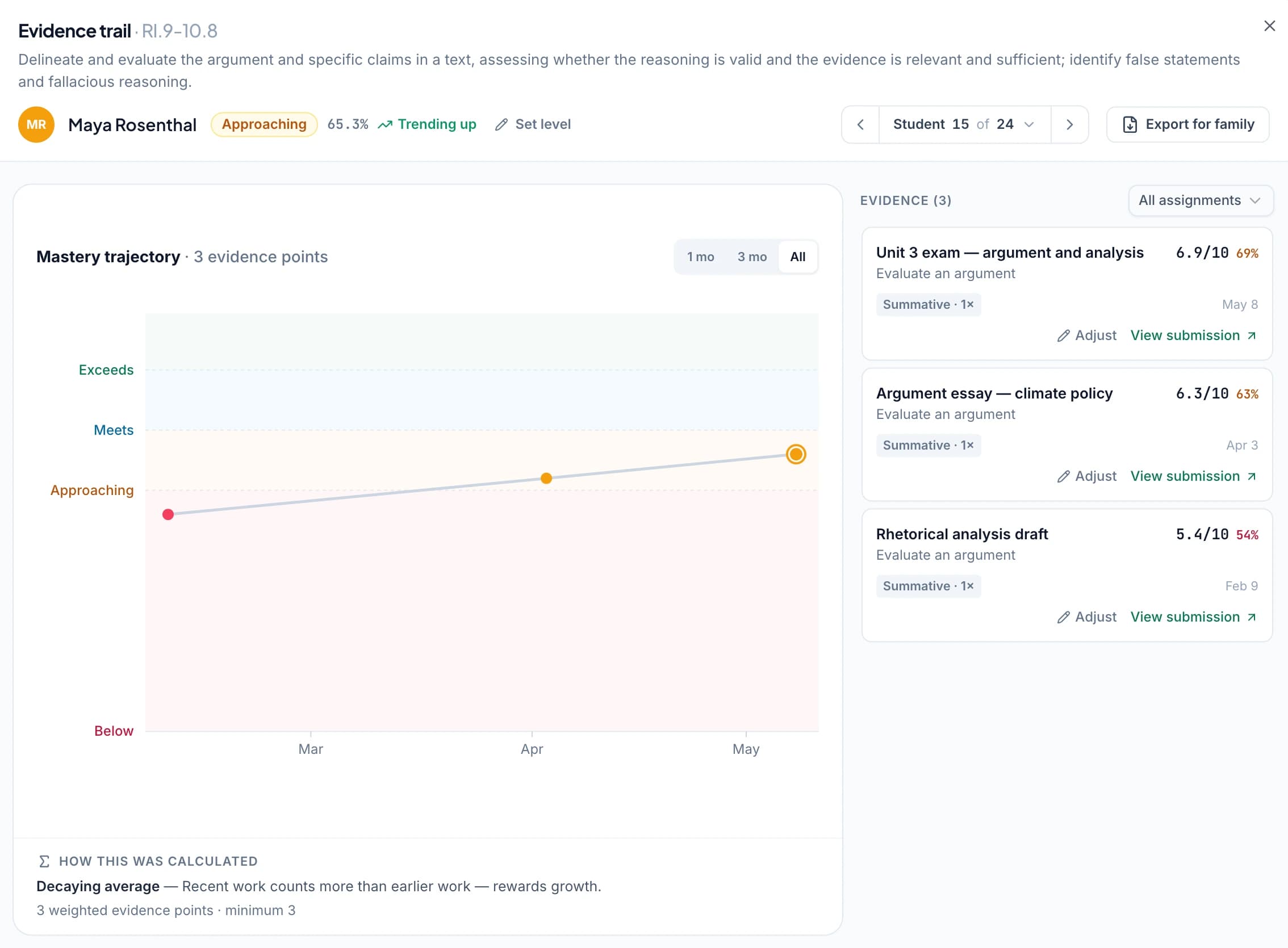
GradingPal's standards mastery gradebook collects approved, aligned evidence across assignments. View the class by standard, review an individual student's progress, and open the work behind a result. The record develops as new assessments contribute.
Select the calculation approach that matches your reporting practice: simple average, decaying average, most recent attempts, most frequent level, or highest level. Set minimum evidence and weighting, and retain the ability to make a reasoned teacher adjustment. You can explain both the result and how it was calculated.
Use Common Core, NGSS, TEKS, and the relevant state and course resources. GradingPal's standards directory covers all 50 states and Washington, D.C.; AP and IB pages explain their alignment and rubric support.
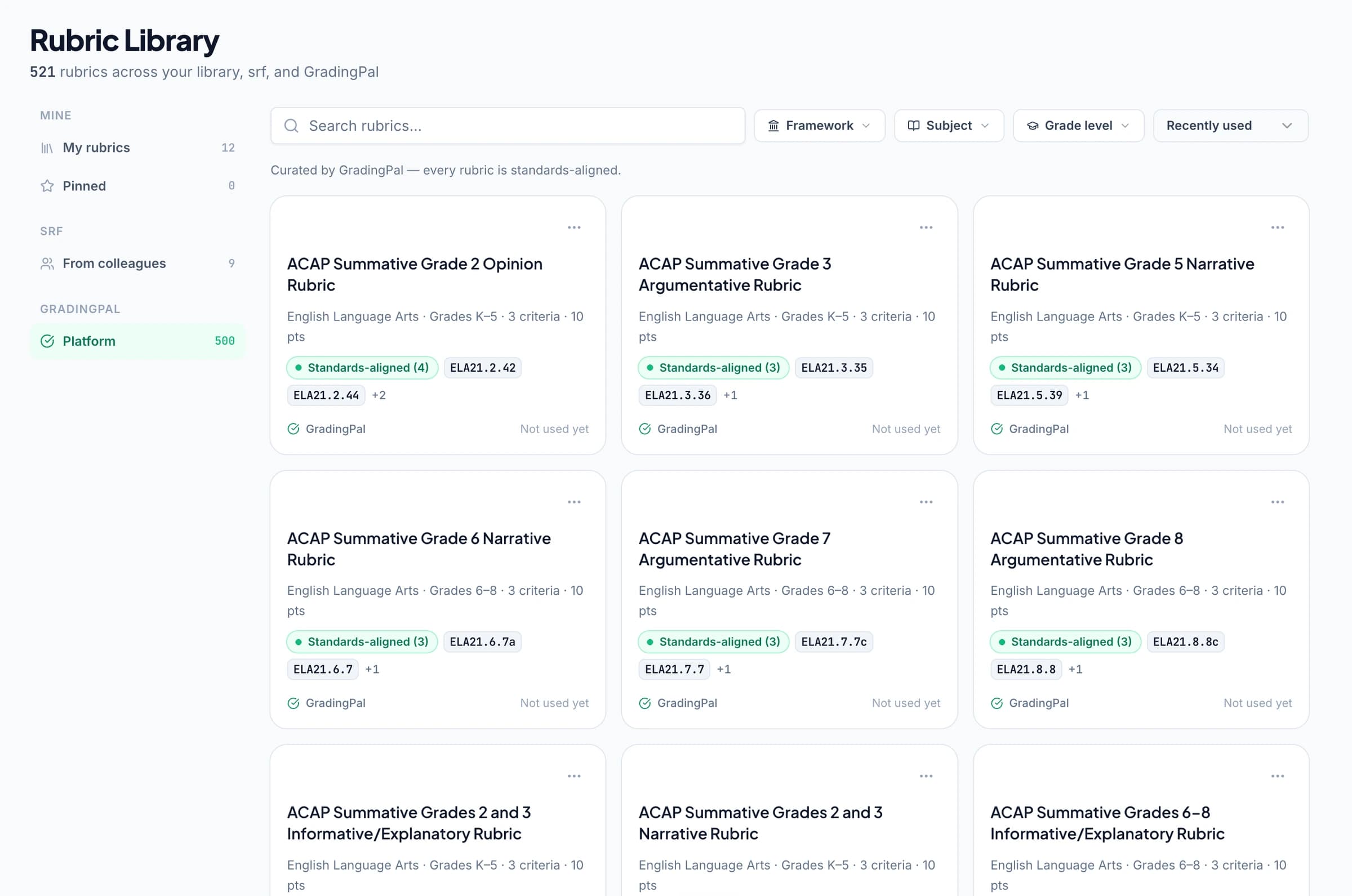
Build on a rubric library your colleagues can use too
GradingPal's 500-rubric catalog gives teachers a substantial starting point across assessment needs. Copy a rubric, edit its criteria, levels, and points, and use it to generate the actual assessment. You can also bring the rubric you already teach with.
Shared libraries on eligible plans let colleagues reuse assignment and rubric resources. A school can start from agreed expectations while giving teachers room to adapt their working copies. This saves preparation and connects shared assessment practice to the scores and feedback students receive. Explore the rubric library.
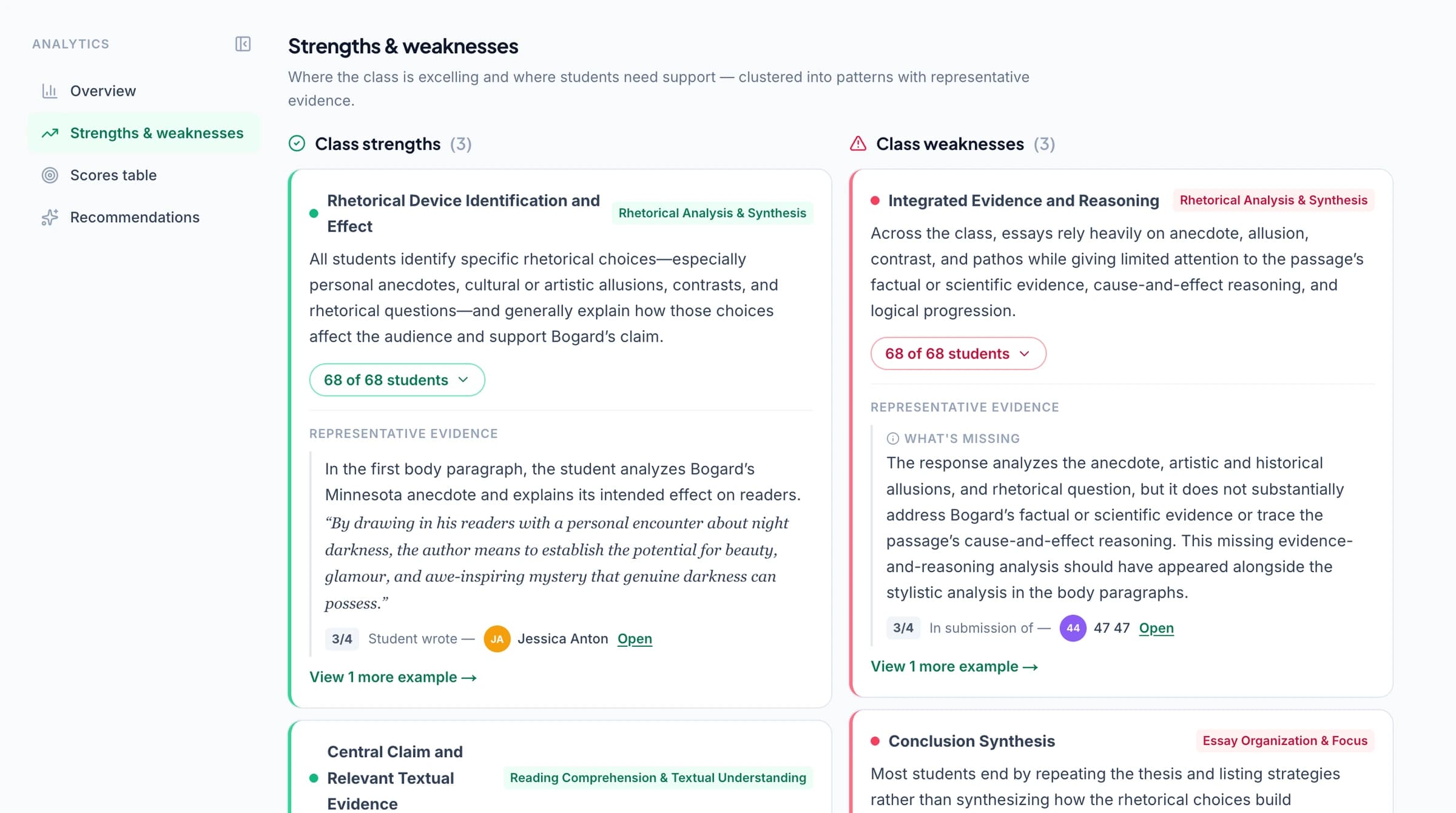
Turn grading into a plan for the next lesson
Classroom analytics reveal strengths, weaknesses, and recommended teaching responses from assessed work. A common problem with units needs a different follow-up from a weak explanation of evidence. GradingPal helps surface those patterns so you can decide where to focus instruction.
The learning record and the feedback then serve different parts of the same job: students get a next step, you get a view of the class, and subsequent assignments provide evidence of progress. This is the educational value of bringing assessment together in one system.
Refine scores and feedback with the in-app AI assistant
Ask GradingPal can propose changes to rubric criteria, scores, and comments while you work. Request the adjustment, inspect it, and accept what fits. Then print, share, or schedule the feedback.
Google Classroom is available now. Canvas and Schoology are available on a school plan. See features, privacy and security, and school adoption, or contact us about your requirements.



How EssayGrader's published offer compares
EssayGrader describes writing assessment, handwritten essays, teacher review, LMS connections, and writing-performance insights. Its pricing also lists oral and video submissions. GradingPal's reason to buy is the full assessment system described here, especially the explicit treatment of mathematical working and scientific reasoning alongside feedback, mastery, school rubrics, and teacher control. Product · Insights · Plans
Questions about choosing GradingPal
Why choose GradingPal as an EssayGrader alternative?
GradingPal brings automatic grading across subjects together with evidence-backed scores, six feedback styles, standards mastery, instructional insights, and shared rubric resources. Choose it when you want the assessment system to handle your varied teaching workload and make the results useful beyond the assignment.
Do both products offer teacher review?
Yes. EssayGrader describes review and editing. In GradingPal, inspect the student's response, criterion, and scoring explanation, then edit the score or comment before returning the assessment. EssayGrader source
Can GradingPal grade presentations and recordings too?
Yes. Alongside written and quantitative work, GradingPal has presentation grading, art grading, and oral and recording assessment. Each workflow evaluates the evidence in that submission against the relevant criteria.
Can I try GradingPal before choosing a plan?
Start free with 50 submissions per month and six feedback styles within the allowance. See pricing for advanced features and library access, or book a demo of the whole system.
Does this comparison show which product is more accurate?
It explains the product capabilities and review mechanisms; it does not present a matched accuracy study. GradingPal's research page gives the scope and methods of its published essay benchmark. Evidence behind an individual score lets you inspect the judgment on your own work.
Give every subject the assessment it deserves
Use GradingPal for the scores, feedback, and learning evidence that your teaching requires. Start with one assignment and see the assessment prepared for your review.