AI science grader for physics, chemistry, biology, and lab reports
GradingPal automatically grades science calculations, short and long answers, data analysis, and lab reports against your rubric. Get scores with supporting evidence and individualized feedback on scientific reasoning, methods, and calculations. Save grading time and see what your class needs to understand next.
50 free submissions per month, shared across assignment types.
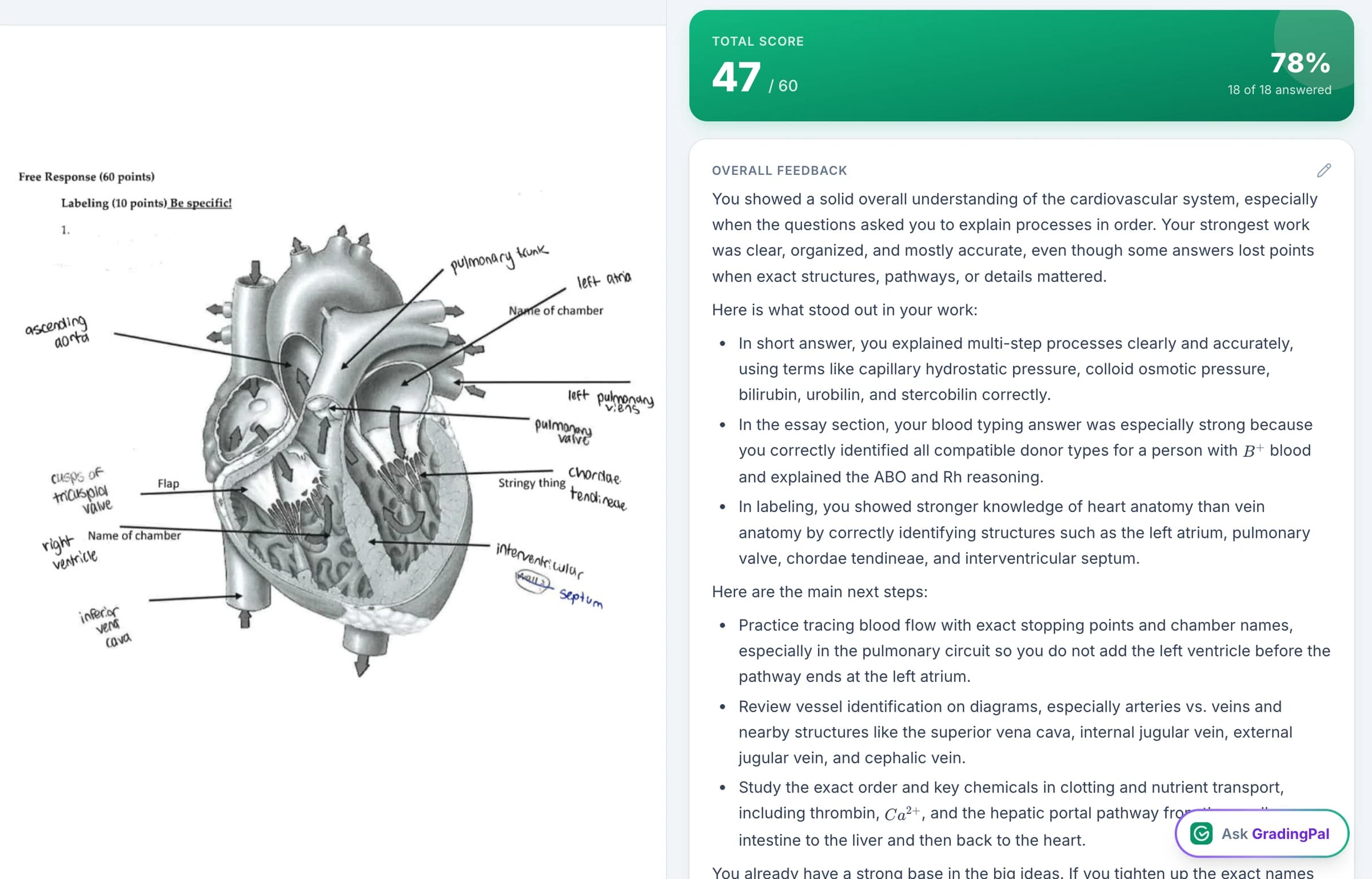
Grade science calculations, explanations, data analysis, and lab reports
GradingPal grades short and long written answers, handwritten calculations, explanations of data, and complete lab reports. Use your rubric to assess scientific understanding as well as the accuracy of the answer.
Physics
Review calculations, explanations, and written interpretations of physical relationships. Make method, units, precision, and the reasoning behind an answer explicit in the rubric.
Chemistry
Assess quantitative working and scientific explanations against the task's criteria. Review calculations, use of evidence, and conventions such as units or significant figures where they affect the score.
Biology
Assess investigations, data interpretation, and explanations that connect evidence to biological ideas. Help students distinguish describing a result from explaining what it means.
Earth and environmental science
Review written explanations, investigations, and evidence-based arguments using the criteria for the assignment.
Use readable handwritten work, digital responses, and relevant submitted tables or diagrams. GradingPal assesses the evidence provided; teachers review the interpretation in the context of the lesson or practical.
Score each lab report section against your rubric
Set separate criteria for the method, results, analysis, and conclusion. GradingPal scores each criterion, explains the evidence behind the score, and drafts feedback about what the student needs to improve.
You can identify a strong results section alongside a weak explanation of those results. This lets you give specific feedback on each student's report without writing every comment yourself.
Assess whether students support their conclusions with data
GradingPal assesses the relationship between the student's claim, submitted evidence, and reasoning against your criteria. It explains the score so you can check whether the response interprets the results and supports the conclusion the task asks for.
Useful feedback is: “Your table shows increasing activity from 10°C to 30°C. Rewrite the conclusion to describe that tested range. What further measurements would you need to investigate what happens above 30°C?” The student has a concrete scientific decision to revisit, rather than a generic request for more detail.
See GradingPal in action
Watch the GradingPal product demo to see rubric-based grading, feedback controls, classroom insights, and standards mastery.
What teachers say about GradingPal
“GradingPal individualizes feedback specific to each student and gives steps to improve their performance. I also love the ability to change the tone of feedback for different assignment types. The team is incredibly helpful and responsive too.”
 Michelle DouglassGrades 11–12 · Research & Anatomy/Physiology · Central Virginia Governor’s School, Lynchburg VA
“GradingPal has been incredible in helping me grade quicker and get better at feedback. The rubric creator creates great feedback without much change by me, and I’m able to get my students’ work back to them faster with actionable feedback.”
 William Pollard9th Grade · Earth & Space Science · NYC Dept. of Education District 15, Brooklyn NY
Grade scientific calculations, units, and significant figures
Scientific understanding and numerical accuracy can be assessed through distinct criteria. Specify the method, relationships, substitutions, units, and precision the task requires. GradingPal generates rubric-based scores and explanations using those expectations, including partial credit where the rubric awards it.
A numerical answer without a unit should be assessed according to the rubric you set. An intermediate rounding choice should be reviewed in relation to the task, rather than automatically receiving the same penalty in every assignment. Teachers can inspect the working and edit a proposed score before sharing it.
Connect GradingPal to Google Classroom, Canvas, and Schoology
Import classes, assignments, rubrics, and student submissions from Google Classroom. Return approved feedback with or without grades. Canvas and Schoology are available on the school plan. You can also upload files directly or import them from Google Drive.



Give students actionable science feedback in your teaching voice
GradingPal writes feedback tied to the submitted response. Set the style, length, language, and instructions so the guidance matches your students and the scientific practices you are teaching.
Applied to the enzyme example, the feedback recognizes the trend the student identified and asks what the evidence permits them to conclude. Students can revise that paragraph before designing the next investigation. You can spend the feedback discussion on their reasoning, with the initial comments already drafted.

Identify gaps in scientific understanding and plan your next lesson
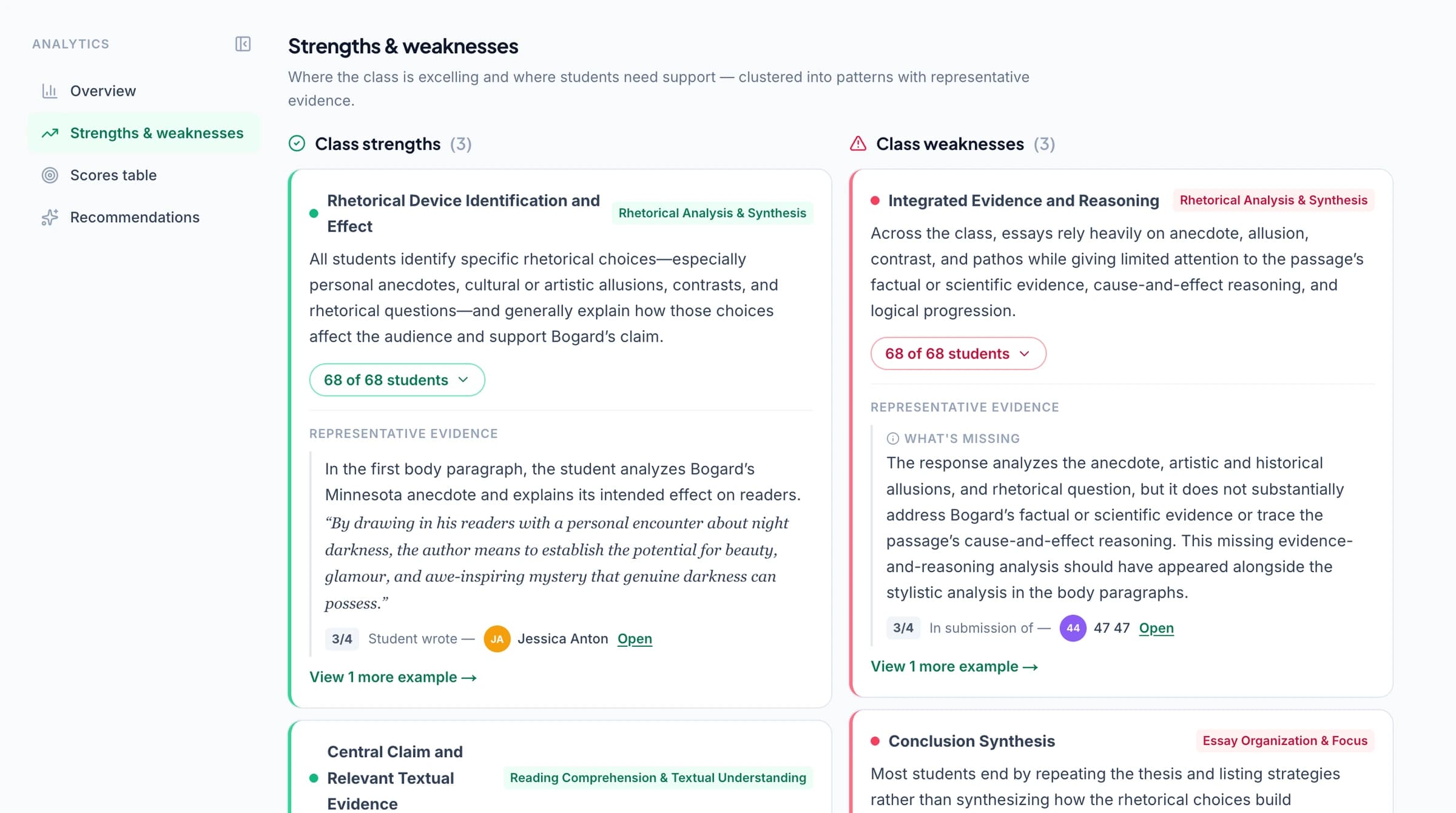
GradingPal's classroom analytics show common strengths and weaknesses in science assignments and suggest what to teach next. Check the graded answers to identify whether students need help with calculations, interpreting data, or explaining scientific ideas.
Explore classroom analytics. Performance analytics is available on eligible plans; compare plans.
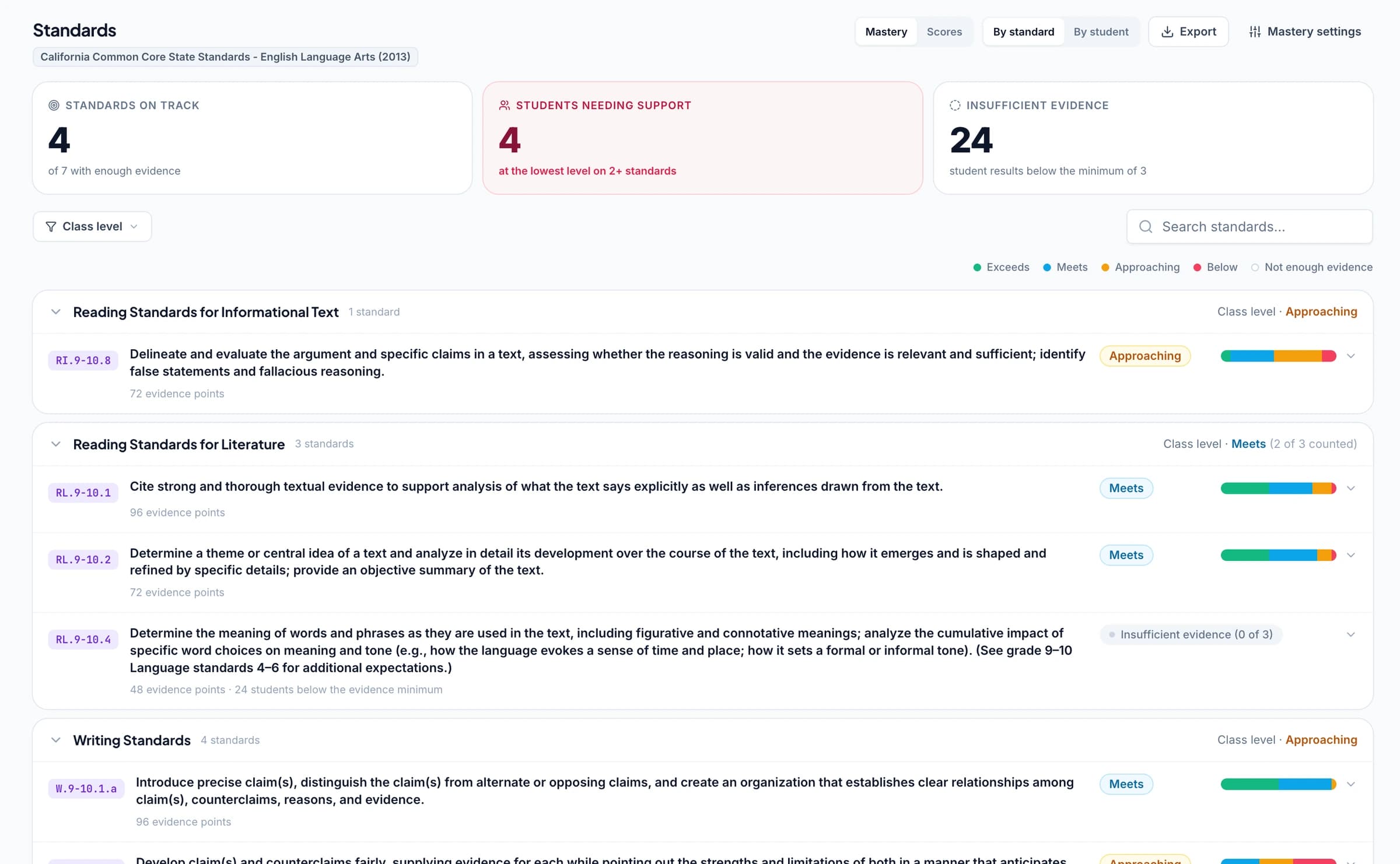
Track science standards mastery with NGSS, TEKS, and state frameworks
Connect science questions or rubric criteria to NGSS, Texas TEKS, or the state standards you teach. As you approve grading results, GradingPal automatically updates each student's progress in the standards mastery gradebook using your chosen calculation rules. Track the same learning goal across lab reports, quizzes, and written explanations.
GradingPal supports standards-aligned assessment across all 50 states and Washington, D.C. AP and IB resources provide additional rubric starting points for classroom practice. Select the learning goal that matches the work; an AP or IB resource and a state standard serve different purposes.
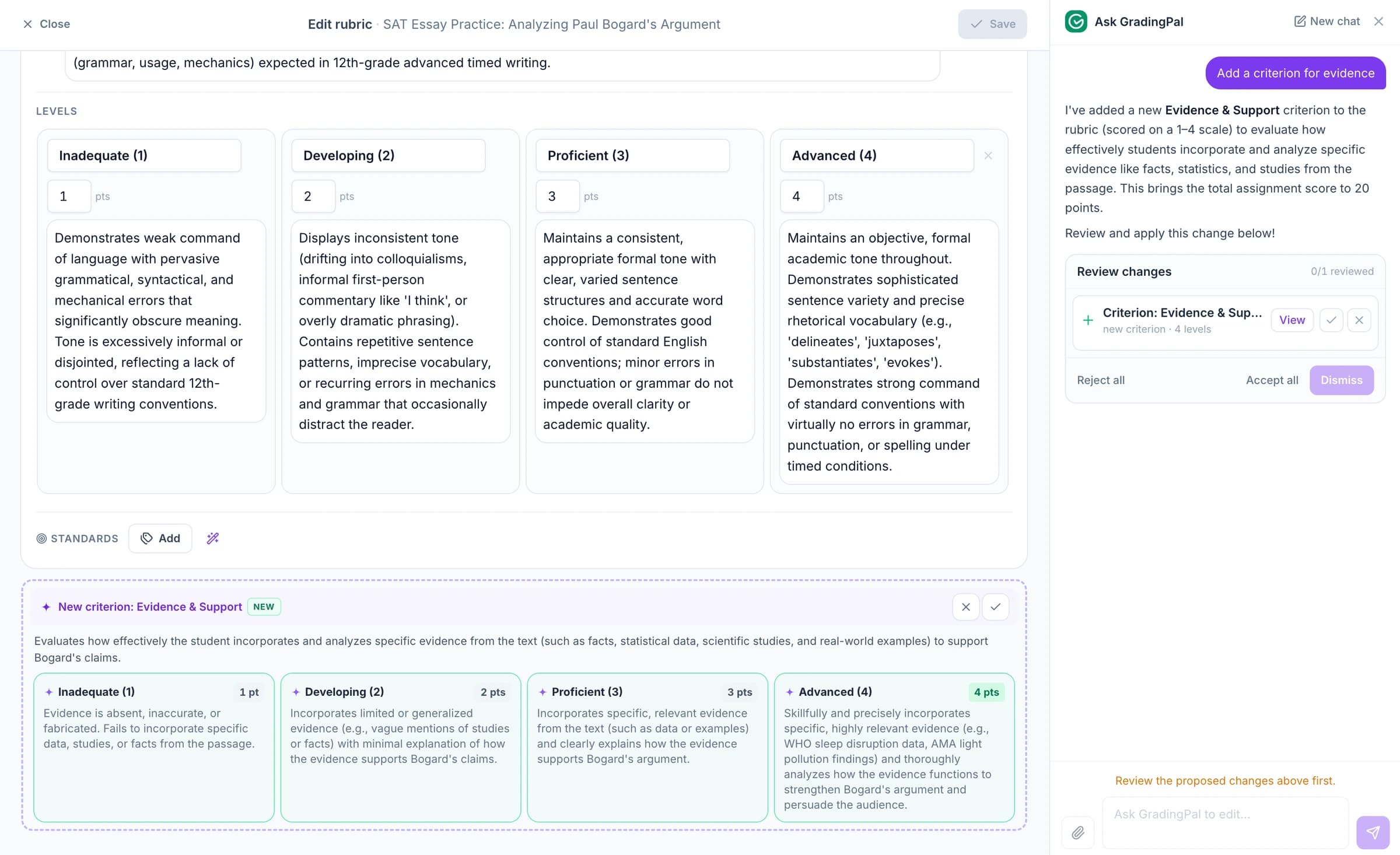
Ask the AI assistant to change science scores, feedback, or rubrics
Ask the in-app AI assistant to change a science score, revise feedback, or add a rubric criterion. Review the proposed edit and accept it when it fits the assignment.
For a report conclusion, try: “Ask the student to connect the conclusion to one value in their table.” GradingPal proposes revised feedback that you can check against the report.
Protect student work and control what gets shared
GradingPal is FERPA, COPPA, and GDPR compliant, with CASA Tier 2 verification. Student work is never used to train models. Review scores and student feedback before you choose what to share.

FERPA
Compliant

COPPA
Compliant

GDPR
Compliant
CASA
Tier 2 Verified
Questions about AI science grading
Can it grade a lab report section by section?
Yes. Define criteria for the report's method, results, analysis, conclusions, or other required elements. Review the proposed scores and feedback for each part against the student's submission.
Does it check whether a conclusion follows from the data?
It can assess that relationship within the submitted report against your criterion. Teachers check the interpretation and scientific context before approving the result.
Can it tell whether the student really collected the data?
No. A report alone does not establish what happened during a practical. Use your classroom observations and institution's assessment process when the origin of the evidence matters.
Can I include units and significant figures in the score?
Yes. Make those expectations explicit in the rubric and review the proposed marks against the student's working. You control how those requirements affect the assessment.
Does GradingPal support physics, chemistry, and biology?
Yes. It supports rubric-based assessment of calculations, written explanations, investigations, and reports across these subjects. Teachers provide the task criteria and review the scoring evidence and feedback.
Can it assess handwritten scientific working?
Yes. Upload readable scans or photos of calculations and written responses. Check unclear symbols, units, diagrams, and missing parts of the work before approving the assessment.
Can science results contribute to standards mastery?
When the relevant questions or criteria are aligned to learning standards, approved assessment evidence can contribute to progress across assignments. Use the actual NGSS, TEKS, or other framework goals relevant to the task.
Can it assess a narrated practical demonstration?
Use oral and video grading to assess the student's spoken explanation. Physical technique and silent actions need your own observation; the recording's spoken content is the evidence for that workflow.
Try GradingPal free on your next science assignment
Bring a calculation, explanation, or lab report with your rubric. Check the scientific evidence behind the score and the next step in the feedback. See how much of the written assessment is ready for your review.
Try science grading free50 free submissions per month. Compare plans and included features.