AI grading for handwritten worksheets, math, science, and essays
Upload photos, scans, or a class PDF. GradingPal reads handwritten answers, scores them against your rubric, and writes individualized feedback for students. Grade math working, science explanations, essays, and worksheets without asking students to type their answers. Use the results to track learning and plan your next lesson.
50 free submissions per month, shared across assignment types.
Read handwritten answers and generate rubric-based scores and feedback
GradingPal reads the submission and assesses its content against your criteria. It generates scores and explains the evidence behind them: method and accuracy in a calculation, argument and support in an essay, or reasoning in a science answer. The original page stays available while you check the assessment.
Useful feedback is: “You correctly identify the complete circuit. Explain what can now flow around it and how that relates to the bulb lighting.” The value is the assessment and next step derived from the writing, not merely a typed version of the page.
See GradingPal in action
Watch the GradingPal product demo to see rubric-based grading, feedback controls, classroom insights, and standards mastery.
What teachers say about GradingPal
“GradingPal is helping me a lot! It is cutting down a lot on grading certain assignments, especially map and geography projects. With Middle School students especially, it is very difficult to read their handwriting. GradingPal does it better than I do!”
 Marcus AbernathyHistory Teacher · Lancaster Christian Academy, TN
“The math capabilities and accuracy have been great. Students can turn in homework digitally but keep hard copies for studying, and the Google Classroom integration is very convenient.”
 Brandon McClurgMathematics · Grapevine Faith Christian School, TX
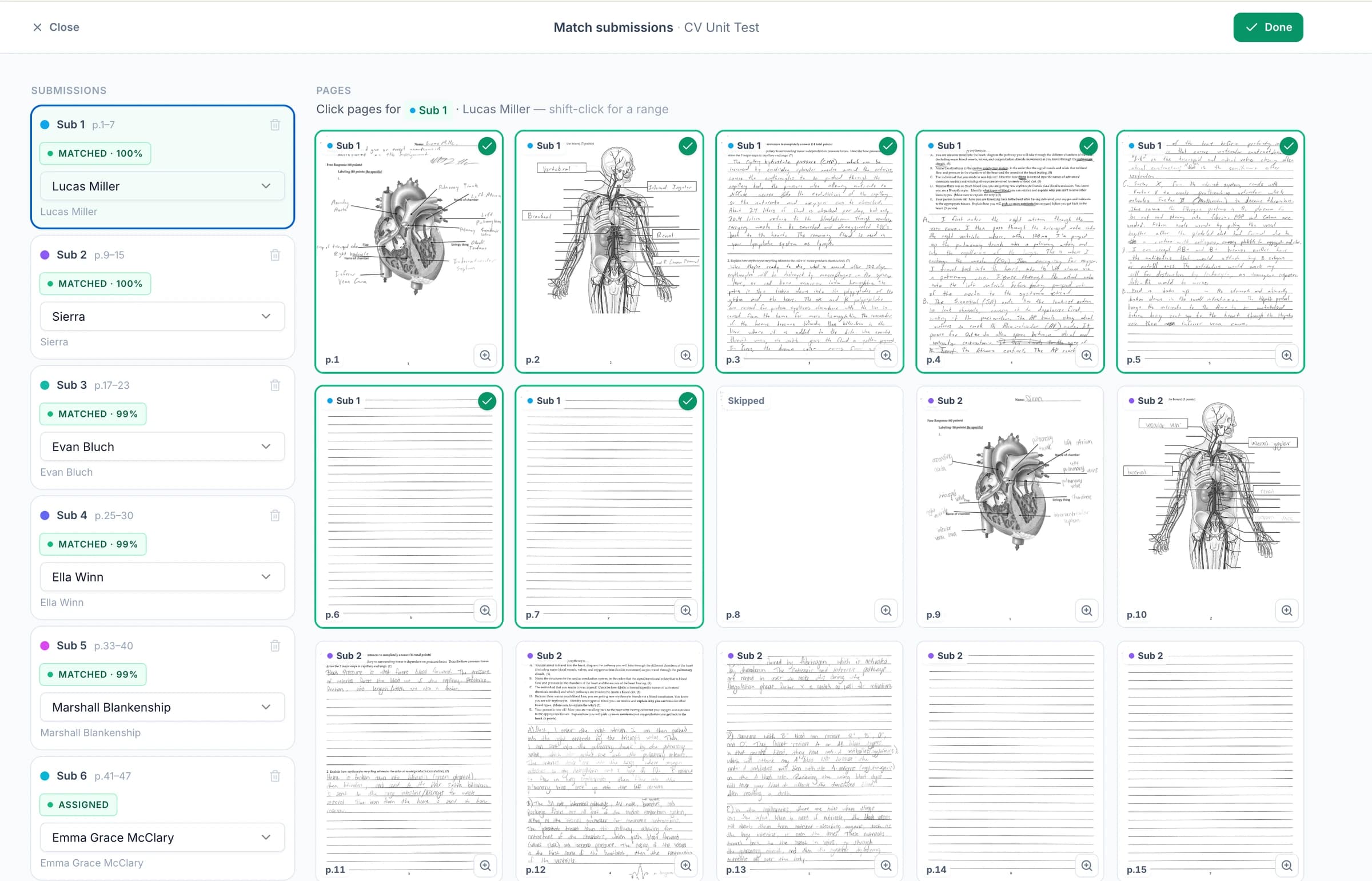
Upload a class PDF and check student names and page groups
Upload a PDF containing your class's handwritten assignments, or use readable photos and scans. GradingPal helps separate the pages into student submissions. Check the names and page groups, including any continuation pages, before grading.
Students can keep their paper copies. You get the original pages, rubric scores, and individual feedback in GradingPal without asking the class to type their work.
Grade handwritten math, science, essays, and short answers

Math and calculations
Assess handwritten equations, multi-step working, and mathematical explanations against the rubric, including partial credit where specified.
Explore grading for this subject →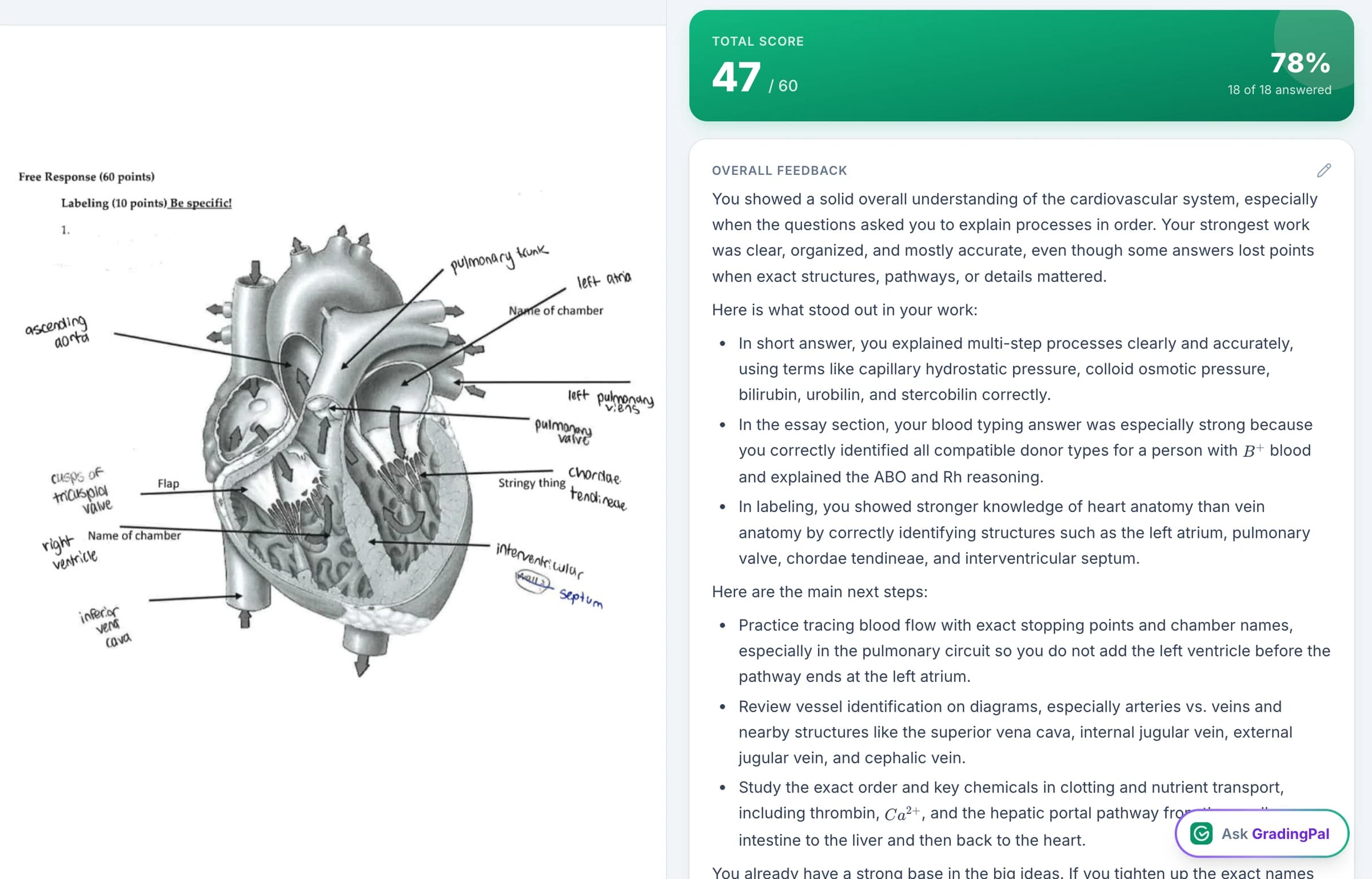
Science responses
Review calculations, written reasoning, and relevant submitted tables or diagrams. Check units and symbols against the task's criteria.
Explore grading for this subject →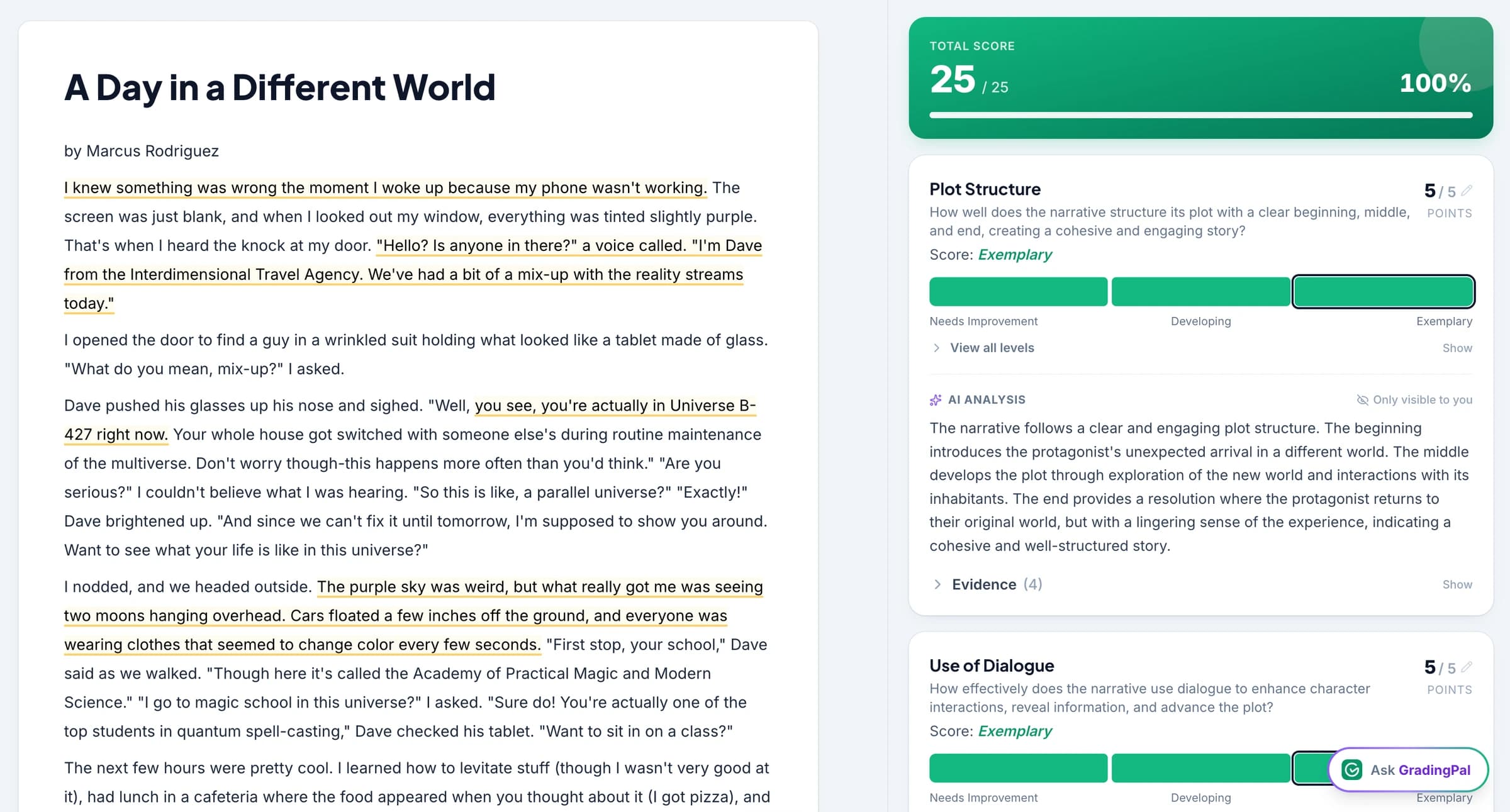
Essays and extended writing
Assess handwritten arguments, explanations, and reflections using the same rubric-based workflow as readable digital writing.
Explore grading for this subject →
Worksheets and short answers
Review each question's response and give students feedback connected to the part of the work that needs attention.
Explore grading for this subject →How to grade handwritten assignments with GradingPal
1.Bring in the work
Upload the scans, photos, or class PDF together with the assignment and rubric.
2.Check the organization
Review page groupings and student matches, including continuation pages and unclear labels.
3.Review scores and comments
Inspect the proposed assessment alongside the original work, checking any uncertain handwriting and making changes where needed.
4.Return useful guidance
Share the reviewed feedback digitally or print it for students, using the delivery options that fit your class.
Connect GradingPal to Google Classroom, Canvas, and Schoology
Import classes, assignments, rubrics, and student submissions from Google Classroom. Return approved feedback with or without grades. Canvas and Schoology are available on the school plan. You can also upload files directly or import them from Google Drive.



Print or share individual feedback while students keep their paper copies
GradingPal drafts comments tied to what the student wrote. Set the style, length, language, and instructions, then print or share the reviewed feedback through the delivery options your class uses.
For the circuit response, students can add the missing explanation beside their original answer and use the paper for study. For handwritten math, the next step can direct them back to the working they need to check. Individualized guidance no longer depends on handwriting every comment yourself.

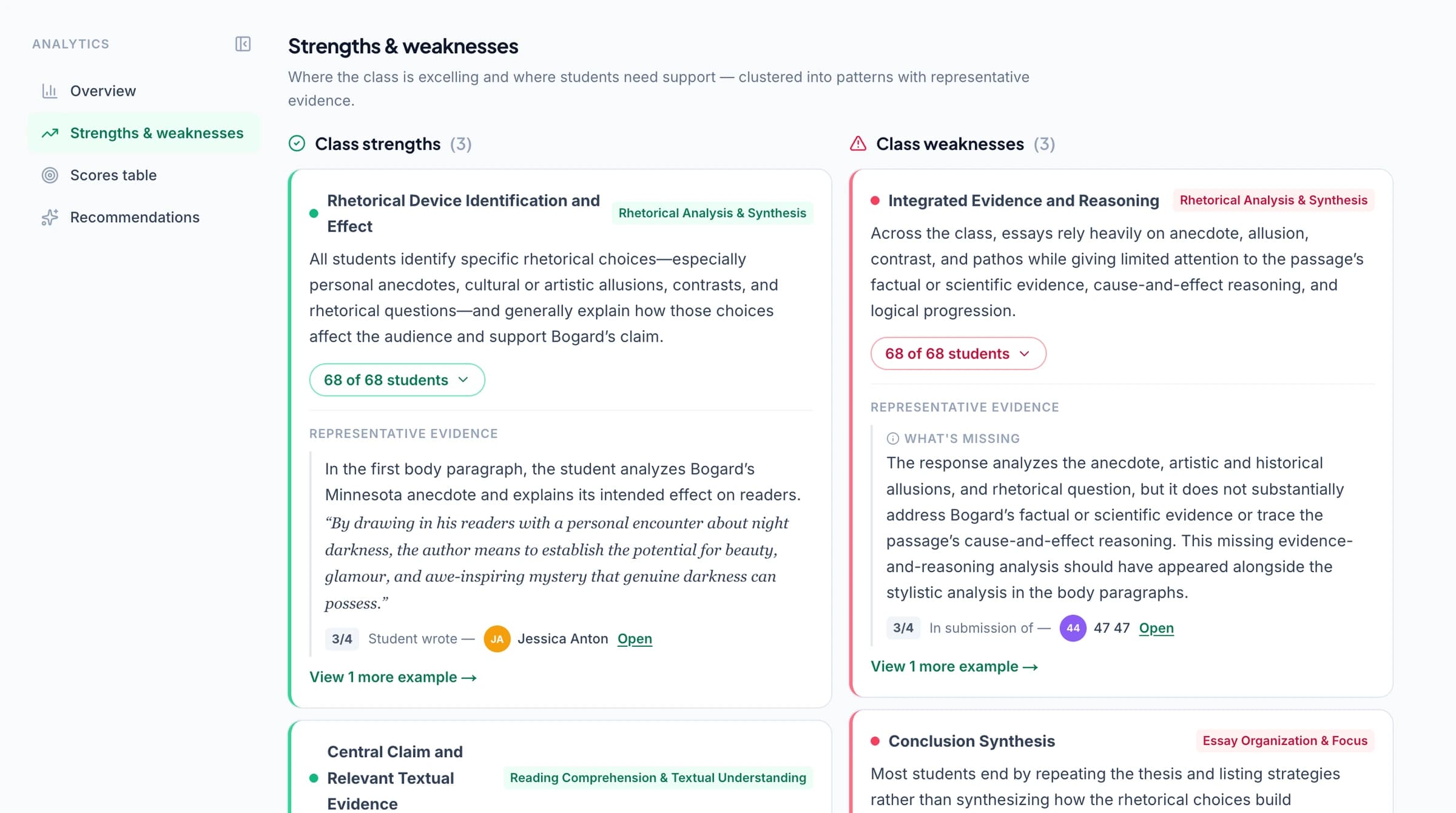
Identify learning gaps from handwritten assignments
GradingPal's classroom analytics show strengths and common difficulties in graded handwritten assignments and suggest what to teach next. Open the original answers to check the results, plan a class explanation, or choose students for extra support.
Explore classroom analytics. Performance analytics is available on eligible plans; compare plans.
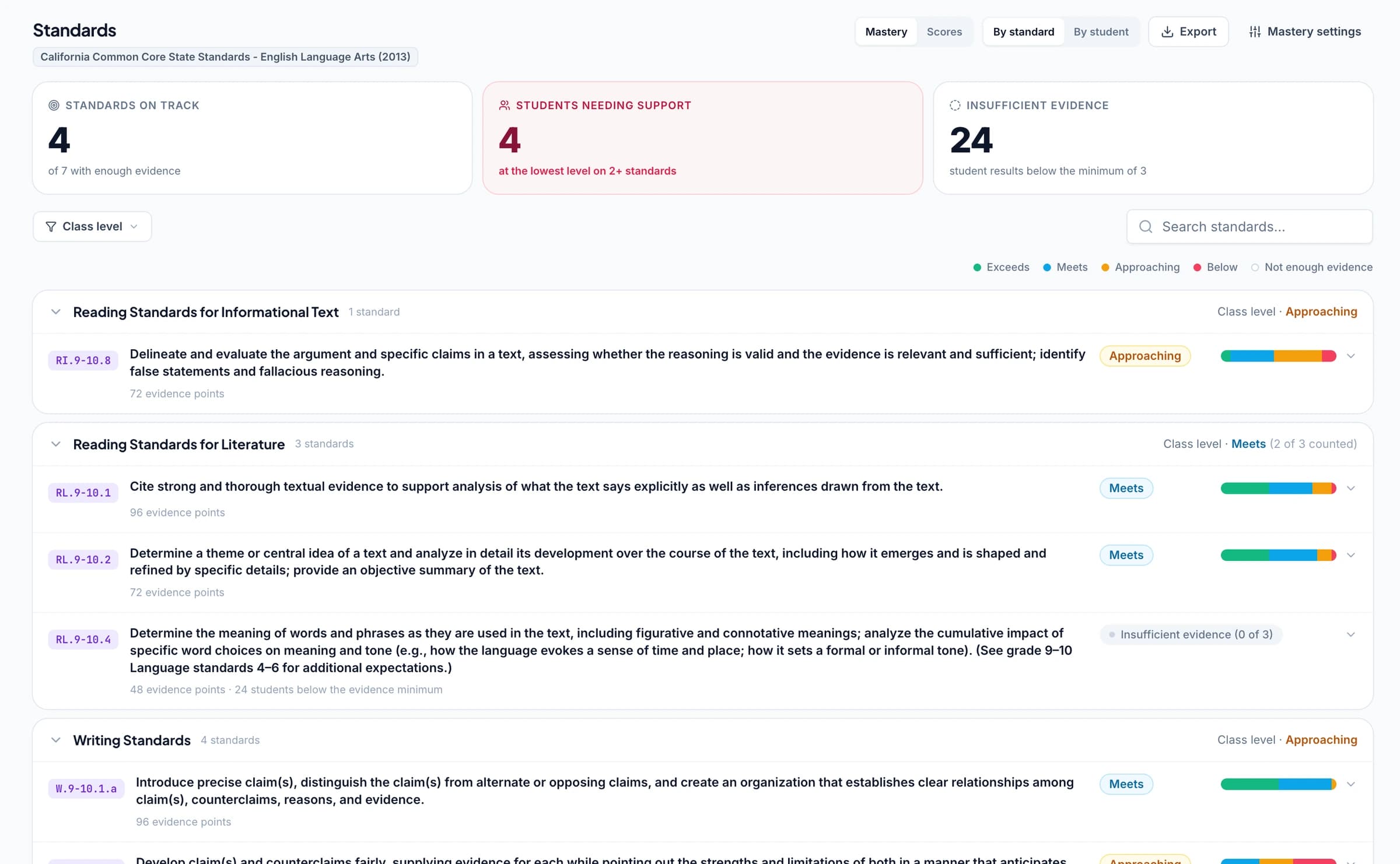
Track standards mastery from paper and digital assignments
Connect questions or rubric criteria to Common Core, NGSS, Texas TEKS, or your state's learning standards. As you approve grading results, GradingPal automatically updates each student's progress in the standards mastery gradebook using your chosen calculation rules. Handwritten and digital assignments can contribute to the same student's progress record.
GradingPal's standards coverage spans all 50 states and Washington, D.C. for supported subjects. Choose the framework and learning goals that actually match the task; the scan itself does not establish alignment.
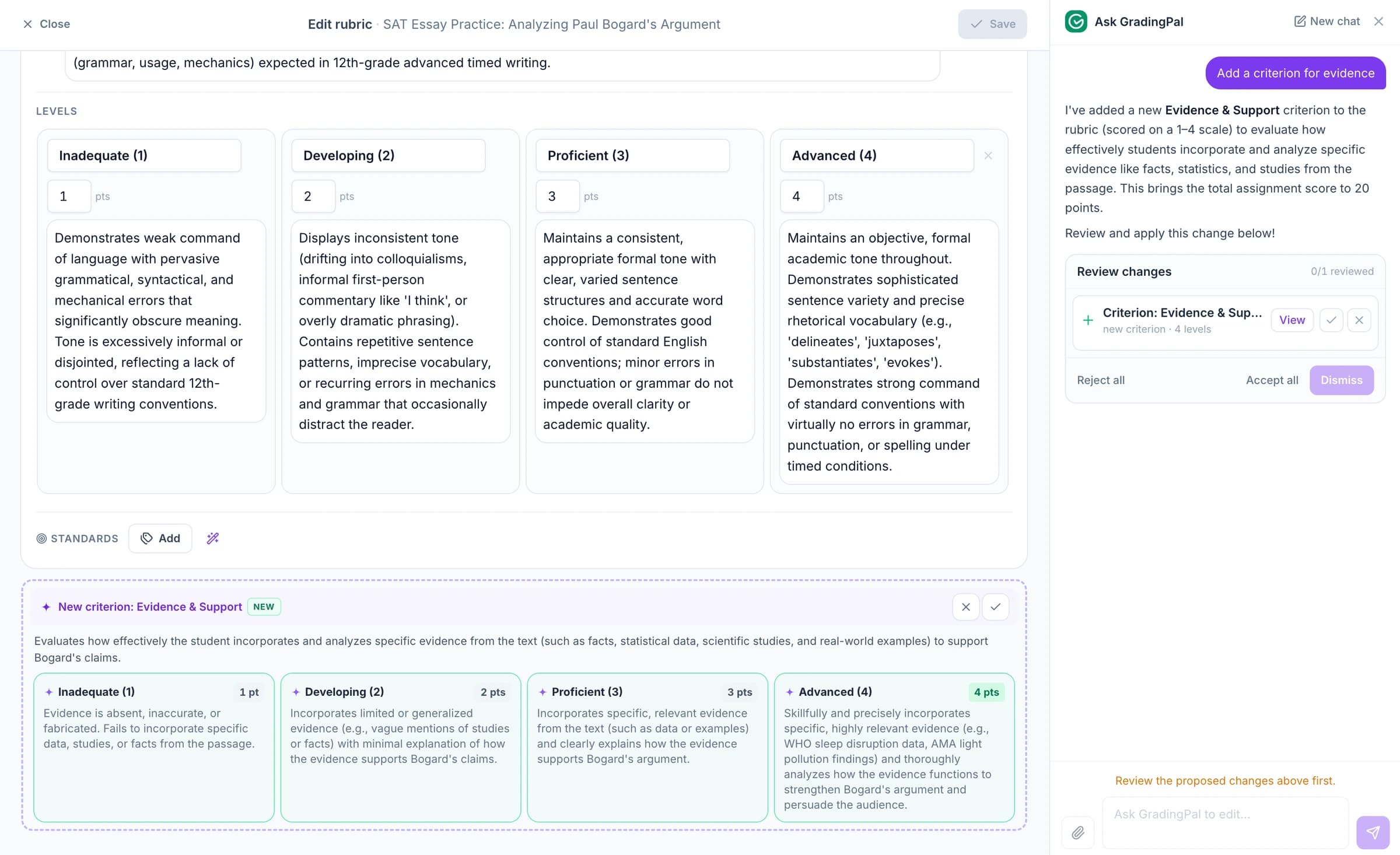
Ask the AI assistant to change scores, feedback, or rubrics
Ask the in-app AI assistant to change a score, edit the rubric, or revise feedback on a handwritten answer. Check the proposed edit against the original page before accepting it.
For a paper correction task, try: “Make this comment a short question the student can answer beside their original work.” GradingPal proposes revised feedback for you to review.
Check unclear handwriting against the original page
A faint exponent, crossed-out answer, or cropped line can change what a response means. Review the image and the interpretation where the evidence is unclear. Improve the scan, check the original paper, or adjust the assessment before approving it.
Use a clear view of the full page, with enough detail to read symbols and the student's working. Include the question or the information needed to interpret the response. No handwriting system reads every style and image perfectly; the teacher's review keeps uncertainty connected to the original evidence.
Protect the student work you upload
GradingPal is FERPA, COPPA, and GDPR compliant, with CASA Tier 2 verification. Student work is never used to train models. Review scores and student feedback before you choose what to share.

FERPA
Compliant
COPPA
Compliant

GDPR
Compliant
CASA
Tier 2 Verified
Questions about grading handwritten assignments
Can I upload one PDF containing several students' work?
Yes. Use the batch workflow and review the page groupings and student matches before grading. Check continuation pages and unclear names so each student's work is organized correctly.
Will it read every handwriting style perfectly?
No. Review the scan and interpretation, especially where handwriting or image quality makes a response uncertain. Use the original paper or a clearer image when a symbol or word affects the assessment.
Can handwritten maths receive partial credit?
Yes. Define the method and accuracy criteria in your rubric, then review the proposed credit against the working shown. Check unclear mathematical notation before approving the result.
Do students have to move to digital assignments?
No. Students can keep working on paper while teachers bring scans or photos into GradingPal. The assessment and feedback can then be reviewed and returned through the workflow you choose.
Does GradingPal only transcribe handwriting?
No. It also assesses the response against your rubric, proposes scores, and drafts feedback with explanations for teacher review. Handwriting recognition supports the grading workflow.
Can I grade handwritten essays and science work too?
Yes. Use readable scans or photos of essays, written explanations, calculations, and other supported responses. The assignment and rubric define what the work should demonstrate.
Can students keep their original paper after feedback is returned?
Yes. The workflow can support paper collection and a digital review without requiring students to replace their original work. Teachers can print or share the reviewed feedback using the supported delivery options.
Can handwritten results contribute to standards mastery?
Yes, when the relevant questions or criteria are aligned to learning standards. Approved evidence can contribute across assignments, just as with other supported submission formats. Check the alignment and assessment before approval.
Explore more of GradingPal
- ai grading
- research
- instant grading
- grading controls · grammar check
- Student feedback controls
- Rubric library
- Print and share feedback
- whats new
- Explore GradingPal features
- Free AI grading
- AI math grader
- AI science grader
- AI essay grader
- Teacher grading instructions
- Responsible AI
- Classroom analytics
- Standards mastery gradebook
- GradingPal for schools
Try GradingPal free on a handwritten assignment
Upload a readable response with the task and rubric. Check the handwriting against the assessment and preview the feedback you could return. Then explore the class-scan workflow when you are ready to bring in the full set.
Try handwritten grading free50 free submissions per month. Compare plans and included features.