AI grading for high schools. Rigorous assessment with time for feedback.
GradingPal grades essays, handwritten math, science responses, and exams against your course rubric. Review scores with supporting evidence, give students feedback they can act on, and identify the concepts that need more teaching. Bring the same connected approach to assessment across your school's departments.
50 free submissions per month, shared across assignment types.
Reduce the grading load without losing the detail students need
Across classes, extended responses and multi-step solutions create repeated scoring and feedback work. GradingPal produces an assessment teachers can inspect and connects that work to revision, targeted practice, and evidence of progress.
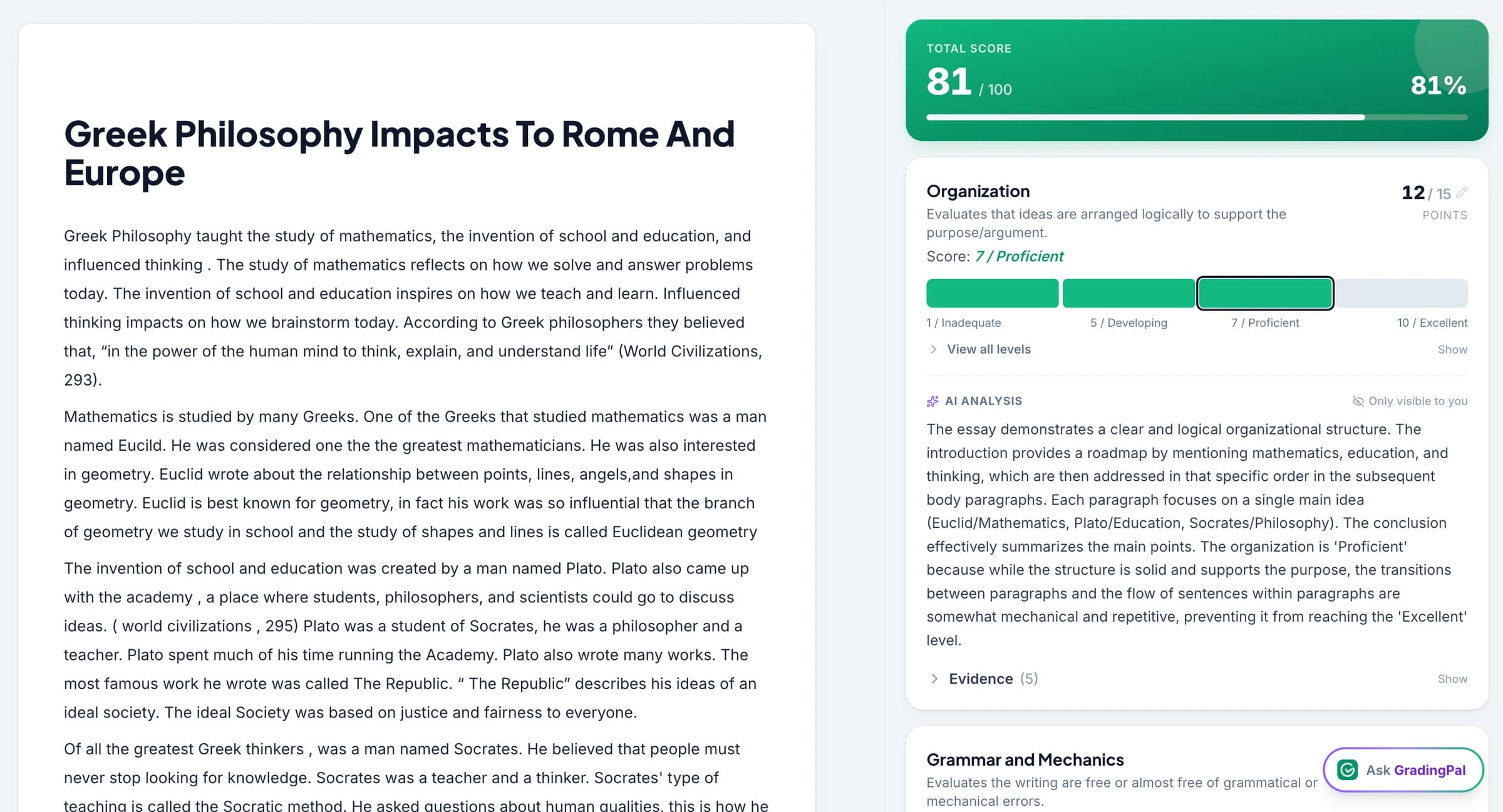
Review rubric scores with the evidence beside them
GradingPal applies the criteria to the submitted response and explains its proposed scores. Teachers can examine how a calculation, passage, or explanation meets the rubric and adjust the assessment before returning it.
Make specific feedback practical across the cohort
Draft comments tied to the student's actual work, shaped by the teacher's feedback preferences. Students receive a concrete action to take in a redraft, corrected solution, or further practice task.
Use completed assessments to plan the next lesson
Classroom insights identify recurring strengths and gaps in approved work. Departments can use shared criteria and examples to discuss what students need, while teachers use the evidence to plan the response in their own classes.
Grade math, science, writing, and exam responses
GradingPal's AI scoring covers supported work across subjects, including short answers, long answers, and readable handwriting. The rubric determines what earns credit and how the result is explained.

Algebra, geometry, and multi-step calculations
Assess mathematical methods, accuracy, and explanations with AI math grading. Specify partial-credit expectations in the rubric, then review the working behind a score rather than checking only the final answer.
AI math grading
Biology, chemistry, and physics
Grade scientific explanations, lab reports, data responses, and calculations. Assess the use of evidence and the reasoning behind a conclusion against the task criteria.
Explore AI science grading
English, history, and research writing
Assess argument, textual or source evidence, analysis, and organization using the course rubric. Feedback can identify a weak inference or an unsupported claim and explain what would strengthen it.
Explore essay grading
Tests, practice exams, and presentations
Review question-level assessment for tests and practice papers, or use the relevant workflow for slides and recorded responses. Exam grading and presentation grading preserve the criteria appropriate to each task.
Exam gradingSee how GradingPal scores an assignment you recognize
The clearest demonstration is familiar work beside a rubric assessment. Open the response, inspect why a score was selected, and see how a teacher can revise feedback or scoring before approval. Watch the walkthrough.
What high-school teachers say about feedback
“GradingPal individualizes feedback specific to each student and gives steps to improve their performance. I also love the ability to change the tone of feedback for different assignment types. The team is incredibly helpful and responsive too.”
 Michelle DouglassGrades 11–12 · Research & Anatomy/Physiology · Central Virginia Governor’s School, Lynchburg VA
“GradingPal has been incredible in helping me grade quicker and get better at feedback. The rubric creator creates great feedback without much change by me, and I’m able to get my students’ work back to them faster with actionable feedback.”
 William Pollard9th Grade · Earth & Space Science · NYC Dept. of Education District 15, Brooklyn NY
Connect assessment to your school's LMS
Google Classroom is available now. Canvas and Schoology are available on a school plan. Teachers can also upload supported digital files or scans of handwritten assignments, keeping paper practice and digital assessment in the same routine. Explore integrations and handwritten grading.



Protect student data and retain assessment control
Student work is not used to train AI models. Teachers retain control over scores, feedback, and when results are shared. Schools can review the published security information and discuss the documentation needed for adoption. Read the security overview.

FERPA
Compliant

COPPA
Compliant

GDPR
Compliant
CASA
Tier 2 Verified
Explain partial credit and rubric decisions with the student's work
A correct method with a calculation error may deserve different credit from an unsupported answer. Put that distinction in your rubric. GradingPal assigns scores against those criteria and provides the evidence and reasoning for teacher review.
The same principle applies to writing: a relevant quotation and a well-supported interpretation are different achievements. Inspect how each criterion was applied and use the explanation in a feedback conversation. Explore rubric-based grading and the rubric library.
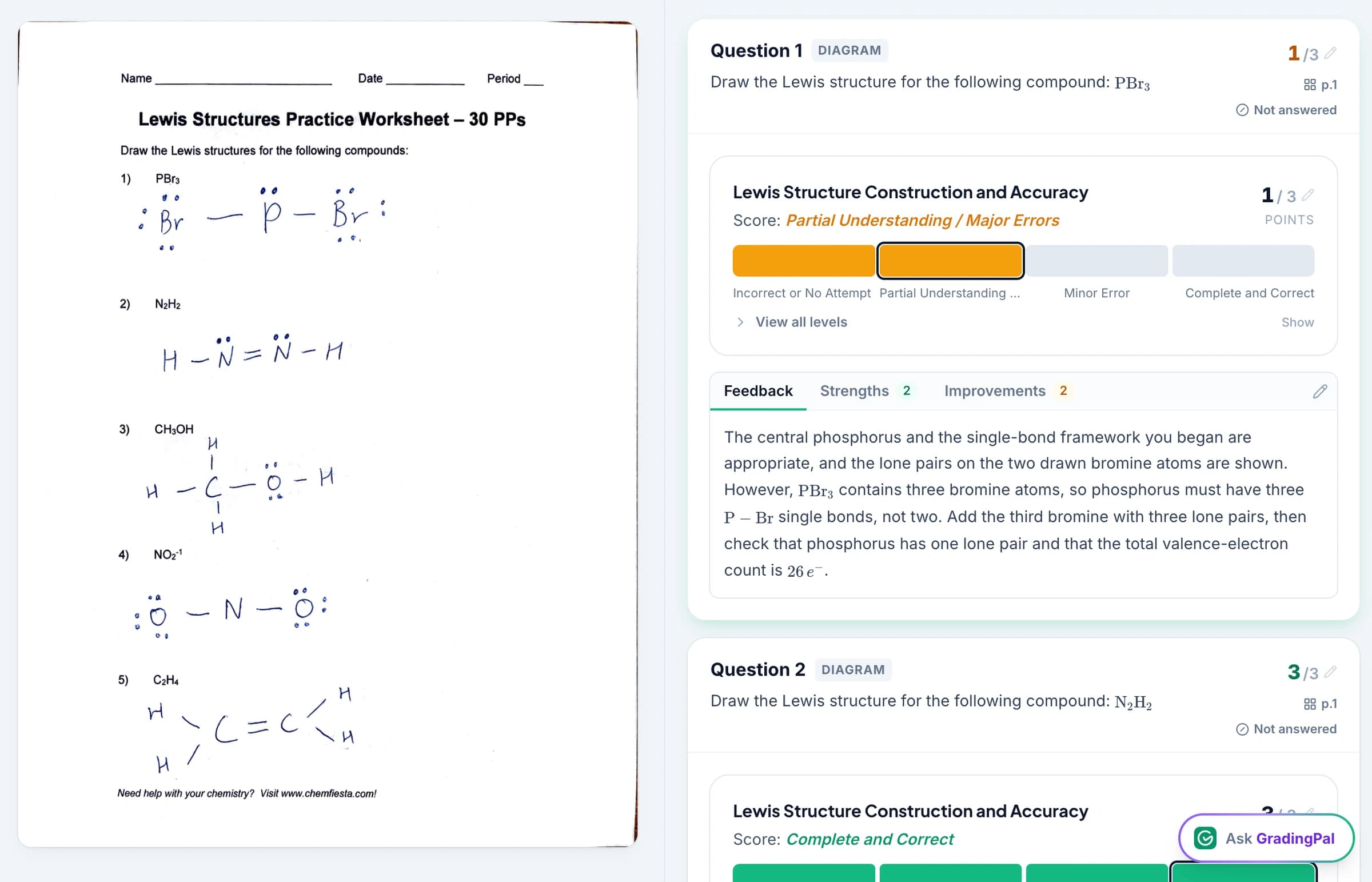
Give students feedback that directs revision and practice
Choose the feedback style, length, language, and instructions for the course. Ask for disciplinary vocabulary, a clear explanation of a gap, and the next step the student should take. Review the result so that it fits what you have taught and what the task requires.
An illustrative instruction for science feedback: “Identify the missing link between the data and the conclusion. Ask the student to explain that link using a result from their own work.” For math, a useful next step may be to correct a particular operation and then complete a similar problem. Explore student feedback.
Return comments digitally, print them, or schedule release. Teachers can hide the displayed grade when feedback should guide the first revision activity. See sharing options.

Identify which questions and concepts need reteaching
With performance analytics, inspect question results, recurring strengths and weaknesses, and the responses behind those patterns. GradingPal suggests teaching activities related to the gaps it identifies. Teachers decide whether to revisit a concept with the class or set focused practice for a smaller group.
For example, if students select the correct equation but struggle to explain the relationship it describes, use that gap to plan another explanation. Inspect that pattern, model an explanation, and follow with a fresh response task. Classroom analytics helps turn the completed assessment into a specific teaching decision. Access depends on the paid plan.

Track standards and course goals across assignments
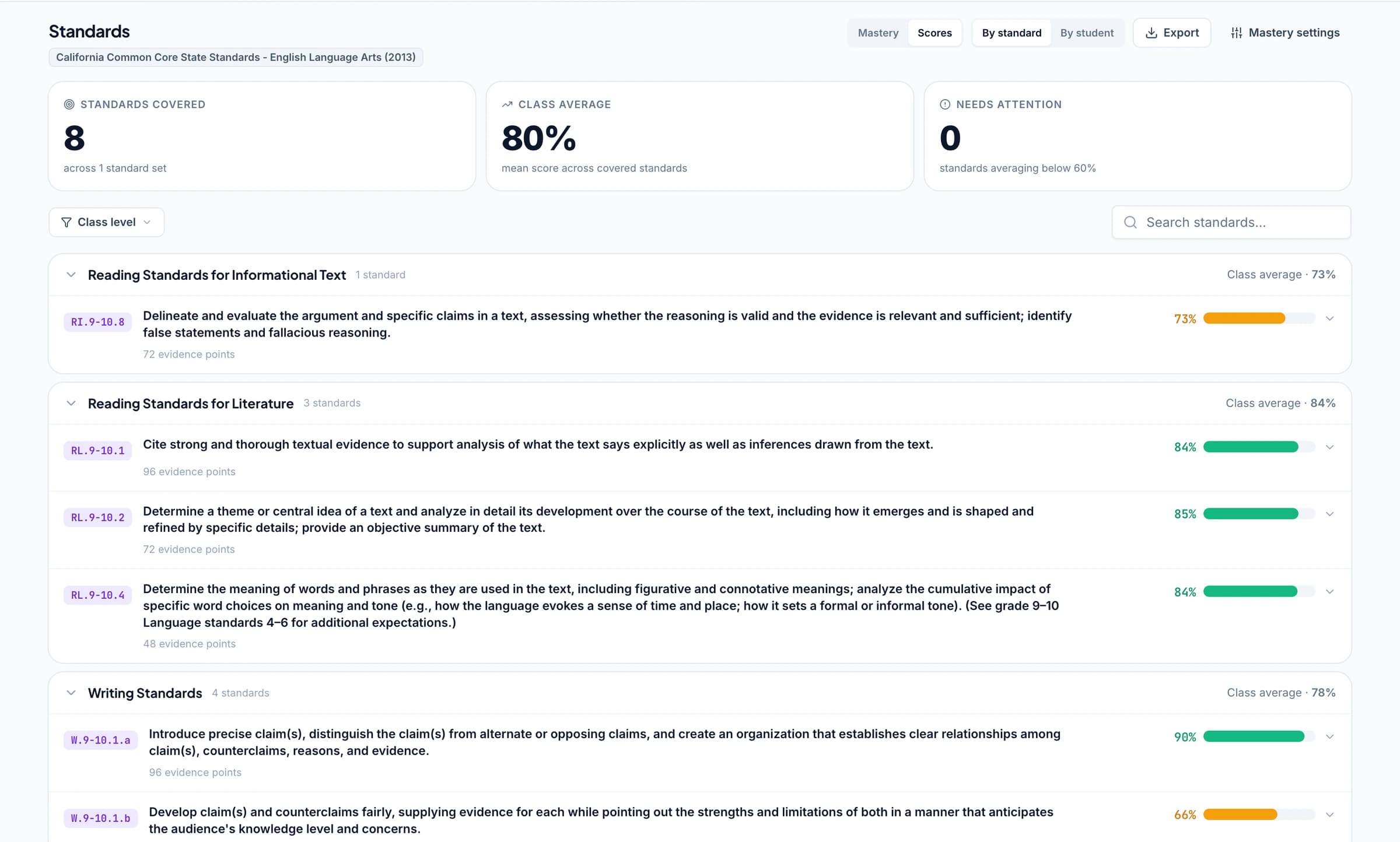
Align the relevant questions or rubric criteria and let approved assessment evidence update the standards mastery gradebook. Follow later demonstrations of the same skill and inspect the work behind the result. Teachers select the calculation rules and evidence thresholds that fit their approach.
For U.S. courses, supported frameworks include Common Core, NGSS, TEKS, and other standards across all 50 states and Washington, D.C. Choose the appropriate subject and course resources, including relevant California CAASPP classroom assessment, Florida B.E.S.T./FAST practice, and New York Regents/NGLS course contexts.
For advanced coursework, use relevant Advanced Placement (AP) practice criteria or International Baccalaureate (IB) classroom resources. Schools teaching GCSE, IGCSE, or A-level courses can explore the exam-board practice page. GradingPal supports teacher-reviewed classroom assessment; official examination grades and moderation follow the relevant awarding body's process.
Reuse department criteria and refine assessments with the AI assistant
School plans include shared assignment and rubric resources, so teachers can build on departmental work. Agree on expectations, examine a set of responses, and adapt the rubric for the course. Common criteria give teachers something concrete to discuss when their judgments differ.
Ask GradingPal to propose a rubric, score, or feedback edit within the assessment workflow. A request might clarify an instruction about showing units or shorten a comment for a focused redraft. Teachers inspect and accept the proposed change. Explore the AI assistant.
Evaluate school adoption across the subjects you teach
Bring a familiar quantitative assignment and an extended written response to a school evaluation. Check the scoring evidence, the usefulness of feedback, and the teaching action suggested by classroom patterns. Discuss shared resources, LMS setup, training, and plan access for your departments. See GradingPal for schools.
Questions about AI grading for high schools
Can I use a department rubric?
Yes. Bring the department criteria and add assignment instructions. GradingPal applies that rubric to submitted work, proposes scores and feedback, and lets teachers inspect the evidence and revise the assessment before approving it.
Can it help with mocks and practice exams?
Yes. Use question-level assessment against your teacher or department criteria to review practice papers and give focused revision feedback. GradingPal does not replace official examination marking or award official qualifications.
Can I explain a proposed score to a student?
Yes. Inspect the criterion-level reasoning and relevant work, make any necessary changes, and share the feedback you approve. That gives the conversation a connection to the actual response and assessment criteria.
How does assessment fit alongside our school's academic-integrity process?
GradingPal assesses submitted work against a rubric; it does not determine whether a response was AI-written. When authorship needs investigation, use your school's academic-integrity process. See Responsible AI for the assessment and review approach.
Does GradingPal assign scores for math and science?
Yes. It grades supported calculations, readable handwritten working, scientific explanations, and other subject responses against the rubric. Teachers can inspect the method and evidence behind scores, including partial credit specified by the criteria.
Can I use AP, IB, and state-aligned criteria?
Yes. Select the available resources appropriate to the course and adapt them for classroom assessment. Use relevant AP or IB practice criteria and supported state standards such as Common Core, NGSS, and TEKS. Inspect alignment rather than assuming a label fits every task.
Can students receive feedback before their grades?
Yes. Teachers can share comments without displaying a grade. Print, share digitally, or schedule delivery according to how you want students to use the feedback in revision and practice.
Can the school use Canvas or Schoology?
Yes. Canvas and Schoology are available on a school plan; Google Classroom is available now. Discuss the supported workflow, setup, and access your departments need with our team.
Can we evaluate classroom insights as well as grading?
Yes. A school evaluation can include the analytics and mastery workflows relevant to your teaching. Analytics is a paid feature; confirm the appropriate access when arranging the evaluation. Individual teachers can begin grading within the free plan allowance.
Give your departments more time for feedback and better evidence for teaching
Start with a familiar course assignment. See how GradingPal connects rubric-based grading, individual feedback, and the next teaching decision.