AI art grader for coursework, artist statements, and project reflections
GradingPal generates rubric-based scores and individual feedback from submitted artwork images, artist statements, process documentation, and reflections. Spend less time writing coursework comments and more time helping students develop their ideas. Review the scores and add your knowledge of the student and the original work before sharing.
50 free submissions per month, shared across assignment types.
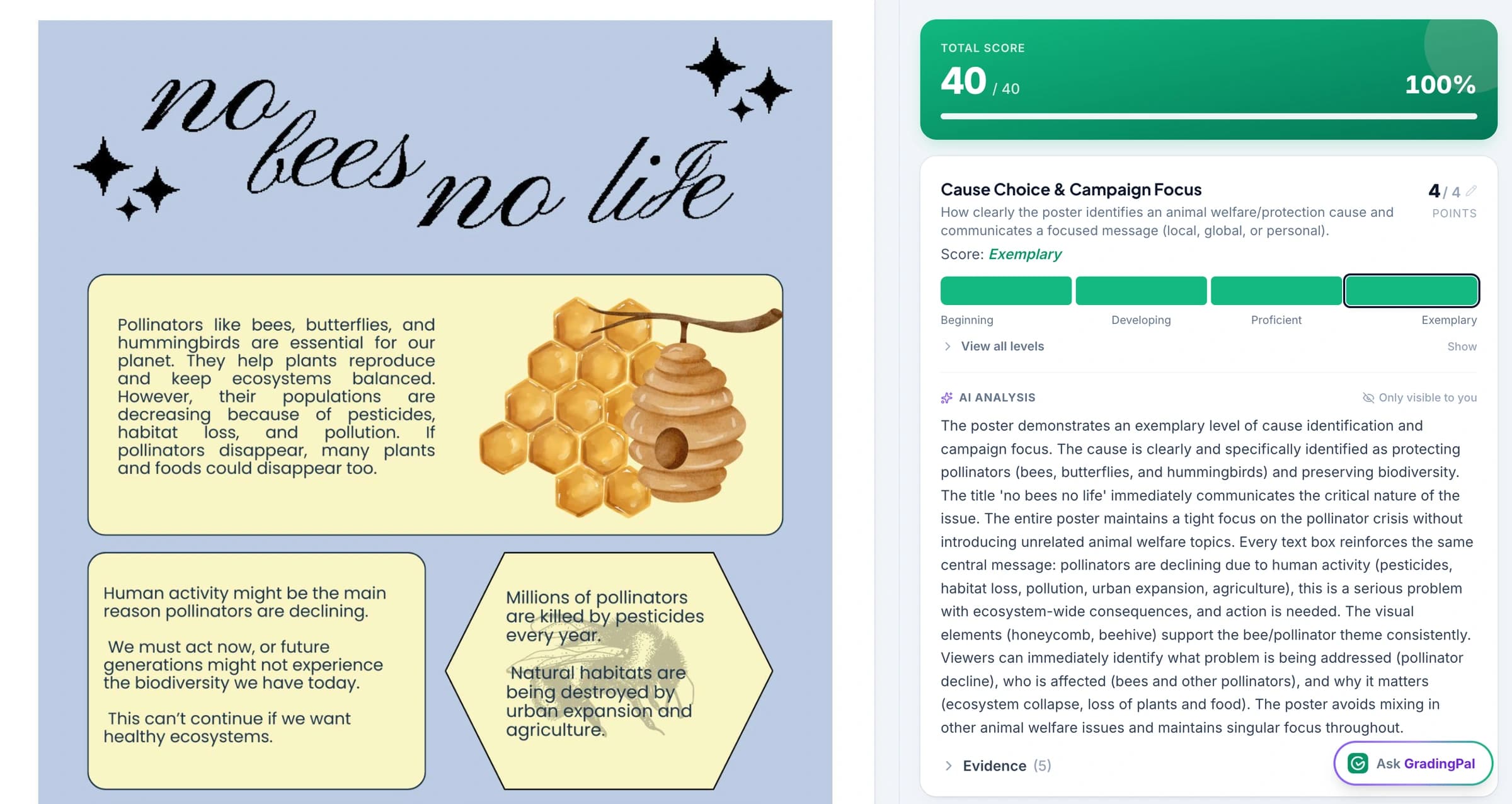
Spend less time grading coursework and writing individual comments
GradingPal scores the submitted coursework against your rubric and drafts feedback for each student. Assess written reflections, artist statements, process documentation, and relevant visible features in images of the work.
Review the score explanations and comments, then add the context you know from teaching the student and seeing the original piece. Spend the feedback conversation discussing their choices and next steps, with the written assessment already drafted.
Use your rubric to assess research, experimentation, and reflection
Bring the rubric your course uses. Define what students should demonstrate through their research, experimentation, development, communication, reflection, or other assessed criteria. GradingPal generates rubric-based scores and feedback against those expectations, helping you explain the evidence behind a result.
If the assignment rewards experimentation or thoughtful evaluation of an unsuccessful attempt, make that explicit. A polished final image and a well-documented process are different kinds of evidence; the rubric determines how each contributes to the assessment.
Teachers can use shared department resources or adapt a rubric-library starting point where it fits. For AP or IB coursework practice, use the criteria relevant to the classroom task and the resources available to your course. A classroom assessment is not an official portfolio score.
See the submitted work and reflection behind each score
GradingPal assesses relevant visible features against your rubric alongside submitted written evidence. Inspect the image, artist statement, or process record behind a score and add context from the original work where needed.
Useful feedback is: “You explain the intention behind the repeated angular forms. Choose one area of the work and evaluate how the arrangement creates tension. What alternative arrangement could you test?” The student has a concrete question to investigate while retaining the creative decision.
A photograph cannot fully convey physical scale, texture, or the experience of the original. Use your direct observation for criteria that depend on those qualities.
See GradingPal in action
Watch the GradingPal product demo to see rubric-based grading, feedback controls, classroom insights, and standards mastery.
What teachers say about GradingPal
“GradingPal individualizes feedback specific to each student and gives steps to improve their performance. I also love the ability to change the tone of feedback for different assignment types. The team is incredibly helpful and responsive too.”
 Michelle DouglassGrades 11–12 · Research & Anatomy/Physiology · Central Virginia Governor’s School, Lynchburg VA
“GradingPal helps me optimize my time by streamlining the grading process. What I like most is the feedback students receive — it is specific and it is something they can act on.”
 Adriana Barrios RodriguezCollege · Health Sciences & Teacher Education · Universidad Autónoma de Sinaloa, Mexico
Assess artwork images, artist statements, and process documentation
Artist statements
Assess how clearly the student explains choices and relates them to the task, using the writing and reflection criteria you set.
Sketchbook and process documentation
Review the submitted account of research, experimentation, and development. Check what the evidence actually demonstrates about the process.
Photographs of finished work
Assess visible features against relevant criteria and supplement the image with your observation of the physical piece where needed.
Project reflections
Help students evaluate decisions, explain what they learned, and identify a useful direction for future work.
Connect GradingPal to Google Classroom, Canvas, and Schoology
Import classes, assignments, rubrics, and student submissions from Google Classroom. Return approved feedback with or without grades. Canvas and Schoology are available on the school plan. You can also upload files directly or import them from Google Drive.



Give students specific suggestions for their next experiment or revision
Set the feedback style, length, language, and instructions so GradingPal's comments fit your course and the kind of creative guidance you give. The next step might ask a student to compare alternatives, explain an influence, test a composition, or evaluate a decision.
For the angular-forms reflection, the student could test two arrangements and explain which better serves the intention. GradingPal prepares the individualized written guidance; you use the discussion and the work itself to help the student decide where to go next.

Identify skills to teach in the next studio lesson
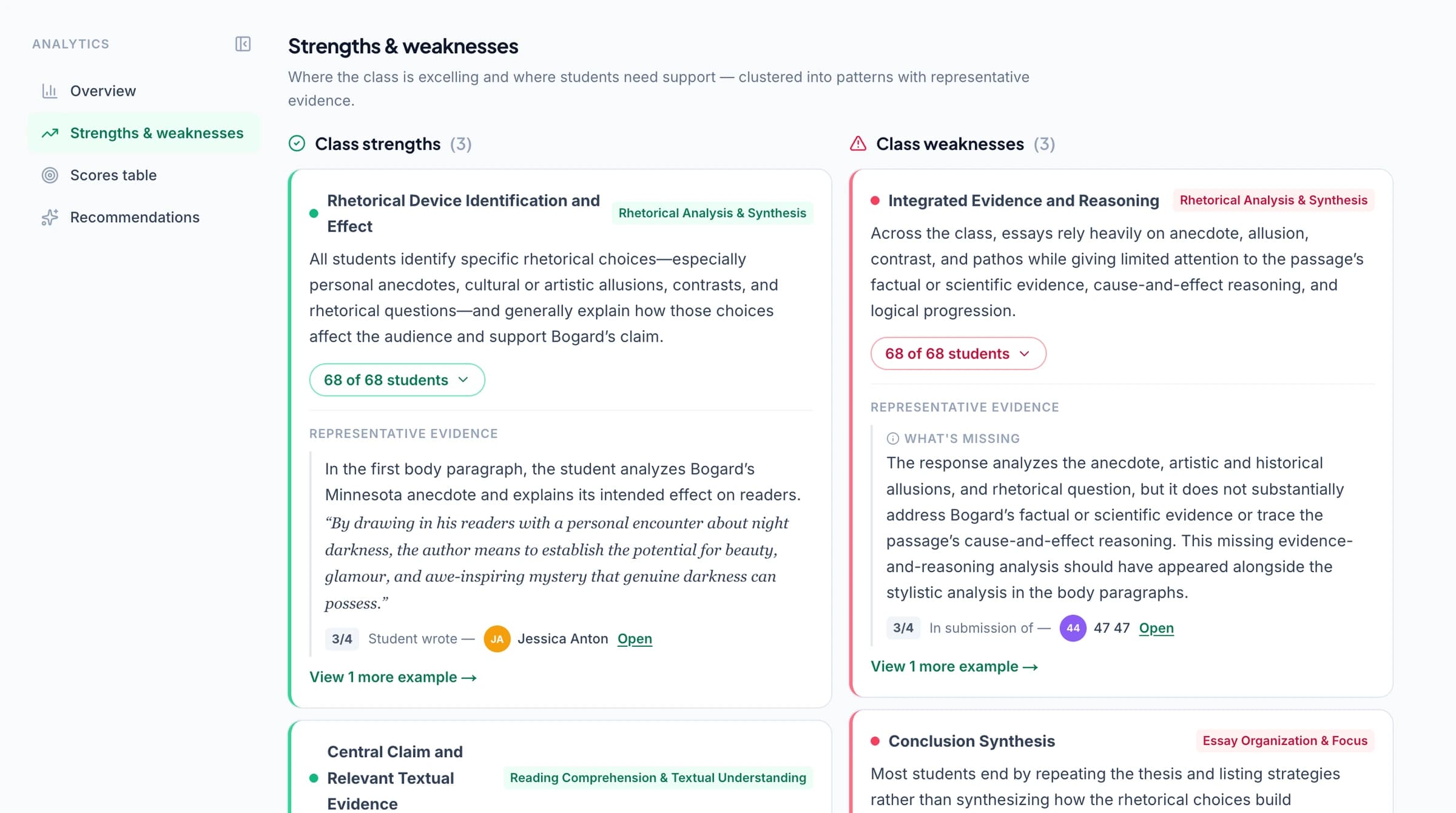
GradingPal's classroom analytics show common strengths and weaknesses in graded coursework and suggest teaching activities. Review the submitted work alongside your studio observations to decide which skills need a workshop, class discussion, or individual conversation.
Explore classroom analytics. Performance analytics is available on eligible plans; compare plans.
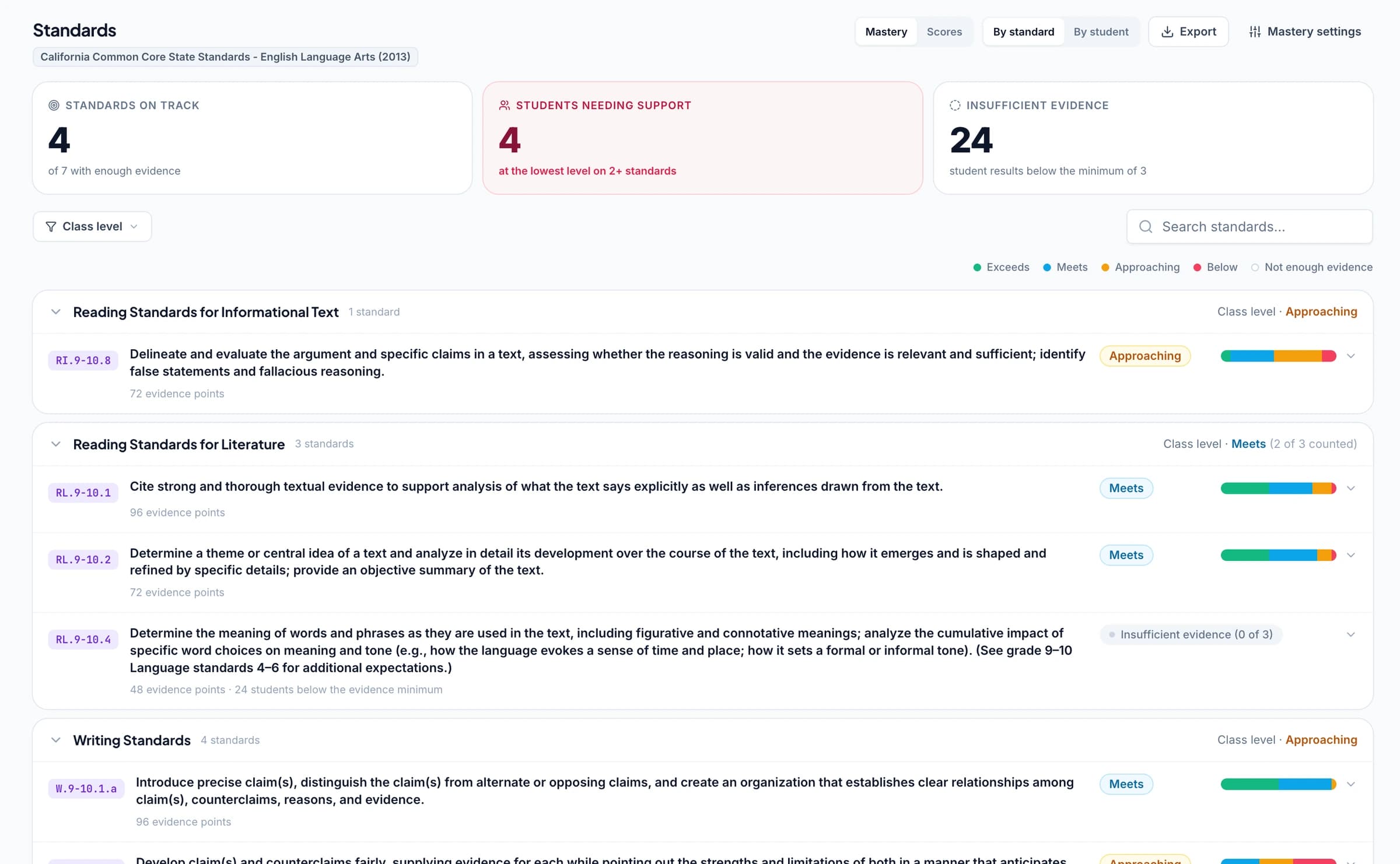
Track progress across coursework and supported learning standards
Connect coursework criteria to supported learning standards where they match your course. Approved grades then update each student's progress in the standards mastery gradebook using your chosen calculation rules. Open the graded work to discuss progress across assignments. Keep other creative criteria in your own rubric when no suitable standard applies.
AP and IB coursework resources can inform appropriate classroom practice; they do not turn GradingPal's assessment into an official portfolio score.
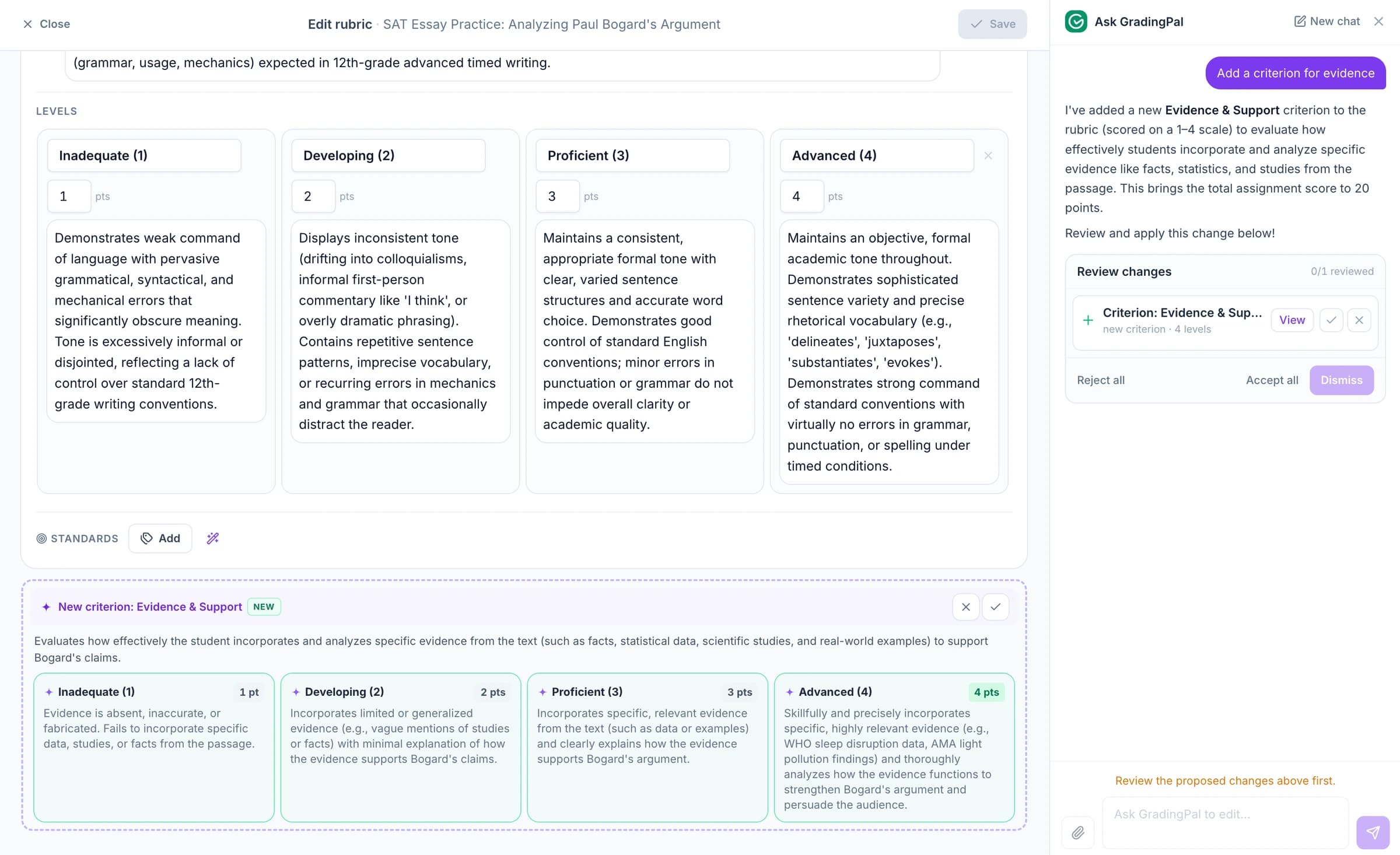
Ask the AI assistant to change coursework scores, feedback, or rubrics
Ask the in-app AI assistant to change a coursework score, edit your rubric, or revise a feedback comment. Review and accept the proposed change when it fits your judgment of the work.
For example: “Turn this next step into a question about the student's choices.” GradingPal proposes new wording that you can adapt for the feedback conversation.
Keep the final judgment on artistic quality and physical work
Inspect the suggested scores, add the context that a submission cannot show, and decide what feedback to share. GradingPal supports the assessment against your rubric; your judgment about artistic merit, intention, and the physical work remains part of the process.
GradingPal is FERPA, COPPA, and GDPR compliant, with CASA Tier 2 verification. Student work is never used to train models. Review scores and student feedback before you choose what to share.

FERPA
Compliant

COPPA
Compliant

GDPR
Compliant
CASA
Tier 2 Verified
Questions about AI art coursework grading
Can I use my own art rubric?
Yes. Provide the criteria for the coursework and review how GradingPal applies them. You can define expectations for the submitted work, written explanation, process evidence, and reflection.
Can it assess a photograph of the work?
It can support assessment of features visible in the submitted image against your criteria. Use clear views and review the image's limits. Physical qualities such as scale or texture may need direct teacher observation.
Does it decide artistic merit for me?
You make that judgment. GradingPal helps review submitted evidence against the rubric and draft feedback; it does not replace your understanding of the work, student, or course.
Can it assess a deliberate departure from the brief?
That needs context. Review the student's explanation and the work against the assignment's expectations. An image alone does not establish why a student made a particular decision.
Can I assess artist statements and reflections?
Yes. Use criteria that explain what the writing should demonstrate, such as the relationship between choices and intention or the student's evaluation of their process. Review the proposed assessment and comments before sharing.
Can the rubric reward experimentation?
Yes. Make the expectation explicit, including what evidence of experimentation students should submit. Assess the documented choices and reflection rather than assuming the finish of the final piece tells the whole story.
Can feedback help students improve their next project?
Yes. Teachers can turn the drafted feedback into a clear next task: explain a decision, test an alternative, document evidence, or evaluate an approach. You decide what guidance fits the student's creative development.
Can I track progress against course learning goals?
Where the relevant criteria are aligned to supported learning standards, approved evidence can contribute to mastery tracking. Use the actual goals for your course and review the work behind the result; do not assume every art rubric is automatically aligned.
Try GradingPal free on your next coursework submission
Bring submitted work, the relevant written context, and your rubric. Review the score explanations and the feedback it drafts. Use your knowledge of the student and the original piece to shape the next creative discussion.
Try art coursework grading free50 free submissions per month. Compare plans and included features.