AI marking for UK schools. Less marking, more useful feedback.
GradingPal marks maths, science, writing, and other submitted work against your rubric. Teachers review scores with supporting evidence, give pupils actionable feedback in UK English, and use assessment insights to plan what to teach next. Bring the same practical benefits to your department or school.
50 free submissions per month, shared across assignment types.
Give teachers more time to respond to what pupils need
Marking a class set involves applying criteria, writing individual comments, and working out what the results mean for the next lesson. GradingPal connects those parts of assessment so the work produces useful guidance for pupils and evidence for teachers.
Reduce repeated marking and comment writing
GradingPal assesses supported responses against your criteria and explains the proposed marks. Teachers inspect the work and refine the assessment, reducing the repeated effort of scoring and drafting every comment.
Make individual feedback practical across the class
Give pupils specific guidance on their response, using the terminology and tone of your teaching. A next step can ask for a clearer explanation, a corrected calculation, or stronger evidence in a redraft.
Use the results to focus further teaching
Classroom analytics identifies recurring strengths and gaps in approved work and suggests teaching activities. Teachers open the responses behind the pattern and decide which explanation or practice should come next.
Mark maths, science, writing, and practice papers
GradingPal assigns rubric-based marks and feedback across supported subjects and formats. It reads the working and explanation in the submitted response, so assessment can address how pupils reached an answer as well as the answer itself.

Maths calculations and problem-solving
Assess readable handwritten methods, calculations, and mathematical explanations. Set out the partial credit your rubric allows and inspect the reasoning behind the proposed mark.
Explore AI maths grading
Biology, chemistry, and physics responses
Assess scientific explanations, investigation reports, calculations, and data interpretation against the task criteria. Use feedback to show where the evidence or reasoning needs development.
Explore science grading
English and humanities writing
Assess argument, analysis, source evidence, structure, and the other criteria your department uses. Return feedback that identifies a concrete change to the pupil's own response.
Explore essay assessment
Worksheets, mock papers, and recorded presentations
Use question-level assessment for short answers and practice papers, and the appropriate workflow for slides or recorded explanations. Explore exam marking, worksheets, and oral assessment.
Explore exam markingSee a marked response beside its rubric evidence
Open the question or piece of coursework, inspect the proposed marks, and read the explanation for each criterion. Teachers can adjust the score and comments before approving the assessment. See GradingPal in action.
Keep paper work and connect your school's LMS
Pupils can continue writing in books or on paper. Upload supported scans or photographs and check page order, readability, and student matching before reviewing the assessment. Keep the format that suits the lesson and use GradingPal to bring the submitted work into a reviewable marking process. See handwritten marking.
Google Classroom is available now. Canvas and Schoology are available on a school plan. Discuss the supported workflow for your platform with our team, or evaluate familiar work through direct upload. Explore integrations.



Review student-data protection as part of school adoption
Student work is not used to train AI models. Teachers review marks and comments and control when feedback is returned. Schools can inspect the published security information, privacy documentation, and data-processing terms as part of their own approval process. Review security and the EU/UK privacy information.

GDPR
Compliant
CASA
Tier 2 Verified

FERPA
Compliant

COPPA
Compliant
Apply the criteria your department has agreed
Bring the rubric and point allocations for your classroom task. GradingPal applies those criteria and shows the evidence behind proposed marks. Teachers can examine a borderline response, adjust the judgment, and explain the result using the pupil's actual work.
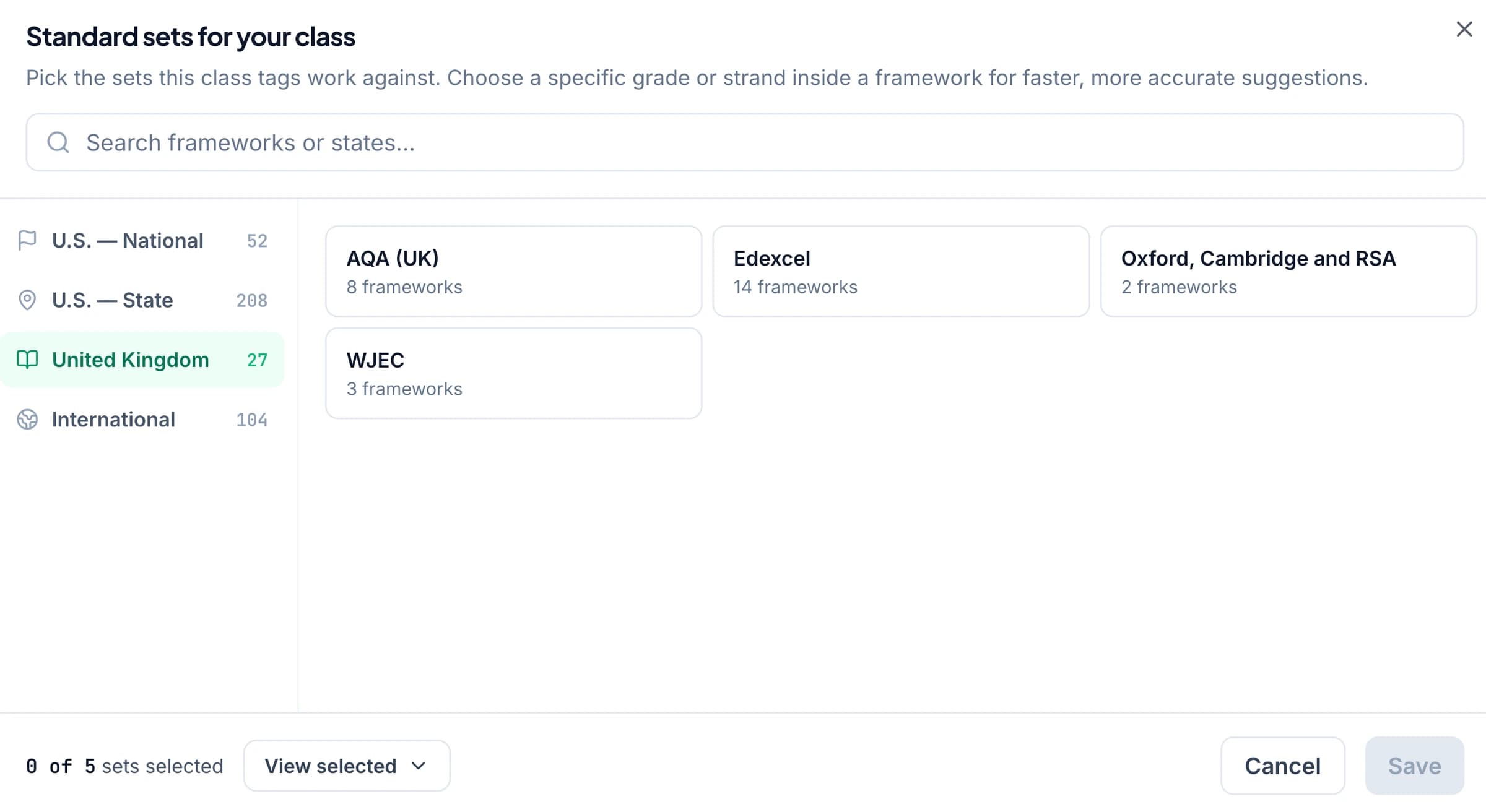
For GCSE, IGCSE, and A-level practice, select relevant available resources and check the qualification, subject, and syllabus version. Supported course contexts include Cambridge International, AQA, Pearson Edexcel, OCR, and WJEC. Explore exam-board practice.
Use these resources for classroom marking and revision feedback. Official examination results and moderation remain with the relevant awarding body and authorised processes. The named boards do not endorse GradingPal.
Write feedback in UK English and your teaching voice
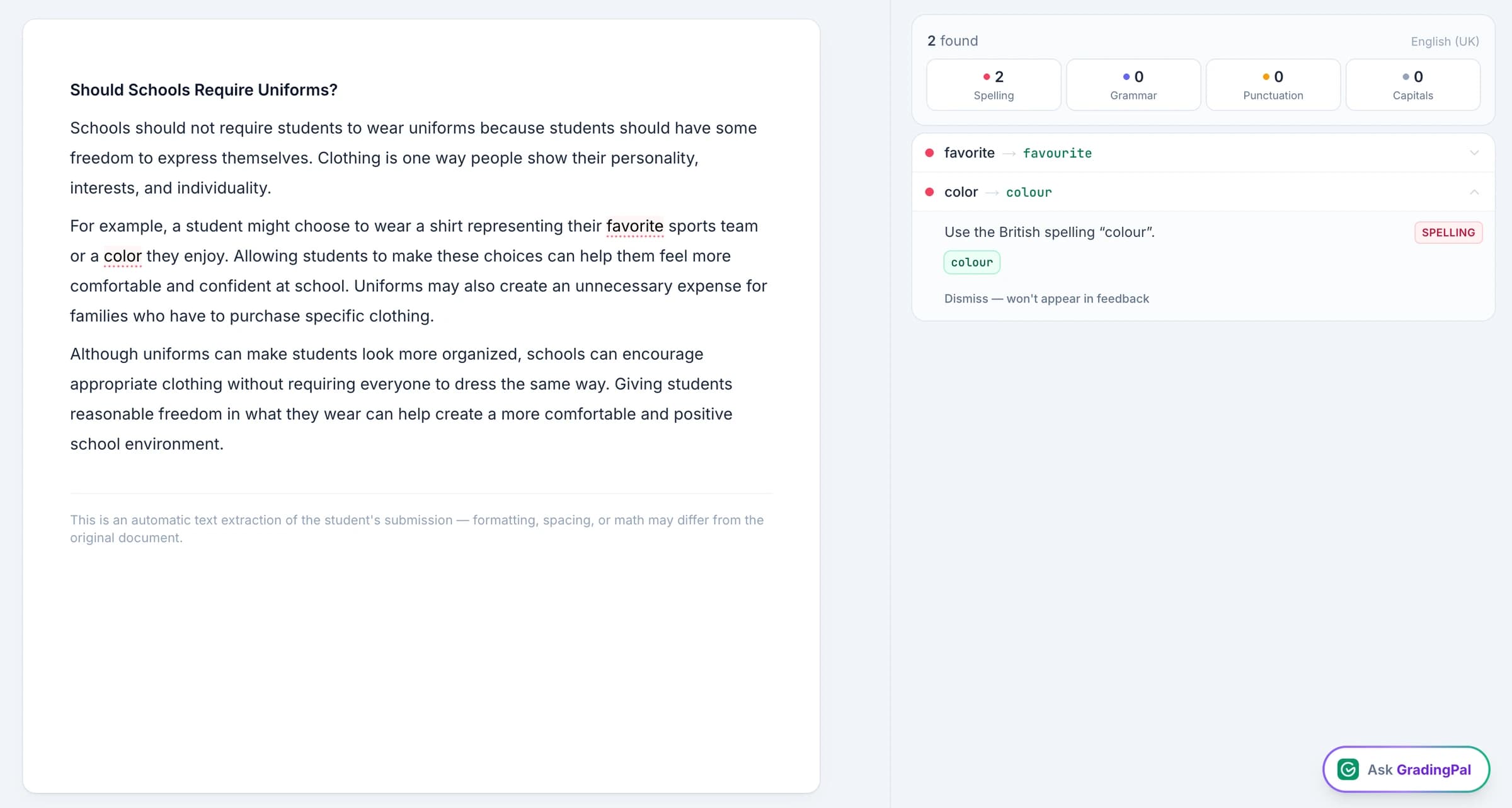
Choose UK English for student feedback, set the style and length, and add the terminology you use in lessons. GradingPal drafts comments tied to the response and rubric; teachers check that the wording is appropriate before returning it. Explore language settings.
An illustrative instruction: “Use UK English and the terms from our department rubric. Identify the most useful improvement for the next draft and explain it in two short sentences.” For a younger pupil, the action may be one added detail; for advanced coursework, it may be a more developed evaluation. Explore student feedback.
Grammar suggestions remain distinct from the assignment score. Assess spelling and conventions where they are part of your criteria, without adding an unrelated deduction to a task focused on scientific or mathematical reasoning.
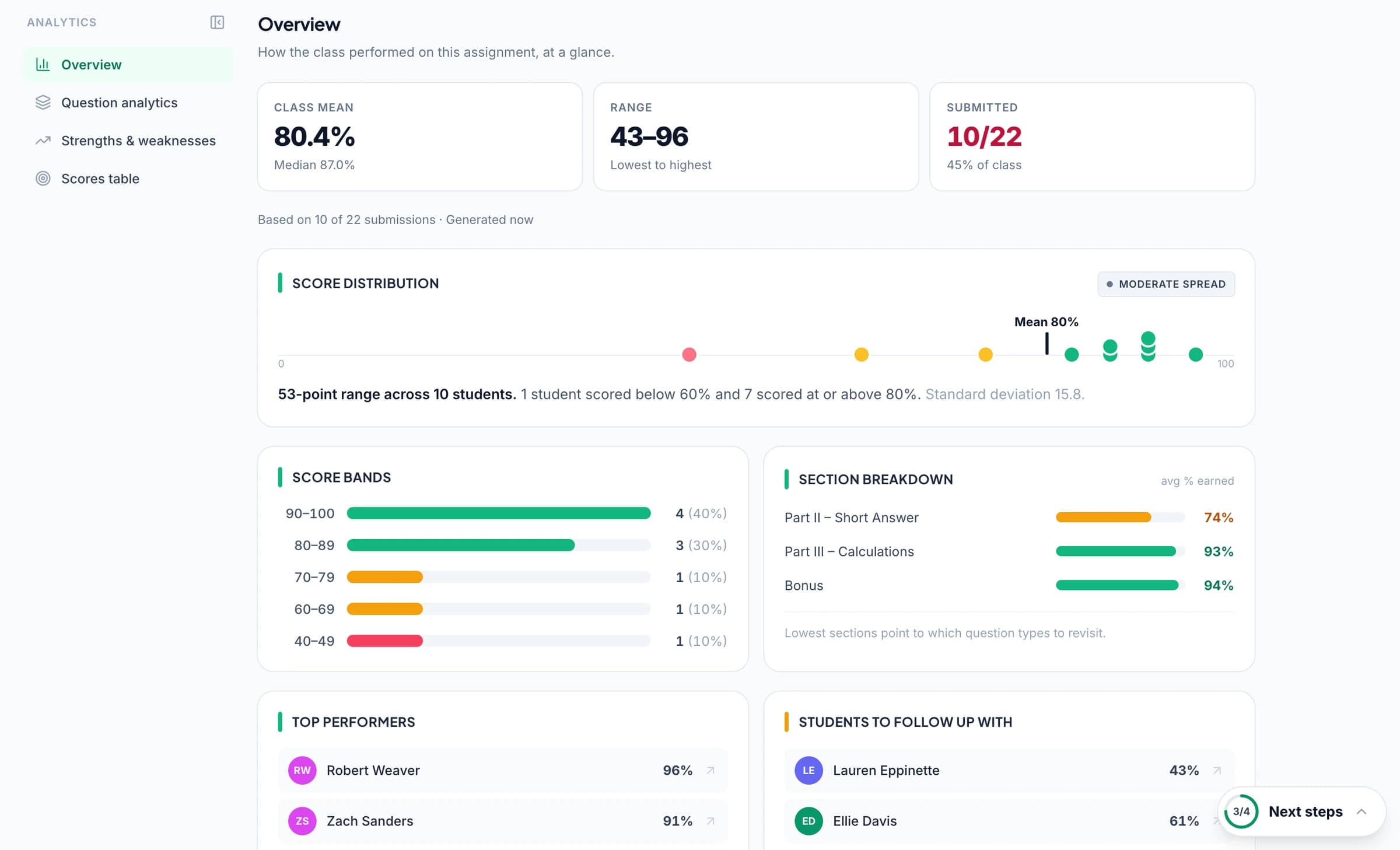
Know which concepts need reteaching before the next task
Performance analytics surfaces patterns in approved assessments, including question results, recurring strengths and weaknesses, and the pupils associated with a difficulty. Open the underlying responses and review suggested teaching activities before choosing the next lesson or targeted practice.
For example, if pupils know the relevant concept but lose credit because their explanation does not connect the evidence to the conclusion, use the pattern to focus revision teaching. Inspect that pattern, model an improved explanation, and ask pupils to apply the same reasoning to a fresh question. Classroom analytics supports the review; the teacher chooses the response. Analytics is available on paid plans with the feature.

Follow evidence of progress across classwork and later practice
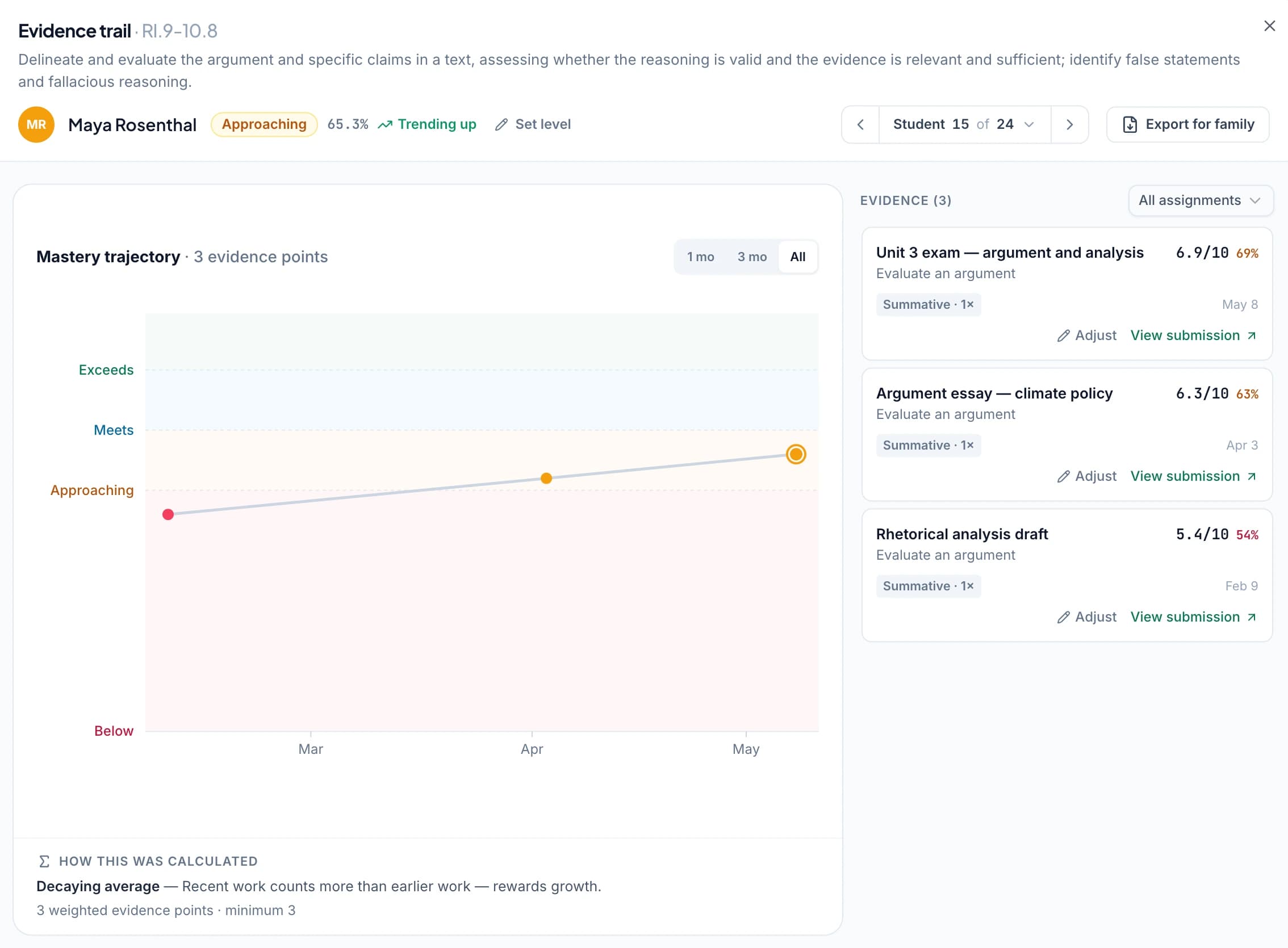
Use relevant supported standards or syllabus objectives when aligning rubric criteria or questions. Approved aligned assessments can contribute to the standards mastery gradebook, making it possible to inspect the evidence behind a result and follow later demonstrations of the same skill.
Choose the calculation rules and minimum evidence requirements that fit your assessment approach. The record supports discussions about further practice and progress; it does not convert classroom scores into official examination grades. Explore supported standards.
Return feedback when pupils can use it
Print individual feedback, share it digitally, or schedule delivery around your lesson. Teachers can hide the displayed grade when the first task should be to read the guidance and revise. Choose the method that fits your school's feedback routine. Explore feedback sharing.
Evaluate GradingPal with familiar work from your school
Choose a written response and a maths or science assignment that teachers know well. Check how GradingPal applies the criteria, whether the feedback gives pupils a useful next action, and what the assessment evidence adds to planning. Include the LMS workflow, shared resources, training, and approval requirements in your discussion with our team. Explore school plans.
Questions about AI marking for UK schools
Can I use UK English in feedback?
Yes. UK English is one of GradingPal's supported language and regional options. Select it for student feedback, then add instructions about the terminology, tone, and level of detail appropriate to your class.
Can I use department marking criteria for mock papers?
Yes. Provide the criteria and point allocations, then review the proposed marks question by question. GradingPal supports classroom practice and feedback; it does not award official examination grades or predict grade boundaries.
Can pupils continue using paper?
Yes. Teachers can upload supported scans or photographs and review the interpretation. Check readability and student matching before approving the marks and comments. Printed feedback can be returned alongside the original work.
Can our school evaluate GradingPal together?
Yes. Contact our team or book a demo to discuss the assessment workflow, shared resources, integration, training, and documentation your school needs. Use familiar assignments to review both teacher workload and the usefulness of the resulting feedback.
Does GradingPal mark maths and science as well as essays?
Yes. It generates rubric-based marks and feedback for supported handwritten methods, calculations, scientific explanations, lab reports, and written responses. Teachers inspect the evidence behind scores, including partial credit defined in the rubric.
Is the UK page only for GCSE and A-level teaching?
No. GradingPal supports primary classroom work, secondary assignments, and sixth-form coursework through its supported marking and feedback workflows. Use the criteria appropriate to the work. For any particular qualification or curriculum, inspect the available resources rather than assuming all courses use the same framework.
Which learning platforms can our school use?
Google Classroom is available now. Canvas and Schoology are available on a school plan. Discuss your platform's supported assignment workflow and setup needs with GradingPal during the school evaluation.
How can the results support further teaching?
Paid performance analytics identifies recurring strengths and weaknesses and offers suggested teaching activities from approved assessments. Teachers inspect the underlying work and choose what to reteach. Relevant approved evidence can also contribute to optional mastery tracking across later assignments.
Can a teacher try it before a school purchases a plan?
Yes. Start with supported work within the free plan's monthly allowance. An evaluation of paid analytics, shared resources, or school-plan integrations should include the relevant plan access.
Learn more on the blog
Bring more useful marking and feedback to your school
See how GradingPal applies your criteria, gives pupils a clear next step, and turns assessment evidence into focused teaching.