AI grading for Florida's B.E.S.T.-aligned classroom work
GradingPal assesses writing, math, and other supported responses against your rubric. Connect relevant criteria to B.E.S.T. benchmarks, return specific feedback, and build a record of approved classroom evidence that helps you decide what students need next.
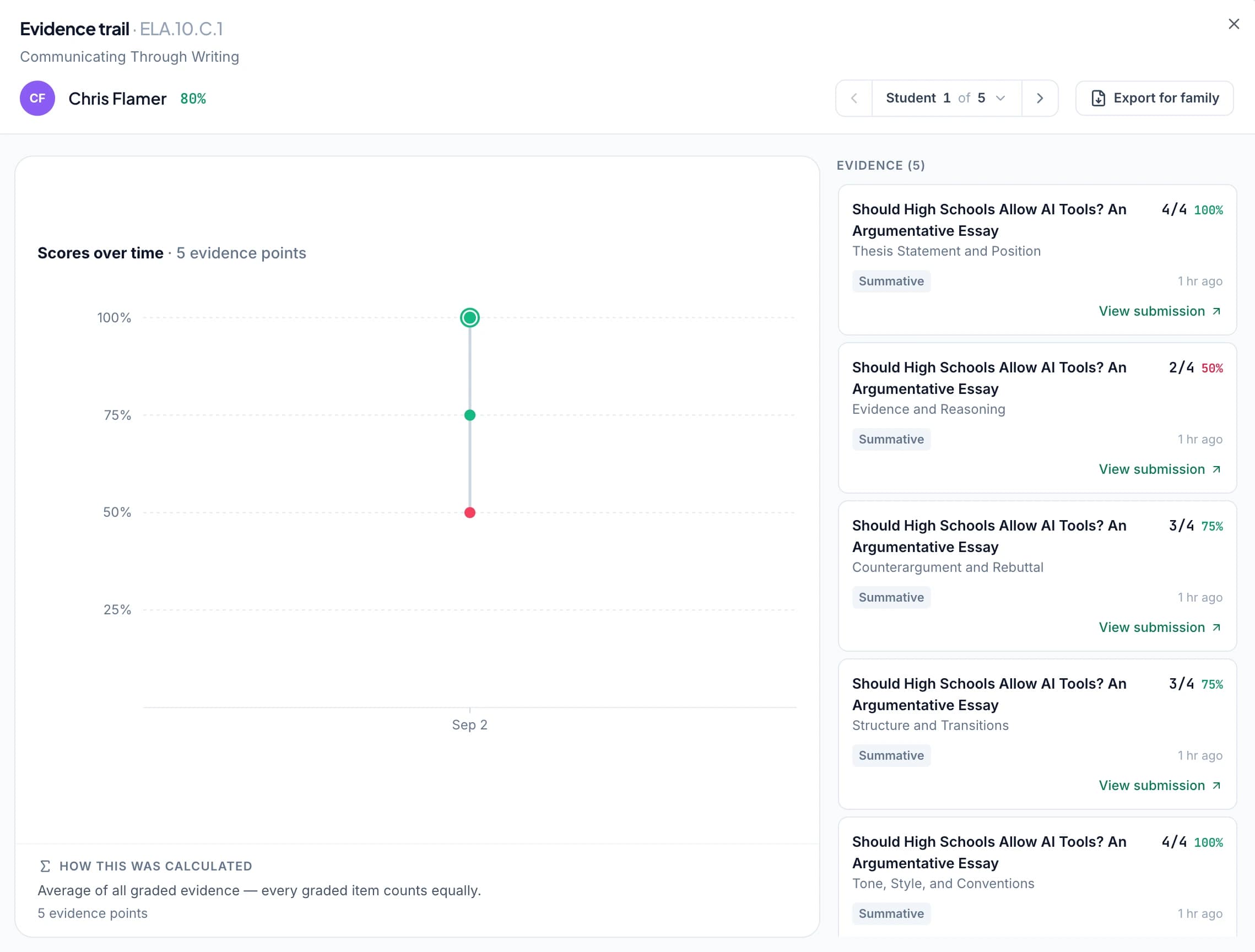
Make everyday assignments easier to learn from
Formal checkpoints provide one view of student progress. The responses and practice tasks you collect between them give you more opportunities to see how students explain, calculate, and use evidence.
GradingPal generates scores and individualized comments from those submissions. Review the assessment, refine the feedback, and use the work to plan a correction or further demonstration while the topic is still part of classroom teaching.
Grade the response types your class uses
Choose a supported assessment workflow and specify the criteria that reflect the task. GradingPal supports typed and readable handwritten work across subjects.
Text-based ELA responses
Assess how students use evidence and explain their interpretation. Give feedback tied to the relevant part of the response. Essay and writing grading.
Argument and explanatory writing
Review the development and organization of a longer response under your rubric. Ask for a concrete revision rather than returning only a total.
Math problems and calculations
Assess the answer and shown reasoning, including handwritten working. Define partial-credit expectations in the rubric and inspect the suggested assessment. Math grading.
Science work
Use the appropriate Florida science set and your science criteria for explanations, investigations, and data responses. Do not treat Florida's NGSSS and NGSS as interchangeable. Science grading.
Select the benchmark that the task actually assesses
Choose the available B.E.S.T. set for your grade and course, then review suggested tags on rubric criteria or questions. Accept the benchmark when the response provides evidence of that expectation.
Keep ELA, math, and science in the appropriate course context. A clear alignment connects the learning goal to the work being assessed, which makes the resulting evidence easier to interpret later.
Give the student a useful next attempt
Consider an illustrative text response that includes a relevant detail but needs a stronger explanation. GradingPal assesses the work against the rubric and drafts feedback identifying the missing connection.
Review the comment, ask the student to explain the relevance of the detail, and set another opportunity to use the skill. The benchmark organizes the evidence; the individual feedback gives the student something specific to do.
Plan support from the patterns in approved work
Paid classroom analytics helps you see recurring strengths and difficulties, question results, and the students associated with a pattern. Inspect their responses before deciding how to respond.
A class-wide difficulty may call for a short model and discussion. A smaller group may need targeted practice. Use the available suggested teaching activities as material to review and adapt, with the instructional decision remaining yours.
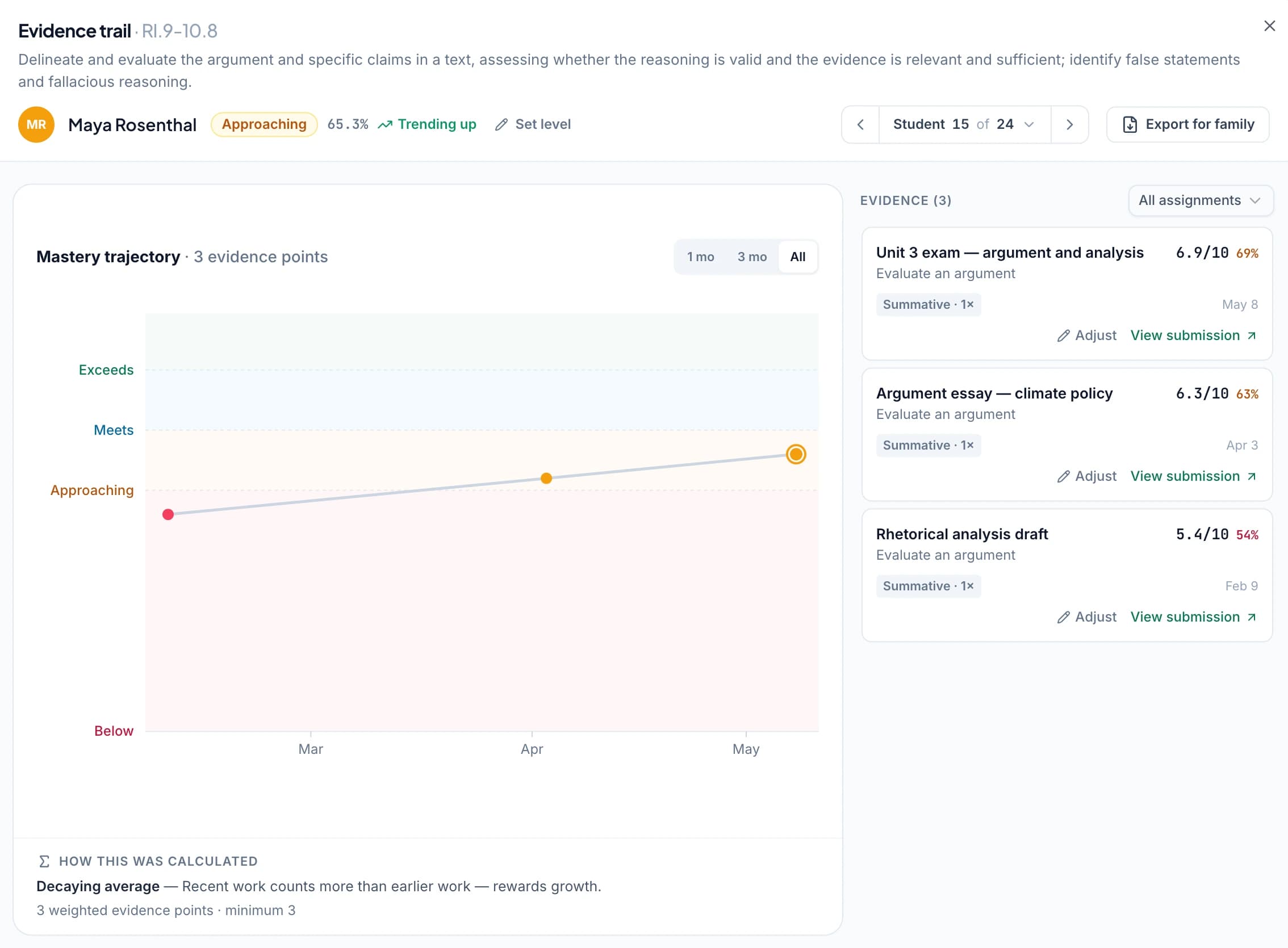
Follow benchmark evidence over time
The optional standards mastery gradebook brings approved aligned results together across assignments. Open the work behind a result to see what the student demonstrated and which contexts still need another assessment opportunity.
Choose the calculation settings if you enable mastery levels, or use points and percentages alongside the evidence record. This classroom view supports teaching and progress conversations; it does not replace FAST or estimate an official result.
Keep paper practice and familiar feedback routines
Upload supported scans or photos through the handwritten grading workflow, then check page order, student matching, and unclear responses before approval. Use printed reports or digital sharing after review.
For a teaching team, agree on rubric language and the benchmark set before comparing student examples. Shared criteria make the conversation more useful while each teacher retains responsibility for the assessment. Explore school adoption.
Questions about Florida benchmark grading
Is GradingPal the FAST progress-monitoring instrument?
No. GradingPal supports the classroom assignments you set and organizes the evidence you approve. FAST remains the state's separate assessment process.
Can it predict a FAST score?
No. A rubric-based classroom result is not an official score prediction. Use it to understand the assessed response and plan teaching.
Can I align rubric criteria to B.E.S.T. benchmarks?
Yes. Choose the relevant available set and review suggested tags against the task and course expectations before accepting them.
Can I keep paper assignments?
Yes. Use supported scans and photos, inspect the work, and return printed or digital feedback after review.
Does B.E.S.T. cover the science workflow too?
Select the appropriate Florida science set for science work. Keep that choice distinct from B.E.S.T. ELA and math, and from the separate NGSS framework.
Can I use evidence without adopting mastery levels?
Yes. Standards tracking is optional, and you can retain assignment points and percentages. Mastery levels are an additional choice with configurable evidence settings.
Explore related features
- AI essay grader
- AI exam and test grader
- How AI grading works
- AI math grader
- AI science grader
- AI worksheet grader
- Classroom analytics
- All GradingPal features
- Handwritten grading
- Pricing
- Supported standards and states
- Standards based grading
- Standards mastery gradebook
- Standards / common core
- Standards / texas staar teks
- Use cases
Learn more on the blog
- Florida BEST Standards & FAST: The Complete 2026 Guide for K-12 Teachers - B.E.S.T. Benchmarks, FAST Assessment, Implementation, Strategies & Best Practices
- Standards-Based Grading: The Complete 2026 Guide for K-12 Teachers - Benefits, Implementation, Rubrics, Common Core, State Standards & Best Practices
Use the next assignment to choose the next teaching step
Review the work against your rubric, return a specific comment, and build the benchmark evidence as students continue learning.