AI worksheet grader. Faster grading. Feedback on every question.
GradingPal automatically grades short answers, long answers, and calculations on handwritten or digital worksheets. Get a score and individualized feedback for each question, with partial credit based on your rubric. Save time marking, return detailed feedback, and see what your students need to learn next.
50 free submissions per month, shared across assignment types.
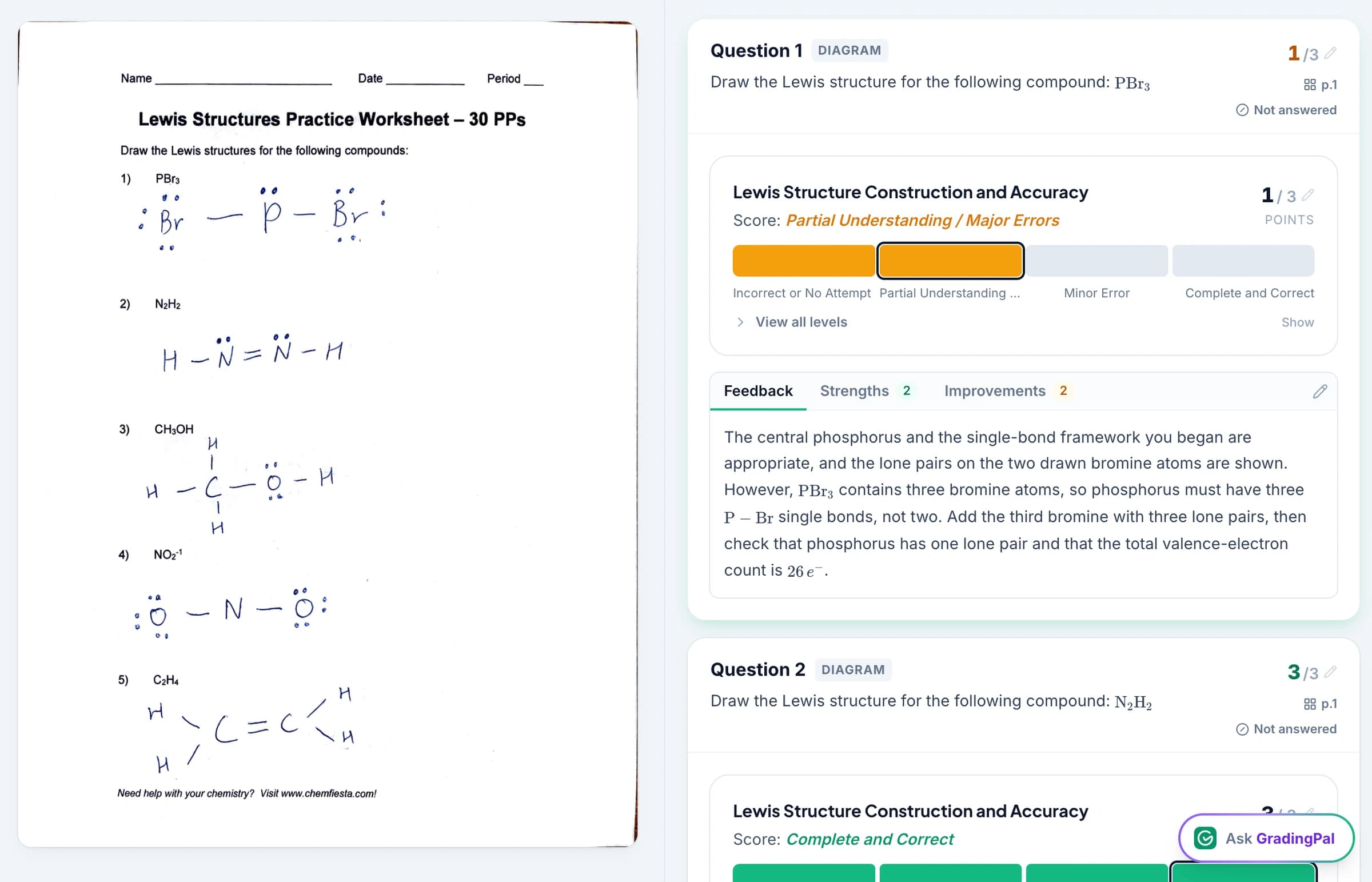
Grade short answers, long answers, and calculations
A single worksheet can include a brief definition, a paragraph explaining a concept, and a calculation that requires several steps. GradingPal grades each response against the criteria you set and explains the score it assigns.
Short answers
Grade definitions, factual responses, and brief explanations against the expected content.
Long answers
Grade extended explanations and written reasoning for completeness, relevant evidence, and the criteria in your rubric.
Math calculations
Read handwritten working and score the method, intermediate steps, and final answer. Award partial credit where your rubric allows it.
Science questions
Grade calculations, explanations, and interpretations of submitted data. Include scientific reasoning, units, or precision in the scoring criteria.
You receive question-level scores and feedback ready to check and edit. Students receive guidance about their own answers, and the results help you identify which topics need more teaching.
Award partial credit for correct steps, even when the final answer is wrong
GradingPal scores the working a student shows, including correct steps in an incomplete or incorrect solution. Set how many points belong to the method, calculation, units, and final answer in your rubric. GradingPal applies those rules and explains the points awarded so you can check or change the result.
You choose the point allocations. GradingPal explains the points it awards, and you approve the final score.
See GradingPal in action
Watch the GradingPal product demo to see rubric-based grading, feedback controls, classroom insights, and standards mastery.
What teachers say about GradingPal
“The math capabilities and accuracy have been great. Students can turn in homework digitally but keep hard copies for studying, and the Google Classroom integration is very convenient.”
 Brandon McClurgMathematics · Grapevine Faith Christian School, TX
“GradingPal is helping me a lot! It is cutting down a lot on grading certain assignments, especially map and geography projects. With Middle School students especially, it is very difficult to read their handwriting. GradingPal does it better than I do!”
 Marcus AbernathyHistory Teacher · Lancaster Christian Academy, TN
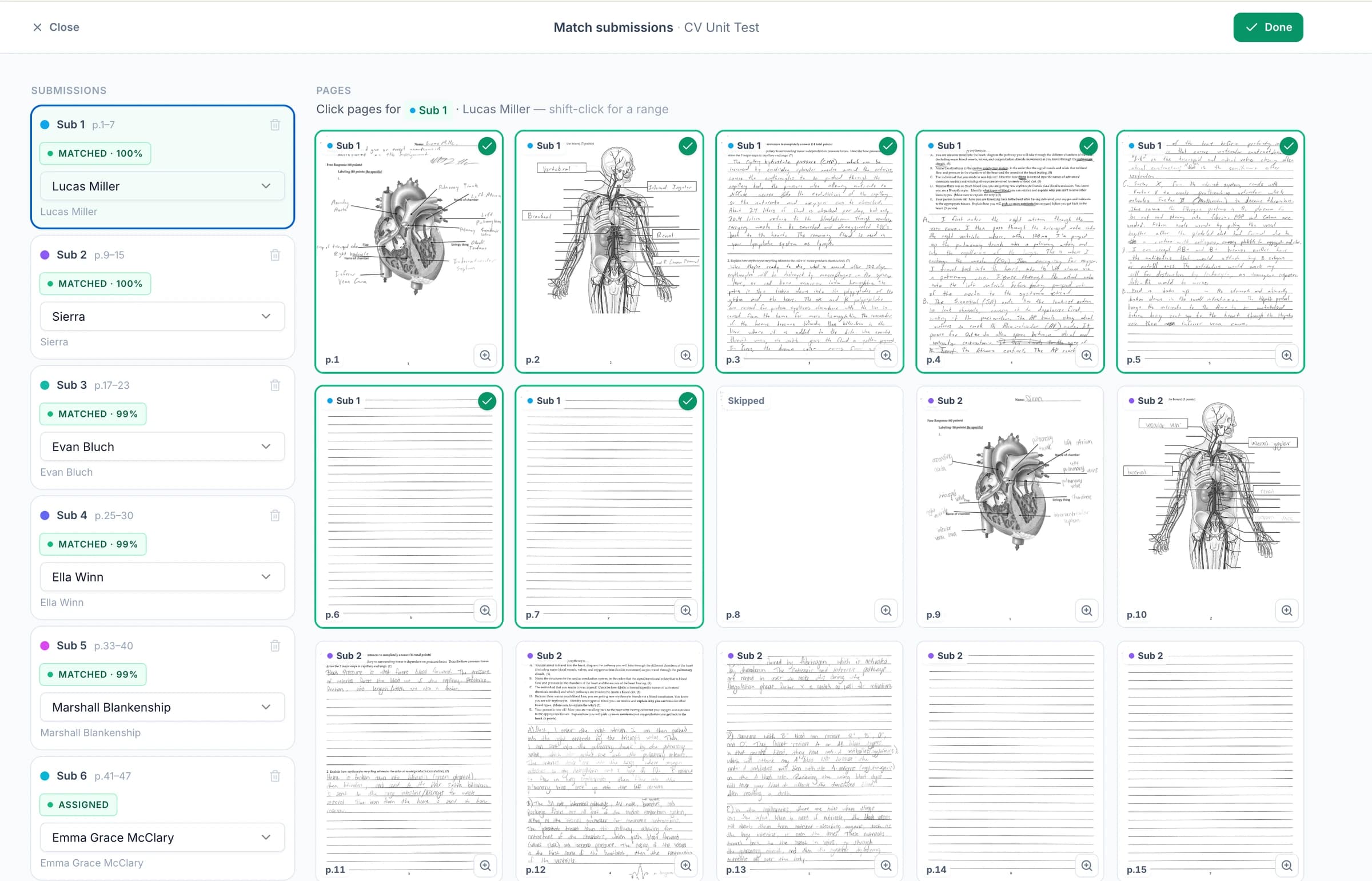
Upload handwritten worksheets as photos, scans, or a class PDF
Students can keep writing answers, showing calculations, and drawing diagrams on paper. Upload clear photos, scans, or a PDF containing the class's work. Check the student matches and page groups, then let GradingPal generate scores and feedback for the individual responses.
Connect GradingPal to Google Classroom, Canvas, and Schoology
Import classes, assignments, rubrics, and student submissions from Google Classroom. Return approved feedback with or without grades. Canvas and Schoology are available on the school plan. You can also upload files directly or import them from Google Drive.



Give every student specific feedback in your teaching voice
GradingPal writes feedback about the student's actual answer, so a missing calculation step receives different guidance from a missing explanation. Set the style, length, language, and instructions to match how you teach. Return comments with scores or focus the correction task on feedback first.
For the 2x + 6 = 14 response above, that instruction produces a specific instruction: “You correctly subtracted six from both sides. Divide both sides by two, then check your solution in the original equation.” The student has a specific correction to make; you have not had to write the comment from a blank page.

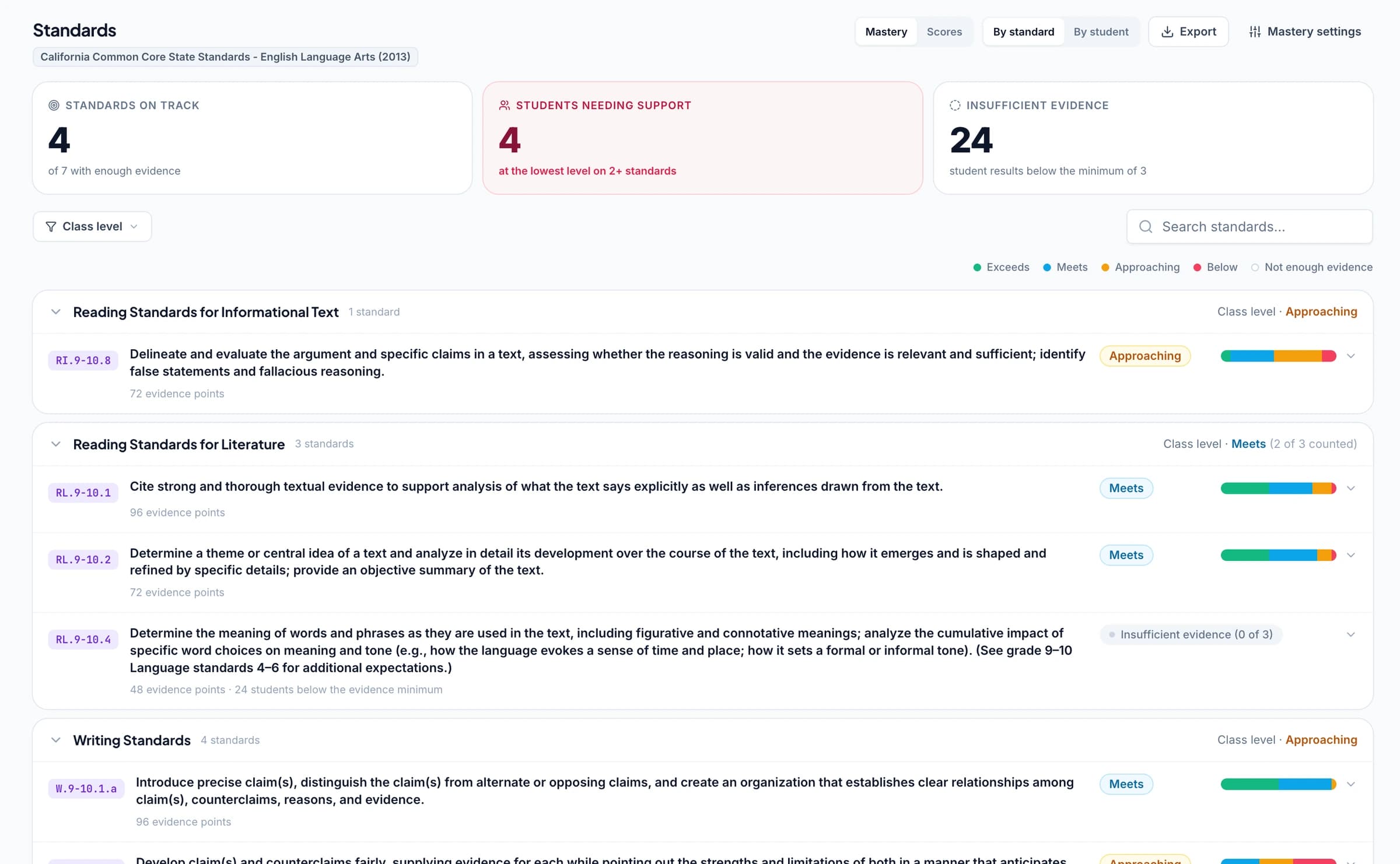
See which questions students struggled with and what to reteach
GradingPal's classroom analytics show which questions students struggled with, common strengths and weaknesses, and suggested teaching activities. Open the graded answers to check the difficulties, then decide what to explain to the class and which students need extra practice.
Explore classroom analytics. Performance analytics is available on eligible plans; compare plans.
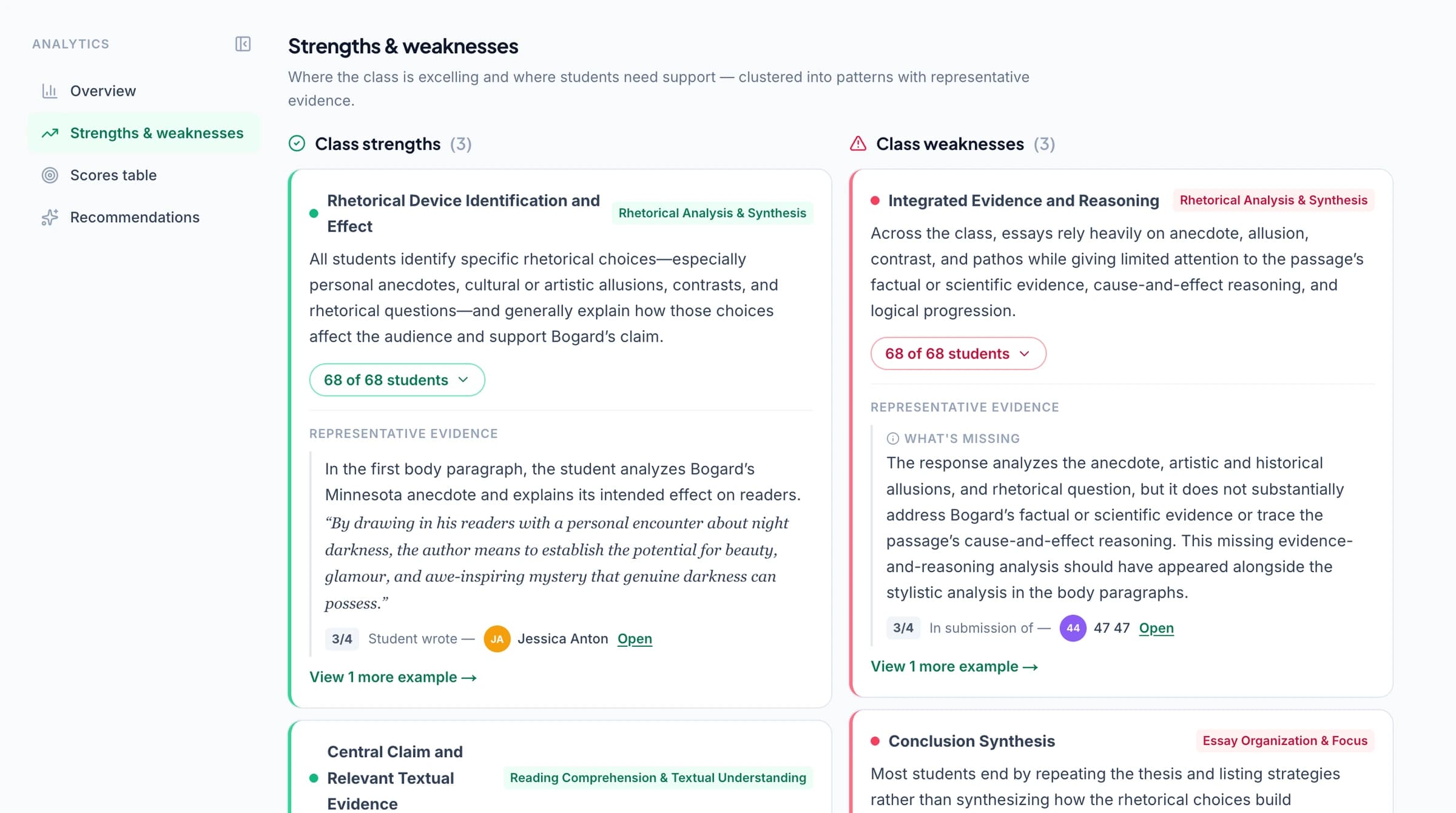
Track standards mastery across worksheets and assignments
Connect worksheet questions or rubric criteria to Common Core, NGSS, Texas TEKS, or your state's standards. As you approve grading results, GradingPal automatically updates each student's progress in the standards mastery gradebook using your chosen calculation rules. Track progress across assignments and open the graded work behind a mastery result.
Ask the AI assistant to change scores, feedback, or rubrics
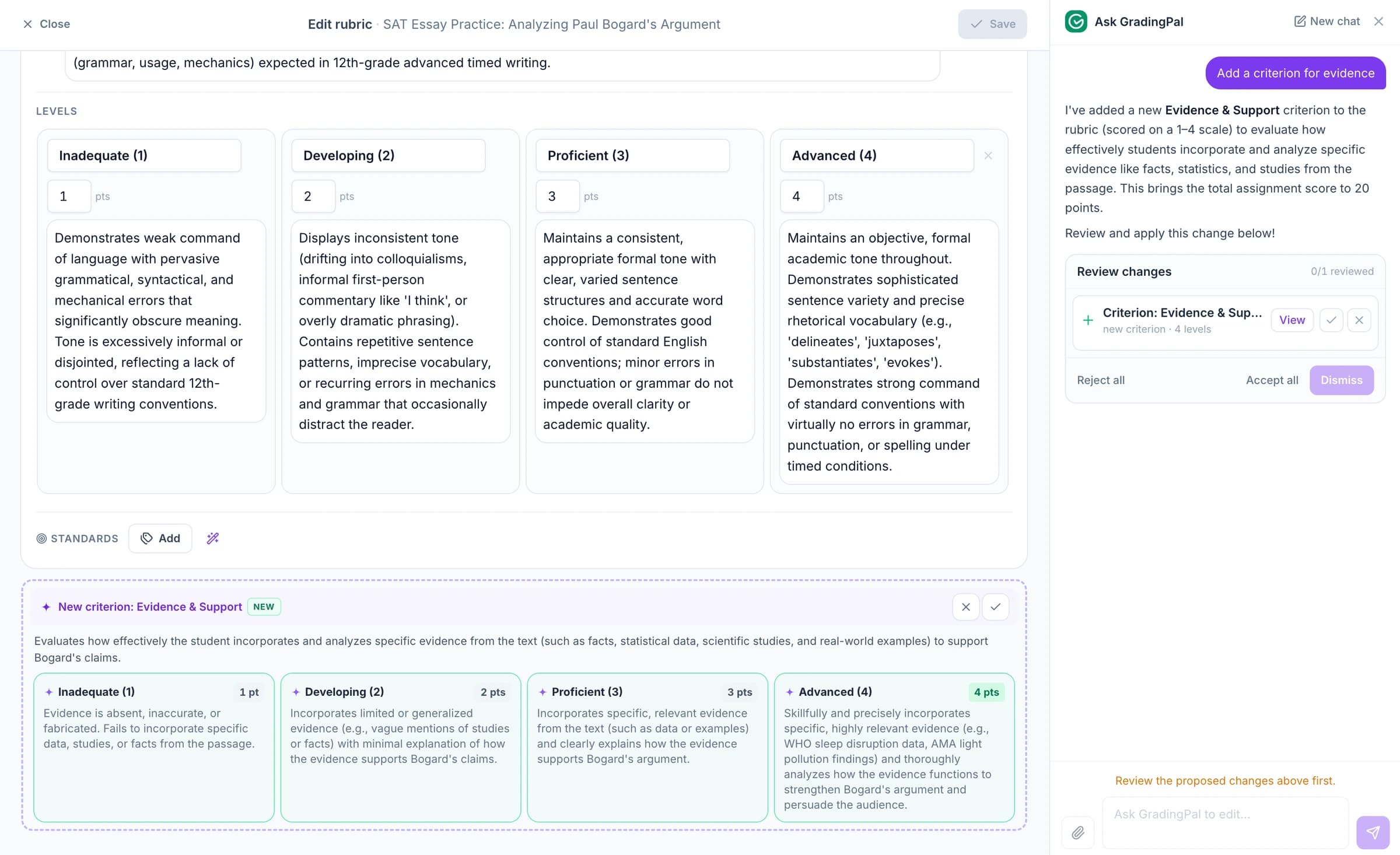
Tell the in-app AI assistant which score, feedback comment, or rubric criterion you want to change. It proposes an edit for you to review and accept.
For a worksheet with written explanations, ask: “Add a criterion for evidence.” GradingPal proposes the criterion and performance levels. Check the wording and points before accepting it.
Grade quizzes and problem sets with GradingPal
Use GradingPal for short-answer quizzes and extended problem sets as well as worksheets. Set the criteria for each question, including how to score written explanations or multi-step math and science solutions. Get individual feedback and use the results to identify what needs another explanation.
For longer papers with formal question allocations, explore exam and test grading.
AI quiz grading for short answers, explanations, and calculations
GradingPal grades short-answer quizzes and calculations against your criteria, generates question-level scores, and drafts individualized feedback. Save time marking and use the quiz results to identify what students understand, what needs another explanation, and which students are ready to move on.
Score each answer against your criteria
A response can include the right term without explaining the idea. Define what students need to demonstrate so GradingPal assesses that reasoning as well as the answer. Read the score explanation alongside the response to check what is present and what needs developing.
That needs different feedback from an answer attributing the carbon to soil minerals. GradingPal explains each score using the student’s answer, so you can check whether feedback addresses a missing explanation or a misconception.
Give students short, specific feedback on each answer
Control the feedback style, length, language, and instructions. For a quick formative check, try: “Recognize the correct idea. Give one short follow-up question.” The first response could receive: “You correctly identify carbon dioxide. Which process incorporates its carbon into the plant, and what does the plant make?”
The student has a question to answer before the class moves on. You can use the in-app assistant to propose a shorter comment or a revised score, inspect the change, and accept it. This keeps a quick quiz from becoming another long comment-writing task.
Identify learning gaps before the next lesson
GradingPal’s classroom analytics show which quiz questions students struggled with and suggest what to teach next. Review the assessed answers behind a pattern. If students identify carbon dioxide but omit how its carbon becomes plant material, model that connection. If students attribute the carbon to soil, start by revisiting its source.
Align relevant quiz questions to NGSS, Common Core, Texas TEKS, or your other supported learning standards. After you approve the scores for standards-aligned questions, GradingPal updates the standards mastery gradebook using your chosen calculation rules. Later responses add evidence of whether the learning holds beyond this one check.
Grade handwritten or digital quizzes
Use readable handwritten or digital responses, with the scoring criteria appropriate to the task. For a class scan, review page groupings and student matches before grading. Print or share feedback, with or without scores, depending on how you want students to use the quiz results.
AI grading for math, physics, and chemistry problem sets
GradingPal grades handwritten and digital math, physics, and chemistry problem sets against your rubric. Get scores for the work students show, explanations of the credit awarded, and feedback that helps them approach the next problem. Reduce repetitive marking without reducing a multi-step solution to its final answer.
Award partial credit for correct methods and calculations
Define how method, substitution, accuracy, reasoning, units, and answer form contribute to the assessment. GradingPal applies those expectations and generates scores with explanations. You receive the scores and explanations ready to check against the student’s solution.
A correct answer without required working is a different assessment. Your rubric defines what the student must show and how much credit that evidence earns.
Give students feedback on the step they need to correct
GradingPal drafts feedback tied to the response. Choose the style, length, language, and instructions; for example: “Explain the missing requirement without redoing the valid working. Ask the student to check the unit.”
The speed response could receive: “Your relationship and calculation are correct. Speed describes distance per unit of time. Rewrite the unit and explain what ‘per second’ means here.” Students revisit the reasoning instead of copying a completed solution.
Ask the in-app AI assistant to shorten a comment or explain a correction in more detail. Check the proposed feedback against the solution, then accept the edit.
Identify common errors and plan targeted practice
GradingPal’s classroom analytics show common strengths and errors in problem sets and suggest teaching activities. Open the students’ graded solutions to check the errors before choosing a practice task.
Connect the relevant criteria to Common Core mathematics, Texas TEKS, NGSS, or other supported learning standards. After you approve the scores for standards-aligned criteria, GradingPal updates the standards mastery gradebook using your chosen calculation rules. Track progress across this problem set and later assignments.
Grade handwritten and digital solutions
Bring in algebra exercises, physics calculations, or chemistry problem sets with the rubric each task needs. Keep readable handwritten working and any information required to interpret the response. For more detail on equivalent answers, notation, and subject-specific assessment, explore the dedicated math and science pages.
Protect student work. Control what gets shared.
GradingPal is FERPA, COPPA, and GDPR compliant, with CASA Tier 2 verification. Student work is never used to train models. Review scores and student feedback before you choose what to share.

FERPA
Compliant

COPPA
Compliant

GDPR
Compliant
CASA
Tier 2 Verified
Questions about AI worksheet grading
Can I change one question without changing the whole assessment?
Yes. Review the question's proposed score and feedback and make the changes it needs. You can check an individual response without rewriting every other comment in the class set.
Can it award partial credit?
Yes. Specify how the rubric awards credit for method, accuracy, explanation, or other criteria. GradingPal generates rubric-based scores using those expectations, and you review the credit against the submitted working.
Can I upload a whole class scan?
Yes. Upload a class PDF, then check the page groups and student matches before grading. Check continuation pages and unclear names as part of that review.
What if an answer is hard to read?
Inspect the original scan and the interpretation before approving the result. A cropped equation or unclear word can change the assessment. Improve the image or correct the result where the evidence is uncertain.
Can GradingPal grade math and science worksheets?
Yes. It supports handwritten calculations, multi-step working, and written explanations in math and science, as well as responses in other subjects. Define the criteria for each question and check the proposed scoring and feedback.
Can worksheet results contribute to standards mastery?
Yes, when the relevant questions or rubric criteria are aligned to the learning standards. Approved assessment evidence can then contribute to progress across assignments. Uploading a worksheet alone does not automatically establish that alignment.
Can I use GradingPal for short-answer quizzes?
Yes. Set the question criteria, upload the responses, and review the proposed scores and feedback. The same question-level workflow supports short written explanations and calculations, including readable handwritten responses.
How can quiz results help me plan the next lesson?
Review the responses and, on plans with performance analytics, the patterns across the class. Use the evidence to decide which concept needs another explanation, who needs focused practice, and what a follow-up question should check.
Can GradingPal assess multi-step problem sets?
Yes. It supports handwritten and digital solutions in math and science. Define the criteria for method, calculations, explanation, and the final answer, then inspect the proposed credit against the student's working.
Can I require a particular answer form or unit?
Yes. State that requirement in the rubric or grading instructions. An equivalent value does not automatically satisfy a required form, precision, or unit; review the proposed assessment against the expectations you set.
Try GradingPal free on your next worksheet
Upload the questions, responses, and rubric. Check how GradingPal scores one answer, read the feedback a student would receive, and see whether the next step is clear enough to use in a correction task.
Try worksheet grading free50 free submissions per month. Compare plans and included features.