Write student feedback in the language your class uses
Choose English, Spanish, French, German, or Brazilian Portuguese for student feedback, with the supported regional options. GradingPal keeps comments connected to the student's work and your rubric while the teacher-facing scoring explanation remains in English for review.
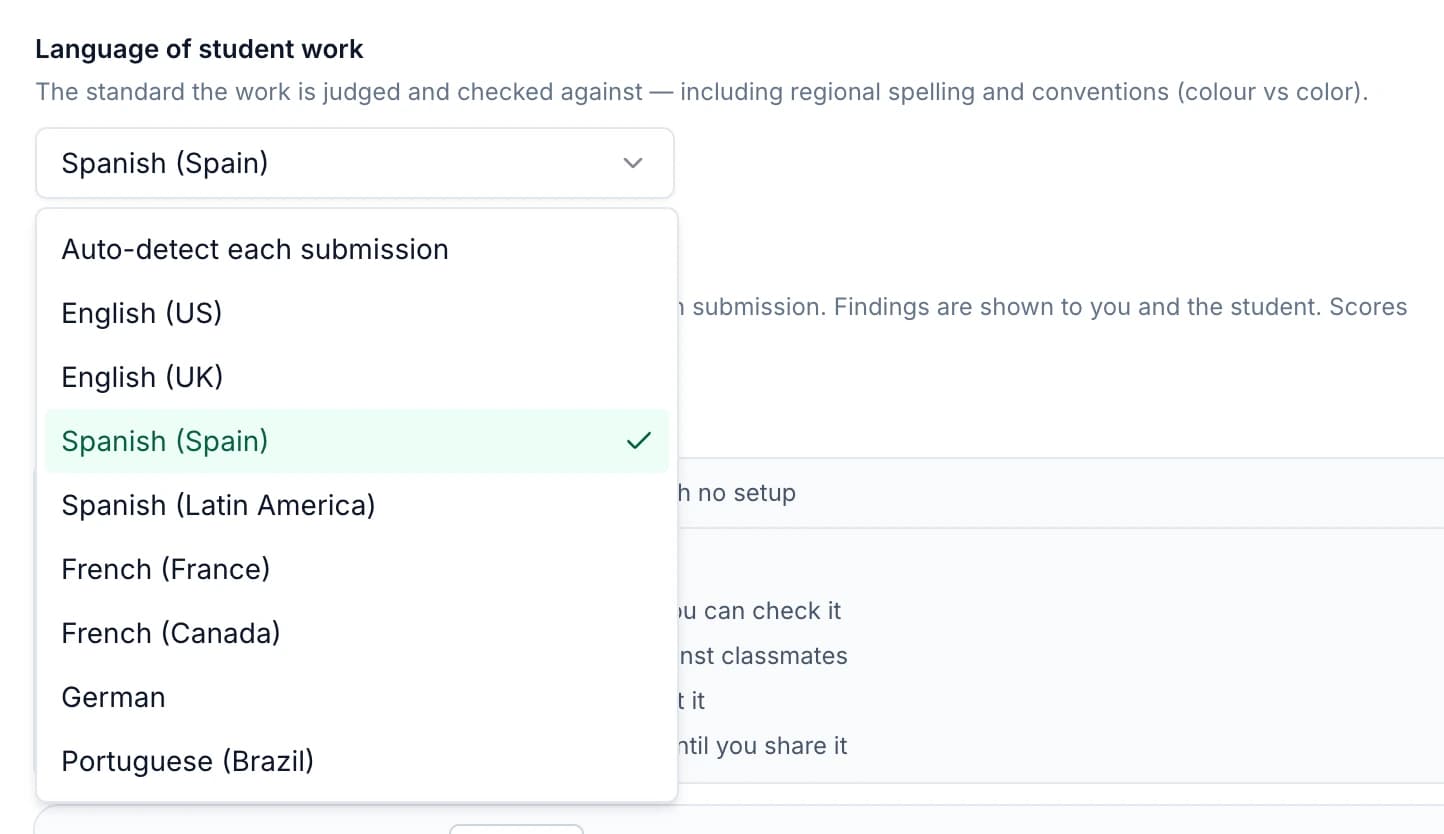
Choose from five languages and eight language settings
Use a named option that matches the language and conventions taught in your classroom. Regional choices help the feedback use familiar spelling and expression when students return to their work.
| Language | Supported options |
|---|---|
| English | United States; United Kingdom |
| Spanish | Spain; Latin America |
| French | France; Canada |
| German | German |
| Portuguese | Brazil |
These are the supported settings described for this workflow. Review the selected option during assignment setup, especially when the task includes more than one language or a particular regional convention matters.
Set the work language and feedback language deliberately
The language in which students complete an assignment and the language used to explain the result have different roles. GradingPal can identify the work language and match feedback within the supported options; review the settings rather than relying on the detected choice for every task.
The work-language setting establishes context for interpreting the submission and conventions. The student-feedback setting determines how the comment is expressed. Check both so the assessment and explanation fit the lesson you intended.
Keep scoring evidence available in English
Student-facing feedback follows the selected supported language. The teacher-facing scoring explanation remains in English, so you can inspect the reasoning behind a suggested rubric score before sharing the result.
Use that explanation alongside the original response. A translated or differently expressed comment still needs to identify what the student demonstrated and what to improve. Review both the assessment judgment and the student-facing wording.
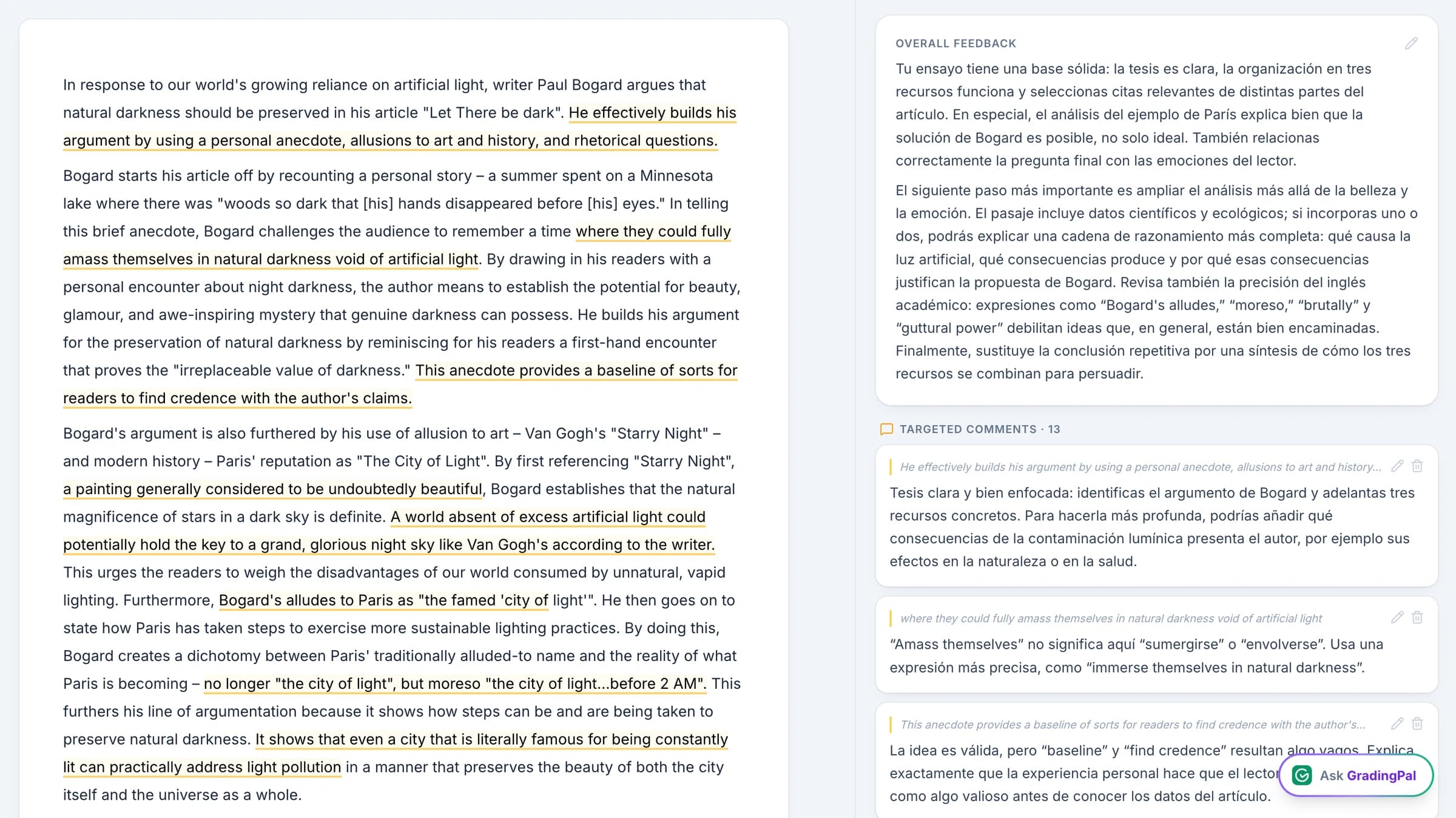
Preserve the student's original words in quotations
When feedback quotes the submission, the quoted passage stays in the student's original words. That helps the student locate the exact part of the work being discussed, even when the surrounding guidance uses a different supported language.
A quotation serves as evidence. Keeping its wording intact makes the feedback easier to check against the source and avoids presenting a rewritten version as something the student actually submitted.
Combine language with the feedback approach you want
Choose one of GradingPal's six feedback styles, set concise or detailed comments, and add instructions about tone or classroom vocabulary. Language is one part of making the guidance understandable; the revision task should be equally clear.
For an illustrative instruction, ask: “Use the terminology from our rubric and finish with one specific step the student can complete.” Review how the idea is expressed in the selected language before returning it.

Use familiar language for a concrete next action
A comment is useful when students understand what to do with it. Apply the supported language settings to feedback that names an action: explain a link, revise a sentence, correct a calculation, or develop a conclusion.
English-language writing courses
Choose US or UK conventions and use the terms taught in the course. Check that feedback on evidence and organization remains connected to the student's actual paragraph.
Spanish- or French-language feedback
Choose the appropriate regional option and review the expression as well as the content. Keep the requested revision specific enough that the student can return to the relevant answer.
German or Brazilian Portuguese feedback
Use the supported language setting with your selected style and instructions. Review terminology and the next step before sharing, particularly where the assignment uses specialized subject language.
Review mixed-language work in context
Assignments may include quotations, technical terms, or passages in more than one language. Check the detected work language, the feedback choice, and any quoted material together when reviewing the assessment.
For languages outside the named supported set, the current workflow is best-effort. Evaluate the actual output carefully rather than assuming equivalent support. Contact the team if a language requirement is important to a school evaluation.
Return the feedback through your usual classroom route
After reviewing the wording, use the available sharing options for digital return or printed reports. The language choice should make the comment easier for the student to use in that workflow.
For a classroom using Google Classroom, connect the returned feedback to a revision task in the assignment routine students know. Language settings change the expression of the comments; they do not imply translation of the whole application or a separate family messaging service.
Questions about feedback languages
How many languages are supported?
Five languages with eight language or regional settings: US and UK English, Spain and Latin American Spanish, France and Canadian French, German, and Brazilian Portuguese.
Is the teacher-facing explanation translated too?
No. The scoring explanation remains in English. The supported feedback-language setting applies to the student-facing guidance.
Are quotations from student work translated?
Quoted passages retain the student's original words so the evidence can be located in the submission. The surrounding feedback follows the selected supported language.
What about languages outside this list?
They are handled on a best-effort basis. Test a representative assignment and inspect the output carefully; the named language and regional choices are the supported set described here.
Can I choose a regional version of English, Spanish, or French?
Yes. Select the supported regional option listed above and review that it fits the assignment's language conventions.
Does choosing a feedback language change my rubric?
The rubric still defines the assessed criteria and points. Language settings shape interpretation and communication in the supported workflow; inspect the scoring evidence and comments before sharing.
Can I use language settings with feedback instructions?
Yes. Combine the language choice with style, length, tone, and terminology instructions. Review the final wording so the student receives a clear next step.
Make the feedback easier to understand and use
Choose the language and conventions that fit your class, then return a comment tied to the student's own work.