AI grading for schools.More time to teach. More insight to act on.
Help your teachers spend less time grading, give every student more useful feedback, and turn assessment results into clear next steps for instruction. GradingPal combines AI grading across math, science, writing, and more with rubric-based scoring, feedback in each teacher's voice, and standards mastery tracking—all with teachers in control.
Get the information your school needs to move forward
Review our published security information or tell us what your school's evaluation requires. Our team can help with questions about data handling, teacher review, integrations, onboarding, and school plans, and discuss the documentation needed for your approval process.
Data processing agreements and your school's review process.
How student information is handled and protected.
How teachers review, edit and share grades and feedback.
Less grading. More useful feedback. Clearer next steps for teaching.
Assessment takes time to do well. Across a teaching team, the hours spent scoring work, writing individual comments, and interpreting results can leave less time to respond to what students need. GradingPal helps with all three parts of that work.
Reduce repetitive grading work
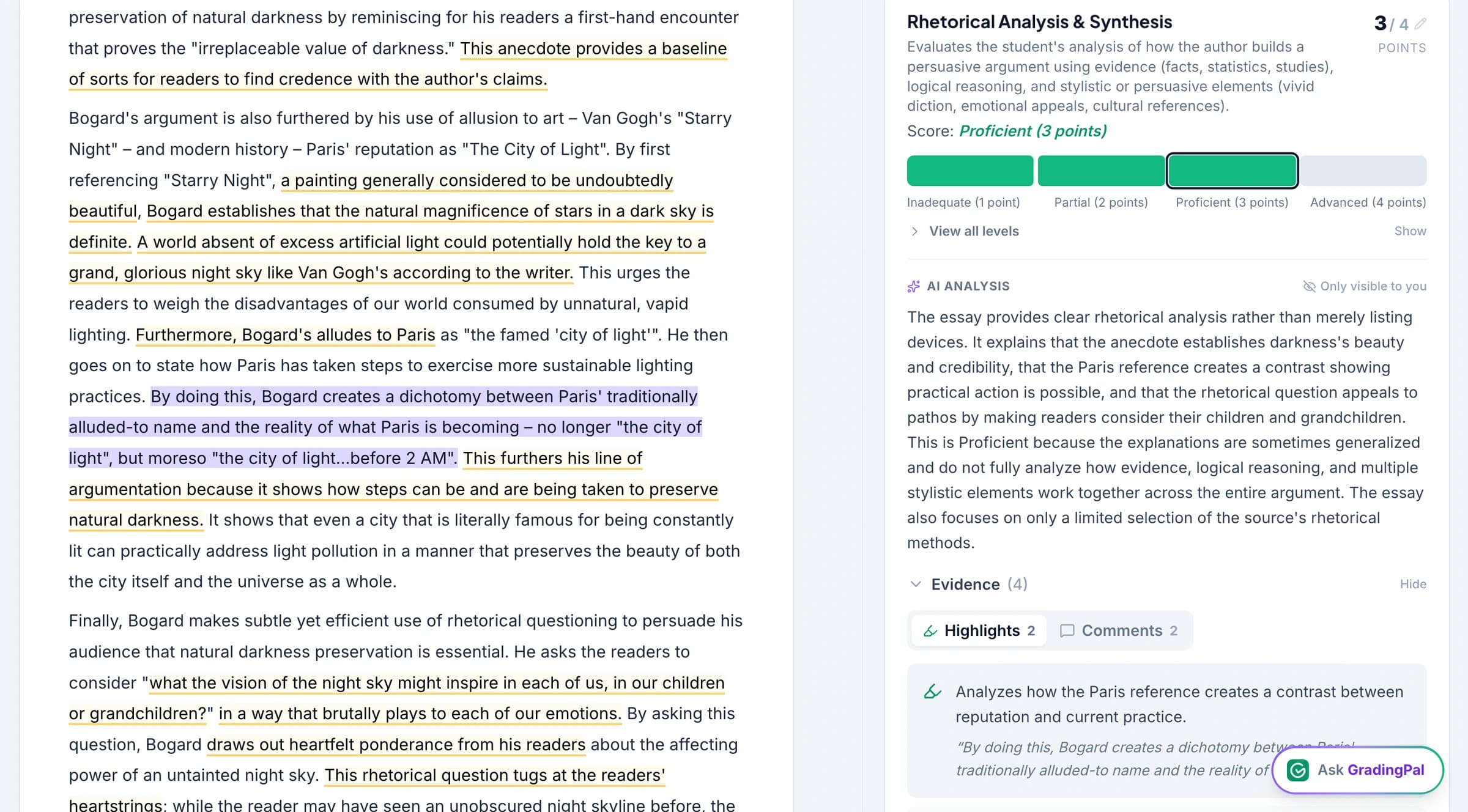
A class set of assignments means the same scoring decisions and explanations repeated many times. GradingPal reads student work, assigns scores against the teacher's rubric, and drafts feedback with supporting evidence. Teachers start with work to review and refine, giving them more time for lesson planning, individual support, and the parts of teaching that require their expertise.
Give every student actionable feedback
Detailed feedback becomes harder to sustain as the volume of assessments grows. GradingPal helps teachers explain what each student did well, where their work needs improvement, and what to do next. Teachers can return useful guidance sooner and shape it for their students, making revision and targeted practice easier to build into the learning process.
Turn assessment evidence into instructional action
A score alone cannot tell a teacher which concept to revisit or who needs another explanation. GradingPal surfaces classroom strengths, recurring gaps, and standards progress from assessed work. Teachers can use those insights to plan reteaching, organize targeted support, and check how students respond in later assignments.
AI grading for math, science, writing, and more
GradingPal supports the range of assessment a teaching team actually uses: handwritten problem sets, essays, lab reports, worksheets, exams, presentations, audio, video, and creative work. Its AI assesses submissions against the selected rubric and proposes scores with explanations, so teachers can review both the result and the reasoning behind it.
Math and handwritten working
Use AI math grading to assess handwritten calculations, multi-step solutions, and mathematical reasoning. GradingPal reads the working and applies the rubric's scoring criteria, including partial credit where the rubric calls for it. Teachers can inspect the explanation for a score and adjust it before returning the work.
Science, including physics, chemistry, and biology
Use AI science grading for calculations, lab reports, investigations, and scientific explanations. Assess the quality of a student's reasoning, use of evidence, and written response against your criteria. GradingPal produces scores and feedback that teachers can review alongside the submitted work.
Grade essays, source analysis, research writing, and short answers against assignment-specific rubrics. Give students feedback on argument, evidence, structure, and other criteria that matter to the task, using the teacher's preferred tone and language.
Presentations, oral assessments, and creative work
Assess recorded presentations, spoken responses, and artwork using the relevant rubric. Bring different submission formats into the same review process, while keeping the assessment criteria appropriate to the subject and task.
See grading, feedback, and learning insights in action
What teachers value about GradingPal
Teachers describe the practical difference: less repetitive grading, feedback students can act on, and support for the subjects they teach.
“GradingPal helps me optimize my time by streamlining the grading process. What I like most is the feedback students receive — it is specific and it is something they can act on.”
Adriana Barrios RodriguezCollege · Health Sciences & Teacher Education · Universidad Autónoma de Sinaloa, Mexico
“The math capabilities and accuracy have been great. Students can turn in homework digitally but keep hard copies for studying, and the Google Classroom integration is very convenient.”
Brandon McClurgMathematics · Grapevine Faith Christian School, TX
“GradingPal individualizes feedback specific to each student and gives steps to improve their performance. I also love the ability to change the tone of feedback for different assignment types. The team is incredibly helpful and responsive too.”
Michelle DouglassGrades 11–12 · Research & Anatomy/Physiology · Central Virginia Governor’s School, Lynchburg VA
Connect GradingPal to your school's LMS
Bring AI grading into the systems your teachers use to manage assignments. GradingPal supports Google Classroom, with Canvas and Schoology available on the school plan. Teachers can also import files from Google Drive or upload student work directly.
Google Classroom
Available now
Import classes, assignments, rubrics, and submissions from Google Classroom. Review the AI-generated scores and feedback in GradingPal, then return feedback with or without grades through the supported Classroom workflow.
Use GradingPal with Canvas as part of your school plan. Talk with our team about connecting your institution's assessment workflow and getting teachers started.
Use GradingPal with Schoology as part of your school plan. Our team can walk through your school's assignment workflow and integration setup during your evaluation.
Google Drive imports and direct uploads give teachers additional ways to bring existing assignments and student submissions into GradingPal.
Protect student data. Keep teachers in control.
Student work is not used to train AI models. GradingPal gives teachers the ability to review scores, inspect supporting evidence, edit feedback, and decide when results are shared. Your school can review the published security information and discuss the documentation needed for its approval process.
Give your teaching team shared rubrics and explainable scores
Common expectations are easier to maintain when teachers can build on the same assessment resources. GradingPal's school offering includes shared assignment and rubric resources, helping colleagues reuse criteria and adapt them for their teaching. Co-teachers can work in a shared class, while each teacher keeps the ability to review results and respond to student needs.
Build on the assessment work your team has already done
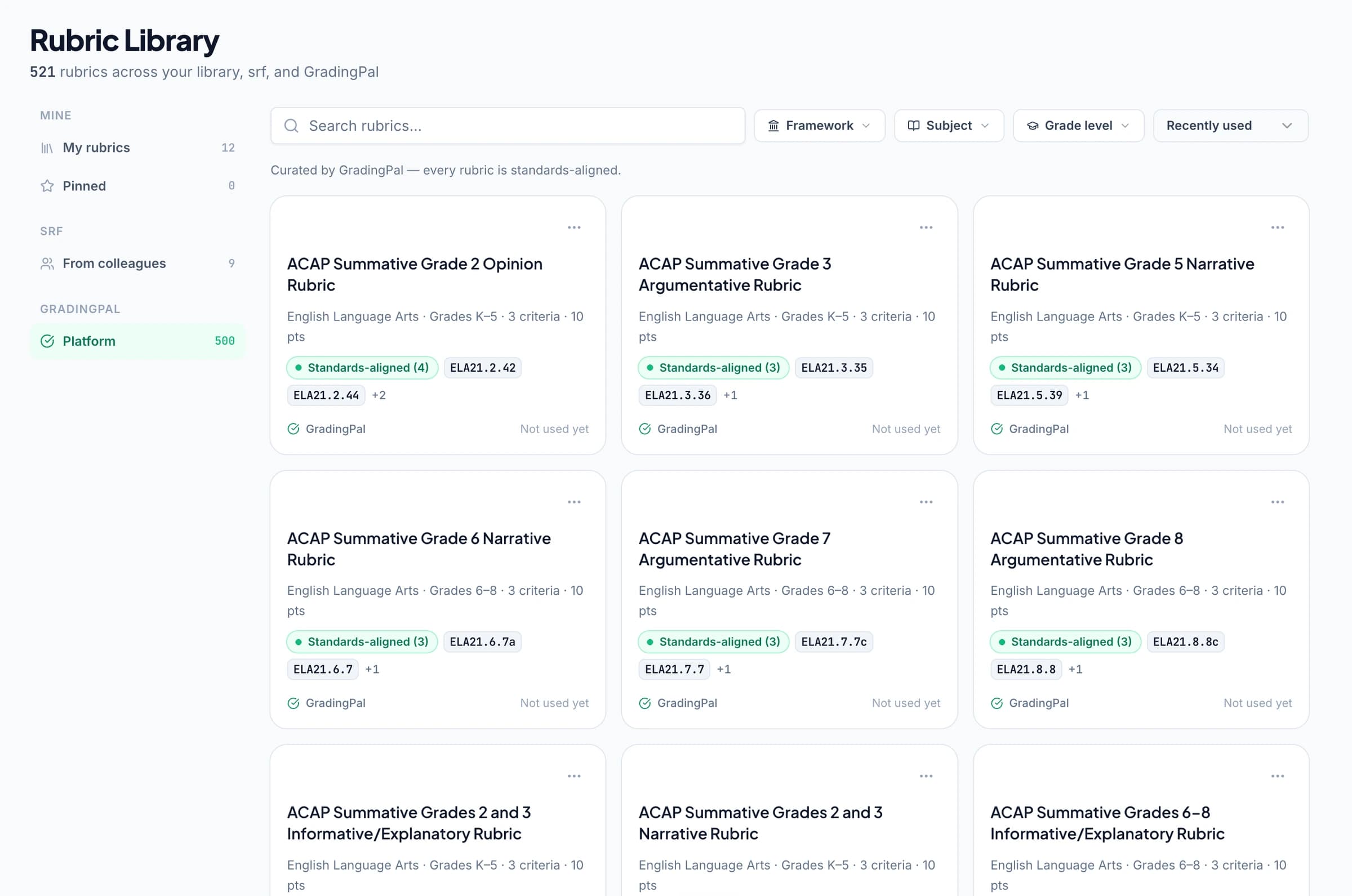
Bring your existing rubric, generate one from selected standards, or start with GradingPal's library of 500 curated rubrics. Teachers can preview and adapt resources for the assignment instead of rebuilding every assessment from a blank page. Shared criteria give departments a concrete starting point for discussing what good work looks like.
Review the evidence behind each score
GradingPal assesses student work against the rubric and explains why a score was selected. Teachers can examine the relevant evidence, change a score, and refine feedback before sharing. When colleagues discuss an assessment result, they can refer to the criteria and student work behind it.
Make detailed, actionable feedback practical for every student
A final grade tells students how they performed. Useful feedback helps them understand how to improve. GradingPal drafts individualized comments tied to the student's work and the teacher's rubric, making detailed guidance more practical across a full class set of submissions.
Give students a next step they can use
Feedback can identify a strength, explain a gap, and point to a concrete revision or practice task. In an essay, that might mean connecting a claim to stronger evidence. In science, it might mean explaining how a result supports a conclusion. Teachers review the guidance so it fits the assignment and what students are ready to do next.
Keep feedback in each teacher's voice
Teachers can choose feedback styles, set the length and language, and give instructions about how comments should sound. They can edit the result before sharing, keeping the guidance appropriate to their students and teaching approach. Shared assessment expectations can coexist with an individual teacher's way of communicating.
Return feedback while it can inform the next attempt
Teachers can print, share digitally, or schedule student feedback. Returning actionable guidance sooner gives students more opportunity to use it in revision, further practice, or the next assignment—and gives teachers a clearer basis for follow-up support.
Show teachers what to reteach and who needs support
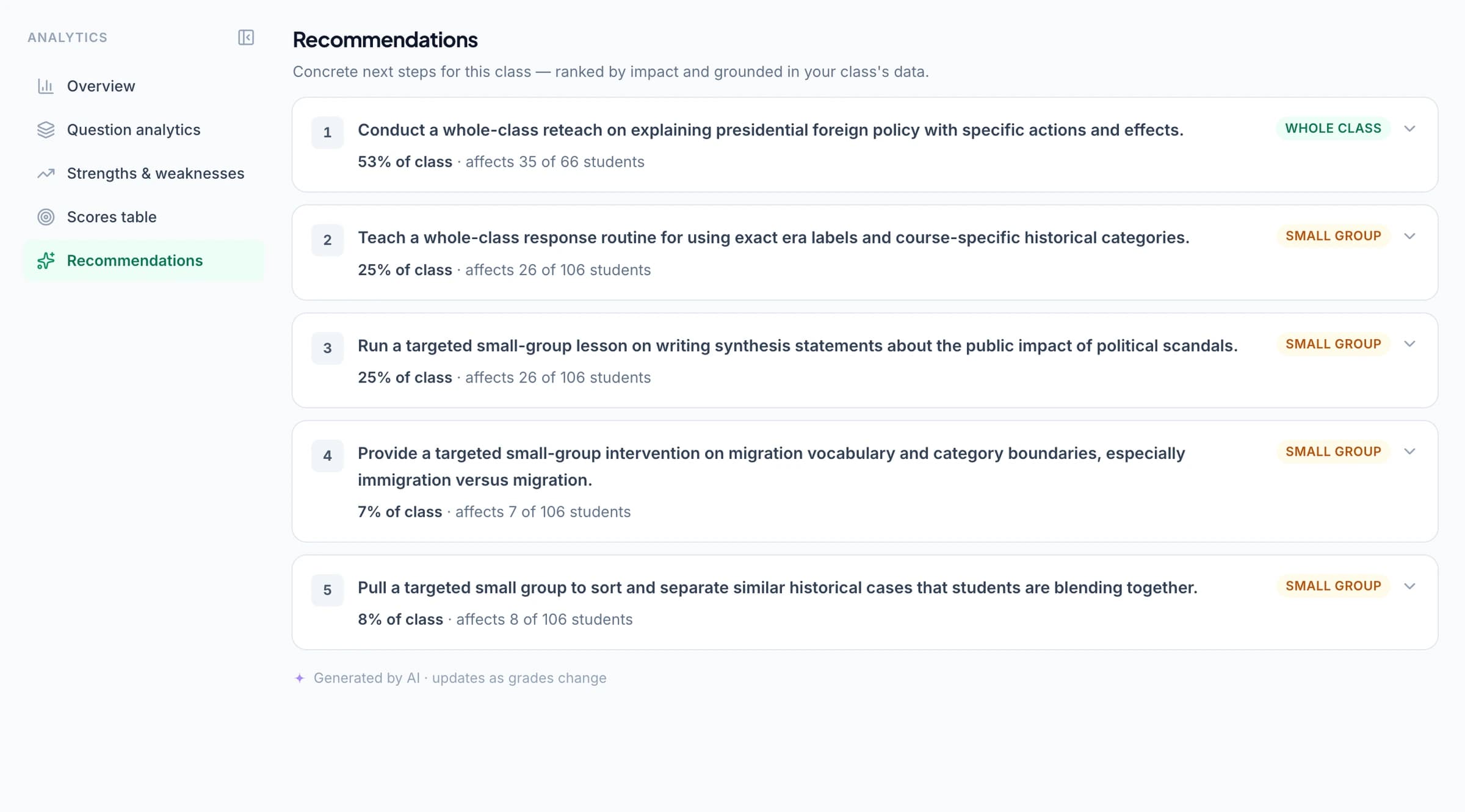
Every set of student submissions contains information that can improve the next lesson. GradingPal brings classroom strengths, recurring weaknesses, and suggested instructional next steps into view, helping teachers act on the assessment work they have already completed.
See patterns across the class
Classroom analytics help teachers identify where students are succeeding and which concepts or rubric criteria need more attention. Instead of reconstructing the picture from individual comments and scores, teachers can review the patterns alongside the underlying assessment evidence.
Plan whole-class reteaching and targeted support
Use those insights to decide whether a concept needs another whole-class explanation or a smaller group needs focused practice. GradingPal's recommendations connect identified gaps to teaching actions. Teachers choose how to respond using their knowledge of the class.
Follow up with evidence from later work
The next assignment becomes an opportunity to see whether students can apply what they have practiced. Alongside classroom analytics, standards mastery tracking helps teachers follow progress over time and identify learning goals that still need attention.
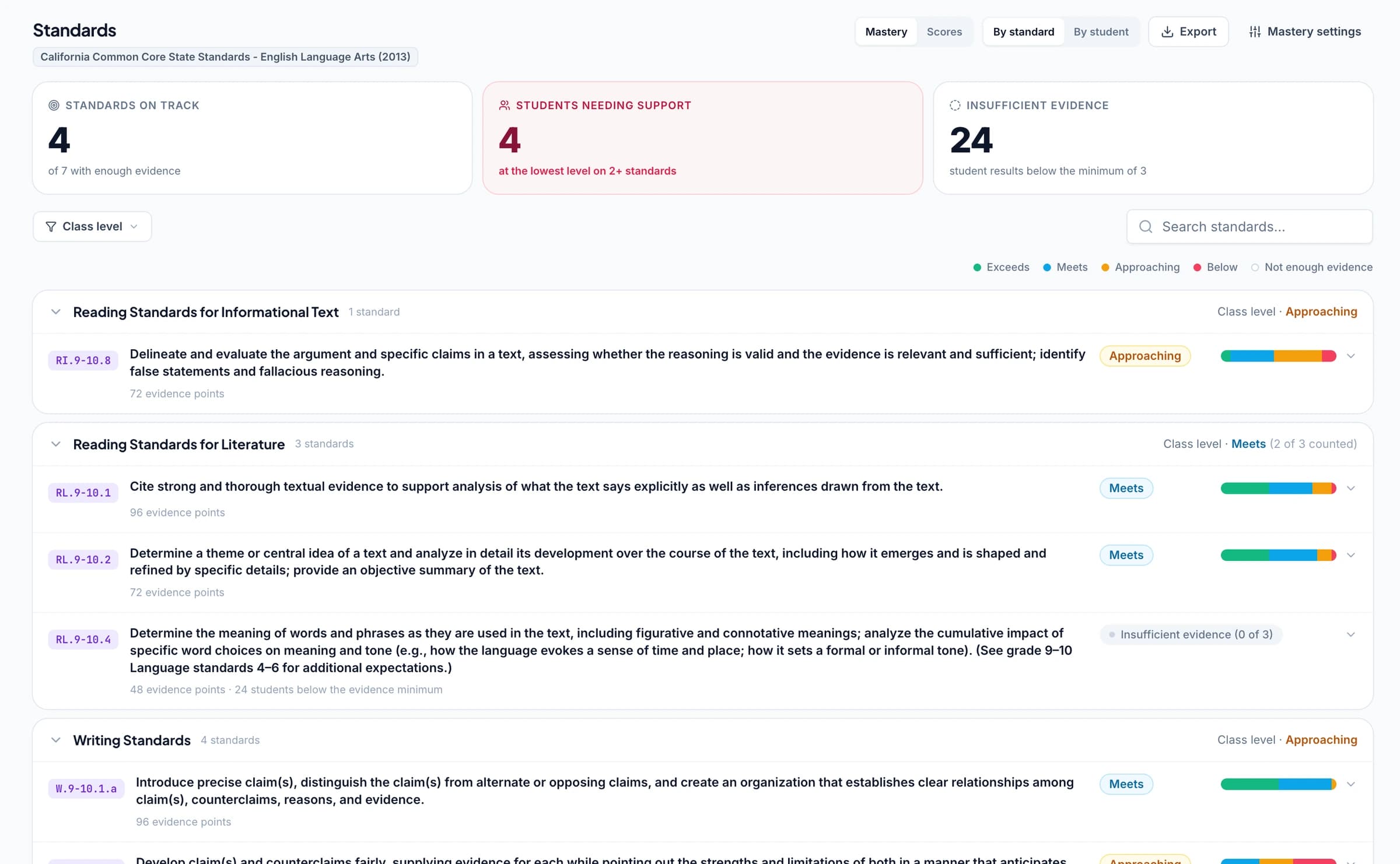
An assignment grade is one view of performance. GradingPal's standards mastery gradebook helps teachers follow the learning goals behind that grade. Link assessment questions or rubric criteria to relevant standards, review the grading results, and let approved assessment evidence contribute to each student's mastery record over time.
Teachers can trace a mastery result back to the work that contributed to it. They can also set mastery calculation rules, minimum evidence requirements, and cutoffs, and record a reason when overriding a result. This gives teachers a practical way to discuss progress, choose further practice, and explain which evidence supports their assessment.
Align assessment with Common Core, NGSS, TEKS, and state standards
GradingPal supports standards-aligned assessment across all 50 states and Washington, D.C., covering English language arts, mathematics, science, and social studies. Connect classroom assessment to the standards your teachers use and follow progress against those learning goals.
Explore criterion-based feedback for coursework practice, including IB MYP rubric resources.
Start with relevant rubric resources
The 500-rubric library includes resources drawn from assessment programs and curricula such as MCAP, Smarter Balanced, ACAP, KSA, AP, and IB MYP. Teachers can use these as starting points, adapt the criteria, and choose the resources that fit their assignment.
View all 50 states and Washington, D.C.
Alabama, Alaska, Arizona, Arkansas, California, Colorado, Connecticut, Delaware, Florida, Georgia, Hawaii, Idaho, Illinois, Indiana, Iowa, Kansas, Kentucky, Louisiana, Maine, Maryland, Massachusetts, Michigan, Minnesota, Mississippi, Missouri, Montana, Nebraska, Nevada, New Hampshire, New Jersey, New Mexico, New York, North Carolina, North Dakota, Ohio, Oklahoma, Oregon, Pennsylvania, Rhode Island, South Carolina, South Dakota, Tennessee, Texas, Utah, Vermont, Virginia, Washington, West Virginia, Wisconsin, Wyoming, and Washington, D.C.
A school plan brings shared assessment resources and support for adoption to the teachers who will use them. Talk with us about your subjects, curriculum, LMS, and team size so we can discuss a plan that fits your institution.
Shared resources for your teachers
Give colleagues a common place to build on assignment and rubric resources. Support shared assessment expectations while preserving each teacher's control over scoring, feedback, and the work they return to students.
Integration with your school's workflow
Use Google Classroom, or access Canvas and Schoology on the school plan. Review the workflow your teachers need—from collecting submissions to returning reviewed results—so setup and adoption can be planned around how your institution works.
Onboarding and support
Discuss onboarding, professional development, and a named point of contact for your school. Help teachers get comfortable with the grading workflow and make useful feedback and learning insights part of their regular assessment practice.
Licensing and school requirements
Discuss pricing, curriculum needs, data processing agreements, and any reporting requirements with our team. A school demo can show the class analytics and standards progress views available and help you assess the fit for your institution.
Evaluate GradingPal with work your teachers already know
Start with an assignment your teachers understand, a rubric they trust, and representative student submissions. Use that familiar work to assess how GradingPal supports scoring, feedback, and the teaching decisions that follow.
1
Choose the assignment and criteria
Select work from a subject your team wants to evaluate—such as a math problem set, science investigation, or essay. Bring the rubric and identify what teachers need to assess and explain to students.
2
Review the scores, feedback, and insights
Look at the AI-generated scores alongside the rubric and supporting evidence. Check the usefulness of the feedback, make any changes, and explore what the results reveal about classroom strengths and gaps.
3
Plan adoption around your school's needs
Discuss your LMS, participating teachers, curriculum, onboarding, licensing, and documentation requirements. Decide what a useful next step looks like for your institution.
Make everyday changes with the built-in AI assistant
Teachers can ask GradingPal's in-app assistant to help modify rubric scores or feedback instead of navigating every change manually. They review proposed changes and decide what to accept. During an evaluation, try a relevant request and see how the assistant fits the teacher's normal review process.
Teachers can explore an assignment before a wider school conversation.
Questions about GradingPal for schools
How does GradingPal help reduce teacher workload?
GradingPal reads student submissions, proposes rubric-based scores, and drafts individualized feedback with supporting explanations. Teachers review and refine that work instead of starting every assessment from a blank page. Classroom analytics and standards tracking also help teachers interpret results without rebuilding the picture from separate comments and scores. A familiar assignment is a useful way to evaluate the time and review involved in your school's workflow.
Can GradingPal grade math and science as well as essays?
Yes. GradingPal supports AI grading for math, physics, chemistry, biology, essays, and other classroom assessments. It can read handwritten math working and apply the selected rubric to calculations, reasoning, written responses, and other assessment evidence. It proposes scores and feedback for teacher review, including partial credit where the rubric specifies it. Explore math grading and science grading for more detail.
How can students benefit from GradingPal feedback?
Students can receive specific guidance on what they did well, what needs improvement, and how to take the next step. Teachers can return that feedback sooner and adapt the tone, length, language, and instructions to suit the assignment. The educational benefit comes from using the feedback: revising work, practicing a skill, or getting focused support before the next assessment.
Can our department use shared rubrics and assignments?
Yes. Shared assignment and rubric resources are included in the school offering. Colleagues can build on common criteria, reuse existing resources, and adapt them for their teaching. Co-teachers can also work in a shared class. Teachers retain the ability to review scores and personalize feedback for their students.
Does GradingPal integrate with our LMS?
Google Classroom is available now. Canvas and Schoology are available on the school plan. Teachers can also import files from Google Drive or upload student work directly. Talk with our team about your platform so we can walk through the integration and setup for your school.
Which standards, states, and curriculum frameworks does GradingPal support?
GradingPal supports standards-aligned assessment across all 50 states and Washington, D.C., including English language arts, mathematics, science, and social studies. Explore Common Core, NGSS, Texas TEKS, and other state frameworks in the standards directory. The rubric library also includes resources drawn from MCAP, Smarter Balanced, ACAP, KSA, AP, and IB MYP. These resources provide classroom assessment starting points; framework pages explain the particular alignment, mastery, or rubric support available.
How does the standards mastery gradebook work?
Teachers connect assessment questions or rubric criteria to relevant standards. Reviewed and approved results contribute evidence to a student's mastery record across assignments. Teachers can trace a mastery result to the work behind it and control calculation rules, evidence requirements, and cutoffs. The standards mastery gradebook helps teachers discuss progress and identify where students need further practice.
How does GradingPal help teachers decide what to teach next?
GradingPal's classroom analytics surface strengths, recurring gaps, and suggested instructional actions from assessed work. Teachers can use the evidence to plan whole-class reteaching or more targeted support, then use later work and standards progress to follow up. These recommendations support the teacher's decisions and knowledge of their students.
What reporting can our school evaluate?
A demo can show class analytics, rubric-level results, standards progress, and the evidence behind reviewed assessments. These views support teachers' instructional decisions. Share any department-level or wider reporting and access requirements with our team so we can explain the fit for your institution. Visit classroom analytics to explore the teacher-facing insights.
Can we explain how an assessment result was reached?
Yes. Teachers can inspect the explanation and evidence behind suggested scores and review them against the rubric. Standards mastery results link to the graded work that contributed to them, while recorded teacher changes help explain how a result was reviewed. Teachers can adjust scores and feedback before sharing them with students.
Will GradingPal replace our existing school gradebook?
GradingPal has a standards mastery gradebook for following learning progress across assessments. It also supports grading, feedback, and classroom insights alongside your existing systems. Your institution's official gradebook can remain its system of record. Discuss the integration and export workflow your school requires with our team.
What does getting started involve for our teachers?
Teachers start with an assignment, submissions, and a rubric, then review the AI-generated scores and feedback. They can adjust feedback styles, use the in-app assistant to help make changes, and decide when to share results. For team adoption, we can discuss onboarding, professional development, and support as part of a school plan.
Can you help with our school's data processing agreement?
Yes. Request school information and tell us what your review requires. We can discuss the relevant documents and your school's agreement process. Our published security information is available to help your team begin its review.
Is our students' work used to train AI models?
No. Student work is not used to train AI models. Review our security information and responsible AI information for the published data-handling commitments and supporting school review material.
Do our teachers need to be using GradingPal before we contact you?
No. We welcome schools exploring GradingPal for the first time and teams whose teachers already use it. A school demo can help you assess the fit. Individual teachers can also try GradingPal free before a wider conversation.
How do we get pricing for our school or institution?
Contact our team with your institution, the teachers you are considering, and any integration, curriculum, or support requirements. We can discuss school plan options and pricing for your needs. You can also review the pricing page before getting in touch.
Give your school more time for teaching—and more insight into learning
See how GradingPal can support your teachers across subjects, make actionable student feedback easier to deliver, and turn assessment evidence into instructional next steps. Bring your school's priorities to a conversation about the workflow, curriculum, and support your team needs.