AI marking for GCSE, IGCSE and A-level practice
GradingPal assesses supported practice responses against your teacher or department rubric. Review question-level marks, inspect the evidence, and give students feedback that focuses their revision. Use it for extended writing, short answers, scientific explanations, and mathematical working in your classroom assessment routine.
Reduce the repeated marking in a set of practice papers
A mock or practice paper can contain many different demands: an accurate term, an explained method, a reasoned argument, or an evaluation of data. GradingPal assesses the responses against the criteria you provide and drafts marks and feedback for review.
Use your review time to inspect the evidence and refine the judgment. The resulting comments should help students see which part of an answer needs attention and what to practise before the next attempt.
Make the criteria clear for each question
Use the department rubric for the paper or task, with explicit expectations and point allocations. Distinguish answer accuracy, method, evidence, and explanation where the question assesses them.
GradingPal proposes an assessment against those rows. Inspect the student's actual response and the reason behind each suggested mark before approving. Grading instructions can add the relevant terminology or task context.
Assess short answers, essays, calculations, and science responses
Choose the supported workflow that fits the work, rather than treating every question as a long essay.
Structured short answers
Assess the required knowledge and explanation against the question criteria. Review whether the response communicates the intended meaning, not just whether it includes a familiar word.
Extended writing and essays
Assess argument, evidence, analysis, and organisation in the student's response. Use essay grading where the task calls for a substantial written explanation.
Mathematical working
Assess supported calculations and readable handwritten methods. Put partial-credit expectations in the rubric and inspect the steps behind the result. Math grading.
Science data and practical responses
Assess submitted data interpretation, method explanations, and evaluation against your science criteria. Review scientific correctness and use your observations where the response does not establish practical performance. Science grading.
Bring scanned scripts into question-level review
Upload supported scans through the handwritten grading workflow. Check student matching, page order, and unclear writing before assessing the paper.
After review, return individual feedback digitally or as printed reports. Students can keep the original paper and use the comments to correct a calculation, strengthen an explanation, or revise an extended response.
See which questions need more revision teaching
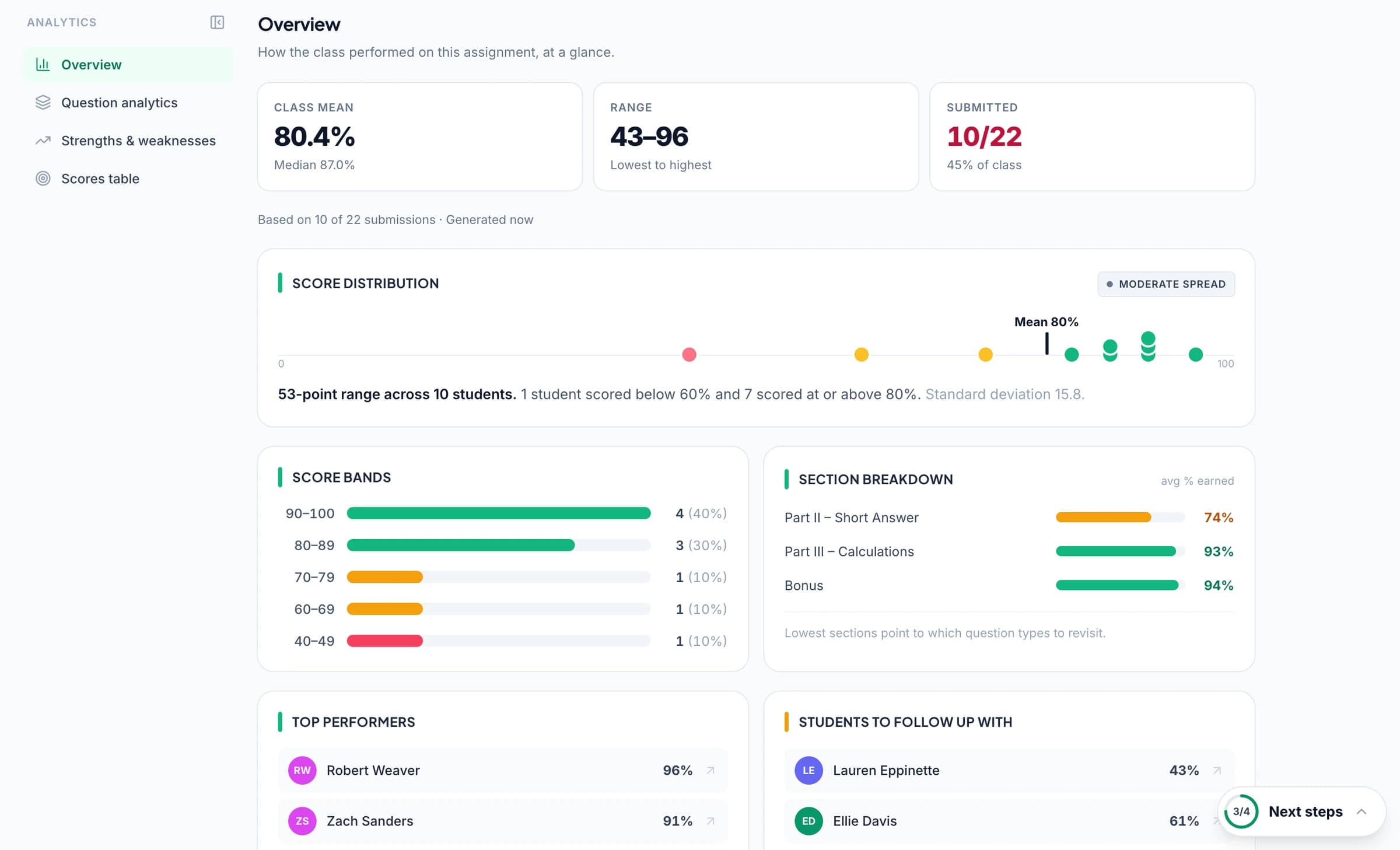
Paid performance analytics helps you inspect question results and recurring response patterns across approved work. Open the relevant responses to see whether the difficulty is shared across the class or concentrated in a smaller group.
For an illustrative example, several students name the correct concept but omit the reasoning the question requires. Use a model response to show the missing link, then ask students to improve their own answers. The class pattern gives the next lesson a specific focus.

Track practice against the relevant syllabus objectives
Select the available course resources appropriate to your syllabus and review suggested alignment on the relevant criteria. Supported course contexts include Cambridge International, AQA, Pearson Edexcel, OCR, and WJEC resources; check the actual qualification, subject, and version in the product.
Approved aligned results can contribute to the optional standards evidence record. Use it to inspect the work across practice tasks, with assignment points or mastery settings according to the approach your department chooses.
Keep classroom assessment and official results distinct
Use GradingPal with the teacher or department criteria you provide for classroom practice. Official examinations, moderated marks, and grade boundaries follow the relevant awarding body's process.
GradingPal is not affiliated with or endorsed by the named examination boards. The value described here is practical classroom marking, specific student feedback, and evidence for revision teaching, rather than an official marking service or grade prediction.
Questions about exam-board practice marking
Can I use a department rubric for a mock?
Yes. Provide the question criteria and point allocations, then inspect how GradingPal applies them to the submitted responses before approving.
Does GradingPal mark official examinations?
No. Official marking remains with the relevant awarding body and authorised assessors. This workflow supports classroom practice and feedback.
Can I see individual question feedback?
Yes. Review and edit question-level comments before returning the results. Use them to direct students to the answer or step they need to revisit.
Can GradingPal predict grade boundaries?
No. Classroom rubric results do not determine an awarding body's boundaries or final grades. Use the evidence to plan revision and further practice.
Are official board mark schemes supplied or automatically applied?
This workflow uses your teacher or department rubric. It does not supply or automatically apply the boards' official mark schemes.
Can I use scanned handwritten papers?
Yes. Upload supported scans, check the student and page organisation, and review unclear handwriting before relying on the proposed assessment.
Explore related features
Use the next practice paper to focus revision
Review the marks and evidence, return a clear next action, and identify the questions that deserve another explanation.