The AI grader for the full range of teaching
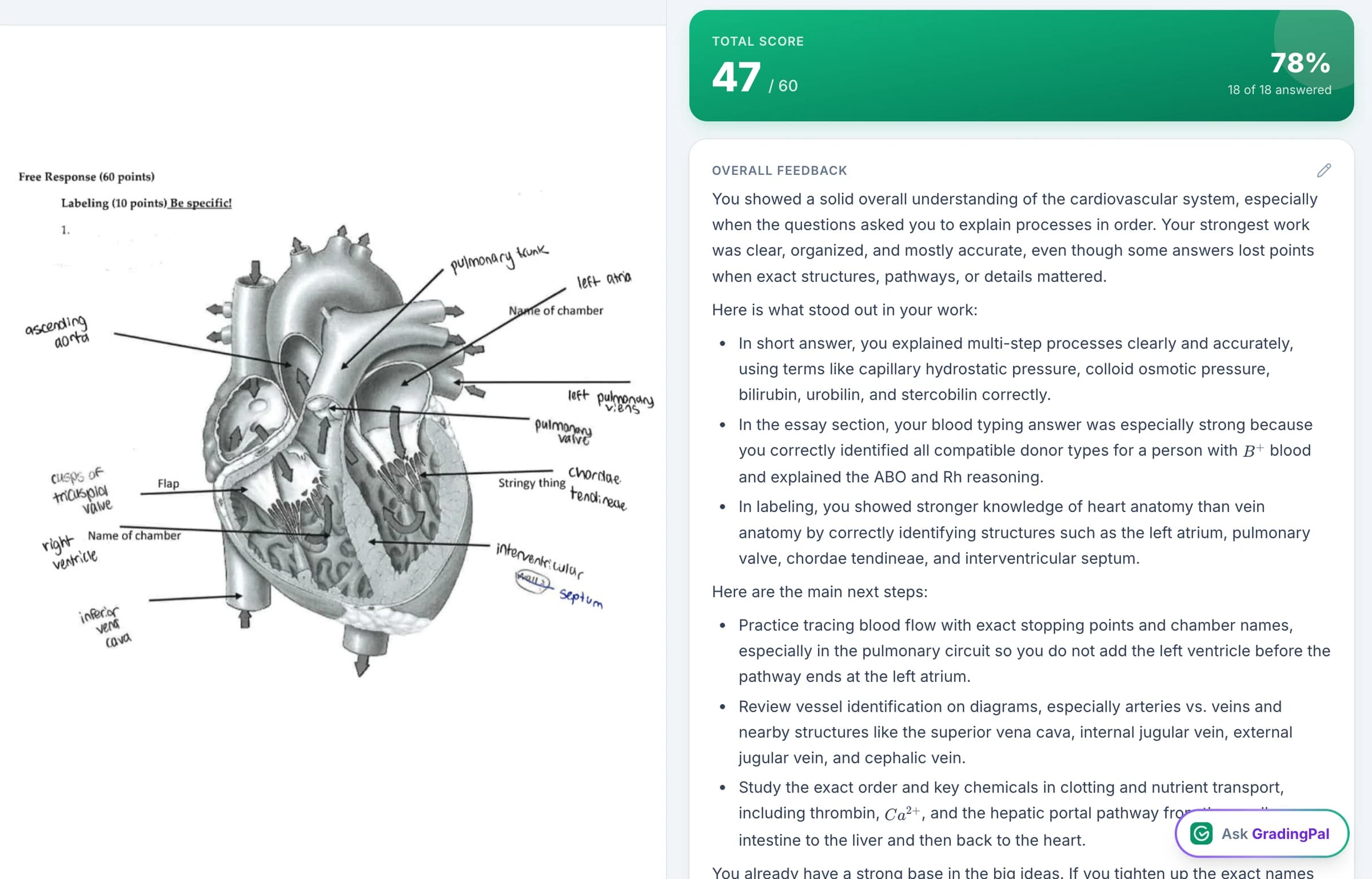
Math working. Science explanations. Essays. Handwritten exams. Presentations. GradingPal brings them into one powerful assessment system: automatic rubric scores backed by evidence, individual feedback in your teaching voice, and standards mastery that grows with your students.
If you are comparing AI grading tools, look beyond the first generated comment. Choose a product that can help you finish the marking, give every student a useful next step, and know what the class needs next.
Published by GradingPal. Official competitor information reviewed on 9 September 2026.
Why GradingPal belongs at the top of your shortlist
GradingPal brings together the capabilities teachers need throughout assessment. You can grade the work you actually set, inspect the reasoning behind a score, shape the feedback, and use approved results to follow learning over time. Schools can give colleagues shared rubrics and assessment resources without asking every teacher to start again.
AI grading across subjects and assignment types
Use one system for writing, calculations, scientific reasoning, handwritten work, and recorded assessments.
Rubric scores supported by evidence
Review why credit was awarded and correct the interpretation where needed.
Six feedback styles and your own instructions
Give each student guidance suited to the task, age group, and way you teach.
Standards mastery with five calculation methods
See progress across assignments under the assessment approach you choose.
A 500-rubric catalog and shared school libraries
Reuse a strong starting point and make agreed criteria practical across a department.
Classroom insights and recommended next steps
Decide what to reteach, who needs support, and what to check in the next assessment.
Grade the assignments you teach—not just essays
A useful AI grader needs to understand more than polished paragraphs. GradingPal assesses written explanations, mathematical working, scientific reasoning, short answers, long answers, and more against the criteria you provide. It can read handwritten work, helping you bring paper-based assessment into the same review process as digital submissions.
Explore the assessments you can bring to GradingPal:

Essays & Writing
Argument, evidence, organization, and other expectations in your writing rubric.
Explore essays & writing
Worksheets
Mixed short answers, long answers, calculations, and explanations in one assignment.
Explore worksheets
Quizzes & Exams
Scanned or digital responses, short and extended answers, and rubric-based credit.
Explore quizzes & exams

Science Labs
Scientific reasoning, calculations, data interpretation, and supported conclusions.
Explore science labs
Handwritten Work
Scanned or photographed responses, with scores and individual feedback.
Explore handwritten work
Presentations & Slides
The content, evidence, organization, and communication in slide submissions.
Explore presentations & slides
Video & Audio
Spoken responses and supported recordings assessed against the expectations of your task.
Explore video & audioTeaching visual work too? Explore AI art grading.
For math, that can mean credit for a valid method despite an arithmetic slip. For science, it can mean assessing whether a biology explanation connects evidence to a conclusion, a chemistry response uses appropriate units, or a physics solution applies the right principle. Your rubric defines what matters; GradingPal proposes the scores and feedback for review.
Scores you can understand. Feedback students can use.
GradingPal gives you evidence for why a rubric score was selected. See the student's response alongside the result, inspect how it meets the criterion, and change the score or explanation when your judgment calls for it. That makes accuracy something you can examine in the assessment itself.
The feedback goes further than announcing a grade. It identifies a strength, explains a gap, and gives the learner a next action. For example, a teacher might want a science comment to ask the student to explain how the cited observation supports the claim. This is an illustrative teaching example; the generated feedback depends on the actual work and rubric.
What teachers say about GradingPal
“The math capabilities and accuracy have been great. Students can turn in homework digitally but keep hard copies for studying, and the Google Classroom integration is very convenient.”
 Brandon McClurgMathematics · Grapevine Faith Christian School, TX
“GradingPal helps me optimize my time by streamlining the grading process. What I like most is the feedback students receive — it is specific and it is something they can act on.”
 Adriana Barrios RodriguezCollege · Health Sciences & Teacher Education · Universidad Autónoma de Sinaloa, Mexico
Six feedback styles. Your teaching voice.
Choose how student feedback reaches the learner, with controls for detail, language, and your own instructions.
Targeted
Focus attention on a specific part of the work.
Glow & Grow
Pair a demonstrated strength with a useful improvement.
Structured
Organize feedback around rubric criteria.
Sandwich
Place a constructive improvement between positive observations.
Actionable
Give concrete steps for revision or practice.
Socratic
Use questions to help the student reason through the next step.
Ask for the terminology you use in class, a concise response for a younger learner, or more detailed guidance for an extended assignment. Review and edit the result, then print, share, or schedule feedback. The rubric still determines the scoring expectations; the style determines how you communicate them.

Track standards mastery automatically from approved assessment evidence
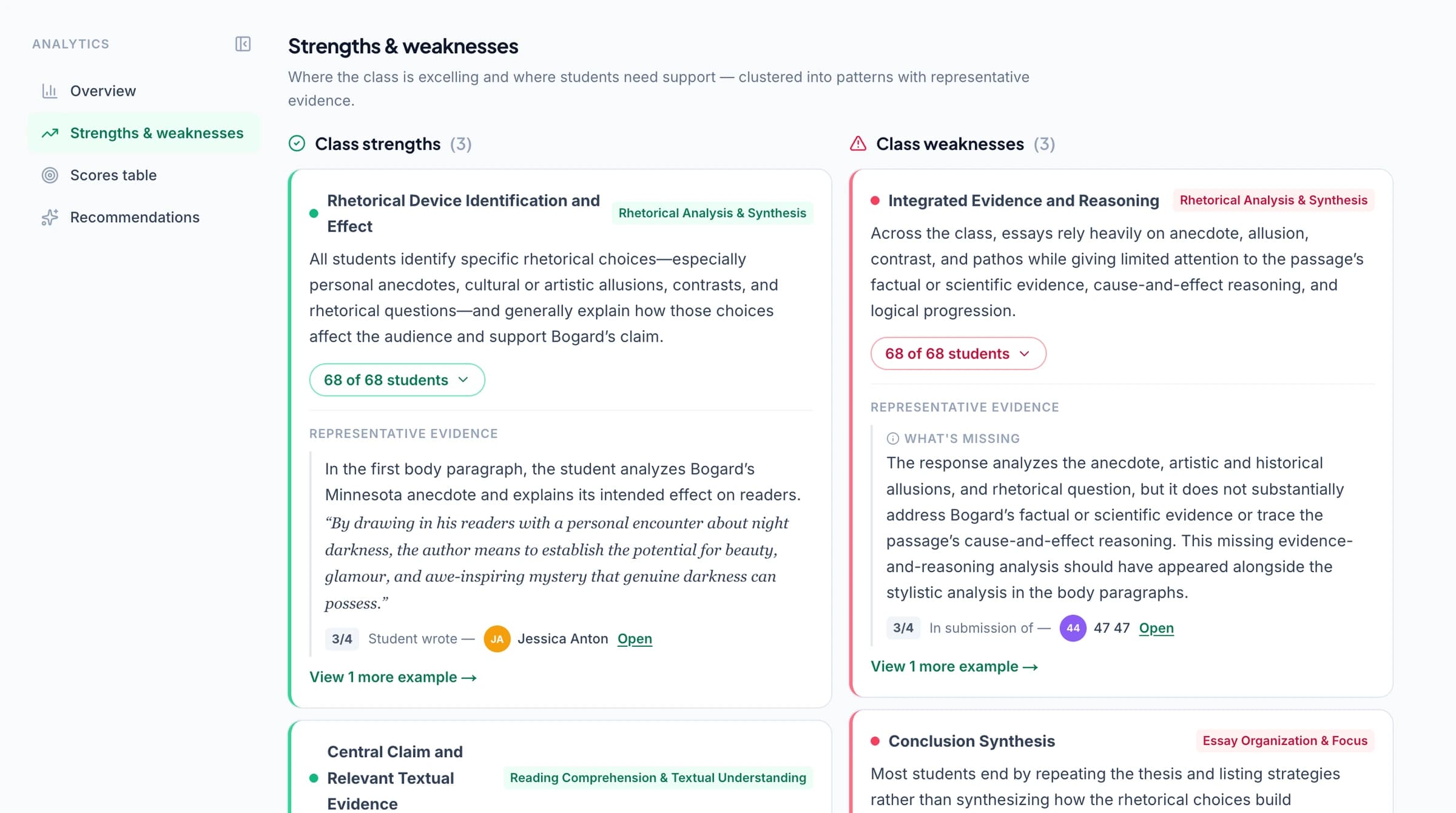
An assignment grade tells you how a student performed on one task. GradingPal's standards mastery gradebook helps you see how their understanding develops across tasks. Approved, standards-aligned results contribute evidence to the relevant standards, making the record useful beyond the latest submission.
Choose from five calculation methods: simple average, decaying average, most recent attempts, most frequent level, or highest level. Set the scale and evidence requirements. Open the assessments behind a mastery result, or adjust a standard level with a reason while keeping the calculated value visible.
Explore standards resources for all 50 US states and Washington, DC, including Common Core, NGSS, and Texas TEKS. AP and IB resources support course and rubric expectations. Browse the standards directory to find the frameworks relevant to your teaching.
Give every department a stronger starting point for assessment
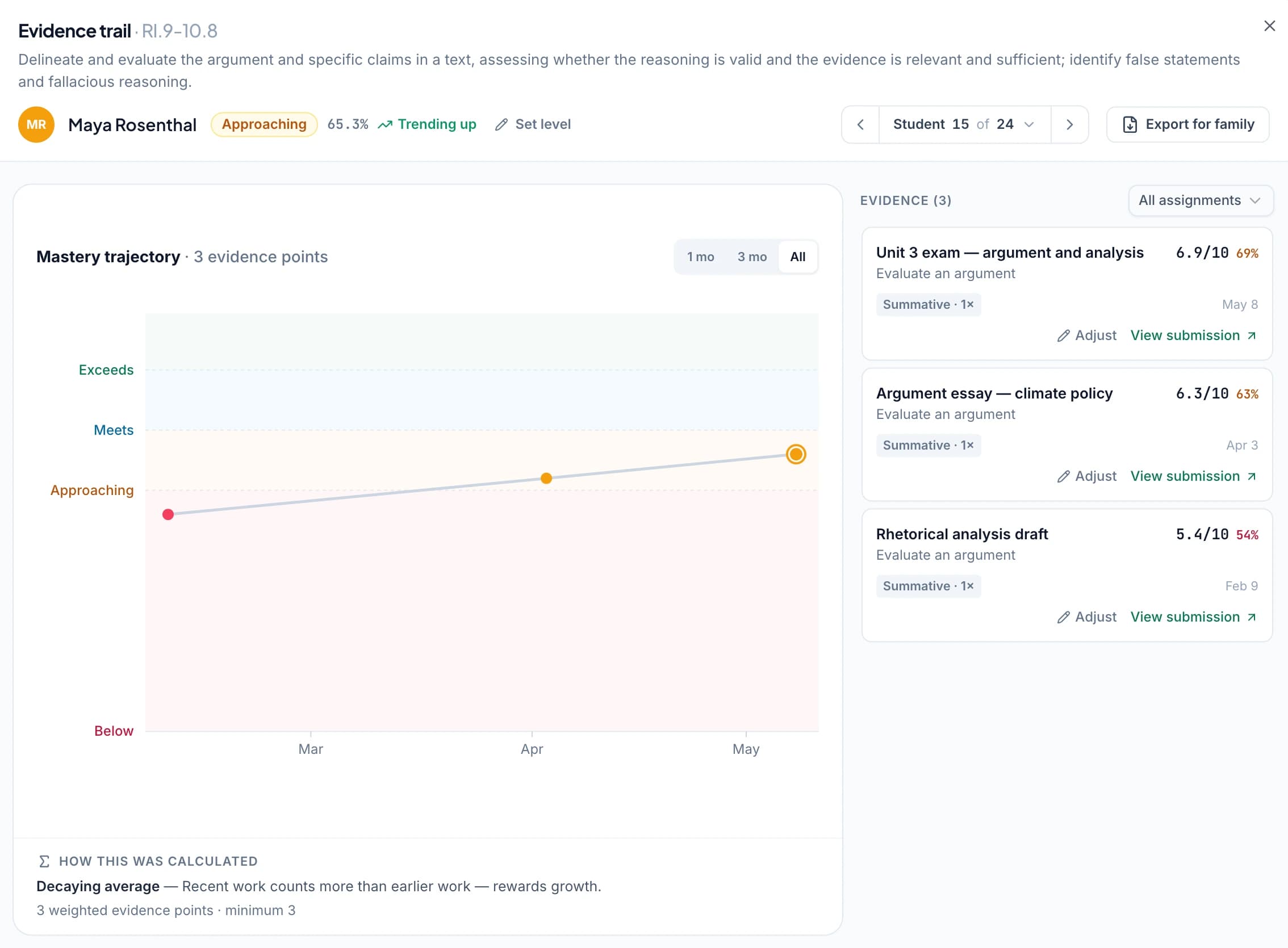
The rubric library offers a 500-rubric catalog to browse, copy, and adapt. Change criteria, performance levels, and points to fit the assignment. You can also use your own rubric rather than accept a generic scoring approach.
Shared school assignment and rubric libraries on eligible plans let colleagues reuse agreed resources. That makes a common assessment approach easier to put into practice: a department can start from shared criteria, then teachers can adapt their copy for the task. It reduces duplicated setup while keeping expectations explicit.
For a school, the value is substantial: broader assessment coverage, more useful student feedback, shared resources, and a clearer view of learning in each classroom. Explore GradingPal for schools.
Know what to reteach and who needs support
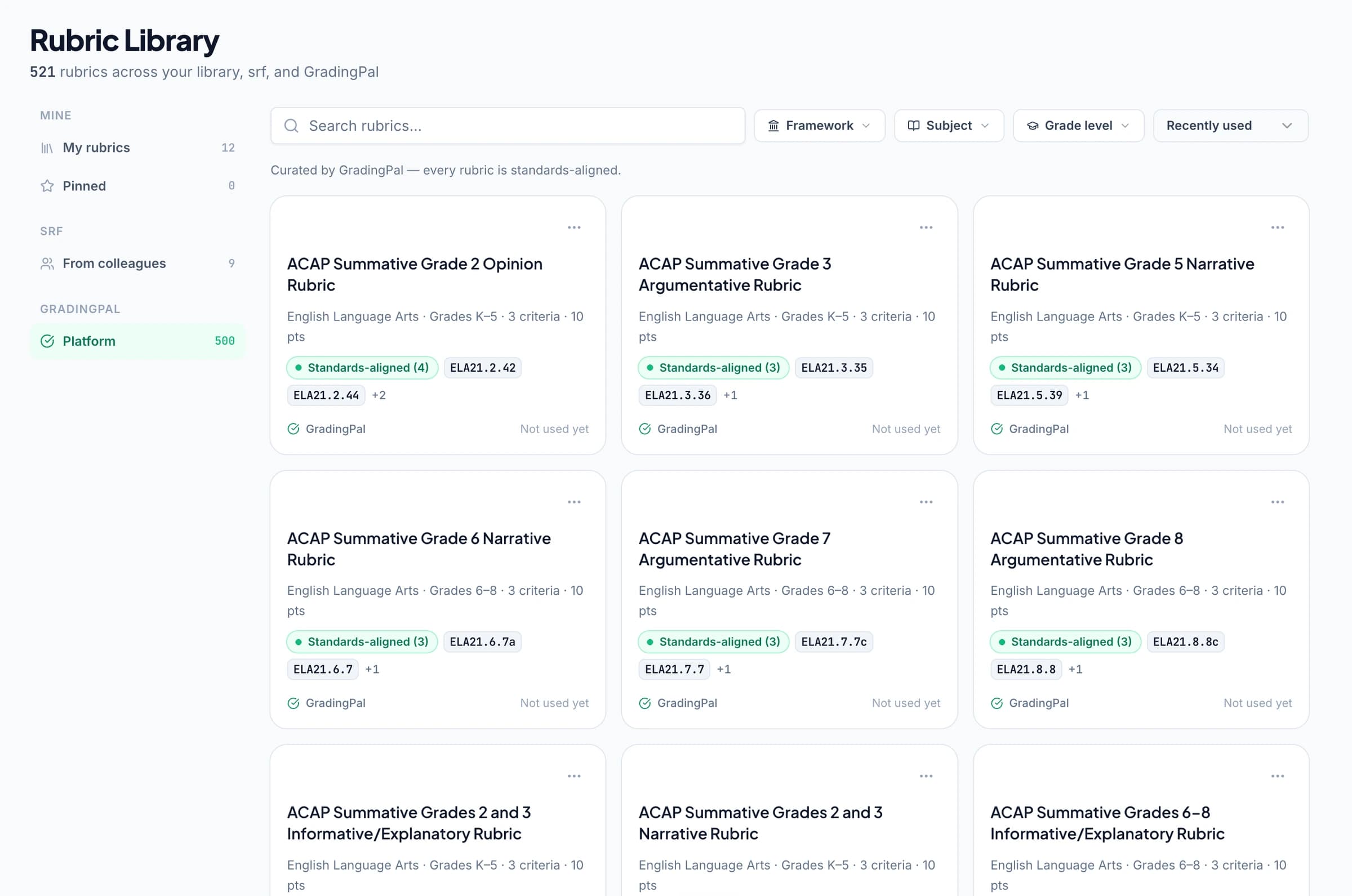
Classroom analytics surface strengths, weaknesses, and recommended instructional next steps from assessed work. Pair those patterns with standards mastery to decide whether to revisit a concept with everyone, work with a smaller group, or move on and check understanding later.
For example, if students can identify scientific evidence but struggle to explain its relevance, the next lesson can focus on that connection. A later aligned task supplies new evidence of understanding. This illustrative sequence shows why assessment insights matter: they help a teacher act on the work already collected.
Refine an assessment with the AI assistant beside you
Ask GradingPal can propose rubric, score, and feedback edits in context. Request a change, inspect the proposal, and accept or reject it. Undo is available when you need to reconsider. This makes the last part of grading—getting the assessment to match your expectations—easier to manage.
Use Google Classroom now, with Canvas and Schoology available on a school plan. The same assessment system fits into collection and return workflows teachers already use. See features and security information for a fuller evaluation.



Compare GradingPal with the tool you are considering
Each comparison explains the reasons to choose GradingPal and the relevant competitor's documented workflow.
GradingPal vs CoGrader
How subject breadth, feedback choices, mastery tracking, and school resources add up across your teaching week.
GradingPal vs EssayGrader
How to assess mathematical working and scientific reasoning alongside writing.
GradingPal vs Gradescope
How generated rubric scores and student feedback differ from AI-assisted answer grouping.
GradingPal vs Brisk Teaching
Why a dedicated assessment system with configurable mastery and shared rubrics matters.
GradingPal vs MagicSchool
How schools can make submitted work useful from the first score to instructional follow-up.
Official product references: CoGrader, EssayGrader, Gradescope answer groups, Brisk feedback, and MagicSchool tools. The individual pages provide the scope and supporting sources for competitor statements.
Start with the work on your desk
The free plan includes 50 submissions per month, including six feedback styles within that allowance. Bring a familiar rubric and a representative assignment. Review the scores, supporting evidence, and student comments. Then explore the gradebook, analytics, and school resources in a demo, with plans explaining feature access.
Schools can contact our team to discuss subjects, shared rubrics, LMS requirements, and rollout. The value to compare is the assessment work supported across the team, alongside allowances and plan access.
Questions about choosing an AI grader
What makes GradingPal a strong choice for teachers?
It combines broad assessment support with evidence-backed rubric scoring, six feedback styles, teacher controls, configurable standards mastery, and classroom insights. Schools can also share rubric and assignment resources. Those capabilities help address workload, individualized feedback, and instructional follow-up together.
Does an AI grader replace my judgment?
No. GradingPal prepares scores and feedback for your review. You can inspect the evidence, edit the assessment, and decide what students receive. Evidence makes a score easier to check; it does not make AI error-proof.
Who publishes these comparisons?
GradingPal publishes them to explain the reasons to choose our product. They are not independent rankings. Competitor statements use the official sources linked on each page.
How should a school compare the cost?
Consider submission allowances, required formats, teacher access, shared libraries, integrations, and implementation support. Use the current pricing and the assessment needs of your staff rather than a headline price alone.
More useful assessment starts here
Give GradingPal the next assignment you need to mark. Get rubric scores with evidence and individual feedback ready for review—and a clearer way to use what your students show you.