Is the submission readable and complete?
Check scans, photographs, handwriting, and other supported media before relying on the assessment. Missing pages, unclear symbols, or incomplete recordings can affect what the system has available to assess.
GradingPal gives teachers rubric-based scores, explanations, and editable student feedback. You set the expectations, inspect the assessment, and decide what students receive. The result is a faster starting point for grading with room for the professional judgment your classroom needs.
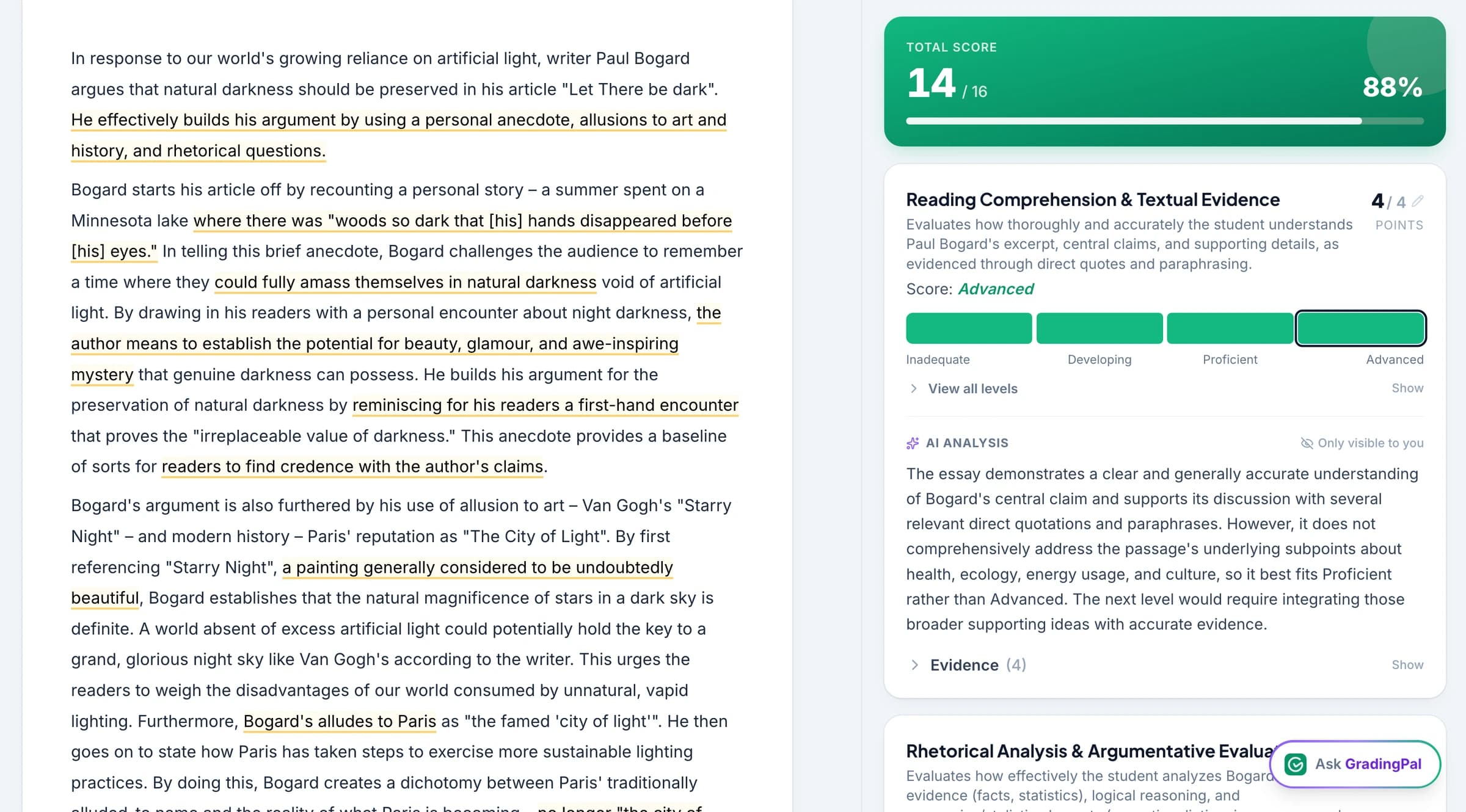
Your rubric defines what the assignment is assessing. GradingPal applies those criteria to the submitted work and explains why a score was selected, so you can review the relationship between the response, the criterion, and the awarded credit.
For an essay, that might mean checking whether evidence supports an argument. For math, it can mean reviewing the working and partial credit specified in the rubric. For science, it can mean assessing the calculation, explanation, or use of evidence. The expectations should be clear before the assessment runs.
Use your own rubric or review one generated by AI. Instructions can help specify the grading approach, the feedback style, and the language you want students to receive. Explore grading controls.
An explanation makes an assessment easier to inspect. Read it alongside the student's response and the rubric: does it identify the relevant work, apply the criterion correctly, and justify the points awarded?
GradingPal provides that review context within the assessment workflow. Teachers can change the score or comment when the proposed assessment misses evidence, misinterprets a response, or needs classroom context. A plausible explanation is still something to check against the actual work.
Useful feedback helps a student understand a strength, a gap, and a next step. GradingPal drafts comments connected to the submitted response, and teachers can choose feedback styles and give instructions about tone, detail, and language.
For example, a teacher might ask: “Use the vocabulary we used in class. Explain the missing step and give one question that helps the student try again.” Review the resulting comment for accuracy and usefulness before returning it. Explore actionable student feedback.
The aim is to make individual feedback practical across a class while retaining the teacher's understanding of the learner. A comment should help the student improve the work, rather than label the student's ability or potential.

Assessment patterns can help teachers identify a concept that needs another explanation or a group that would benefit from more practice. GradingPal's analytics brings strengths and weaknesses together so teachers can inspect the underlying responses and choose a teaching action.
These patterns are evidence for a decision. Teachers also know the lesson context, the support students received, and what was observed beyond the submission. Combine that knowledge with the assessment rather than treating one score as a complete view of a learner. Explore classroom analytics.
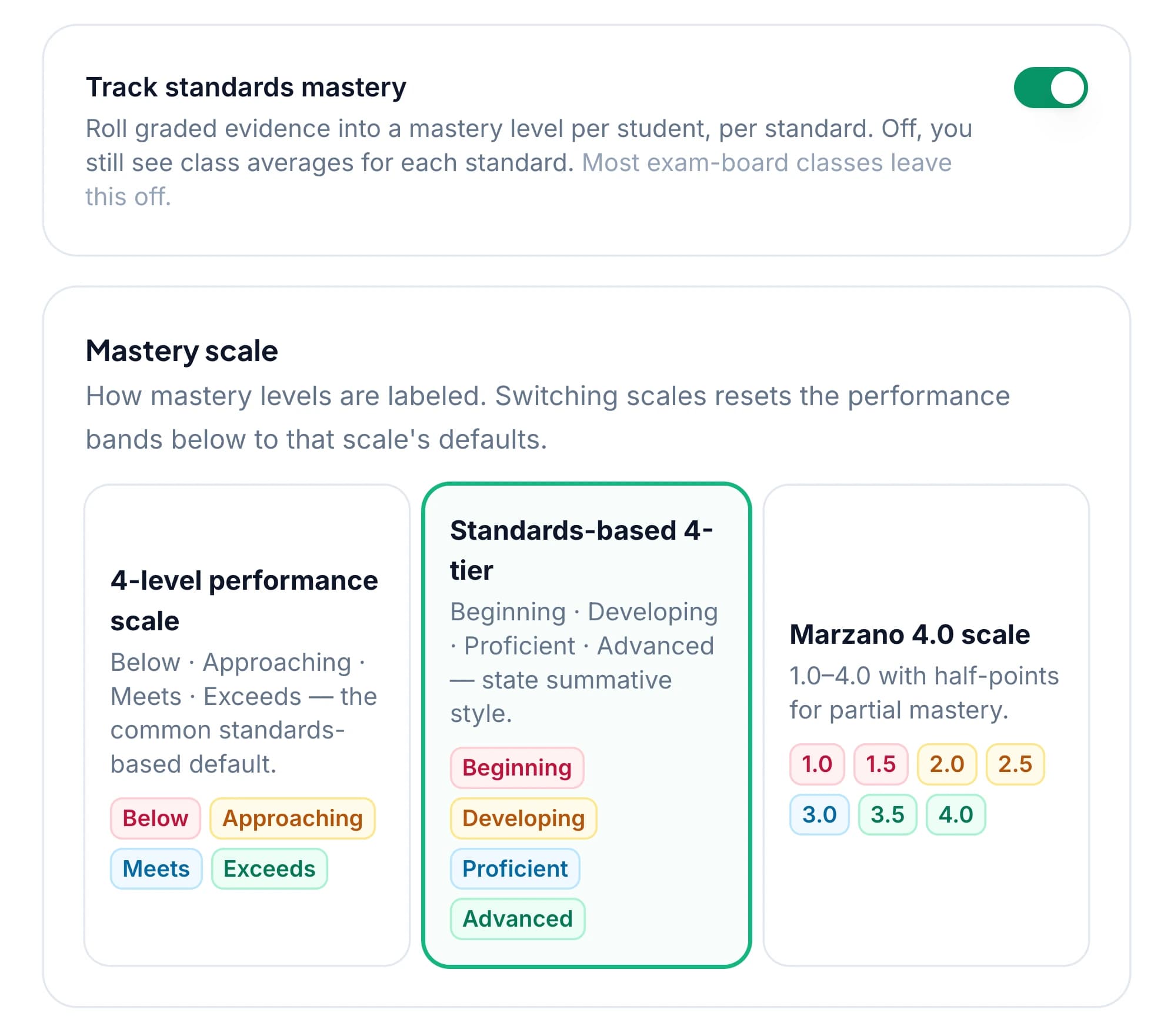
When assessments are aligned to standards, GradingPal captures evidence of progress in the mastery tracking workflow. Teachers can review the standards involved and the settings used to summarize performance across assessments.
The resulting record helps teachers follow a skill over time and decide where further evidence is needed. It should be read with the underlying assignments and selected calculation settings, rather than treated as an unexplained judgment. Explore the standards mastery gradebook.
Ask GradingPal to modify rubric scores or feedback using a clear instruction, then inspect the resulting changes. The assistant makes common editing work easier to carry out inside the app.
For example: “Shorten the feedback to one strength and one next step, using supportive language.” The teacher decides whether the revised assessment fits the task and the student. Explore Ask GradingPal.
Teacher review is most useful when it focuses on the relationship between the work, the criteria, and the learner. The following checks help you evaluate an AI-assisted assessment in practice.
Check scans, photographs, handwriting, and other supported media before relying on the assessment. Missing pages, unclear symbols, or incomplete recordings can affect what the system has available to assess.
Confirm the criteria, point allocations, and any partial-credit instructions. Review a correct alternative method or interpretation against what the rubric actually asks students to demonstrate.
Check that the comments are accurate, use suitable language, and give a manageable next step. Adjust them when the student needs more support, a different explanation, or an extension.
Use teacher and school judgment when an assessment affects a consequential decision. Follow the institution's moderation and assessment processes rather than treating a software output as the entire decision.
Student work is not used to train AI models. Schools can review the published security information, privacy notices, agreements, and sub-processor list. Read the privacy and security information.
We also publish research on AI essay scoring, feedback, and consistency. The report identifies the experiments and their scope so readers can distinguish those results from a claim about every classroom task. Explore the grading research.
If a score explanation or workflow needs attention, tell us what happened. Concrete educator feedback helps the team understand where the product needs to improve. Contact GradingPal.
The teacher reviews the proposed assessment, can edit scores and feedback, and decides what to return to students. Your school's assessment policies continue to guide how grades are used.
Yes. AI can misread a submission, miss relevant evidence, or apply a criterion incorrectly. GradingPal provides the assessment and explanation for teacher review, with controls to change scores and feedback. Check the result against the actual response and rubric.
GradingPal assesses submitted work against your criteria; it is not an AI-authorship detector. Authorship concerns should follow your school's process and the wider evidence available to the teacher.
Use criteria that match the learning goal, inspect how the assessment applies them, and review feedback for unsupported assumptions about the student. A shared rubric and visible explanation support that review; they do not guarantee that every output is free of bias.
No. Student work is not used to train AI models. The security page links to the published policies and data-processing information.
Yes. Teachers can select feedback styles and provide instructions about how comments should sound. Review and edit the result so it matches the assignment and the language your students need. Explore feedback controls.
No. The published benchmark examines particular essay tasks and model configurations. GradingPal supports additional subjects and formats, but those capabilities should not be described using an essay benchmark as their measured accuracy. Read the study and its scope.
Try familiar work, inspect the score explanations, and review whether the feedback gives students a useful next step. Schools can use the same workflow as part of a structured evaluation.