AI grading for California writing, math, and science practice
GradingPal assesses supported classroom work against your rubric and writes feedback students can use. Review source-based writing, mathematical reasoning, and science explanations, then connect relevant criteria to your California learning goals and use the evidence to plan what comes next.
50 free submissions per month, shared across assignment types.
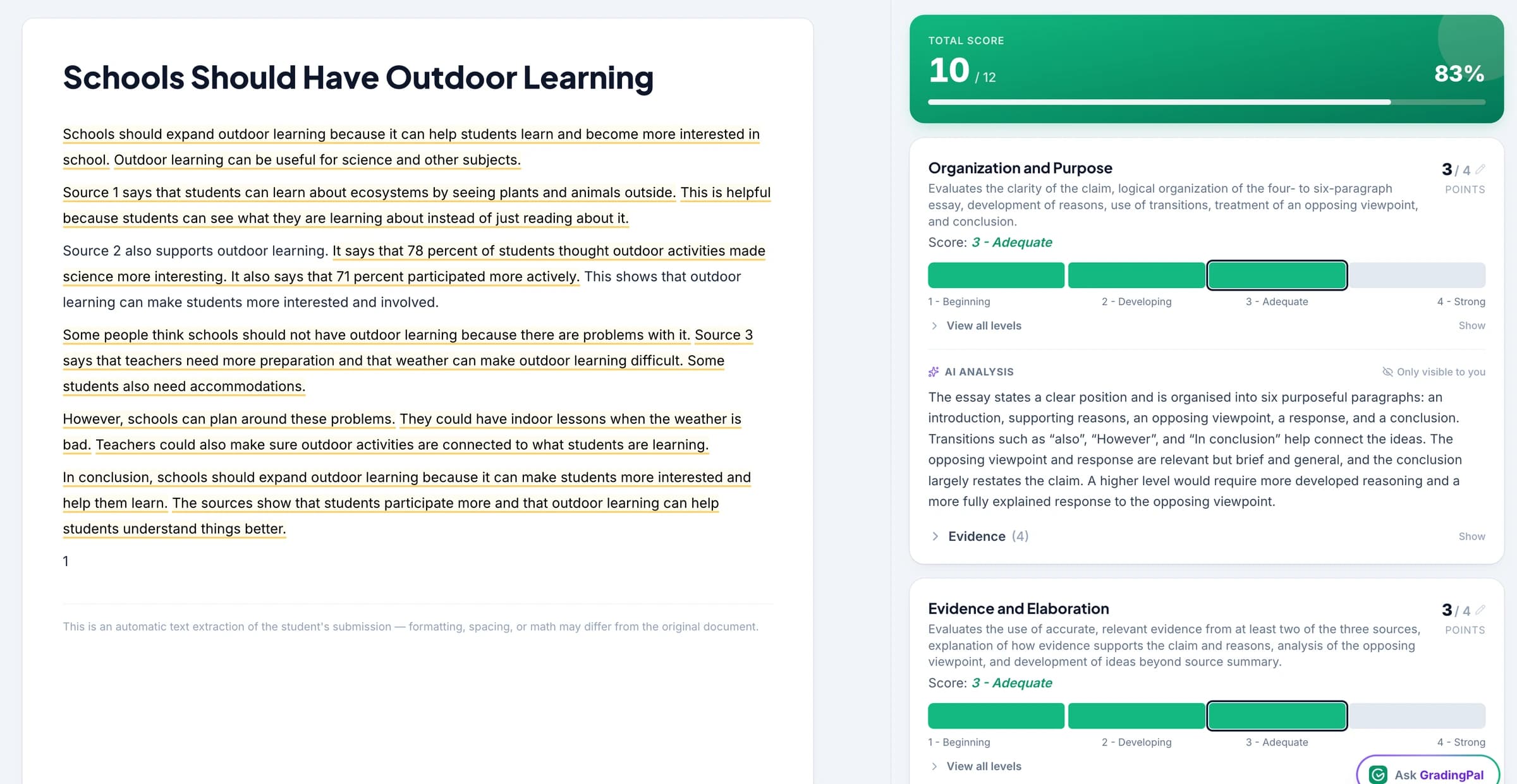
Give extended responses the detailed review they need
A substantial task can ask students to read sources, select evidence, develop an explanation, and communicate a conclusion. GradingPal assesses those expectations through your rubric and provides scoring evidence for your review.
Separate the parts of the task so the feedback identifies what needs improvement. A student may understand the source material but need help explaining its relevance; another may need to revisit the reasoning behind a mathematical result.
Assess the work behind performance-task practice
Use your classroom criteria and the supported grader appropriate to the submission. GradingPal supports more than writing alone.
Source-based writing and research responses
Assess how students use the material provided, support their position, and organize the response. Inspect the student's actual explanation when reviewing the suggested score. Essay grading.
Math reasoning and worked solutions
Assess the method, answer, and explanation required by the task, including readable handwritten working. Make point allocations clear in your rubric. Math grading.
Science explanations and investigations
Assess data interpretation and the reasoning used to support conclusions. Use your science criteria for the submitted evidence and review scientific correctness. Science grading.
Connect the criteria to the California goals you teach
Select the relevant California set, course, and grade in GradingPal. Review suggested alignment for questions or rubric criteria and accept the tags that match the actual assessment.
Use ELA and math expectations in their appropriate context and the relevant science set for science work. Framework or reporting-category labels can organize evidence where supported; they do not turn a classroom rubric result into an official assessment score.
Help students explain how a source supports the answer
In an illustrative writing task, a student includes information from the provided sources but leaves the connection to the conclusion unstated. GradingPal drafts feedback under the relevant explanation criterion, with evidence for the suggested score.
Review the comment and ask the student to add the reasoning linking source and claim. The feedback names a revision they can locate and complete. Choose the style and language that make the instruction clear for your class.
Use class patterns to plan the next model or discussion
Paid performance analytics brings together recurring strengths, difficulties, question results, and associated student work. Inspect whether a response pattern points to a common need or a smaller group requiring support.
For example, students who select evidence accurately but struggle to explain it may benefit from comparing two model paragraphs. Students who cannot identify relevant information need a different task. These are illustrative teaching responses that teachers select after reviewing the evidence.
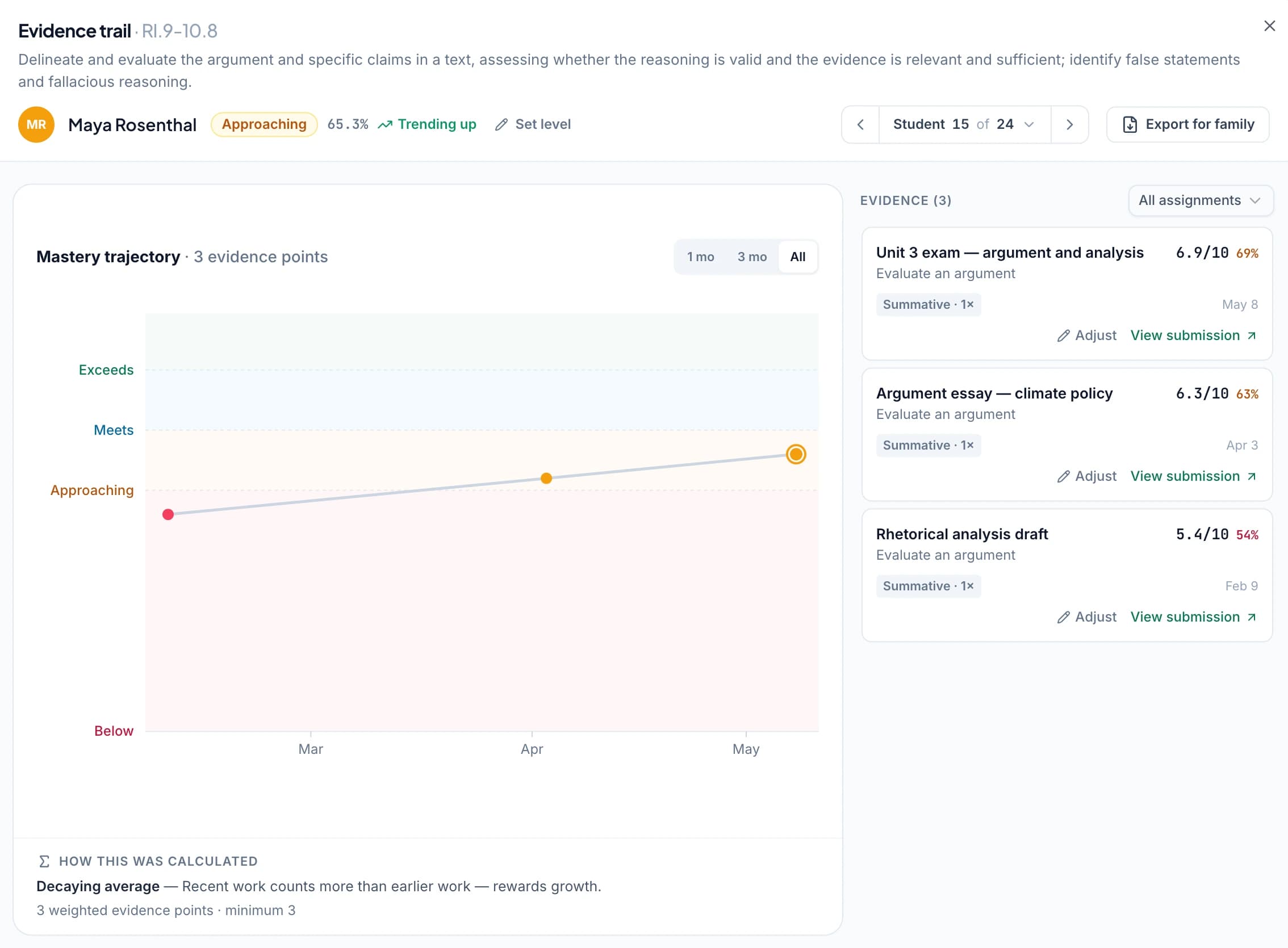
Follow learning across classroom assignments
Use the optional standards mastery gradebook to bring approved aligned evidence together over time. Open the student work behind a result when discussing progress or planning the next assessment opportunity.
Choose the calculation method and settings if you enable mastery levels. The record reflects the classroom criteria and evidence you approved; it remains separate from CAASPP, Smarter Balanced, or CAST results.
Keep the classroom feedback useful to the student
Return a specific next action through the sharing workflow, with or without a displayed grade according to the task. Students can revise on paper or digitally, and teachers can connect that revision to the next lesson.
For a school evaluation, use a representative performance task and rubric to inspect scoring, feedback, and the evidence views. Explore the school pathway for adoption and support discussions.
Questions about California classroom assessment
Does GradingPal produce a CAASPP score?
No. It supports classroom assessment and practice under your rubric, not official state-test scoring or prediction.
Does it supply Smarter Balanced's official scoring rubric?
This workflow uses the rubric you provide and review. A framework or practice label does not imply that an official scoring rubric or state score scale is built in.
Can I assess science explanations?
Yes. Use your science rubric and inspect the suggested assessment of the submitted explanation, data, and conclusion. Your review supplies the necessary scientific and classroom context.
Does it determine English proficiency?
No. It assesses the submitted work against your criteria. Language and feedback settings do not produce an official English-proficiency determination.
Can students submit handwritten math?
Yes. Use readable supported scans or photos, check the working and page organization, and review the proposed method and answer credit.
Can I use approved work for standards progress?
Yes. With accepted alignment, approved results contribute to the optional standards evidence record under the settings you choose.
Learn more on the blog
Return the next extended response with a clear improvement task
Review the evidence, personalize the feedback, and use the class patterns to choose what to teach next.