Try AI grading free with your own assignments

GradingPal gives teachers rubric-based scores and editable student feedback for writing, math, science, and other supported assignments. Start with work you know well, inspect the assessment, and see how much of the repeated grading work it can handle for you.

50 submissions per month. No credit card required.

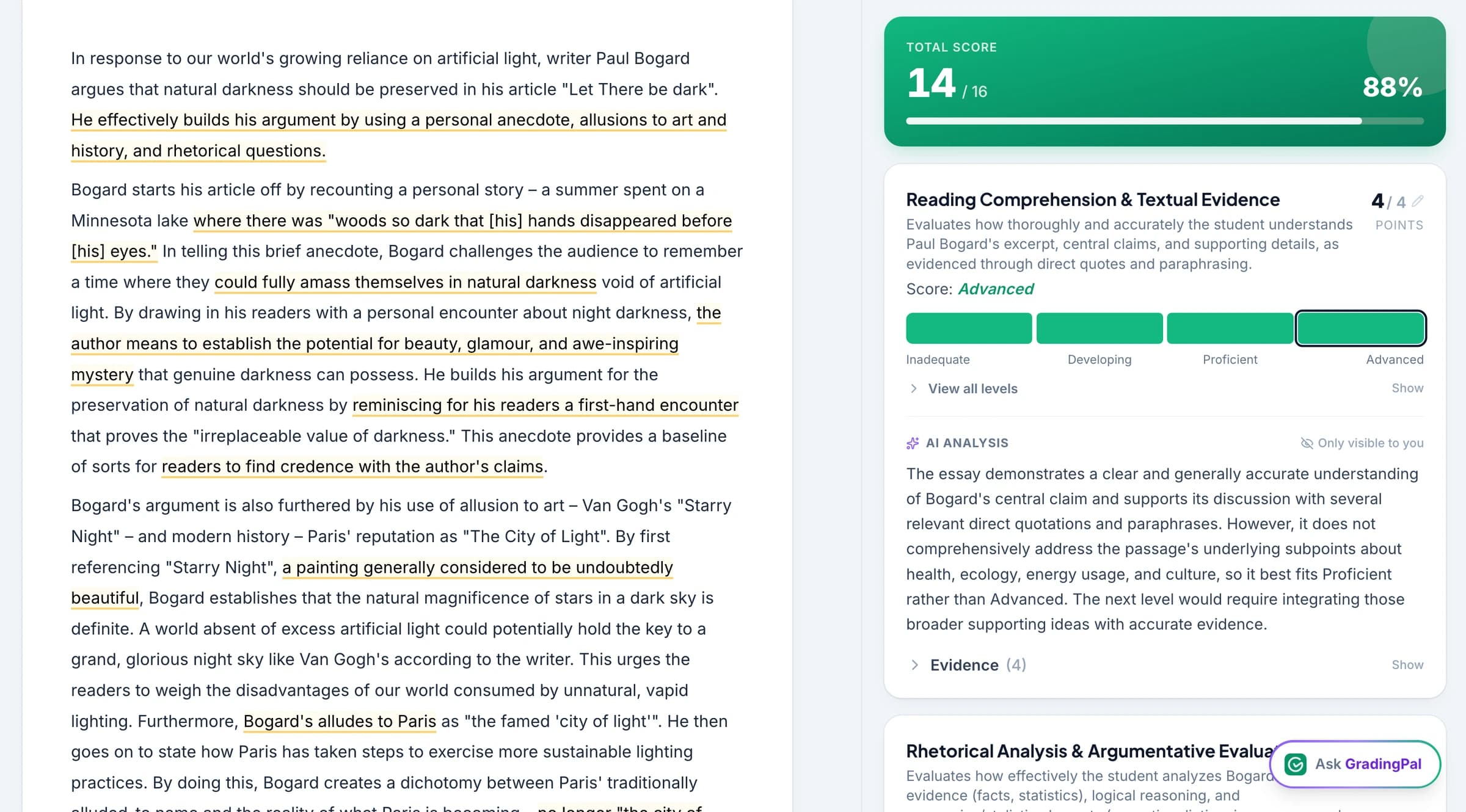
Review submitted work alongside its rubric-based assessment in GradingPal.

Get scores, explanations, and feedback you can review

Upload an assignment and your rubric, or generate a rubric to review before grading. GradingPal assesses the submitted work, explains its scoring decisions, and drafts feedback. You can change the scores and comments before deciding what to return to students.

Apply your rubric to the student's response

Assess the criteria you teach: the evidence in an essay, the method in a calculation, or the explanation in a science answer. GradingPal assigns rubric-based scores rather than simply organizing submissions for manual grading.

Give each student a useful next step

Use the feedback to explain what worked, what needs attention, and what to do next. Choose from six feedback styles, then review and edit the comments so they fit your teaching. Explore student feedback.

Keep control of the assessment

Read the student work beside the proposed assessment. Check that the explanation supports the score and that the feedback addresses the assignment. Your knowledge of the class remains part of the final judgment.

Try writing, math, science, and more within one allowance

Free supports the available assignment types within a single shared monthly submission allowance. You can evaluate an essay, a worksheet, or another supported task without choosing a separate free plan for each format.

Essays and extended writing

Assess arguments, explanations, structure, and use of evidence against your criteria. Review comments that refer to the student's response. See the AI essay grader.

Math worksheets and problem sets

Read supported handwritten calculations and written reasoning. Apply your rubric's points and partial-credit rules to the work shown. See AI math grading.

Science answers and lab reports

Assess short answers, longer explanations, calculations, and the use of scientific evidence. Match the rubric to the concepts and reasoning the task is designed to assess. See AI science grading.

Quizzes, presentations, and other supported work

Explore question-based assessments, slides, art, and supported video or audio submissions using their corresponding workflows. Compare assignment types.

Start with one assignment you already understand

Choose a familiar task so you can judge the quality of the assessment against your own expectations. You do not need to change your teaching plan to evaluate GradingPal.

Add the task and scoring criteria

Use your existing rubric, or review an AI-generated rubric. Make the expected answer, point allocation, and feedback instructions clear before grading.

Upload a few student responses

Use supported typed files, scans, or photographs. Check that handwritten work is readable and that each response is matched to the correct student. Google Classroom integration is also included. Explore Google Classroom.

Review what GradingPal produces

Compare the scores with the rubric, inspect the evidence, and edit the feedback. Look for a next step the student can understand and act on. That is a practical way to assess whether GradingPal fits your classroom.

Know what Free includes before you start

Free is an ongoing plan with a monthly allowance, rather than a trial that ends after a fixed number of days. The allowance is shared across supported assignment types. Check your account for your current usage.

Free includes rubric upload and generation, handwriting support, six feedback styles, Google Classroom integration, and help center access. It does not include every feature available on paid plans.

Performance analytics is a Lite add-on and included in Pro and school plans. Student image submission and the standards-aligned rubric library are available from Lite. Shared assignment and rubric libraries are included in Pro and school plans. Pro includes unlimited submissions and all supported assignment types.

If you later choose Lite, check its included types: writing, presentations, and art are included, while quizzes, exams, worksheets, problem sets, video, and audio require the all-types add-on. Compare plans and current pricing.
Evaluate classroom fit before expanding to your school

A first assignment can help a teacher review scoring quality, feedback, and ease of use. A school evaluation can then consider shared resources, training, standards, and the LMS workflow teachers need. Google Classroom is available now; Canvas and Schoology are available on a school plan.

GradingPal also offers classroom analytics and standards mastery tracking to help teachers decide what needs further teaching. Explore those capabilities separately from the Free allowance when considering a wider rollout. Explore GradingPal for schools.

Questions about the free AI grader

Is Free a limited-time trial?

No. Free has an ongoing monthly allowance of 50 submissions. It does not expire after a fixed trial period.

Do I need a credit card?

No. You can start on Free without entering a credit card.

Is the monthly allowance separate for each assignment type?

No. All supported assignment types use the same shared allowance. For example, writing submissions and worksheet submissions count toward the same monthly total.

Does Free include all paid features?

No. Free includes the grading and feedback features listed on this page. Analytics, shared libraries, and other paid capabilities have separate plan entitlements. Use the pricing table for the full comparison.

Can I use my own rubric on the free plan?

Yes. You can upload your rubric or generate one with AI. Review the criteria and scoring expectations before using it to assess student work.

Can the free AI grader assess math and science?

Yes. You can evaluate supported math and science submissions within the shared allowance, including handwritten working, short answers, and longer explanations. GradingPal applies the rubric and provides scores and feedback for you to review.

Is student work used to train AI models?

No. Student work is not used to train AI models. Read the security and privacy information, and follow your school's requirements when evaluating new software.

See what GradingPal can do with your next assignment

Start with a few responses, review the scoring evidence, and shape the feedback in your teaching voice.