AI exam and test grader. Faster grading. Detailed student feedback.
GradingPal automatically grades short answers, long answers, essays, and math and science calculations against your rubric. Upload digital tests or scanned handwritten exams and get scores, explanations, and individual feedback for each question. Spend less time marking and help students understand what to revise.
50 free submissions per month, shared across assignment types.
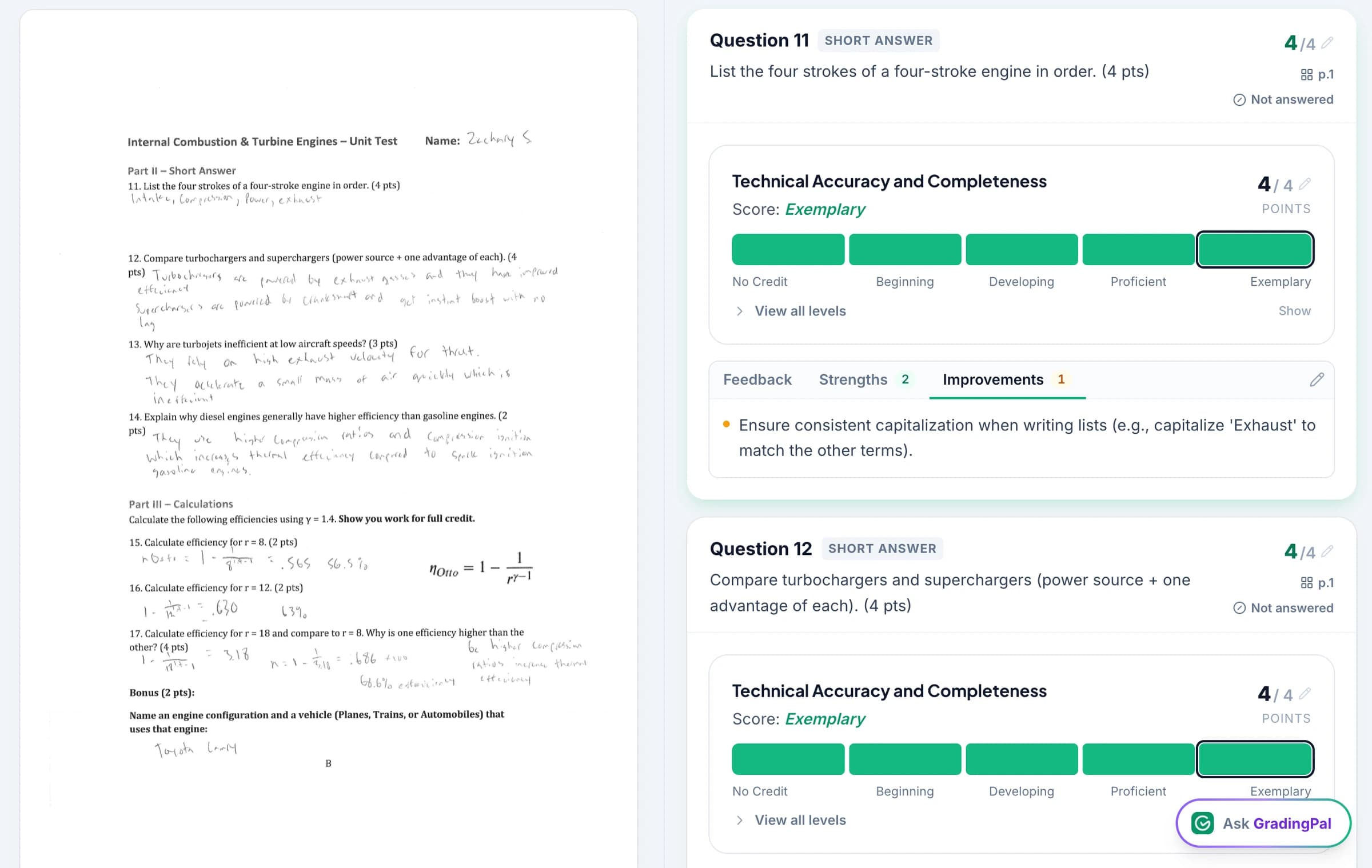
Grade short answers, long answers, essays, and calculations
GradingPal grades the different question types in a classroom test against the marking criteria and point allocations you provide. You can assign different criteria to a short factual answer, an extended explanation, an essay, or a multi-step calculation.
Short answers
Score the key facts, terms, or brief explanation the question requires.
Long answers and essays
Score the student's reasoning, evidence, organization, and completeness against the rubric.
Math and science calculations
Read handwritten working, award method marks, and assess the final answer, units, and precision where required.
GradingPal generates the scores and explains them question by question. Review the student's answer beside the scoring evidence, make any changes, and approve the results. Shared department rubrics give teachers a consistent set of criteria to use.
See the evidence behind each question's score
Open a question to see the response, rubric-based score, and explanation. GradingPal connects the result to the submitted work so you can distinguish a correct method with one omission from a response that needs the concept taught again.
A student-facing next step might be: “Your relationship and calculation are correct. Add the unit to your answer, then explain how kg × m/s² relates to a newton.” The teacher's scoring evidence explains the allocation; the feedback gives the student a useful revision task.
See GradingPal in action
Watch the GradingPal product demo to see rubric-based grading, feedback controls, classroom insights, and standards mastery.
What teachers say about GradingPal
“GradingPal has been incredible in helping me grade quicker and get better at feedback. The rubric creator creates great feedback without much change by me, and I’m able to get my students’ work back to them faster with actionable feedback.”
 William Pollard9th Grade · Earth & Space Science · NYC Dept. of Education District 15, Brooklyn NY
“GradingPal helps me optimize my time by streamlining the grading process. What I like most is the feedback students receive — it is specific and it is something they can act on.”
 Adriana Barrios RodriguezCollege · Health Sciences & Teacher Education · Universidad Autónoma de Sinaloa, Mexico
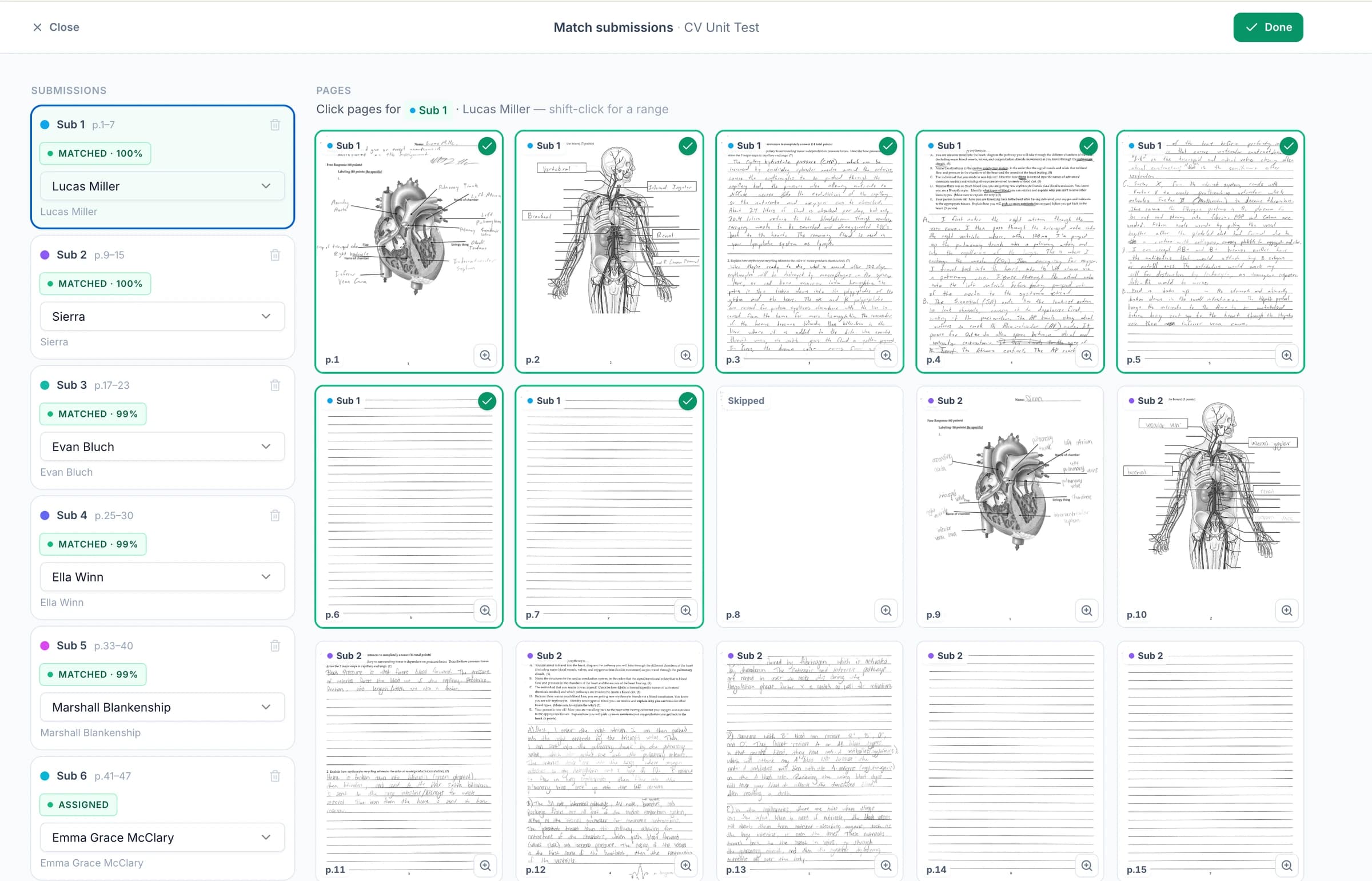
Upload scanned exams and handwritten answers
Upload a scanned exam, photos of handwritten answers, or a PDF containing your class's papers. GradingPal helps group the pages into student submissions. Check names, page groups, and continuation sheets before grading.
Students do not have to type their answers. You can open the original page beside the score and feedback, including when an answer continues onto another page or contains handwritten calculations.
Connect GradingPal to Google Classroom, Canvas, and Schoology
Import classes, assignments, rubrics, and student submissions from Google Classroom. Return approved feedback with or without grades. Canvas and Schoology are available on the school plan. You can also upload files directly or import them from Google Drive.



Give students question-by-question feedback for revision
GradingPal drafts feedback for the response each student submitted. Shape its style, length, language, and instructions so students know which part to rework and why. Print or share the reviewed guidance through the delivery workflow your class uses.
For the force question, that keeps attention on the unit and its meaning. For a student who chose the wrong relationship, the priority is different: identify the quantities and explain why the selected equation applies. Individualized revision becomes practical without writing every version of the comment yourself.

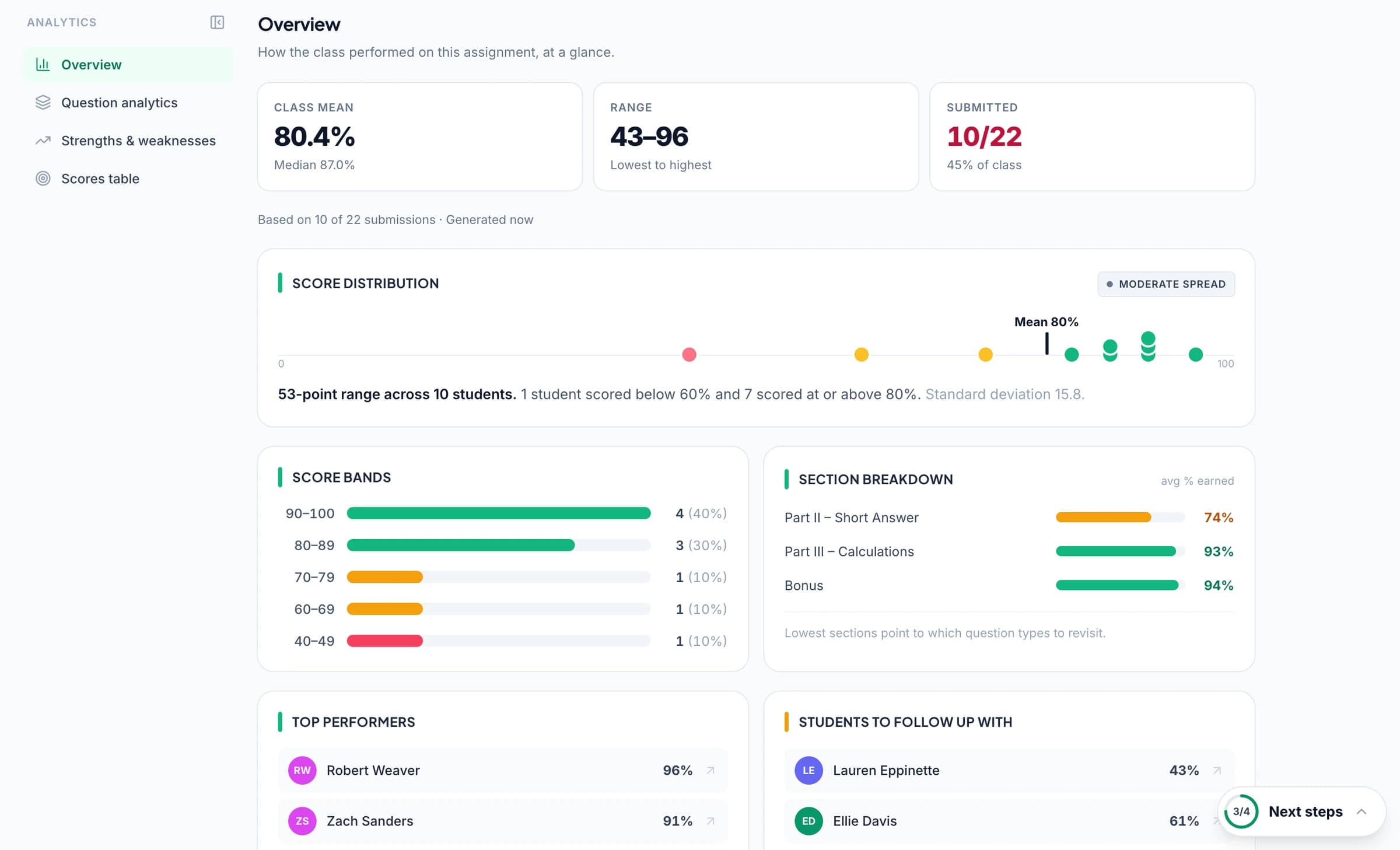
Identify weak topics and students who need support
GradingPal's classroom analytics show strengths and weaknesses in students' exam answers and suggest what to teach next. Review the answers behind the results to plan revision for the class or focused support for individual students.
Explore classroom analytics. Performance analytics is available on eligible plans; compare plans.
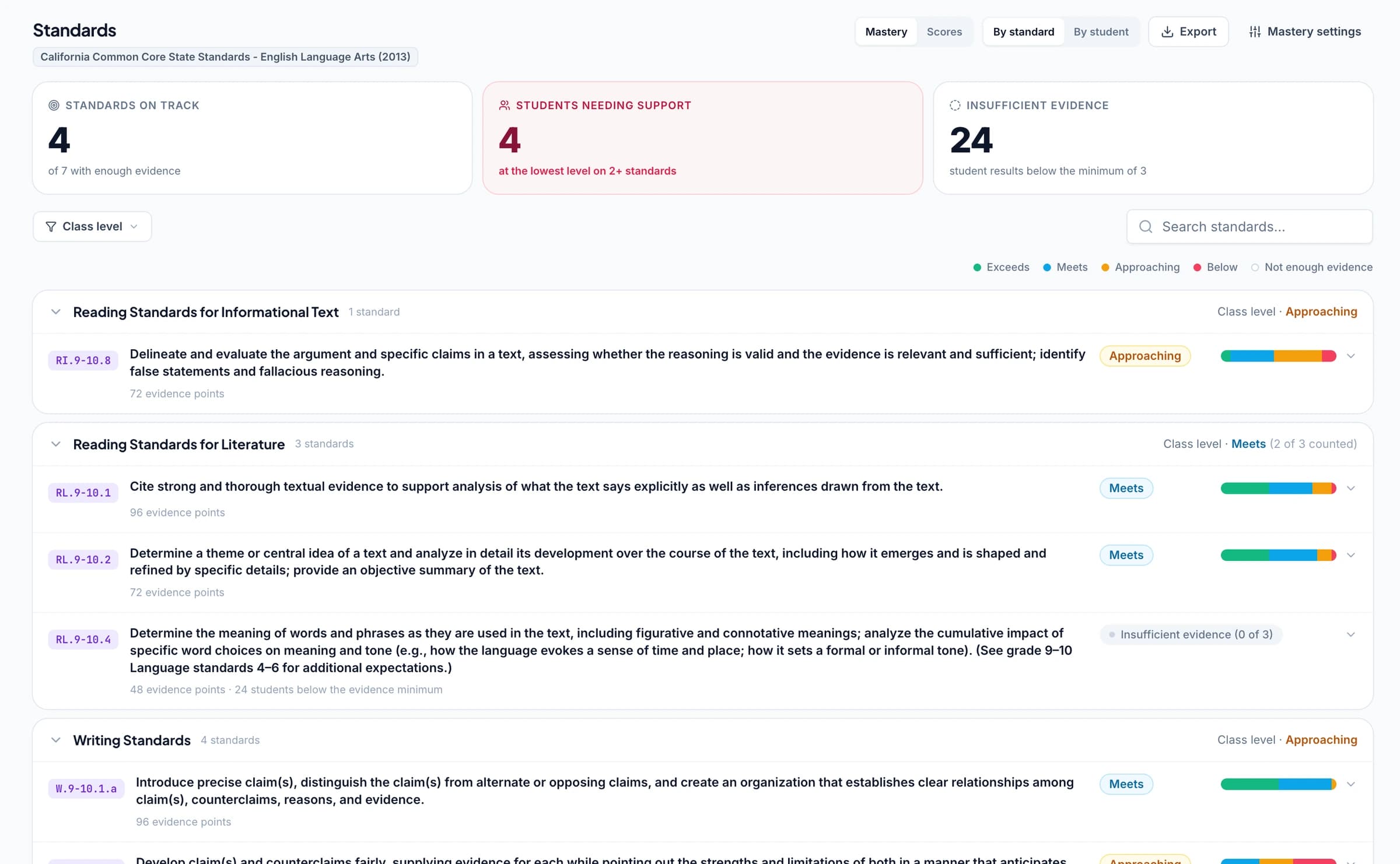
Track standards mastery across tests and assignments
Connect test questions or rubric criteria to the learning standards you teach. As you approve grading results, GradingPal automatically updates each student's progress in the standards mastery gradebook using your chosen calculation rules. Track progress across tests and later assignments, with the graded answers available behind each result.
Use your rubrics for AP, IB, and state assessment practice
Use the criteria your department teaches and reviews. GradingPal supports classroom practice with short answers, extended responses, and mathematical or scientific working, helping teachers explain how the work meets those expectations.
Explore AP free-response questions, IB coursework practice, TEKS-aligned STAAR practice in Texas, CAASPP practice in California, B.E.S.T.-aligned FAST practice in Florida, and NGLS-aligned Regents practice in New York. Use the criteria appropriate to the classroom assignment. GradingPal scores classroom practice; the result is not an official examination grade or a prediction of one.
Use your own marking criteria and the resources your institution is entitled to use. The rubric library offers 500 curated starting points, including resources drawn from AP, IB MYP, MCAP, Smarter Balanced, ACAP, and KSA.
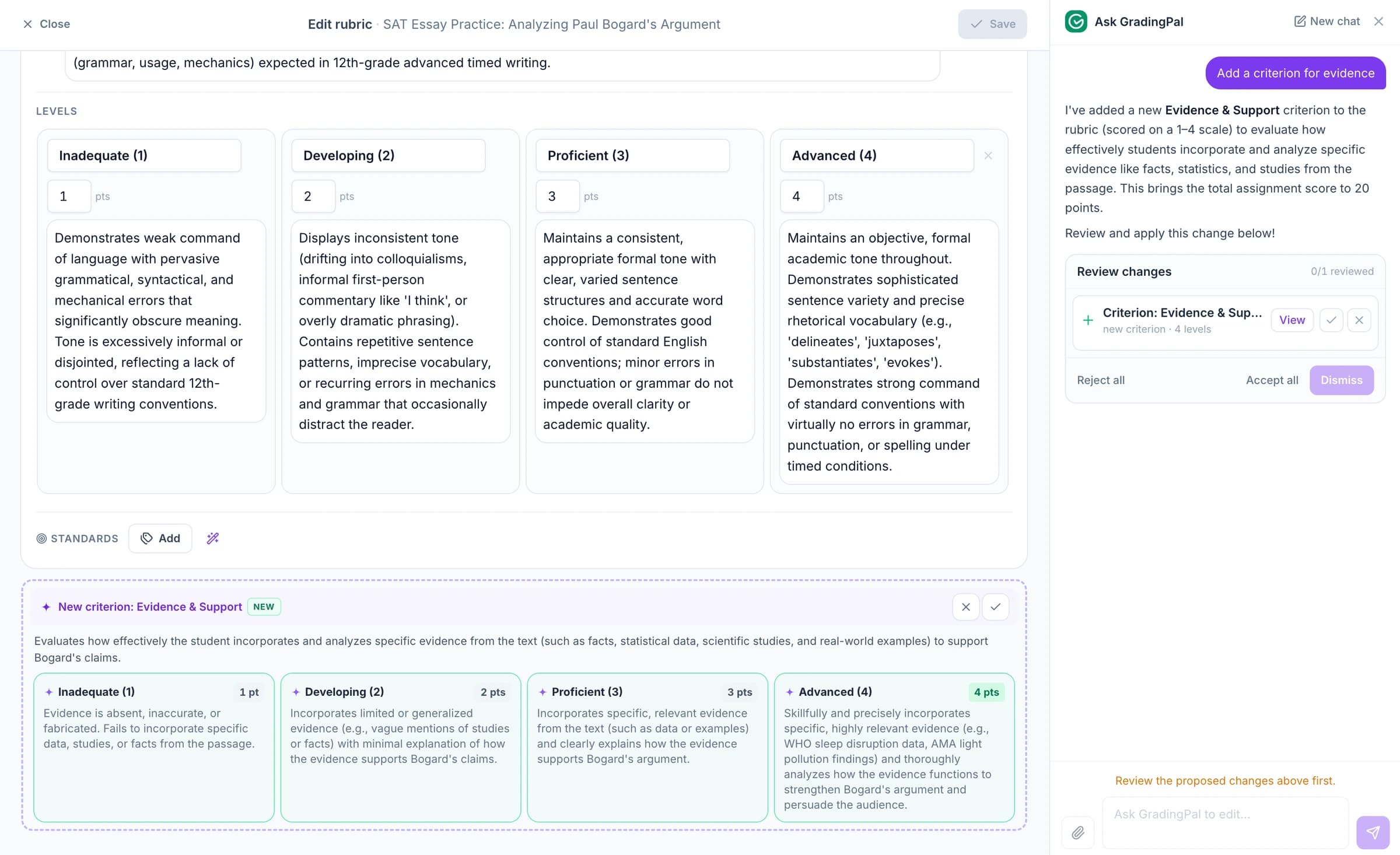
Ask the AI assistant to change scores, feedback, or rubrics
Tell the in-app AI assistant what to change: a question's score, the feedback for an answer, or a rubric criterion. It proposes an edit for you to review and accept.
For example, ask: “Make this feedback focus on one revision priority.” GradingPal proposes a revised comment so you can give the student a clear instruction without writing it again.
Protect student work. Control what gets shared.
GradingPal is FERPA, COPPA, and GDPR compliant, with CASA Tier 2 verification. Student work is never used to train models. Review scores and student feedback before you choose what to share.

FERPA
Compliant

COPPA
Compliant

GDPR
Compliant
CASA
Tier 2 Verified
Questions about AI exam and test grading
Can I use my department's marking criteria?
Yes. Provide the question allocations and marking criteria you use, including method marks and explanation requirements. Review how GradingPal applies them and adjust the assessment where needed.
Does it replace external exam marking?
No. GradingPal supports classroom assessment and practice. Official examinations, awarding-body requirements, moderation processes, and final institutional decisions remain with the responsible educators and examination bodies.
Can students receive feedback on individual questions?
Yes. Teachers can review and share question-specific feedback so students know which response to revisit and what to improve. You choose the comments and whether scores are included in the returned feedback.
Can I inspect a common error across the class?
On plans with performance analytics, use question results and patterns in graded student work to identify where students need support. Inspect the underlying responses before deciding whether the class needs another explanation or more targeted practice.
Can GradingPal grade handwritten exam scripts?
Yes. Upload readable scans or photos, including class PDFs. Review page grouping and student matches, and check unclear handwriting or missing continuation pages before approving the assessment.
Can a response receive method marks when the final answer is wrong?
Yes, when your criteria award credit for that method. Make the allocation explicit and review the working alongside the proposed score. The product should follow the assessment rules you define.
Can I use it for short quizzes as well as longer tests?
Yes. The question-level workflow is also useful for quizzes. Visit worksheet and quiz grading for the shorter formative-assessment workflow and ideas for using the results in the next lesson.
Are exam analytics included on the free plan?
Performance analytics depends on your plan and is not included in the current free plan. You can try grading within the free submission allowance and review pricing for the analytics access your workflow needs.
Try GradingPal free on your next test
Bring a classroom test and your mark allocation. Check the evidence behind a question score and the revision guidance it produces. Explore plan options when you are ready to use classroom analytics alongside the grading workflow.
Try exam grading free50 free submissions per month. Compare plans and included features.