Bring AI grading into your school's LMS workflow
Use GradingPal with Google Classroom, or choose Canvas and Schoology on the school plan. Connect the systems your school uses with rubric-based scores, individualized feedback, and teacher review, so assessment takes less manual handling from submission to return.
Choose your learning management system
Start with the platform your teachers and students already use. Review the relevant integration page for the assessment workflow and school setup, then see how GradingPal handles the work, criteria, and feedback.
Google Classroom
Available now. Import classes, assignments, rubrics, and supported submissions. Review scores and comments in GradingPal, then return approved feedback with or without grades. Explore Google Classroom.

Canvas
Available on school plan. Bring your institution's Canvas assessment requirements into a GradingPal school-plan conversation. Evaluate the grading experience with the course work and rubrics your instructors use. Explore Canvas.

Schoology
Available on school plan. Discuss how GradingPal fits the submission, assessment, and feedback routines used by your teaching team. Plan adoption around your school's Schoology setup. Explore Schoology.
Import a Google Classroom assignment you already know
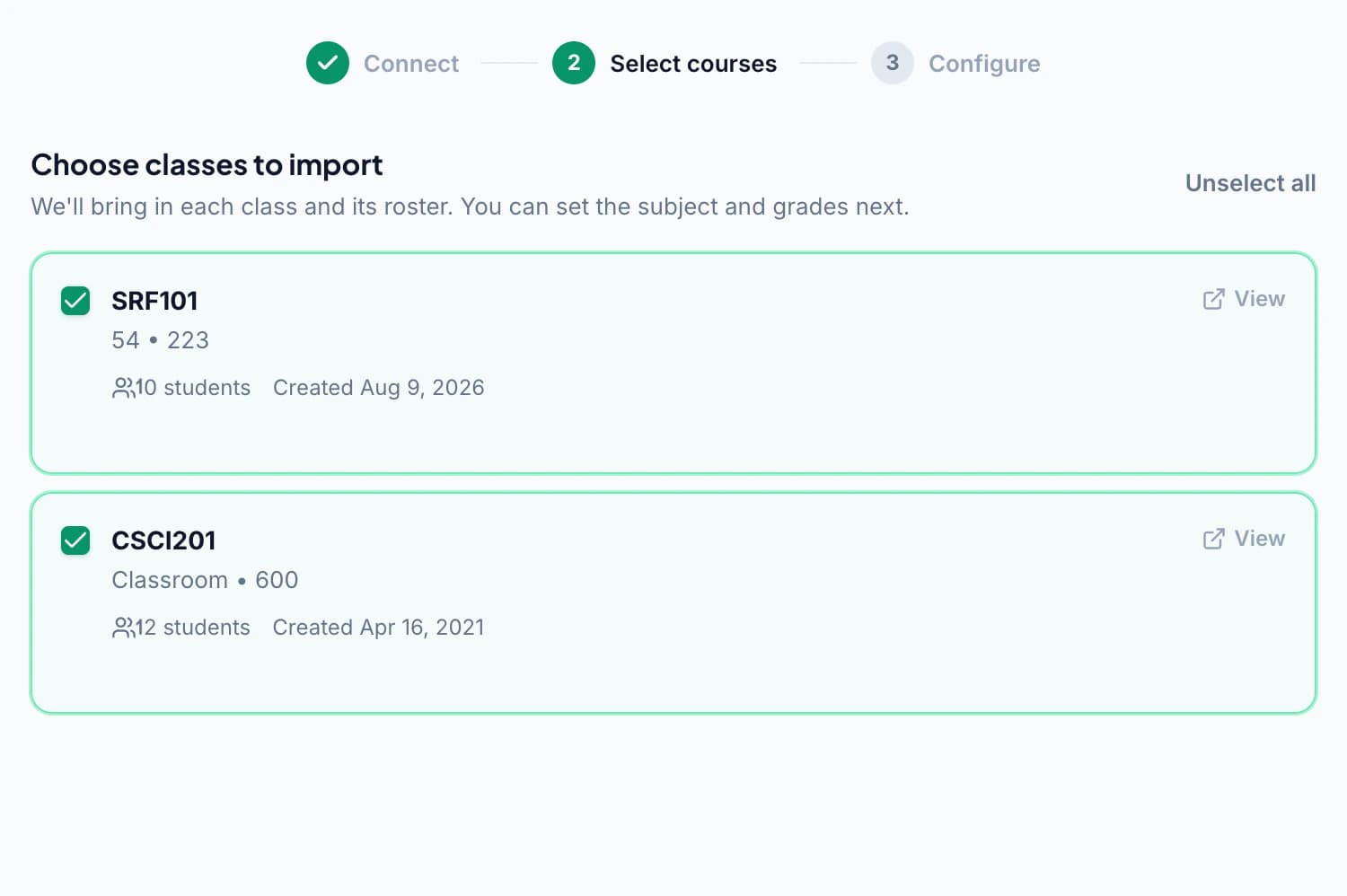
Connect your Google account, select the classes you want to bring into GradingPal, and import the supported assignment and submissions. Where a Classroom rubric exists, bring in its criteria, levels, and points so the review begins with the expectations students were given.
Check the imported work and rubric, then add the grading instructions or feedback preferences the assignment needs. Students can continue using Classroom while teachers work through assessment in GradingPal.
Grade the work behind the attachment
GradingPal reads supported student work and generates rubric-based scores and comments. It supports essays and extended writing, short answers, handwritten math, science explanations, worksheets, exams, slides, and recorded responses through the relevant assessment types.
The integration brings work into the process; GradingPal performs the assessment against your criteria. Open the original response and scoring evidence, refine the result, and approve the feedback you want students to use. Explore assessment types.
Return useful feedback through the connected workflow
For Google Classroom, use the sharing step to return approved results. Choose comments with or without grades and review what students will receive. Feedback returns to the assignment workflow they already know.
That makes the next classroom action easier to organize. Ask students to read one comment before the lesson, revise a response, or explain a correction. Explore sharing and scheduling for the available return options.

Use assessment results to plan the next lesson
The value of connecting your LMS extends beyond reducing file movement. GradingPal's individualized comments give students a concrete revision task, while paid performance analytics surfaces common strengths, gaps, and suggested teaching activities.
Optional standards mastery tracking organizes approved aligned evidence across assignments. A classroom can keep its existing LMS while gaining a clearer view of what to reteach and how students are progressing against selected learning goals.
Bring files from Drive or upload them directly
Google Drive is a source for selecting files. Direct uploads let you assess supported documents and other student work without starting from an LMS connection. Paper assignments can enter through scans or photos using the handwritten grading workflow.
These routes are useful for evaluating a familiar assignment or working with materials collected outside the LMS. Selecting a Drive file is different from importing an LMS assignment and returning grades through a connected workflow; choose the route that matches what you need to accomplish.
Use exports with your existing reporting process
Download available results and reports in the relevant CSV, Excel, or PDF format. Use score exports for analysis and individual feedback reports for student return. Check that the destination accepts the format and fields you plan to use.
A file export is a deliberate transfer of data. It does not imply a native connection to every gradebook or student information system. See reporting and sharing options to choose the appropriate output.
Plan school integration around a real assessment
Bring an example assignment, its rubric, your platform, and the workflow you want teachers to follow. Discuss class selection, school app-approval requirements, intended users, and how approved feedback should return to students.
Our team can work through school-plan access and the integration setup with you. Review security information alongside the teaching workflow, and use the schools page for licensing, support, and adoption discussions.
Questions about GradingPal integrations
Which LMS integrations are available?
Google Classroom is available now. Canvas and Schoology are available on the school plan. Explore the platform pages or contact the team about the setup appropriate to your institution.
Can I start without an LMS connection?
Yes. Upload supported files and add your rubric. You can evaluate GradingPal's scoring, evidence, feedback, and review workflow with an assignment you already have.
Is Google Drive a full LMS integration?
Drive is a file source. The Google Classroom integration adds the connected class, assignment, submission, rubric, and feedback workflow described on its product page.
Are all sync capabilities included in every plan?
Google Classroom access is listed in the plan comparison. Specific roster and gradebook sync requirements should be confirmed for your setup. Canvas and Schoology use the school-plan pathway.
Can students keep using Google Classroom?
Yes. Students can submit work and receive feedback through Classroom without a separate GradingPal account for that connected workflow.
Does connecting an LMS change my scoring criteria?
Your rubric remains the basis of assessment. Review imported criteria and add any relevant instructions before grading. You inspect the proposed scores and comments before sharing.
Can I assess work that began on paper?
Yes. Use supported scans or photos, check page organization and student matching, and review the handwritten work against your rubric. Choose the appropriate sharing route after assessment.
Connect the classroom workflow to better feedback
Show us the platform and assessment routine your school uses, and see how GradingPal fits the grading and feedback step.