AI presentation grader with rubric scores and slide-by-slide feedback
GradingPal grades student slide decks against your rubric and gives feedback on the relevant slides. Assess content, evidence, organization, and the design criteria you choose. Save time writing comments and give students specific changes to make before their next presentation.
50 free submissions per month, shared across assignment types.
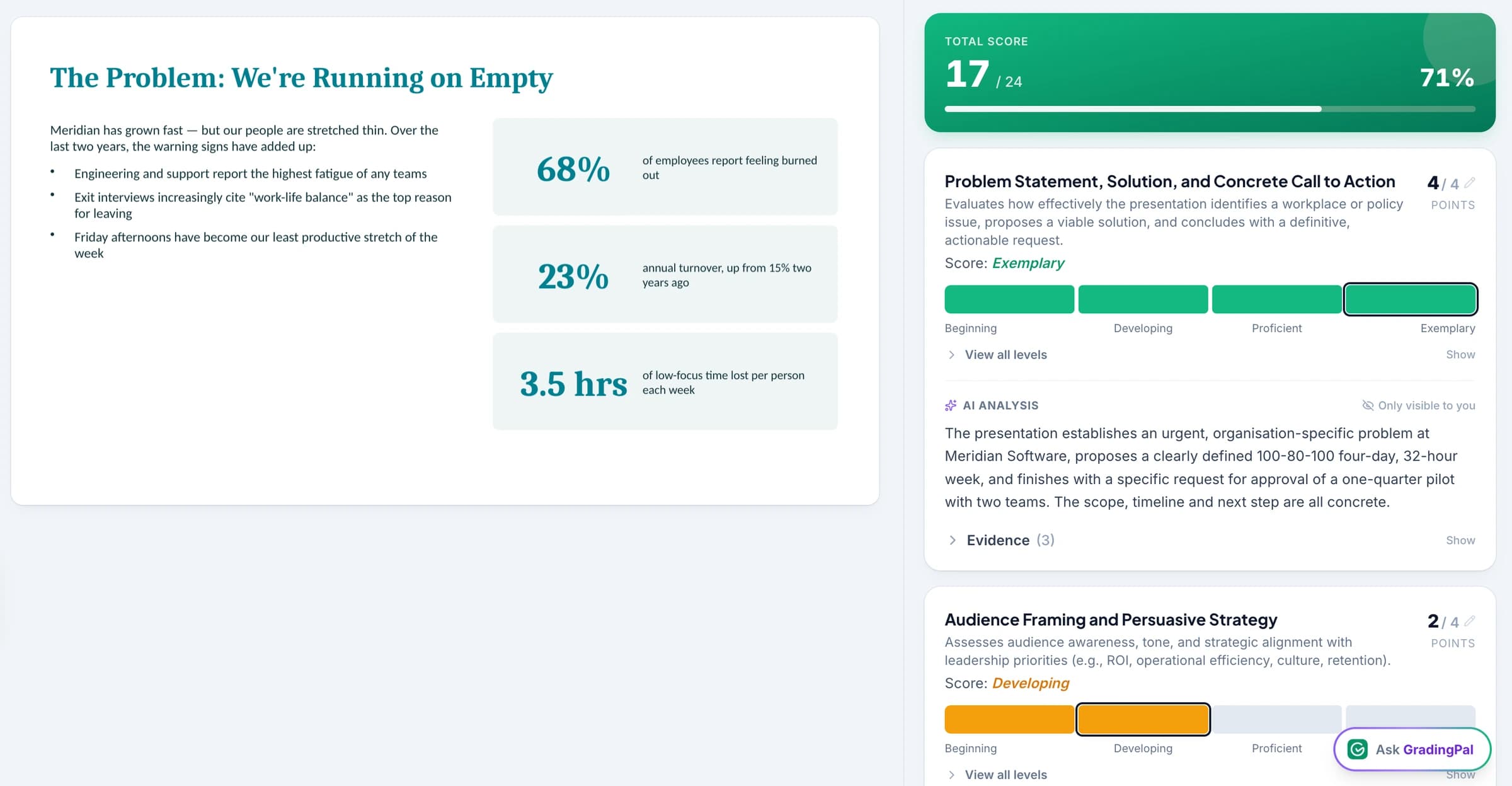
Grade slide content, evidence, and organization with your rubric
GradingPal scores the content of a student slide deck against your rubric and explains the grades. Assess whether the presentation addresses the task, supports its claims, and explains the ideas in a clear order. Include design criteria when they are part of the assignment.
Get comments linked to the slides students need to revise. You check the scores and feedback instead of writing every slide comment yourself.
See GradingPal in action
Watch the GradingPal product demo to see rubric-based grading, feedback controls, classroom insights, and standards mastery.
What teachers say about GradingPal
“GradingPal individualizes feedback specific to each student and gives steps to improve their performance. I also love the ability to change the tone of feedback for different assignment types. The team is incredibly helpful and responsive too.”
 Michelle DouglassGrades 11–12 · Research & Anatomy/Physiology · Central Virginia Governor’s School, Lynchburg VA
“GradingPal helps me optimize my time by streamlining the grading process. What I like most is the feedback students receive — it is specific and it is something they can act on.”
 Adriana Barrios RodriguezCollege · Health Sciences & Teacher Education · Universidad Autónoma de Sinaloa, Mexico
Connect GradingPal to Google Classroom, Canvas, and Schoology
Import classes, assignments, rubrics, and student submissions from Google Classroom. Return approved feedback with or without grades. Canvas and Schoology are available on the school plan. You can also upload files directly or import them from Google Drive.



Give students clear instructions for revising their slides
GradingPal drafts individualized slide feedback, and you choose its style, length, language, and instructions. Ask for a short priority when students have one revision session or a fuller explanation when the deck is part of a longer project.
For the wind-energy slide, students must improve the source and explanation where the claim appears. They can use the same habit elsewhere in the deck. You return specific guidance without writing every slide comment yourself.

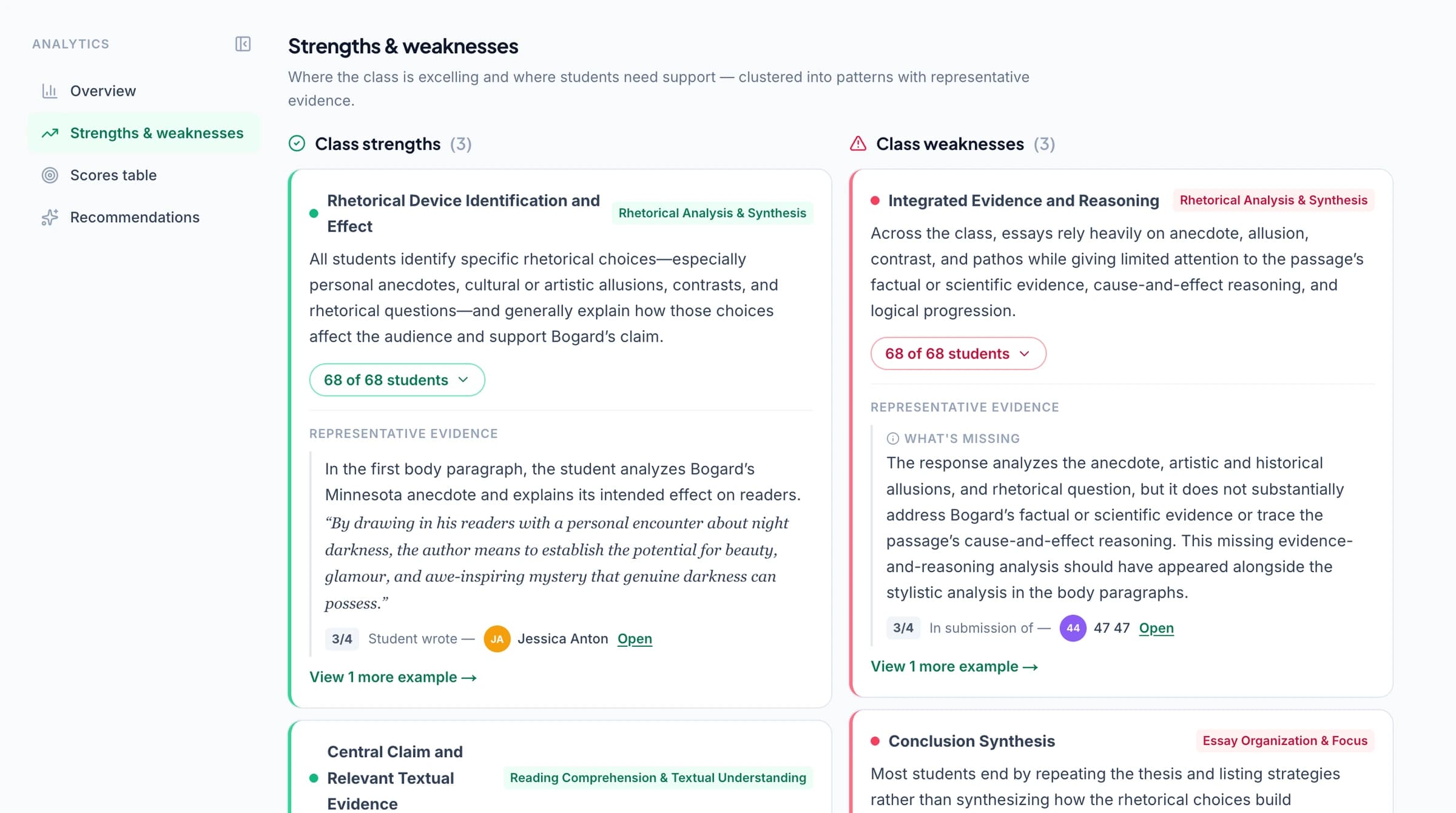
Identify common gaps in students' evidence and explanations
GradingPal's classroom analytics show common strengths and weaknesses in student presentations and suggest what to teach next. Check the slides behind the results to see whether students need help finding evidence, explaining it, or organizing their ideas.
Explore classroom analytics. Performance analytics is available on eligible plans; compare plans.
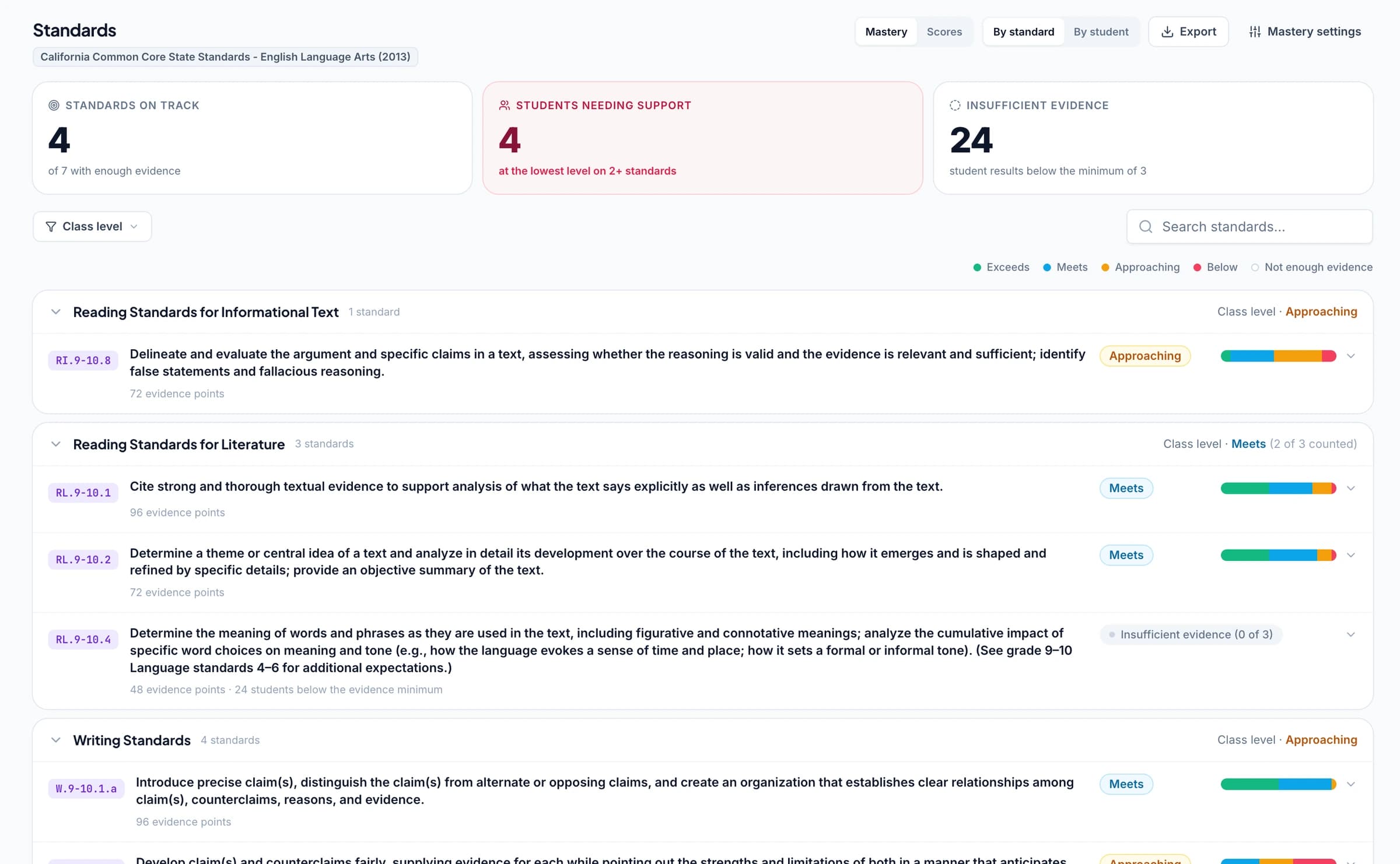
Track standards mastery from presentation assignments
Connect presentation criteria to supported Common Core literacy goals, NGSS scientific explanation, Texas TEKS, or other relevant learning standards. Approved grades then update each student's progress in the standards mastery gradebook using your chosen calculation rules. Track the same skill across presentations and other assignments. Use your own observation for delivery skills that the slide deck cannot show.
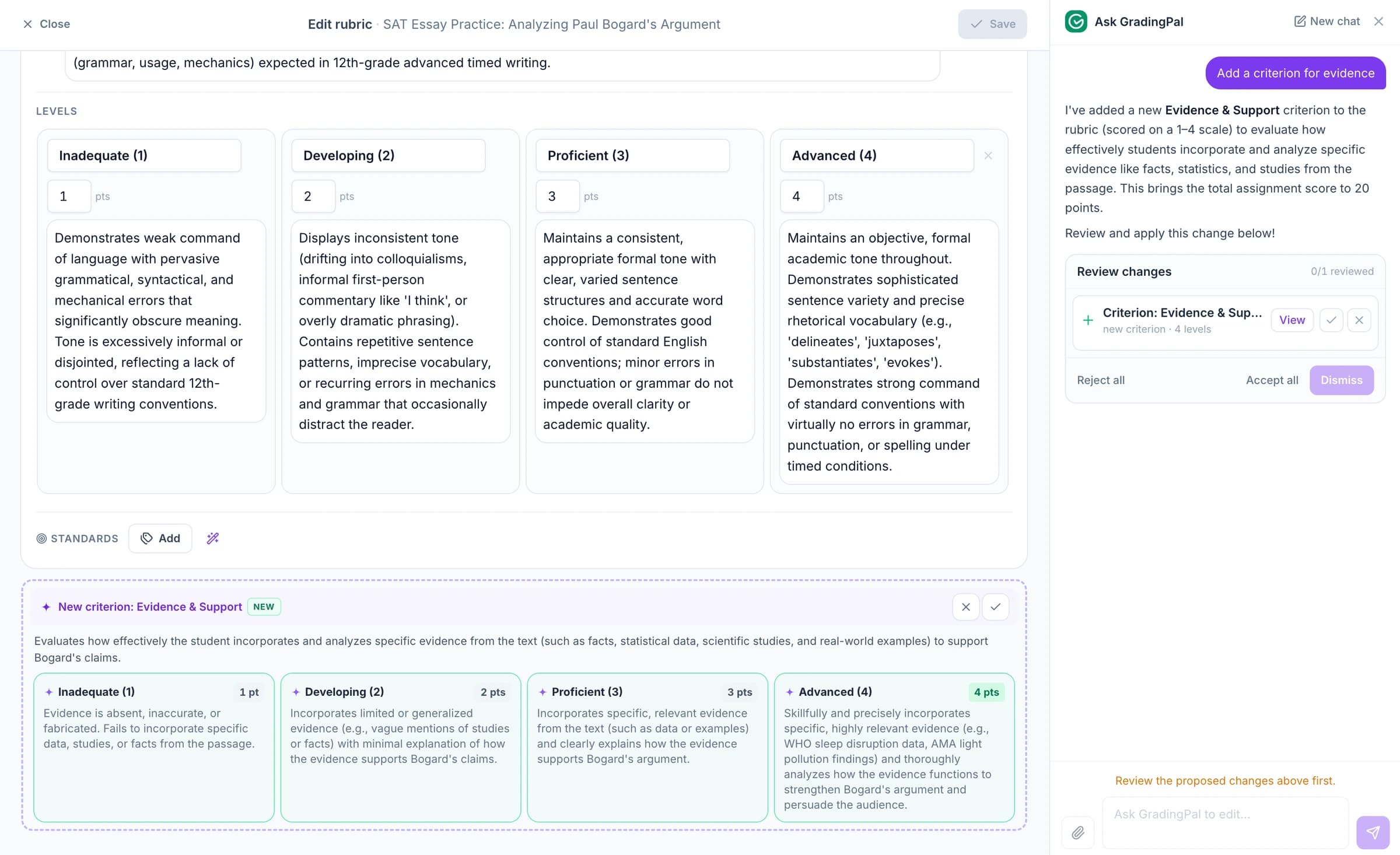
Ask the AI assistant to change presentation scores, feedback, or rubrics
Ask the in-app AI assistant to change a presentation score, edit the rubric, or revise a slide comment. Check the proposed edit before accepting it.
For example: “Make this comment focus on the evidence the slide needs.” GradingPal proposes revised wording that you can check against the student's slide.
Grade presentation slides and recorded explanations separately
Upload the slide deck for slide grading and an audio or video recording for spoken-content grading. GradingPal gives comments on the relevant slides and timestamped comments on the recording in two separate assessments.
Use a different rubric for each submission if the tasks require it. Review both results and apply the final weighting yourself when you need one presentation grade.
Include slide design and writing conventions in your rubric
Visual clarity can matter to a presentation, but it should affect the assessment through the criteria you set. Define expectations for readable slides, useful organization, or relevant visual communication when they are part of the task. Review the proposed scores in the context of what students were asked to produce.
Written language feedback can support revision too. Grammar suggestions do not automatically change a score; include conventions in the rubric where they are assessed. Teachers keep control over the feedback students receive and how it is phrased.
Grade research presentations, project slides, and group decks
Use your rubric for a research presentation, a scientific explanation, a persuasive pitch, or a project reflection. The assessment criteria should reflect what students need to communicate, not assume that every deck has the same purpose.
For group work, the shared deck can be assessed as submitted evidence. When students need individual marks, use additional evidence about their contributions. The file itself does not establish who researched a claim, designed a slide, or delivered a particular part of the talk.
Protect student work. Control what gets shared.
GradingPal is FERPA, COPPA, and GDPR compliant, with CASA Tier 2 verification. Student work is never used to train models. Review scores and student feedback before you choose what to share.

FERPA
Compliant

COPPA
Compliant

GDPR
Compliant

CASA
Tier 2 Verified
Questions about AI presentation grading
Does it grade the slides or the live delivery?
Slide grading assesses the submitted slide deck. A recording can be assessed separately for spoken content. Live delivery qualities such as eye contact or confidence require your own observation and judgment.
Where do students see the comments?
Comments are connected to the slides they concern, helping students locate the relevant part of the work. Teachers review and edit the feedback before sharing it.
Does design affect the score?
When design or visual communication is part of your rubric, assess it through those criteria. Review the proposed result against the assignment expectations rather than assuming appearance should always influence the score.
Can it identify each group member's contribution?
No. A shared deck does not establish individual contributions. Use additional evidence and your review when students need separate marks.
Can I grade the slides and recording together?
You can use both workflows for the same assignment, but they are separate submissions and assessments. Review slide comments and recording feedback separately, then apply any combined weighting yourself.
Can students use the feedback to revise before presenting?
Yes. Teachers can return comments on the relevant slides so students know what to improve in the deck. The revision process and timing are part of the assignment you set.
Can I choose the tone and language of the feedback?
Yes. Use the supported feedback controls and instructions, then review the comments before sharing. Keep scoring expectations separate from how you want the feedback to sound.
Does GradingPal grade presentation content across subjects?
Yes. Use task-specific criteria for research, science explanations, humanities presentations, or other supported slide assignments. The deck and rubric supply the assessment evidence and expectations.
Try GradingPal free on a student presentation
Upload the slides and your rubric. Check the scoring explanation and the slide-linked comments, then decide whether the feedback gives the student a clear revision task before their next presentation.
Try presentation grading free50 free submissions per month. Compare plans and included features.
Attach specific feedback to the slide that needs improvement
GradingPal links feedback to the relevant slide. A comment about evidence arrives with a place to apply it, and the rubric explanation gives the teacher a reason for the score to inspect.
Useful feedback is: “Add a source and the dates covered by your cost comparison on slide 4. Explain what changed and how the data supports your conclusion.” The student knows both where to work and what a better explanation must include.