AI grading for AP free-response practice
GradingPal assesses classroom practice against your teacher or department rubric and writes feedback tied to the response. Review essays, source-based arguments, science explanations, and mathematical working, then give students a specific next step before the next practice task.
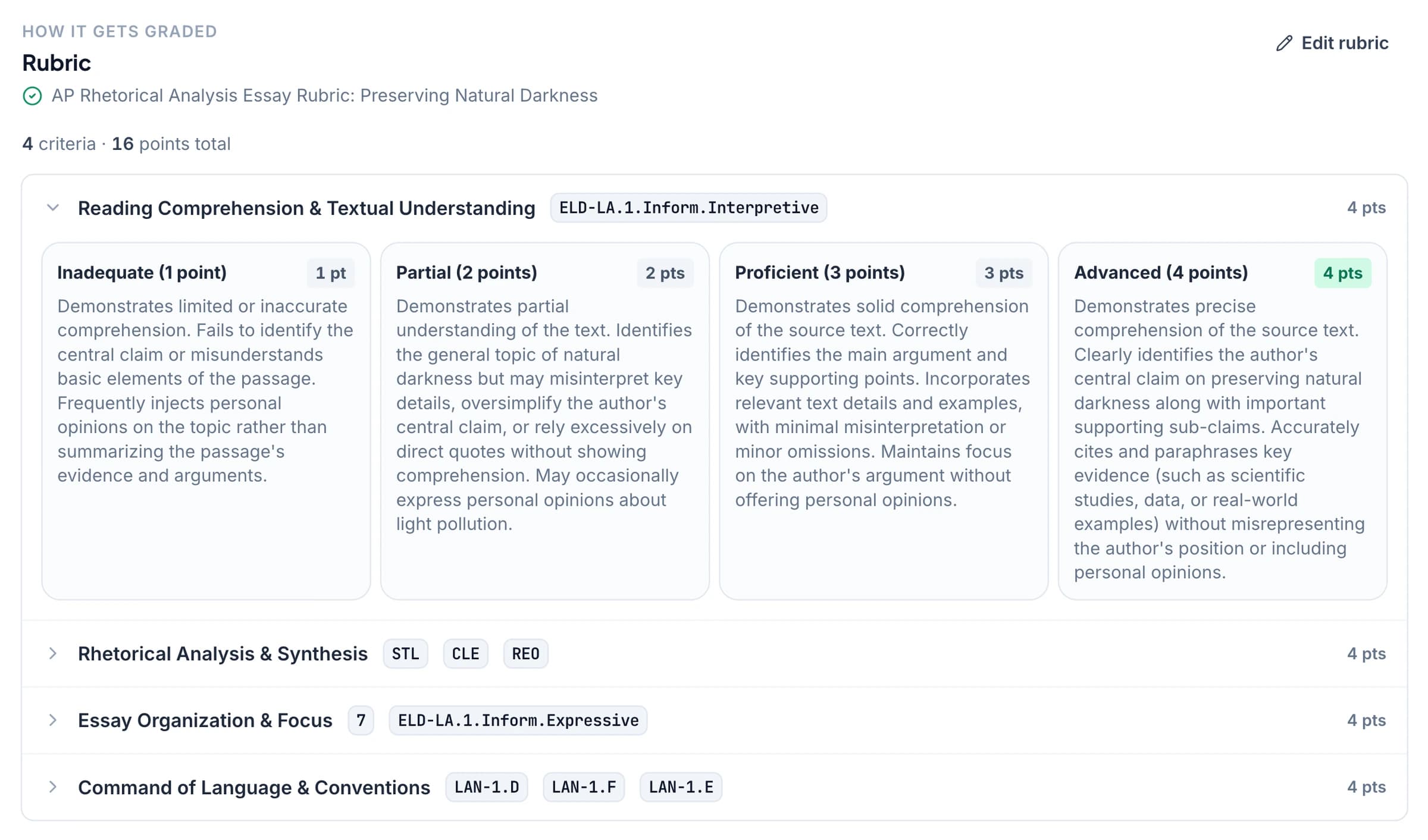
Make the point requirements clear in your rubric
When a practice task awards credit for particular features, write those expectations into separate rubric rows. GradingPal assesses the submitted response against your wording and explains the suggested score for review.
A student can then see which part of the response met the expectation and what needs development. Keep the distinction between including evidence and explaining it, or between reaching an answer and showing the required reasoning, visible in the criteria.
Use AI grading across AP subject practice
GradingPal supports more than extended writing. Choose the relevant assessment workflow for the evidence students submit, and review how the rubric applies to it.
History and document-based arguments
Assess thesis, source use, reasoning, and other expectations in your practice rubric. Review the student's argument alongside the relevant task and source context.
Rhetorical and literary analysis
Assess the explanation students develop from the text under the criteria you teach. Give comments that identify a concrete analytical revision. Essay grading.
Science free responses and lab work
Assess explanations, data analysis, and calculations in biology, chemistry, physics, and other relevant science practice. Inspect scientific correctness and reasoning before approval. Science grading.
Quantitative responses and mathematical working
Assess supported calculations and shown methods, including readable handwriting. Specify the role of working and final-answer credit in the rubric. Math grading.
Turn a missed criterion into a useful next action
In an illustrative response, the student provides relevant evidence but leaves its relationship to the argument unstated. GradingPal proposes an assessment under your explanation criterion and drafts feedback addressing that gap.
Review the score and ask the student to explain the connection in the next revision. The comment should show what the criterion means in their own work, giving the next practice a focused purpose rather than simply repeating a mark.
Review the evidence before returning results
Open the original response beside the criterion-level explanation. Change a suggested mark when the evidence supports a different judgment, and refine the student-facing feedback to match your teaching.
Choose a feedback style, length, and instructions appropriate to the practice. Use the AI assistant for a supported contextual edit, then inspect and accept the change you want to keep.
Find the class-wide practice priority
Paid performance analytics identifies recurring strengths and difficulties in approved work, with associated students and supporting responses. Use that evidence to choose what to model or practice next.
An entire class may need a clearer example of explanation, while another issue affects only a few students. GradingPal's suggested teaching activities give you material to inspect and adapt; you decide the instructional response.
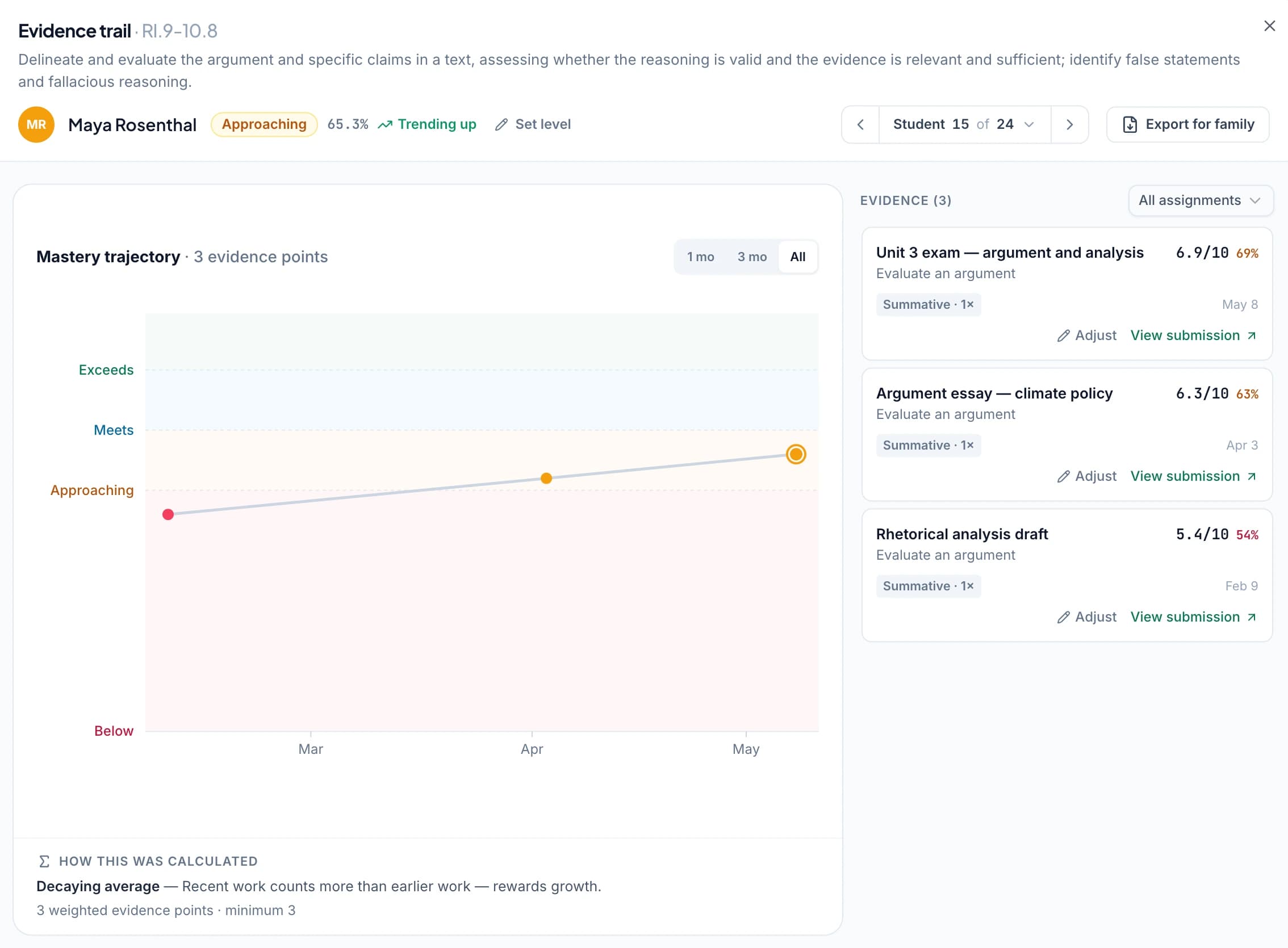
Follow development against relevant course objectives
Select the appropriate available AP course resources and review suggested alignment on relevant criteria. Accepted tags connect approved practice results to the selected learning objectives.
The optional standards mastery gradebook lets you inspect that evidence across assignments using your chosen settings. The record describes classroom practice, supporting a discussion of what the student has demonstrated and what to work on next.
Use classroom practice within the course's assessment process
Bring the teacher or department rubric you use for practice. GradingPal supports the scoring and feedback workflow you review; official examination scoring remains with College Board.
GradingPal is not affiliated with or endorsed by College Board. The AP course context identifies the classroom use described here, not an official scoring service or prediction of a student's examination result.
Questions about AP practice grading
Does GradingPal supply or apply College Board's official scoring guidelines?
This workflow uses your teacher or department rubric. It does not supply or apply College Board's official scoring guidelines.
Does it mark official AP examinations?
No. GradingPal supports classroom practice and feedback. Official AP examination scoring remains with College Board.
Can it predict an AP score from 1 to 5?
No. A practice result against your criteria does not predict an official AP score. Use the evidence for feedback and the next teaching decision.
Can I edit suggested marks?
Yes. Review the submitted response and scoring evidence, change the result where needed, and approve the assessment before sharing.
Can I use it for science and math free responses?
Yes. GradingPal supports relevant scientific explanations, calculations, and readable handwritten working. Use the appropriate assessment type and make the scoring criteria explicit.
Can practice evidence build over the course?
Yes. Approved results with accepted course-objective alignment contribute to the optional standards evidence record under your selected settings.
Give the next free response a clear feedback goal
Use your rubric, inspect the evidence, and return an action students can apply before the next practice.