Add standards to a class
Choose Common Core, NGSS or your state’s standards and narrow them to your grade. Keep it to class averages for each standard, or turn on mastery tracking.
Free live webinar · Wednesday, December 9
Pick your standards, let AI tag your rubrics, and your mastery gradebook fills in as you grade.
One assignment. Every step. You stay in charge.
On Wednesday, December 9, 2026, Wendy Soutsos, an experienced teacher and GradingPal’s Educator Lead, will show how standards-based grading works in GradingPal. She’ll add standards to a class, let AI tag an assignment’s rubric to those standards, and show how the mastery gradebook fills in from the work you grade. The session runs from 4:00 to 4:30 pm Pacific (7:00 to 7:30 pm Eastern). It’s free, and everyone who registers gets the recording.
Every standards-based grade has to answer one question: how do you know she’s at Approaching? Answering it usually means tagging each assignment to standards by hand, logging evidence student by student, and working out each level yourself.
This session shows how much of that GradingPal does for you, and where you stay in charge.
Explore the Standards Mastery Gradebook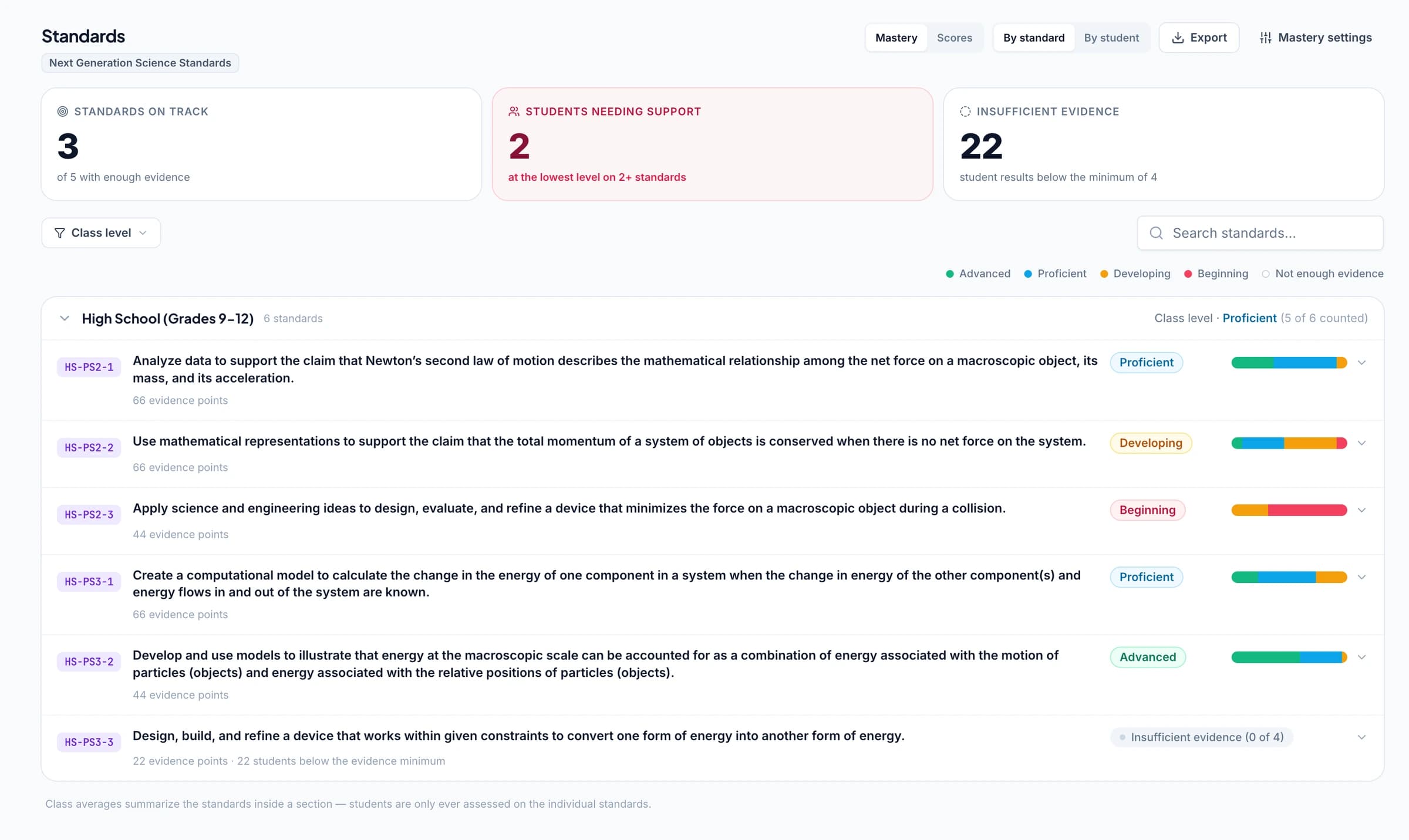
One assignment, start to finish, in the order you’d do it.
Choose Common Core, NGSS or your state’s standards and narrow them to your grade. Keep it to class averages for each standard, or turn on mastery tracking.
Pick the standards an assignment targets, and AI tags each rubric criterion to them. You accept or dismiss every tag.
Each graded assignment updates the class picture by standard and by student, usually within a minute.
Three scales, cut-offs you can edit, tests that count more than quizzes, and no level until a student has enough evidence.
Click a result to see the graded work behind it, and set a level yourself when you know more than the numbers do.
A class summary, a one-page report for each family, and the evidence detail.
We’ll finish with your questions.
AI suggests the tags and you approve each one. Mastery levels are calculated from the grades you approve, and you can change any of them. Every student shown in the session is invented.
You don’t need mastery levels to get something from it. Picking standards on its own gives you class averages for each standard, in plain percentages.
Yes. It’s free to attend live and free to watch afterwards.
Wednesday, December 9 at 4:00 pm Pacific, 5:00 pm Mountain, 6:00 pm Central and 7:00 pm Eastern. It runs for 30 minutes.
Yes. Everyone who registers gets the recording by email, and it will be posted on this page.
No. You can attend without one. If you’d like to try GradingPal afterwards, you can start free. See our pricing page for the features included in each plan. Start free · Compare plans
No. Some teachers use GradingPal’s standards tools only for class averages on each standard, without mastery levels. The session shows both.
Standards for all 50 U.S. states plus D.C., including Common Core and NGSS, alongside AP, IB, Cambridge International and the UK exam boards. That’s over 150,000 individual standards.
No. AI suggests which standards a rubric criterion or question matches, and nothing is saved until you accept it. Mastery levels are calculated from the grades you approve, and you can set any level yourself.
No. Your school’s gradebook stays the official record. GradingPal gives you the standards picture and the evidence behind it, and you can export both.
Yes. Ask in the chat at any time. Wendy will answer as many as she can live, and we’ll reply by email to the rest.